1. Introduktion
This manual provides comprehensive instructions for the setup, operation, and maintenance of your Galaxy Audio PA6BT Powered Hot Spot Monitor Speaker with Bluetooth. Please read this manual thoroughly before using the device to ensure proper functionality and to prevent damage.
The Galaxy Audio PA6BT is a 6-inch, 170-watt, 2-way powered monitor speaker designed for various audio applications, featuring integrated Bluetooth connectivity for wireless audio streaming.

Figur 1: Vinklet front view of the Galaxy Audio PA6BT monitor, highlighting its compact design and the integrated control panel.
2. Vigtige sikkerhedsinstruktioner
- Læs disse instruktioner.
- Gem disse instruktioner.
- Overhold alle advarsler.
- Følg alle instruktioner.
- Brug ikke dette apparat i nærheden af vand.
- Rengør kun med en tør klud.
- Bloker ikke ventilationsåbninger. Installer i overensstemmelse med producentens anvisninger.
- Må ikke installeres i nærheden af varmekilder såsom radiatorer, varmeapparater, komfurer eller andre apparater (inklusive ampløftere), der producerer varme.
- Undgå at omgå sikkerhedsformålet med det polariserede stik eller stik med jordforbindelse. Et polariseret stik har to knive, hvor den ene er bredere end den anden. Et stik med jordforbindelse har to knive og et tredje jordstik. Det brede blad eller det tredje ben er tilvejebragt for din sikkerhed. Hvis det medfølgende stik ikke passer i din stikkontakt, skal du kontakte en elektriker for at få udskiftet den forældede stikkontakt.
- Beskyt netledningen mod at blive trådt på eller klemt, især ved stik, stikkontakter og det sted, hvor de kommer ud af apparatet.
- Brug kun tilbehør/tilbehør specificeret af producenten.
- Brug kun den vogn, stativ, stativ, beslag eller bord, der er specificeret af producenten eller solgt sammen med apparatet. Når en vogn bruges, skal du være forsigtig, når du flytter kombinationen af vognen/apparatet for at undgå skader ved at vælte.
- Træk stikket ud af dette apparat under tordenvejr, eller når det ikke skal bruges i længere perioder.
- Overlad al service til kvalificeret servicepersonale. Service er påkrævet, når apparatet er blevet beskadiget på nogen måde, såsom strømforsyningsledning eller stik er beskadiget, væske er blevet spildt, eller genstande er faldet ind i apparatet, apparatet har været udsat for regn eller fugt, ikke fungerer normalt , eller er blevet droppet.
- ADVARSEL: To reduce the risk of fire or electric shock, do not expose this apparatus to rain or moisture. Do not open the unit; there are no user-serviceable parts inside.
3. Nøglefunktioner
- Strømudgang: 170 Watts for robust sound delivery.
- Frekvensrespons: 80Hz - 18kHz for a wide audio spectrum.
- To-vejs højttalersystem: Features a 6.5" Neodymium High Power Woofer and a 1.5" High Efficiency Tweeter.
- Dobbelt kanaler: Two independent input channels with individual volume controls.
- Alsidige indgange: Channel 1 offers XLR and 1/4" inputs. Channel 2 offers XLR, 1/4", and an additional 1/8" line input.
- Bluetooth-forbindelse: Integrated Bluetooth technology with its own volume control for wireless audio streaming.
- XLR Pass-Through: Allows independent control of microphones without affecting the signal sent to a main PA system.
- -20dB Pad Switch: On each XLR input to accommodate high-level signals without distortion.
- 3-bånds EQ: Adjustable Low, Mid, and High frequency controls for sound shaping.
- Compressor/Limiter: Built-in 18dB circuit with Compressor and Clip LEDs to smooth transient peaks and protect speakers.
- Monteringsmuligheder: Designed for mounting on most mic stands, includes an MSA-1 stand adaptor.
4. Pakkens indhold
Kontroller venligst pakkens indhold ved udpakning for at sikre, at alle varer er til stede:
- Galaxy Audio PA6BT Powered Hot Spot Monitor Speaker
- MSA-1 Stand Adaptor
- IEC-strømkabel
- Brugervejledning (dette dokument)
5. Kontrolelementer og forbindelser
5.1 Betjeningselementer på frontpanelet

Figur 2: Forside view of the Galaxy Audio PA6BT monitor, showing the speaker grille, tweeter, and control panel with knobs and LEDs.
- PWR LED: Lyser, når enheden er tændt.
- LOW, MID, HI Knobs: 3-band equalizer controls to adjust bass, midrange, and treble frequencies.
- CLIP LED: Indicates when the input signal is too high, potentially causing distortion. Reduce input volume if this LED illuminates frequently.
- COMP LED: Indicates when the built-in compressor/limiter circuit is active, smoothing out transient peaks.
- CHAN 1 Knob: Volume control for Channel 1 input.
- CHAN 2 Knob: Volume control for Channel 2 input.
- BT VOL Knob: Volume control for the Bluetooth audio input.
5.2 Bagpaneltilslutninger
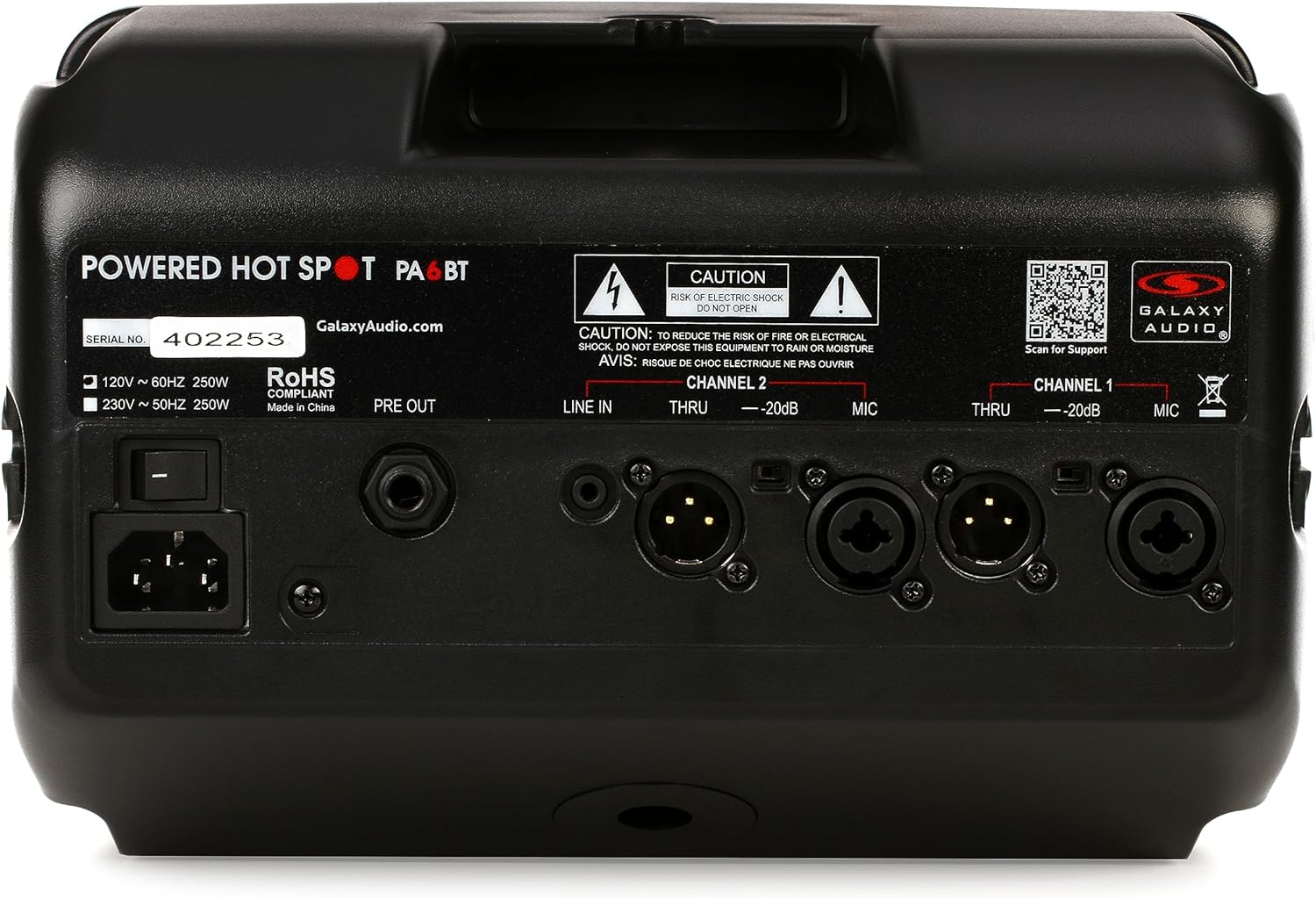
Figur 3: Bagside view of the Galaxy Audio PA6BT monitor, displaying the power input, serial number, and various audio input/output connections for Channel 1 and Channel 2.
- Afbryderen: Tænder eller slukker for enheden.
- IEC Power Inlet: Connects the included IEC power cable to an AC power source.
- FØR UD: Line-level output for sending the mixed signal to another powered speaker or a main PA system.
- Channel 2 Inputs:
- LINE IN (1/8"): Stereo or mono input for connecting devices like MP3 players, smartphones, or laptops.
- THRU (XLR): XLR pass-through for Channel 2, allowing the input signal to be sent to another device without processing.
- -20dB Pad (Switch): Reduces the input sensitivity by 20dB for high-level signals.
- MIC (XLR/1/4" Combo): Combo jack for connecting microphones (XLR) or line-level instruments (1/4").
- Channel 1 Inputs:
- THRU (XLR): XLR pass-through for Channel 1.
- -20dB Pad (Switch): Reduces the input sensitivity by 20dB for high-level signals.
- MIC (XLR/1/4" Combo): Combo jack for connecting microphones (XLR) or line-level instruments (1/4").
6. Opsætningsvejledning
- Pak enheden ud: Carefully remove the PA6BT from its packaging and inspect for any signs of damage.
- Placering:
- For personal monitoring, mount the PA6BT onto a standard microphone stand using the included MSA-1 stand adaptor. Ensure the stand is stable.
- Alternatively, place the unit on a stable, flat surface such as a table or stage-gulv.
- Initial Control Settings: Before connecting power, ensure all volume knobs (CHAN 1, CHAN 2, BT VOL) are turned completely counter-clockwise (minimum). Set the LOW, MID, and HI EQ knobs to their center (flat) positions.
- Strømtilslutning: Connect the supplied IEC power cable to the IEC inlet on the rear panel of the PA6BT, then plug the other end into a suitable AC power outlet.
- Tænd: Flip the Power Switch on the rear panel to the "ON" position. The PWR LED on the front panel should illuminate.
7. Betjeningsvejledning
7.1 Tilslutning af lydkilder
- Microphones/Instruments (XLR/1/4" Combo Jacks):
- Connect your microphone or instrument to either the Channel 1 or Channel 2 MIC input.
- If using a high-output source, engage the -20dB Pad switch for that channel to prevent input clipping.
- Slowly increase the corresponding CHAN 1 or CHAN 2 volume knob until the desired level is reached. Monitor the CLIP LED; if it flashes frequently, reduce the input volume or engage the -20dB pad.
- Line-Level Devices (1/8" LINE IN - Channel 2 only):
- Connect your smartphone, tablet, or other line-level audio device to the 1/8" LINE IN jack on Channel 2.
- Adjust the BT VOL knob to control the volume of this input.
7.2 Bluetooth Pairing and Operation
- Ensure the PA6BT is powered on.
- Activate Bluetooth on your audio device (e.g., smartphone, tablet).
- Søg efter available Bluetooth devices. The PA6BT should appear as "Galaxy Audio PA6BT".
- Select "Galaxy Audio PA6BT" to pair. A confirmation tone may sound from the speaker.
- Once paired, play audio from your device. Adjust the BT VOL knob on the PA6BT to control the playback volume.
7.3 Using the Equalizer (EQ)
The LOW, MID, and HI knobs allow you to tailor the sound to your preference or acoustic environment:
- LAV: Adjusts the bass frequencies. Turn clockwise to boost bass, counter-clockwise to cut.
- MID: Adjusts the midrange frequencies. Turn clockwise to boost mids, counter-clockwise to cut. This is often used to enhance vocal clarity.
- Hej: Adjusts the treble frequencies. Turn clockwise to boost highs, counter-clockwise to cut.
7.4 Compressor/Limiter
The PA6BT features a built-in 18dB compressor/limiter. This circuit automatically reduces the dynamic range of the audio signal, preventing sudden loud peaks from distorting the sound and protecting the speakers from damage. The COMP LED illuminates when the compressor/limiter is active.
7.5 XLR Pass-Through (THRU)
The XLR THRU outputs on both channels allow you to send the unprocessed input signal from that channel to another device, such as a main mixing console or another powered speaker. This is useful for creating a separate monitor mix without affecting the main house sound.
8. Vedligeholdelse
- Rensning: Use a soft, dry cloth to clean the exterior of the unit. Do not use liquid cleaners or solvents, as they may damage the finish or internal components.
- Opbevaring: When not in use for extended periods, store the PA6BT in a cool, dry place, away from direct sunlight and extreme temperatures.
- Ventilation: Sørg for, at ventilationsåbningerne ikke er blokeret for at forhindre overophedning.
- Service: Refer all servicing to qualified service personnel. Do not attempt to open the unit or perform repairs yourself.
9. Fejlfinding
| Problem | Mulig årsag | Løsning |
|---|---|---|
| Ingen strøm (PWR-LED slukket) | Strømkabel ikke tilsluttet; Strømafbryder slukket; Strømstik defekt. | Sørg for, at strømkablet er korrekt tilsluttet. Tænd for strømmen. Test stikkontakten med en anden enhed. |
| Ingen lydudgang | Volume knobs too low; Input source not connected or muted; Incorrect input selected; Faulty cable. | Increase CHAN 1, CHAN 2, or BT VOL. Check input source connection and volume. Ensure correct input is used. Test with a different cable. |
| Distorted sound / CLIP LED flashing | Input signal too high; EQ settings extreme. | Reduce the volume of the input source. Engage the -20dB Pad switch for the affected channel. Adjust EQ knobs to a more neutral position. |
| Bluetooth ikke parring | PA6BT not in pairing mode; Device too far; Interference; Previously paired with another device. | Ensure PA6BT is powered on. Move device closer. Turn off other Bluetooth devices. Forget PA6BT from your device's Bluetooth list and try pairing again. |
| Feedback (hylende lyd) | Microphone too close to speaker; Microphone gain too high; Speaker pointed directly at microphone. | Reposition the microphone and speaker. Reduce microphone gain. Adjust EQ settings (especially MID/HI). |
10. Specifikationer

Figure 4: Diagram showing the dimensions of the Galaxy Audio PA6BT monitor: 12 inches deep, 7 inches wide, and 12 inches high.
| Feature | Detalje |
|---|---|
| Model | PA6BT |
| Strømudgang | 170 watt |
| Frekvensrespons | 80Hz - 18kHz |
| Højttaler type | 2-Way: 6.5" Neodymium Woofer, 1.5" Tweeter |
| Indgange | Channel 1: XLR/1/4" Combo; Channel 2: XLR/1/4" Combo, 1/8" Line In |
| Udgange | PRE OUT (Line Level), XLR THRU (Channel 1 & 2) |
| Trådløs forbindelse | Bluetooth |
| Udligning | 3-bånds (lav, mellem, høj) |
| Dynamic Processing | Built-in 18dB Compressor/Limiter |
| Dimensioner (H x B x D) | 12 x 7 x 12 cm (omtrentligt) |
| Varens vægt | 8.21 pund |
| Inkluderede komponenter | MSA-1 stand adaptor, IEC power cable |
| Strømkilde | Elektrisk med ledning |
| Farve | Sort |
11. Garanti og support
11.1 Begrænset garanti
The Galaxy Audio PA6BT is covered by a limited warranty. For specific terms, conditions, and duration of the warranty, please refer to the warranty card included with your product or visit the official Galaxy Audio webwebsted. Gem din købsbevis til garantikrav.
11.2 Kundesupport
For technical assistance, troubleshooting beyond this manual, or service inquiries, please contact Galaxy Audio customer support. You can find contact information and additional resources on the official Galaxy Audio webwebsted:


