1. Produktet er slutview
The Excelvan 120 inch 16:9 projector screen is crafted from PVC Composite resin material, offering a pliable and smooth, non-deformation surface. Designed for front projection, it provides a 1.1-1.2 gain and a wide 160° viewing angle, ensuring excellent visual performance.
This screen is compatible with various projector types including DLP, LCD, LED, and 3D projectors. Its design minimizes reflectivity and maintains high average values for projection display, delivering a flicker-free visual experience with optimal clarity and color reproduction. The soft light emitted by the screen helps reduce eye fatigue during extended viewing.
It is an environmentally friendly product suitable for diverse image display environments, such as home theaters, presentations, large commercial activity centers, performance entertainment venues, conference centers, and stadiums.

Image 1.1: The Excelvan 120 Inch Projection Screen showcasing a vibrant, high-definition image of a lake and mountains, demonstrating its large viewningsområde og klarhed.
2. Pakkens indhold
Når du åbner din pakke, bedes du kontrollere, at alle følgende varer er inkluderet:
- 1 x Excelvan 120 Inch 16:9 PVC Collapsible Projection Screen
- 1 x Screen Bag (Gift)

Image 2.1: The Excelvan projection screen, neatly folded, being stored inside its dedicated screen bag, highlighting its portability and ease of storage.
3. Opsætning og installation
The Excelvan projection screen is designed for easy and quick installation. It features reinforced edges with grommets (hanging holes) for convenient mounting.
3.1 Initial Unpacking and Wrinkle Management
Due to its collapsible nature, the screen may exhibit some wrinkles upon initial unpacking. This is normal and not a defect. There are two primary methods to address these wrinkles:
- Natural Disappearance: Hang the screen on a wall for approximately 3 days. The wrinkles will naturally diminish and disappear due to the screen's material properties and gravity.
- Manual Smoothing: For quicker results, gently pull the wrinkled areas with your hands. The excellent tensile properties of the PVC material allow for manual smoothing.

Image 3.1: A visual guide demonstrating how hanging the screen for approximately three days allows any initial wrinkles to naturally smooth out, ensuring a flat projection surface.
3.2 Montering af skærmen
Utilize the integrated hanging holes along the edges of the screen for secure mounting. These grommets are designed for compatibility with various hanging methods, such as hooks, ropes, or tension frames (not included), allowing for flexible installation in your desired location.

Billede 3.2: En detaljeret view of the reinforced hanging hole (grommet) on the screen's edge, designed for secure and convenient installation.

Image 3.3: A close-up illustrating the distinct front (white projection surface) and back (black backing) of the Excelvan screen, ensuring proper orientation during setup.
4. Betjening
Once installed, the Excelvan projection screen is ready for use with your projector. Ensure your projector is positioned correctly to fill the screen area for the best viewoplevelse.
4.1 Optimal Viewing erfaring
The screen's 1.1-1.2 gain and 160° viewing angle are engineered to provide a bright and clear image from a wide range of positions. This ensures that viewers across the room can enjoy consistent picture quality without significant loss of brightness or color accuracy.

Image 4.1: A side-by-side comparison demonstrating the superior image clarity and color reproduction achieved with the Excelvan PVC HD screen compared to an ordinary projection surface.
4.2 Kompatibilitet
This screen is universally compatible with most modern projectors, including DLP, LCD, LED, and 3D models, making it a versatile choice for various projection needs.

Image 4.2: An informational graphic highlighting the screen's PVC composite resin material, 1.2 gain, and 160° viewing angle, along with icons indicating support for 3D, Full HD 1080p, and 4K resolutions.
5. Vedligeholdelse og pleje
Proper care will extend the life and maintain the quality of your Excelvan projection screen.
5.1 Rengøringsinstruktioner
The screen can be spot cleaned using mild soap and water. Apply the solution to a soft cloth and gently wipe the affected area. Rinse with clean water and allow to air dry completely.
Vigtig: Do NOT use abrasive cleaners, harsh chemicals, or stiff brushes, as these can damage the screen surface and reduce its lifespan and performance.
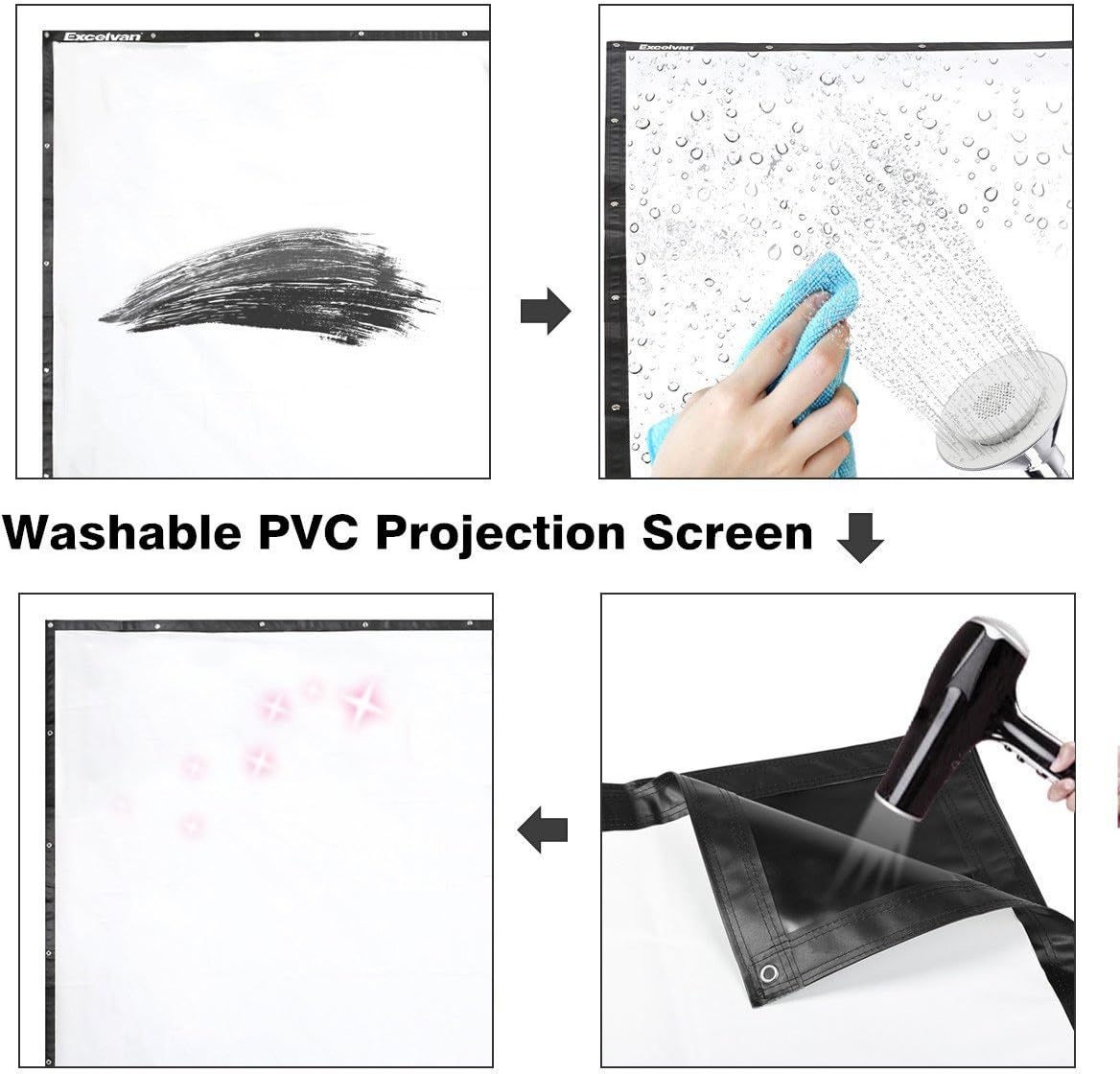
Image 5.1: A visual guide demonstrating the washability of the PVC projection screen, showing it being cleaned with water and a cloth, and then dried.
6. Fejlfinding
6.1 Wrinkles on Screen Surface
Spørgsmål: The screen has wrinkles or creases upon unboxing.
Løsning: This is a common occurrence due to the screen's collapsible design. As mentioned in Section 3.1, the wrinkles will naturally disappear after the screen has been hung for approximately 3 days. Alternatively, you can gently pull and stretch the wrinkled areas by hand to accelerate the smoothing process. The PVC material's tensile properties allow for this.
7. Specifikationer
| Feature | Detalje |
|---|---|
| Diagonal Measurement | 120 tommer |
| Aspektforhold | 16:9 |
| Materiale | PVC Composite Resin |
| Gevinst | 1.1-1.2 |
| Viewi vinkel | 160 grader |
| Lystransmission | 85 % |
| Screen Area (L x W) | 2.66M x 1.49M (104.57" x 58.82") |
| Produktstørrelse (L x B) | 265.6 x 149.4 cm (104.57 x 58.82 tommer) |
| Nettovægt | 2 kg |
| Bruttovægt | 2.2 kg |
| Pakkestørrelse (L x B x H) | 34 x 31 x 5 cm (13.39 x 12.2 x 1.97 tommer) |
| Monteringstype | Wall Mount (via hanging holes) |
| Beskrivelse af skærmoverfladen | Mat |

Image 7.1: A diagram illustrating the precise dimensions of the 120-inch projection screen, including its diagonal, width, and height measurements in both centimeters and inches.
8. Garanti og support
For any questions regarding your Excelvan 120 Inch 16:9 PVC Collapsible Projection Screen, please contact Excelvan customer support. Details for support are typically available on the product packaging or the official Excelvan webwebsted.
Please retain your purchase receipt for warranty claims, if applicable. Specific warranty terms and conditions may vary and are provided at the time of purchase or on the manufacturer's official documentation.


