Indledning
This manual provides comprehensive instructions for the safe and effective use of your Winplus AC55925-80 3-in-1 Emergency Socket Power Bank. This device combines a compact power bank, a USB car charger, and an emergency glass-breaking tool. Please read this manual thoroughly before operation and retain it for future reference.
Produkt overview
The Winplus 3-in-1 Emergency Socket Power Bank is designed for convenience and safety, offering multiple functionalities in a compact form factor.

Figure 1: Winplus 3-in-1 Emergency Socket Power Bank with key features highlighted.
Komponenter:
- Compact Power Bank: Provides portable power for charging devices.
- USB biloplader: Plugs into a 12V car socket to charge devices and the power bank.
- Emergency Glass-Breaking Tool: Integrated for emergency situations.
- USB udgangsport: For connecting charging cables to devices.
- Micro USB-indgangsport: For charging the internal power bank.
- LED-indikator: Viser ladestatus.

Figur 2: Detaljeret view of the device's ports.
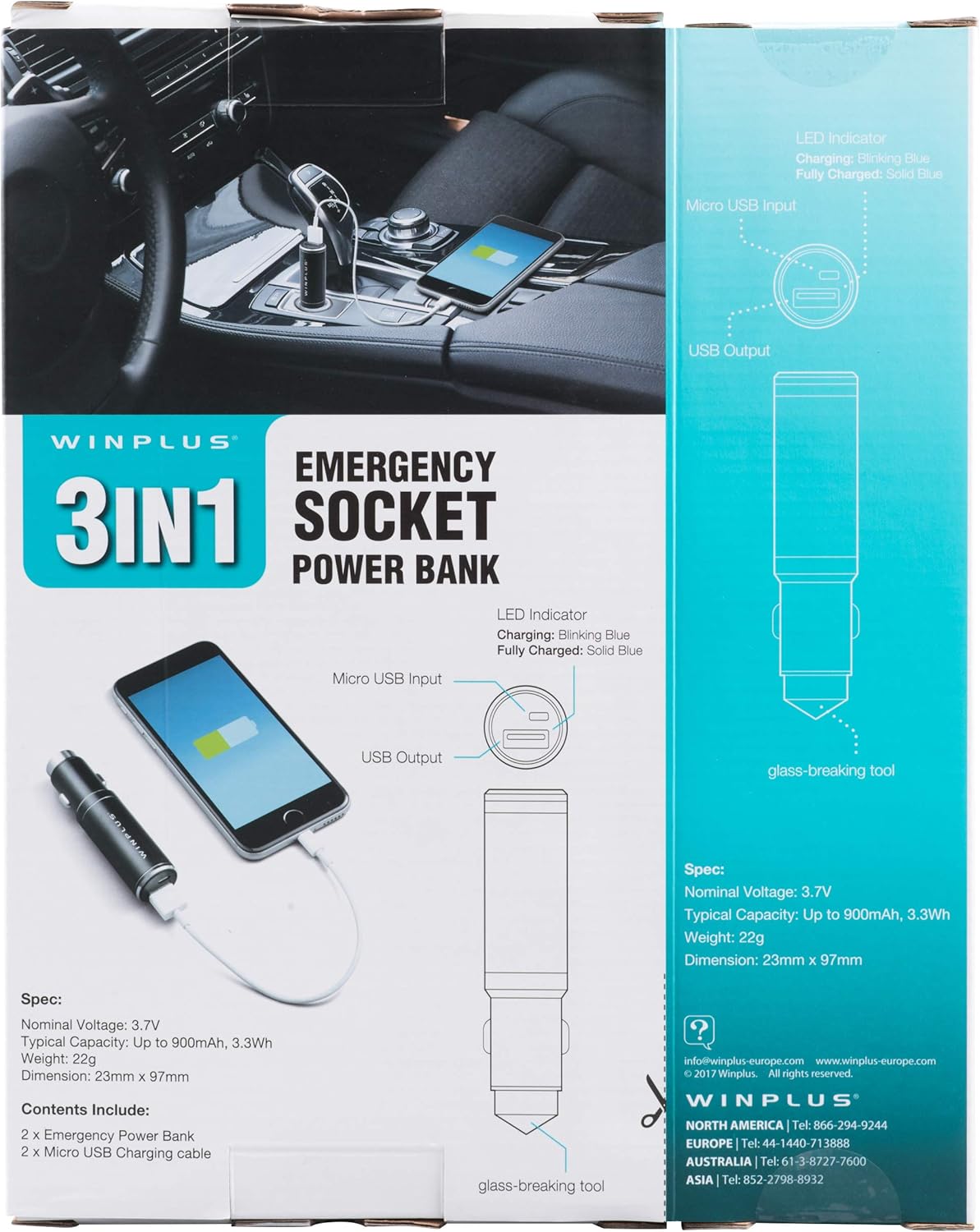
Figure 3: LED indicator status and glass-breaking tool location.
Opsætning
Første opladning af powerbanken:
- Locate the Micro USB Input port on the device.
- Connect the provided Micro USB charging cable to the Micro USB Input port.
- Connect the other end of the USB cable to a standard USB power source (e.g., a computer USB port, a wall adapter, or the car's 12V socket when used as a car charger).
- The LED indicator will blink blue during charging.
- Once fully charged, the LED indicator will turn solid blue.
Bemærk: Det anbefales at oplade powerbanken helt inden den tages i brug første gang.
Betjeningsvejledning
Brug som en bærbar powerbank:
- Ensure the power bank is charged (solid blue LED indicator).
- Connect your device's charging cable to the USB Output port on the power bank.
- Connect the other end of the cable to your mobile device (smartphone, tablet, etc.).
- Powerbanken vil automatisk begynde at oplade din enhed.
Using as a USB Car Charger:
- Insert the Winplus 3-in-1 device into your vehicle's 12V accessory socket (cigarette lighter socket).
- Connect your device's charging cable to the USB Output port on the Winplus device.
- Tilslut den anden ende af kablet til din mobilenhed.
- Your device will begin charging. The internal power bank will also charge simultaneously if it is not full.
Using the Emergency Glass-Breaking Tool:
The emergency glass-breaking tool is located at the tip of the device, opposite the USB ports. This tool is intended for emergency use only to break vehicle side windows in situations where occupants are trapped.
- In an emergency, firmly press the tip of the tool against a corner of a side window.
- Apply steady pressure until the spring-loaded mechanism activates and shatters the glass.
- Once the glass is broken, carefully clear any remaining shards before exiting the vehicle.
ADVARSEL: Use this tool only in genuine emergencies. Misuse can cause serious injury. Keep out of reach of children.
Opretholdelse
- Hold enheden tør. Fugt kan beskadige de interne kredsløb.
- Må ikke udsættes for ekstreme temperaturer (varm eller kold).
- Rengør enheden med en blød, tør klud. Brug ikke skrappe kemikalier eller slibende rengøringsmidler.
- Opbevares på et køligt, tørt sted, når det ikke er i brug.
- Undgå at tabe eller udsætte enheden for kraftige stød.
Fejlfinding
| Problem | Mulig årsag | Løsning |
|---|---|---|
| Enheden oplader ikke. | Power bank is depleted. Cable is faulty. USB port is dirty or damaged. | Genoplad powerbanken. Prøv et andet opladningskabel. Clean the USB ports carefully or try another port. |
| LED-indikatoren lyser ikke. | Device is not connected to a power source. Device is fully charged (if solid blue). Enheden er defekt. | Ensure proper connection to a power source. Check if it's already solid blue. Kontakt kundesupport, hvis problemerne fortsætter. |
| Langsom opladning. | Cable is not suitable. Power source is low current. Device being charged has high power requirements. | Use a high-quality charging cable. Connect to a higher current USB adapter. This device provides 2.1A output, which is standard for fast charging most phones. |
Specifikationer
- Model: AC55925-80
- Nominel bindtage: 3.6V
- Typisk kapacitet: Up to 2500 mAh, 9 Wh
- Battericellesammensætning: Lithium polymer
- USB-udgang: 5V / 2.1A
- Micro USB-indgang: 5V / 0.5A
- Dimensioner: 23 mm x 127 mm (omtrentligt)
- Varens vægt: 510 g (for the 2-pack)
- Connector Type: Micro USB (Input), USB Type-A (Output)
Sikkerhedsoplysninger
- Batteripakken må ikke skilles ad, åbnes eller makuleres.
- Udsæt ikke batteripakken for varme eller ild. Undgå opbevaring i direkte sollys.
- Kortslut ikke en batteripakke. Opbevar ikke batteripakker tilfældigt i en boks eller skuffe, hvor de kan kortslutte hinanden eller blive kortsluttet af andre metalgenstande.
- Udsæt ikke batteripakker for mekaniske stød.
- Hvis et batteri lækker, må væsken ikke komme i kontakt med hud eller øjne. Hvis det har været i kontakt med væsken, skal det berørte område skylles med rigeligt vand og søges lægehjælp.
- Brug ikke andre opladere end dem, der er specifikt leveret til brug med udstyret.
- Opbevar batteripakker utilgængeligt for børn.
- Søg straks læge, hvis en batteripakke er blevet slugt.
- Køb altid den korrekte batteripakke til udstyret.
- Hold batteripakkerne rene og tørre.
- Efterlad ikke et batteri på længere opladning, når det ikke er i brug.
- Bortskaf batteripakker korrekt i henhold til lokale regler.
Garanti og support
For warranty information or technical support, please contact Winplus North America Inc. directly.
- Fabrikant: Winplus North America Inc
- Kontaktoplysninger: Refer to product packaging or the official Winplus webwebstedet for de seneste supportoplysninger.
You can also visit the Winplus webhjemmeside for ofte stillede spørgsmål og yderligere produktinformation: www.winplus-europe.com


