1. Introduktion
The COMMAX DP-SS is an indoor audio intercom unit designed exclusively for use with COMMAX multi-unit door stations. This unit facilitates two-way audio communication with visitors at the door station and includes a function for door release. It is important to note that the DP-SS is an audio-only intercom and is not a telephone; it does not have a telephone jack and is not compatible with intercom systems from other brands.
This manual provides detailed instructions for the installation, operation, and maintenance of your DP-SS intercom unit.
2. Produktet er slutview

Figur 2.1: Front view of the DP-SS intercom unit. This image shows the sleek white design of the unit with its handset resting in the cradle, connected by a coiled cord.

Figur 2.2: Top-down view of the DP-SS unit with the handset removed. This view highlights the speaker grille, microphone, and the prominent door release button on the base unit.

Figur 2.3: Bag view of the DP-SS unit. This image displays the back panel, including the terminal block for wiring connections and a label detailing the model number and basic wiring information.
3. Kompatibilitet
The COMMAX DP-SS intercom unit is designed to be compatible exclusively with specific COMMAX audio intercom multi-apartment systems and door stations. It is not compatible with other brands or non-audio COMMAX systems.
- Compatible Door Stations: DR-nKM, DR-nKS, DR-nAM, DR-nAS, DR-nUM (where 'n' denotes the number of buttons, e.g., DR-4UM, DR-6UM, DR-8UM, DR-12AM).
- Compatible Multi-Apartment Systems: DR-nAM, DR-nKM, DR-nUM, DR-4UM, DR-6UM, DR-8UM, DR-12AM.

Figur 3.1: Examples of compatible COMMAX audio intercom lobby panels. This image illustrates the various door station models that can be used with the DP-SS unit.
4. Installation og opsætning
4.1. Montering
The DP-SS unit is designed for surface mounting. Ensure the mounting location is secure and allows for proper wiring access.
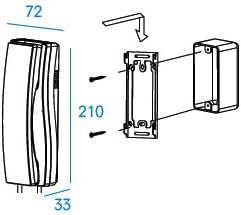
Figur 4.1: Mounting dimensions and procedure. This diagram provides visual guidance for installing the DP-SS unit on a wall surface, including key dimensions in millimeters.
- Fastgør monteringsbeslaget til væggen med passende skruer.
- Connect the necessary wiring before attaching the unit to the bracket.
- Carefully align and attach the DP-SS unit to the mounted bracket.
4.2. Ledninger
The DP-SS unit requires a 4-wire connection to the door unit and a 2-wire connection for the door lock mechanism. Power is supplied via DC12V/500mA.

Figur 4.2: Wiring diagram for DP-SS. This diagram illustrates the connections between the DP-SS unit, the COMMAX door station (e.g., DR-nUM), and the DC12V power supply, including terminals for door lock control.
- Identify the 4 wires from the door unit and connect them to the corresponding terminals on the DP-SS.
- Connect the 2 wires for the electric door lock to the designated terminals.
- Ensure the DC12V/500mA power source is correctly connected.
- Kontroller, at alle forbindelser er sikre, før du tilslutter strøm.
5. Betjening
5.1. Modtagelse af et opkald
- When a visitor presses the call button on the outdoor door station, the DP-SS unit will ring.
- Løft håndsættet for at besvare opkaldet og etablere tovejskommunikation med den besøgende.
5.2. Døråbner
- During an active conversation with a visitor, press the circular door release button located on the base unit of the DP-SS.
- This action will activate the electric door lock, allowing the visitor to enter.
5.3. Afslutning af et opkald
- To end the conversation, simply place the handset back into its cradle.
6. Vedligeholdelse
The COMMAX DP-SS intercom unit requires minimal maintenance to ensure optimal performance.
- Rensning: Use a soft, dry cloth to clean the exterior of the unit. Avoid using abrasive cleaners, solvents, or strong chemicals, as these can damage the surface.
- Miljøforhold: Ensure the unit is operated within the specified temperature range of 0°C to 50°C (32°F to 122°F). Avoid exposing the unit to excessive moisture, direct sunlight, or extreme temperatures.
- Ledningsinspektion: Periodically check the wiring connections at the back of the unit to ensure they remain secure and free from corrosion. Only perform this check when power to the unit is disconnected.
7. Fejlfinding
This section addresses common issues you might encounter with your DP-SS intercom unit.
| Problem | Mulig årsag | Løsning |
|---|---|---|
| Ingen lyd under et opkald. | Loose or incorrect wiring; faulty handset; issue with door station. |
|
| Døråbnerknappen virker ikke. | Incorrect wiring for door lock; faulty door lock mechanism; unit not in active call. |
|
| Unit not ringing when call button is pressed. | No power; incorrect wiring; faulty door station call button. |
|
If the problem persists after attempting these solutions, please contact COMMAX customer support or a qualified technician.
8. Specifikationer
| Model | DP-SS |
| Strømkilde | DC12V / 500mA |
| Monteringstype | Surface mounted type |
| Ledningsføring | 4 wires (to door unit) and 2 wires (for door lock) |
| Dimensions (with handset) | 70 mm (B) x 210 mm (H) x 80 mm (D) |
| Afstand (maks.) | 100m (0.65Φ standard) |
| Driftstemperatur | 0°C ~ 50°C (32°F ~ 122°F) |
| Produktmål (L x B x H) | 10.5 x 4.5 x 2.5 tommer |
| Varens vægt | 4.2 ounces (120 gram) |
| Materiale | Plast |
| Fabrikant | Kommaks |
| Oprindelsesland | Korea, Republikken |
9. Garanti og support
9.1. Returpolitik
This product is subject to a 30-day return policy from the date of purchase. Please refer to your retailer's specific return guidelines for details on refunds or replacements.
9.2. Kundesupport
For technical assistance, troubleshooting beyond this manual, or warranty inquiries, please contact your product vendor or COMMAX customer support. Contact information can typically be found on the product packaging or the vendor's webwebsted.
When contacting support, please have your product model number (DP-SS) and purchase details ready.


