1. Introduktion
This manual provides detailed instructions for the installation, operation, and maintenance of your President Lincoln II Plus 10 and 12 Meter Ham Radio. Designed for amateur radio enthusiasts, this transceiver offers advanced features and reliable performance across multiple bands. Please read this manual thoroughly to ensure proper use and to maximize your radio's capabilities.
2. Nøglefunktioner
The President Lincoln II Plus is equipped with a comprehensive set of features to enhance your communication experience:
- Expanded Band Coverage: Operates on 10 and 12 meter bands, with continuous scanning from 24.890 MHz to 24.990 MHz and 28.000 MHz to 29.700 MHz.
- Multiple Modulation Modes: Supports AM, FM, LSB, USB, and CW for versatile communication.
- Brugervenlig kontrol: Features a rotary switch, Up/Down channel selector, and VFO Mode for precise frequency tuning.
- Avanceret skærm: Multi-functions LCD display shows frequencies, S-meter readings, and various settings.
- Lydforbedringer: Includes ANL filter, Noise Blanker (NB), and HI-CUT for improved audio clarity, along with RF Gain and Mic Gain controls.
- Håndfri betjening: Integrated VOX function allows for voice-activated transmission.
- Memory and Scan Functions: Offers 6 memory channels and capabilities for channel and memory scanning.
- CTCSS/DCS-toner: Supports 38 CTCSS tones and 104 DCS codes for selective calling.
- Bekvemmeligheder: Dual watch, Key locking, Roger Beep, and a customizable Preset Emergency (EMG 1/2) function.
- SWR måler: Built-in SWR (Standing Wave Ratio) meter for antenna tuning and monitoring.
- Adjustable TOT: Time Out Timer (TOT) is adjustable to prevent accidental long transmissions.
3. Hvad er der i æsken
Upon unboxing your President Lincoln II Plus, please ensure all the following components are present:
- President Lincoln II Plus Transceiver
- Power cord with fuse
- Microphone and its hanger
- Mounting bracket with fixing screws
4. Opsætning
Proper setup is crucial for optimal performance of your President Lincoln II Plus radio. Follow these steps for initial installation:
- Montering: Securely attach the radio using the provided mounting bracket and screws. Ensure it is in a location with adequate ventilation and away from direct sunlight or excessive heat.
- Strømtilslutning: Connect the supplied power cord to the radio's power input and to a stable 13.8V DC power source. Observe correct polarity (red for positive, black for negative). The power cord includes an inline fuse for protection.
- Antenneforbindelse: Connect a 50-ohm impedance antenna suitable for 10 and 12 meter bands to the antenna connector on the rear of the radio. Ensure the connection is tight and secure.
- Mikrofonforbindelse: Plug the microphone into the front microphone jack.
- External Loudspeaker (Optional): If desired, connect an external loudspeaker to the dedicated jack for enhanced audio output.
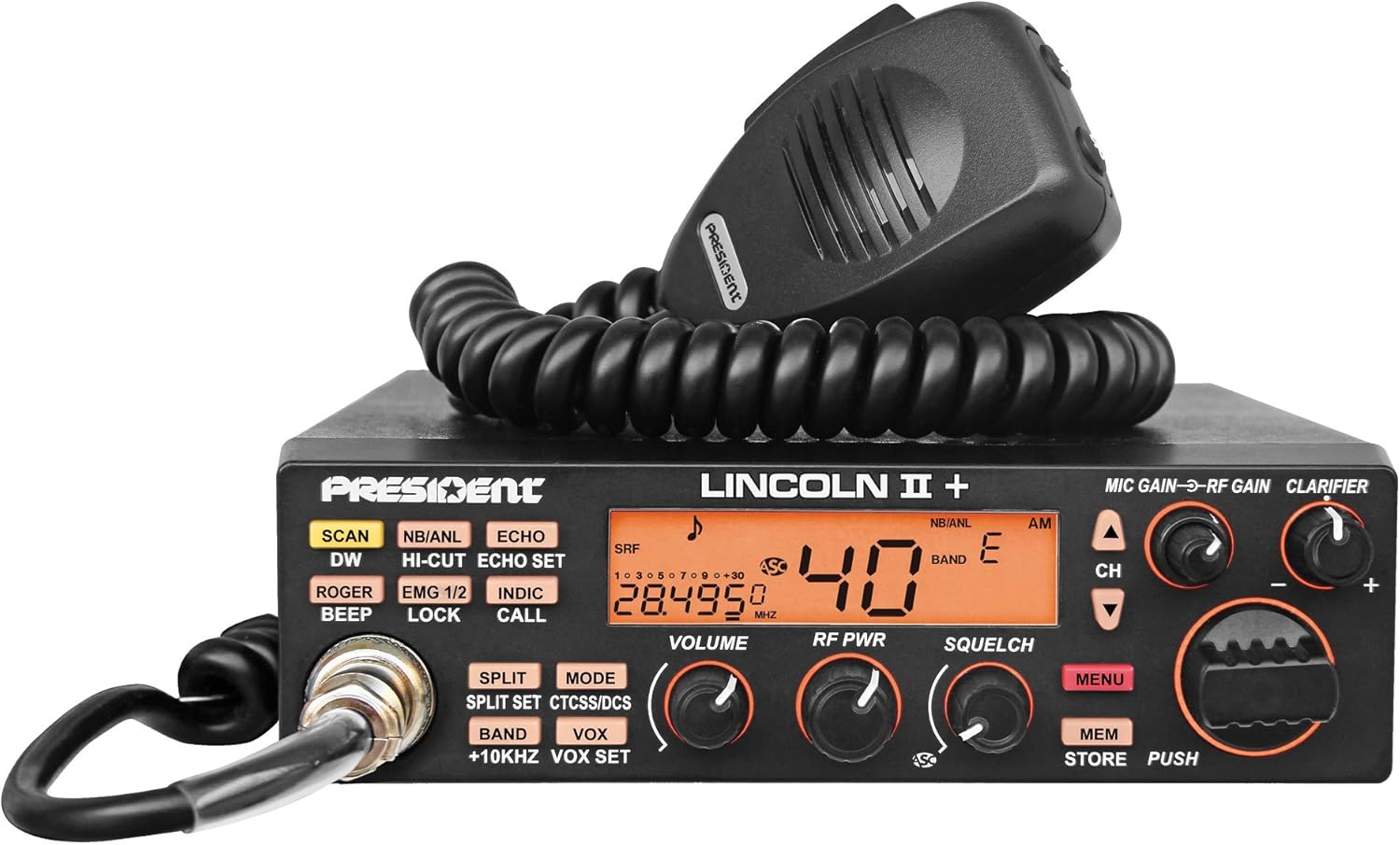
5. Betjeningsvejledning
Familiarize yourself with the controls and functions of your Lincoln II Plus radio for effective operation.
5.1 Grundlæggende kontroller
- Volume Adjustment and ON/OFF: Rotate the VOLUME knob to turn the radio on/off and adjust the audio output level.
- Kanalvælger: Use the Up/Down channel selector or the rotary switch to navigate through channels.
- Squelch (SQL) and ASC: Adjust the SQUELCH knob to eliminate background noise when no signal is present. The Automatic Squelch Control (ASC) can be activated for automatic noise suppression.
- RF strøm: The RF POWER knob controls the transmission output power.
- Multi-functions LCD Display: The LCD shows current frequency, channel number, S-meter, and various activated functions.
5.2 avancerede funktioner
- VFO tilstand: This mode allows continuous frequency scanning within the specified ranges (24.890 Mhz to 24.990 Mhz and 28.000 Mhz to 29.700 Mhz).
- VOX funktion: Enable VOX for hands-free transmission. Adjust VOX sensitivity and delay in the menu.
- ANL, NB, and HI-CUT Filters:
- ANL (Automatic Noise Limiter): Reduces impulse noise.
- NB (Noise Blanker): Suppresses repetitive pulse noise.
- HI-CUT: Filters out high-frequency audio components for a softer sound.
- RF Gain / Mic Gain:
- RF-forstærkning: Adjusts the receiver's sensitivity to incoming signals.
- Mikrofonforstærkning: Controls the microphone's sensitivity for transmission.
- Afklaring: Used for fine-tuning the receive frequency, especially in SSB modes, to ensure clear audio.
- Channels and Memories Scan: Activate scan mode to automatically search for active channels or cycle through stored memories.
- CTCSS (38 tones) / DCS (104 codes): Set these tones/codes for private communication within groups.
- MENU Function Key: Access the radio's settings and customization options.
- Roger Beep: A short tone transmitted at the end of your transmission to signal that you have finished speaking.
- Mode Switch (AM/FM/LSB/USB/CW): Select the desired modulation mode for communication.
- Dobbelt ur: Monitor two different channels simultaneously.
- Nøglelåsning: Forhindrer utilsigtede ændringer af indstillinger.
- SWR (Power Reading / SWR): Displays the Standing Wave Ratio, indicating antenna efficiency.
- Preset Emergency (EMG 1/2): Quickly access two programmable emergency channels.
- TOT (Timeout-timer): Limits the maximum transmission time to prevent accidental continuous transmission.
6. Vedligeholdelse
To ensure the longevity and optimal performance of your President Lincoln II Plus radio, follow these maintenance guidelines:
- Rensning: Use a soft, dry cloth to clean the exterior of the radio. Avoid abrasive cleaners or solvents that could damage the finish or display.
- Forbindelser: Kontrollér regelmæssigt alle kabelforbindelser (strøm, antenne, mikrofon) for at sikre, at de er fastgjorte og fri for korrosion.
- Ventilation: Ensure the radio's ventilation openings are clear and not obstructed to prevent overheating.
- Opbevaring: Når radioen ikke er i brug i længere perioder, skal den opbevares køligt og tørt, væk fra direkte sollys og ekstreme temperaturer.
- Udskiftning af sikring: If the radio does not power on, check the fuse in the power cord. Replace it with a fuse of the same type and rating if blown.
7. Fejlfinding
This section addresses common issues you might encounter with your President Lincoln II Plus radio. If you experience problems not covered here, please contact customer support.
| Problem | Mulig årsag | Løsning |
|---|---|---|
| Radioen tænder ikke. | Ingen strømforsyning; Sprunget sikring; Forkert ledningsføring. | Check power connections; Replace fuse; Verify wiring polarity. |
| Ingen modtagelse eller svage signaler. | Antenna not connected; High Squelch setting; Incorrect mode/frequency. | Ensure antenna is connected; Lower Squelch; Verify mode and frequency. |
| Dårlig transmissionskvalitet. | Microphone issue; High SWR; Low RF Power setting. | Check microphone connection; Adjust SWR; Increase RF Power. |
| Overdreven baggrundsstøj. | Squelch too low; ANL/NB/HI-CUT off; Electrical interference. | Increase Squelch; Activate ANL/NB/HI-CUT; Identify and mitigate interference sources. |
8. Specifikationer
Detailed technical specifications for the President Lincoln II Plus Ham Radio:
| Specifikation | Værdi |
|---|---|
| Modulationstilstande | AM/FM/LSB/USB/CW |
| Frekvensområder | 24.890 Mhz to 24.990 Mhz and 28.000 Mhz to 29.700 Mhz (continuous scanning) |
| Antenne impedans | 50 ohm |
| Strømforsyning | 13.8 V |
| Dimensioner (BxDxH) | 6.69 cm x 9.84 cm x 2.05 cm |
| Vægt | 3.09 lb |
| Frequency Allowance | +/- 300 Hz |
| Carrier Power | 50 W AM (PEP) / 35 W FM / 35W USB-LSB (PEP) / 12W CW |
| Transmission Interference | Inferior to -50 dBc |
| Lydrespons | 300 Hz til 3 kHz |
| Mikrofonfølsomhed | 3 mV |
| Modulated Signal Distortion | 1.8 % |
| Squelch følsomhed | minimum 0.2 µV - 120 dBm, maximum 1 mV - 47 dBm |
| Emitted Power in Adj. Channel | Inferior to 20 µW |
| Mikrofonstik | Front (6 pins) |
9. Garanti og support
For warranty information and technical support, please refer to the documentation provided with your purchase or visit the official President Electronics webwebsted. Gem din købsbevis til garantikrav.


