Indledning
This manual provides comprehensive instructions for the setup, operation, and maintenance of the reiie H9+ Mini Keyboard. This 2.4GHz wireless mini handheld keyboard features a touchpad and LED backlight, offering a convenient input solution for various devices including PCs, Smart TVs, Android TV Boxes, and more.
Læs venligst denne manual grundigt, inden produktet tages i brug, for at sikre korrekt funktionalitet og forhindre skader.
Pakkens indhold
- 1x reiie H9+ Wireless Mini Keyboard
- 1x USB trådløs modtager
- 1x USB opladningskabel
- 1x brugermanual
Produkt overview
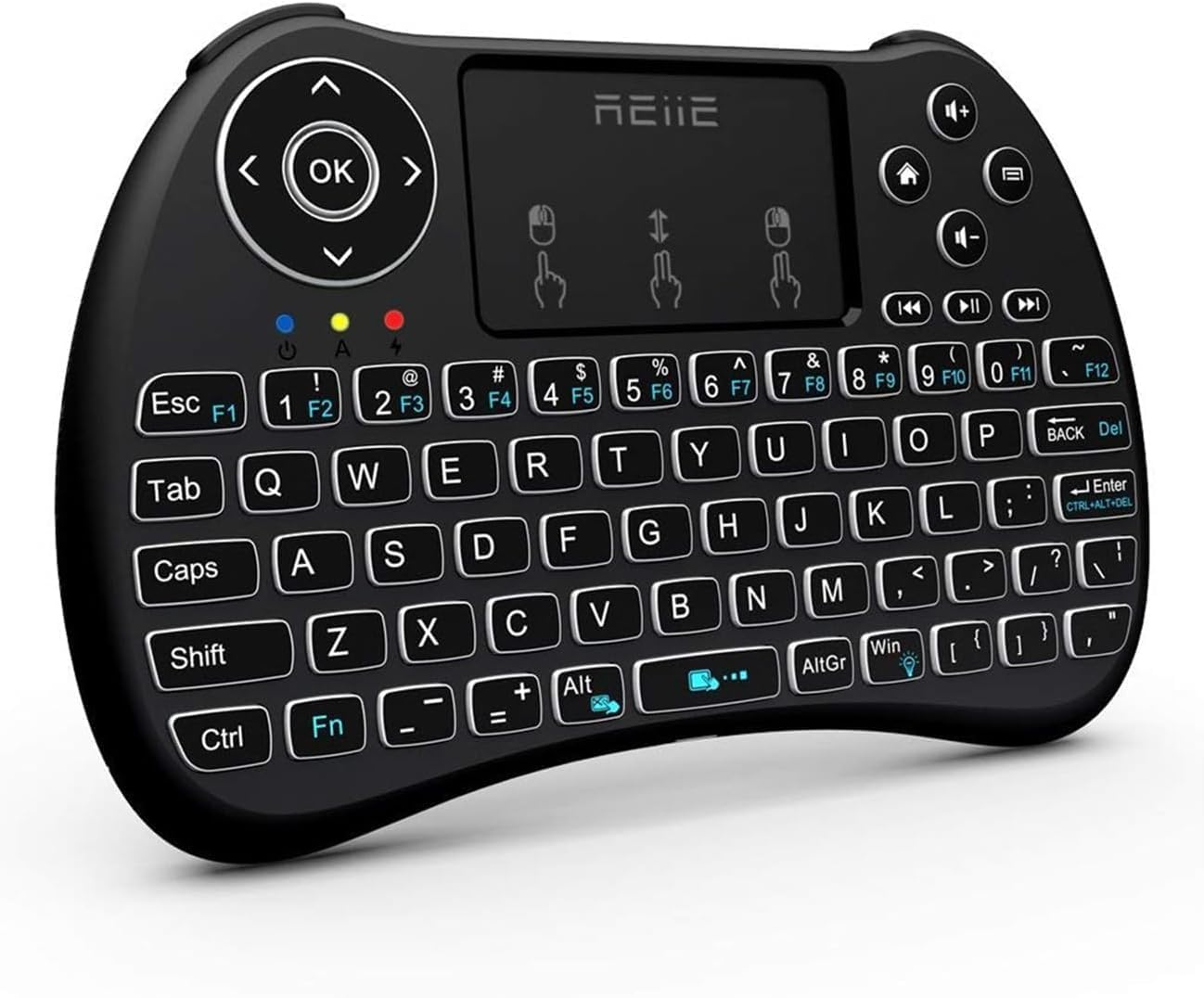
Figur 1: Forside view of the reiie H9+ Mini Keyboard, showing the QWERTY layout, touchpad, and navigation buttons.
The reiie H9+ Mini Keyboard integrates a full QWERTY keyboard, a multi-finger touchpad, and media control keys into a compact, handheld design. It operates on a 2.4GHz wireless connection via a USB receiver.
Nøglefunktioner:
- 2.4 GHz trådløs forbindelse: Giver en stabil forbindelse på op til 15 meter.
- Integreret touchpad: Supports multi-finger gestures for navigation.
- LED baggrundsbelysning: Allows for use in low-light conditions.
- Genopladeligt batteri: Built-in Lithium Ion battery for extended use.
- Kompakt design: Ergonomic and portable for comfortable handling.

Figure 2: The keyboard with its LED backlight activated, highlighting the keys and media controls. The 'Fn+Win' key combination activates the backlight.

Figur 3: Bagside view of the keyboard, illustrating the battery compartment, the USB receiver storage slot, and the charging port.
Opsætning
- Indledende opladning: Before first use, fully charge the keyboard for at least 1 hour using the provided USB charging cable. Connect the small end of the cable to the keyboard's charging port (located on the back, near the power switch) and the other end to a USB power source (e.g., computer USB port, USB wall adapter). The charging indicator light will illuminate during charging and turn off when fully charged.
- Find USB-modtager: The USB wireless receiver is stored in the battery compartment on the back of the keyboard. Gently open the battery cover to retrieve it.
- Tilslut modtager: Insert the USB wireless receiver into an available USB port on your device (PC, Smart TV, Android TV Box, etc.).
- Tænd: Slide the power switch on the back of the keyboard from "OFF" to "ON".
- Automatisk forbindelse: The keyboard should automatically connect to your device. No additional drivers are typically required for most operating systems.

Figure 4: Illustration of the mini USB receiver and the charging port, emphasizing the wireless connection range of up to 15 meters.
Betjeningsvejledning
Tastaturfunktioner:
- Indtastning: Use the QWERTY keyboard layout for text input.
- Funktionstaster (Fn): Tryk og hold på Fn key, then press a corresponding F-key (F1-F12) or other marked keys to access secondary functions (e.g., media controls, backlight toggle).
- Baggrundslys kontrol: Trykke Fn + Win to toggle the LED backlight on/off.
- Mediekontrol: Dedicated buttons for play/pause, next track, previous track, volume up/down, and mute are located on the upper right side.

Figure 5: Diagram illustrating various shortcut key combinations, including Fn + number keys for F-functions, and Fn + Alt to close the touchpad.
Touchpad Functions:
- Tryk med en enkelt finger: Fungerer som venstre museklik.
- Tryk med to fingre: Functions as a right mouse click.
- Two-Finger Drag: Scrolls up or down.
- Touchpad Lock: Trykke Fn + Alt to lock or unlock the touchpad function.

Figure 6: Visual representation of multi-finger touchpad gestures for left click, right click, and scrolling.
Kompatibilitet:
The H9+ Mini Keyboard is compatible with a wide range of devices and operating systems, including:
- PC (Windows 7, 8, 10, Linux)
- Smart TV
- Android TV Box
- Raspberry Pi 2
- Pad
- HTPC/IPTV

Figure 7: The reiie H9+ Mini Keyboard shown with various compatible devices such as Smart TV, laptop, notebook, projector, and TV box.

Figure 8: A user demonstrating interaction with a Smart TV using the reiie H9+ Mini Keyboard, highlighting its handheld convenience.
Opretholdelse
- Rensning: Brug en blød, tør klud til at rengøre tastaturets overflade. Ved genstridigt snavs kan du bruge en let tør klud.amp en klud kan bruges, så det sikres, at der ikke trænger fugt ind i enheden.
- Opbevaring: Når tastaturet ikke er i brug i længere perioder, skal det slukkes for at spare på batteriet. Opbevar det et køligt og tørt sted væk fra direkte sollys og ekstreme temperaturer.
- Batteripleje: Recharge the battery regularly, even if not fully depleted, to maintain optimal battery health. Avoid completely draining the battery frequently.
- USB-modtager: Keep the USB receiver stored securely in its designated slot on the keyboard's back when not in use to prevent loss.
Fejlfinding
- Tastaturet reagerer ikke:
- Sørg for, at tastaturet er tændt.
- Kontroller, om USB-modtageren er tilsluttet korrekt til enheden.
- Recharge the keyboard battery. Low battery can cause unstable connections or non-responsiveness.
- Prøv at tilslutte USB-modtageren til en anden USB-port på din enhed.
- Genstart din enhed.
- Touchpad virker ikke:
- Ensure the keyboard battery is fully charged. The touchpad requires more power than the keys, so it may stop working before the keys do if the battery is low.
- Check if the touchpad is locked. Press Fn + Alt for at låse den op.
- Baggrundslys virker ikke:
- Trykke Fn + Win for at slå baggrundsbelysningen til/fra
- Sørg for, at tastaturets batteri er tilstrækkeligt opladet.
- Short Wireless Range or Intermittent Connection:
- Ensure there are no large metallic objects or other 2.4GHz wireless devices interfering with the signal between the keyboard and the receiver.
- Flyt tættere på USB-modtageren.
- Genoplad tastaturets batteri.
Specifikationer
| Mærke | reiie |
| Model | H9+ |
| Forbindelsesteknologi | 2.4 GHz RF trådløs |
| Operativsystemkompatibilitet | Linux, Windows 10, Windows 7, Windows 8 |
| Hardware platform | PC |
| Særlige funktioner | Backlit, Hotkeys and Media Keys, Rechargeable, Trackpad |
| Strømkilde | Batteridrevet (1 lithium-ion-batteri inkluderet) |
| Varens vægt | 5 ounce (ca. 141.75 gram) |
| Produktmål (LxBxH) | 7.17 x 4.13 x 0.91 tommer (ca. 18.2 x 10.5 x 2.3 cm) |
| Farve | Sort |

Figure 9: Detailed dimensions of the reiie H9+ Mini Keyboard, showing its length of 146.8mm (5.77 inches) and width of 97.5mm (3.83 inches).
Garanti og support
For warranty information and technical support, please refer to the official reiie website or contact their customer service directly. Details may be provided on the product packaging or through the seller's information channel.
As an emerging intelligent electronic brand, reiie aims to provide customers with quality and convenient intelligent electronic use experience. For further assistance, please visit the reiie Store on Amazon.


