1. Vigtige sikkerhedsinstruktioner
Please read all instructions carefully before using your Onkyo LS7200 system. Keep this manual for future reference.
- Udsæt ikke dette apparat for regn eller fugt.
- Bloker ikke ventilationsåbninger. Installer i overensstemmelse med producentens anvisninger.
- Må ikke installeres i nærheden af varmekilder såsom radiatorer, varmeapparater, komfurer eller andre apparater (inklusive ampløftere), der producerer varme.
- Beskyt netledningen mod at blive trådt på eller klemt, især ved stik, stikkontakter og det sted, hvor de kommer ud af apparatet.
- Brug kun tilbehør/tilbehør specificeret af producenten.
- Overlad al service til kvalificeret servicepersonale. Service er påkrævet, når apparatet er blevet beskadiget på nogen måde.
2. Hvad er der i æsken
Bekræft, at alle komponenter er til stede, før du fortsætter med opsætningen.
- 5 Channel Network Receiver (HT-L05)
- Sound Bar System
- Trådløs drevet subwoofer
- Remote Control (RC-941S)
- 2 AAA-batterier (til fjernbetjening)
- AccuEQ Setup Microphone
- Strømkabler
- Højttaler kabler

Image: All components of the Onkyo LS7200 system, including the soundbar, network receiver, and wireless subwoofer.
3. Produktet er slutview
3.1 Network AV Receiver (HT-L05)
The central unit for processing audio and video signals, offering multiple inputs and network connectivity.

Image: Front panel of the Onkyo HT-L05 Network AV Receiver, showing power button, USB port, headphone jack, input selectors, listening mode, display, and tuning knob.
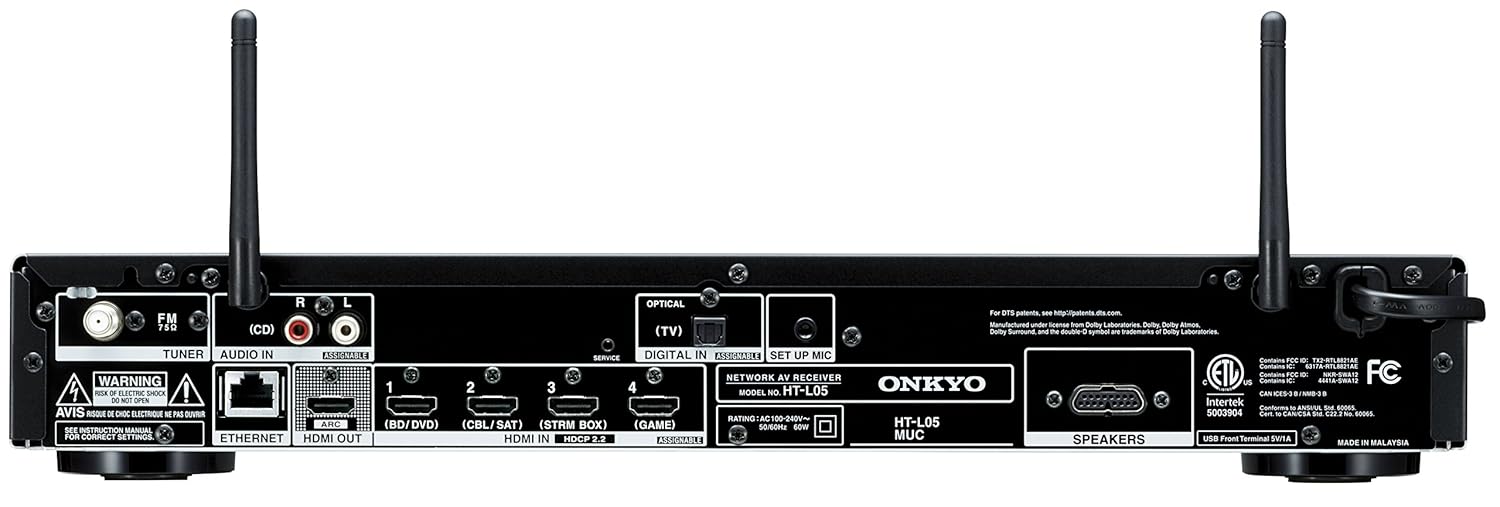
Image: Rear panel of the Onkyo HT-L05 Network AV Receiver, displaying HDMI inputs/output, Ethernet port, optical input, audio inputs, and speaker terminals.
3.2 Soundbar
The sound bar delivers the main audio channels, including height effects for 3D sound.

Image: The sleek black soundbar component of the LS7200 system.
3.3 Wireless Powered Subwoofer
Provides deep bass frequencies wirelessly, enhancing the overall audio experience.

Image: The wireless powered subwoofer, designed to deliver powerful bass.
4. Opsætning
4.1 Komponentplacering
- Sound Bar: Place the sound bar centrally below your TV. Ensure it is not obstructed.
- Trådløs subwoofer: Position the subwoofer in the front half of the room, ideally near a wall for enhanced bass. Experiment with placement for optimal sound.
- Network Receiver: Place the receiver in a well-ventilated area, away from direct heat sources.
4.2 Forbindelser
- Connect the Sound Bar to the Receiver: Use the dedicated speaker cables provided to connect the sound bar to the speaker terminals on the rear of the network receiver. Ensure correct polarity (+ to + and - to -).
- Connect TV to Receiver (HDMI ARC): Connect an HDMI cable from your TV's HDMI ARC port to the HDMI OUT (ARC) port on the receiver. This allows audio from your TV to be sent to the sound system.
- Tilslut kildeenheder: Connect your Blu-ray player, gaming console, cable box, or streaming device to the HDMI IN ports (BD/DVD, CBL/SAT, STRM BOX, GAME) on the receiver.
- Valgfri tilslutninger:
- Optisk lyd: If your TV does not support HDMI ARC, connect an optical cable from your TV's optical output to the DIGITAL IN (TV) port on the receiver.
- Ethernet: For a stable network connection, connect an Ethernet cable from your router to the ETHERNET port on the receiver.
- USB: Connect a USB storage device to the USB port on the front of the receiver for audio playback.
- Strømforbindelser: Connect the power cords to the receiver and the wireless subwoofer, then plug them into AC outlets.
4.3 Initial Configuration (AccuEQ)
After connecting all components and powering on the system, perform the AccuEQ room acoustic calibration for optimized sound.
- Connect the supplied AccuEQ setup microphone to the SETUP MIC port on the front of the receiver.
- Place the microphone at your primary listening position, ideally at ear level.
- Follow the on-screen instructions displayed on your TV to complete the calibration process. The system will emit test tones to measure room acoustics and adjust speaker settings for balanced sound.
- Once calibration is complete, disconnect the microphone.
5. Betjening
5.1 Grundlæggende betjening
- Tænd/sluk: Tryk på PÅ STANDBY button on the receiver or remote control.
- Valg af input: Use the input selector buttons (BD/DVD, CBL/SAT, STRM BOX, GAME, TV, USB, NET, TUNER) on the remote or receiver to switch between connected devices.
- Lydstyrkekontrol: Brug VOL + / - buttons on the remote or the tuning knob on the receiver.
- Stum: Tryk på STUM knappen på fjernbetjeningen for midlertidigt at slå lyden fra.
5.2 lydtilstande
The LS7200 supports advanced audio formats for an immersive experience.
- Dolby Atmos / DTS:X: These object-based audio formats provide a three-dimensional sound field. The system will automatically detect and play content in these formats when available.
- DTS Neural:X: This feature upmixes standard multichannel audio formats to simulate a 3D sound experience.
- Lytningstilstand: Brug LYTTETILSTAND button on the receiver or remote to cycle through available sound modes.
5.3 Netværksfunktioner
Connect your system to your home network for streaming and multiroom audio.
- Wi-Fi/Bluetooth: Enable Wi-Fi or Bluetooth from the receiver's settings menu to connect to your home network or pair with Bluetooth devices.
- Chromecast indbygget: Stream music from compatible apps on your smartphone or tablet.
- DTS Play-Fi: Enjoy high-quality wireless audio from compatible devices and services.
- FireConnect: Create a multiroom audio setup with other FireConnect compatible devices.
5.4 Fjernbetjening
The supplied remote control provides full command over your system.

Image: The Onkyo RC-941S remote control, featuring input selectors, navigation, volume, and sound mode buttons.
6. Vedligeholdelse
- Rensning: Use a soft, dry cloth to clean the surfaces of the sound bar, receiver, and subwoofer. Do not use abrasive cleaners or solvents.
- Ventilation: Ensure that the receiver's ventilation openings are not blocked to prevent overheating.
- Kabelstyring: Keep cables tidy and organized to prevent damage and ensure optimal performance.
7. Fejlfinding
Hvis du støder på problemer, kan du se følgende almindelige problemer og løsninger.
- Ingen lyd:
- Check all cable connections, especially HDMI ARC and speaker cables.
- Ensure the correct input source is selected on the receiver.
- Kontroller, at lydstyrken ikke er slået fra eller indstillet for lavt.
- If using HDMI ARC, sometimes switching between TV audio and HDMI ARC settings on your TV multiple times can resolve temporary audio loss.
- Intet billede:
- Ensure HDMI cables are securely connected between source, receiver, and TV.
- Verify the correct HDMI input is selected on both the receiver and the TV.
- Wireless Subwoofer Not Connecting:
- Ensure both the subwoofer and receiver are powered on.
- Refer to the pairing instructions in the full manual if automatic pairing fails.
- Problemer med netværksforbindelse:
- Tjek din router og internetforbindelse.
- If using Wi-Fi, ensure the receiver is within range of your router. Try connecting via Ethernet for a more stable connection.
8. Specifikationer
| Feature | Specifikation |
|---|---|
| Model | LS7200-BELL |
| Strømudgang | 50 W/kanal (4 ohm, 1 kHz, 1% THD, 1 kanal drevet, IEC) |
| Understøttede lydformater | Dolby Atmos, DTS:X, DTS Neural:X, MP3 |
| HDMI-indgange/-udgange | 4 In / 1 Out (ARC/CEC, 4K/60p, HDCP 2.2, HDR10, BT.2020) |
| Trådløs forbindelse | Wi-Fi, Bluetooth |
| Multiroom Audio | Chromecast built-in, DTS Play-Fi, FireConnect |
| Subwoofer | Wireless 16 cm powered subwoofer (50 Watts) |
| Rumkalibrering | AccuEQ |
| USB-port | 1 (Type-A for audio playback) |
| Dimensioner (modtager) | 43.5 x 32.6 x 7 cm |
| Varens vægt | 14.8 kg (Total System) |
| Medfølgende batterier | 2 AAA (til fjernbetjening) |
9. Garanti og support
The Onkyo LS7200 3D Sound Bar System comes with a 1-års garanti.
For technical support, service, or warranty claims, please contact your authorized Onkyo dealer or visit the official Onkyo support website. Ensure you have your product model number (LS7200) and proof of purchase available when seeking support.


