Indledning
This manual provides comprehensive instructions for the installation, operation, and maintenance of your FOSCAM FI9928P Outdoor PTZ 1080P WiFi Security Camera. Please read this manual thoroughly before using the product to ensure proper setup and functionality.

Billede: Forside view of the FOSCAM FI9928P Outdoor PTZ 1080P WiFi Security Camera.
The FOSCAM FI9928P is a full HD 1080P WiFi IP camera designed for home security. It features 4x optical zoom, pan and tilt capabilities, enhanced night vision up to 196 feet, IP66 weatherproof rating, two-way audio, and Wide Dynamic Range (WDR) technology.
Nøglefunktioner
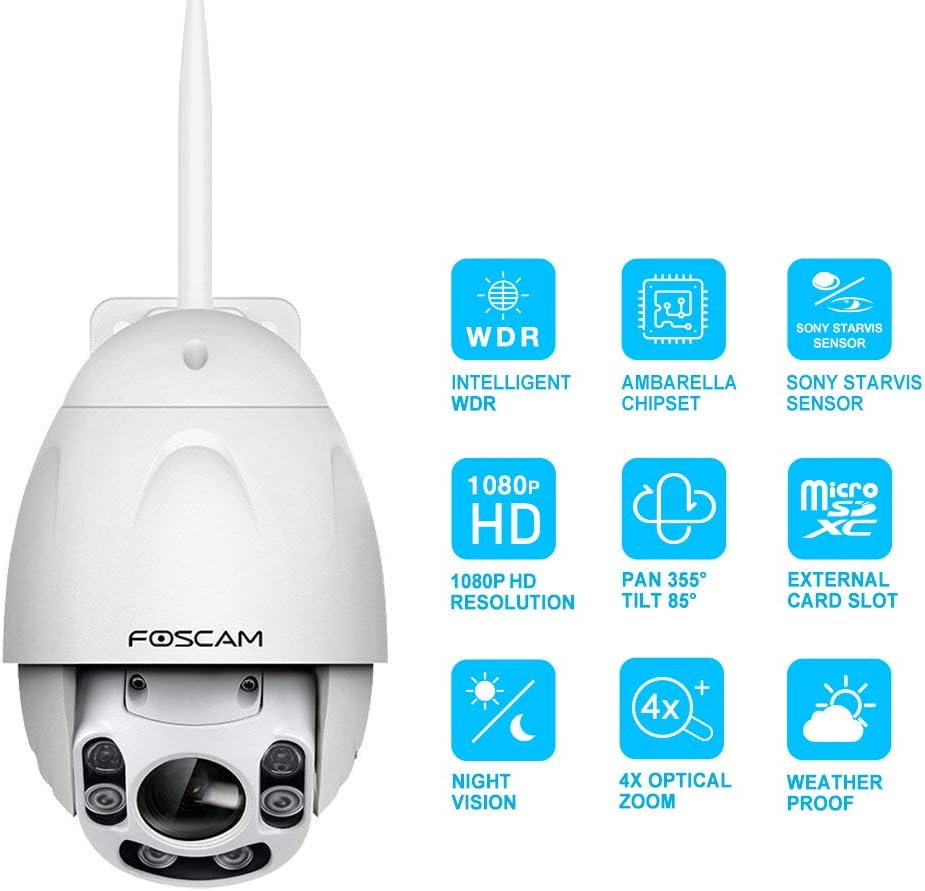
Image: Icons representing key features: Intelligent WDR, Ambarella Chipset, Sony Starvis Sensor, 1080P HD Resolution, Pan 355° Tilt 85°, External Card Slot, Night Vision, 4X Optical Zoom, Weatherproof.
- 1080P HD-video: Delivers clear and smooth 1080p video at 25 frames per second, powered by an Ambarella chipset.
- Pan & Tilt with Optical Zoom: Offers a 355° horizontal and 85° vertical rotation range, along with true 4x optical zoom for detailed viewing.
- Forbedret nattesyn: Equipped with a Sony Starvis sensor and 6 high-performance infrared array LED lights, providing night vision up to 196 feet, including colorful vision in low-light conditions.
- IP66 Vejrbestandig: Designed to withstand outdoor conditions, protecting against rain and dust.
- Intelligent WDR & Image Distortion Correction: Corrects dark faces under heavy light and fixes common image distortion flaws for clear images in various lighting.
- Bevægelsesdetektering og advarsler: Detects movement and sends notifications via email or smartphone app.
- To-vejs lyd: Giver mulighed for kommunikation via kameraet.
- Flere opbevaringsmuligheder: Supports Micro SD card (up to 128GB, not included), computer, NVR, FTP, NAS, or Foscam cloud storage.
- Stemmestyring: Compatible with Amazon Alexa (requires latest firmware update) for instant live view on Echo Show devices.
Opsætning
1. Udpakning og indledende inspektion
Carefully remove all components from the packaging. Verify that all items listed in the "What's in the Box" section are present and undamaged. The package includes the camera unit.
2. Fysisk installation
The FOSCAM FI9928P is designed for outdoor use with an IP66 weatherproof rating. Choose a suitable wall-mount location that provides the desired viewing angle and is within range of your Wi-Fi network or Ethernet connection.

Image: The FOSCAM FI9928P camera mounted outdoors, illustrating its IP66 weatherproof capability against rain.
Securely mount the camera using appropriate hardware for your chosen surface. Ensure the power cable and any optional network cables are routed safely and protected from environmental elements.
3. Netværksforbindelse
The camera supports both Wi-Fi and Ethernet connectivity.
- Wi-Fi opsætning: For wireless connection, ensure your camera is within range of your Wi-Fi router. The Foscam App will guide you through connecting the camera to your Wi-Fi network.
- Ethernet opsætning: For a wired connection, connect an Ethernet cable from your router to the camera's Ethernet port.
4. Foscam App and Software Setup
Download the free Foscam App for iOS or Android devices. Follow the in-app instructions to add your camera. The app provides an easy setup process, often involving scanning a QR code on the camera.
For desktop management, Foscam VMS (Video Management Software) is available. The camera is also compatible with third-party VMS like Blue Iris and ONVIF recording devices, and can be accessed via IE, Chrome, and Firefox browsers.
5. Installation af micro SD-kort
The camera supports Micro SD cards up to 128GB (not included) for local storage. To install, remove the two screws securing the Micro SD card panel, insert the card, and re-secure the panel. Ensure the panel is properly sealed to maintain the IP66 weatherproof rating.
Betjeningsvejledning
1. Pan, Tilt, and Zoom Control
Utilize the Foscam App or Foscam VMS to control the camera's movement. The camera offers a 355° horizontal pan and 85° vertical tilt. The 4x optical zoom allows you to magnify specific areas without losing image clarity.

Image: A smartphone displaying the Foscam app interface, showing controls for pan, tilt, and 4x optical zoom for the FI9928P camera.
2. Nattesyn
The camera automatically switches to night vision mode in low-light conditions. With its Sony Starvis sensor and 6 IR LEDs, it provides clear vision up to 196 feet. The camera can also deliver colorful images in very low light, unlike many cameras that only show black and white.

Image: A split image showing the camera's view during the day in full color and at night with enhanced night vision, highlighting the 196 ft range.
3. Bevægelsesdetektion og advarsler
Configure motion detection settings within the Foscam App or VMS. You can set specific alarm schedules and define areas you do not wish to monitor. Upon detection, the camera can send notifications to your email or smartphone app. Captured images can be stored on a Micro SD card, computer, NVR, FTP, NAS, or Foscam cloud.

Image: A smartphone displaying motion detection alerts from the Foscam app, showing timestamps og præview images of detected events.
4. Cloud Storage
Foscam Cloud utilizes US-based AWS servers for high-level encrypted security and privacy. Cloud storage protects recordings from loss due to camera damage or theft. A 7-day free cloud storage plan with 1 month's validity is available. This allows you to view live feeds, play back recordings, or save alert captures and video clips from the cloud. Additional cloud storage options are available.
5. Voice Control with Alexa
The FOSCAM FI9928P supports voice control via Amazon Alexa. Ensure your camera's firmware is updated to the newest version through the Foscam app. Once updated and linked, you can use simple voice commands to view the camera feed on compatible Echo Show devices (e.g., "Alexa, show me the front door").

Image: A person in a kitchen using voice commands to control the FOSCAM camera, with an Echo Show displaying the camera feed.
Opretholdelse
1. Rensning
Rengør kameralinsen og huset med jævne mellemrum med en blød kludamp cloth to remove dust, dirt, or water spots that may affect image quality. Avoid using harsh chemicals or abrasive materials.
2. Firmwareopdateringer
Regularly check for and install firmware updates via the Foscam App. Firmware updates often include performance improvements, new features, and security enhancements. For example, Alexa compatibility requires the latest firmware.
3. Vejrbeskyttelse
While the camera is IP66 weatherproof, ensure all cable connections are properly sealed and protected from direct exposure to extreme weather conditions to maximize longevity.
Fejlfinding
- Ingen strøm: Ensure the power adapter is securely connected to both the camera and a working power outlet.
- Kan ikke oprette forbindelse til Wi-Fi:
- Verify the camera is within range of your Wi-Fi router.
- Check that your Wi-Fi password is entered correctly.
- Genstart din router og kameraet.
- Hvis du bruger en kabelforbindelse, skal du sørge for, at Ethernet-kablet er korrekt tilsluttet.
- Dårlig billedkvalitet:
- Rengør kameralinsen.
- Sørg for, at der ikke er nogen forhindringer i kameraets synsfelt view.
- Check network stability for streaming issues.
- Verify WDR and Image Distortion Correction settings are enabled if needed.
- Motion Alerts Not Working:
- Confirm motion detection is enabled in the app/software.
- Check alarm schedules and monitored areas.
- Ensure notification settings on your smartphone are configured to receive alerts from the Foscam App.
- Micro SD Card Not Recording:
- Ensure the Micro SD card is correctly inserted and formatted.
- Check if the card is full; consider enabling loop recording or replacing the card.
- Verify recording settings in the Foscam App/VMS.
Specifikationer
| Feature | Detalje |
|---|---|
| Modelnummer | FI9928P |
| Videooptagelsesopløsning | 1080p |
| Billedhastighed | 25 fps |
| Optisk zoom | 4x |
| Pan Range | 355° |
| Tilt rækkevidde | 85° |
| Night Vision Range | Op til 196 fod |
| Vejrbestandig vurdering | IP66 |
| Opbevaringsmuligheder | Micro SD (up to 128GB), NVR, FTP, NAS, Foscam Cloud |
| Forbindelse | Wi-Fi, Ethernet |
| Kompatible enheder | iOS, Android, Amazon Alexa |
| Strømkilde | AC/DC (12 Volts, 10 watts) |
| Dimensioner (L x B x H) | 20.9 x 23.4 x 13.8 tommer |
| Varens vægt | 3.96 pund (1.8 kilo) |
Garanti og support
For technical assistance, product support, or warranty inquiries, please contact FOSCAM customer support. You can reach them via email at support@foscam.com.
FOSCAM has been providing security solutions for over 10 years, focusing on professional services and quality products.


