1. Introduktion og overview
The Nexxt Solutions Acrux 750-AC is a dual-band media gigabit wireless AC router designed for homes and small businesses requiring high-speed network connectivity. It supports transmission speeds up to 750Mbps, utilizing both the 5.0GHz band (433Mbps) and the 2.4GHz band (300Mbps) simultaneously. This router is equipped with a USB port for file sharing, making it suitable for media-connected environments. Key features include Wi-Fi Multimedia (WMM) technology for prioritizing bandwidth-intensive applications like HD streaming, and two detachable 5dBi omnidirectional antennas for extended coverage and reduced dead spots. The device also supports Wi-Fi Protected Setup (WPS) for easy and secure wireless connections.
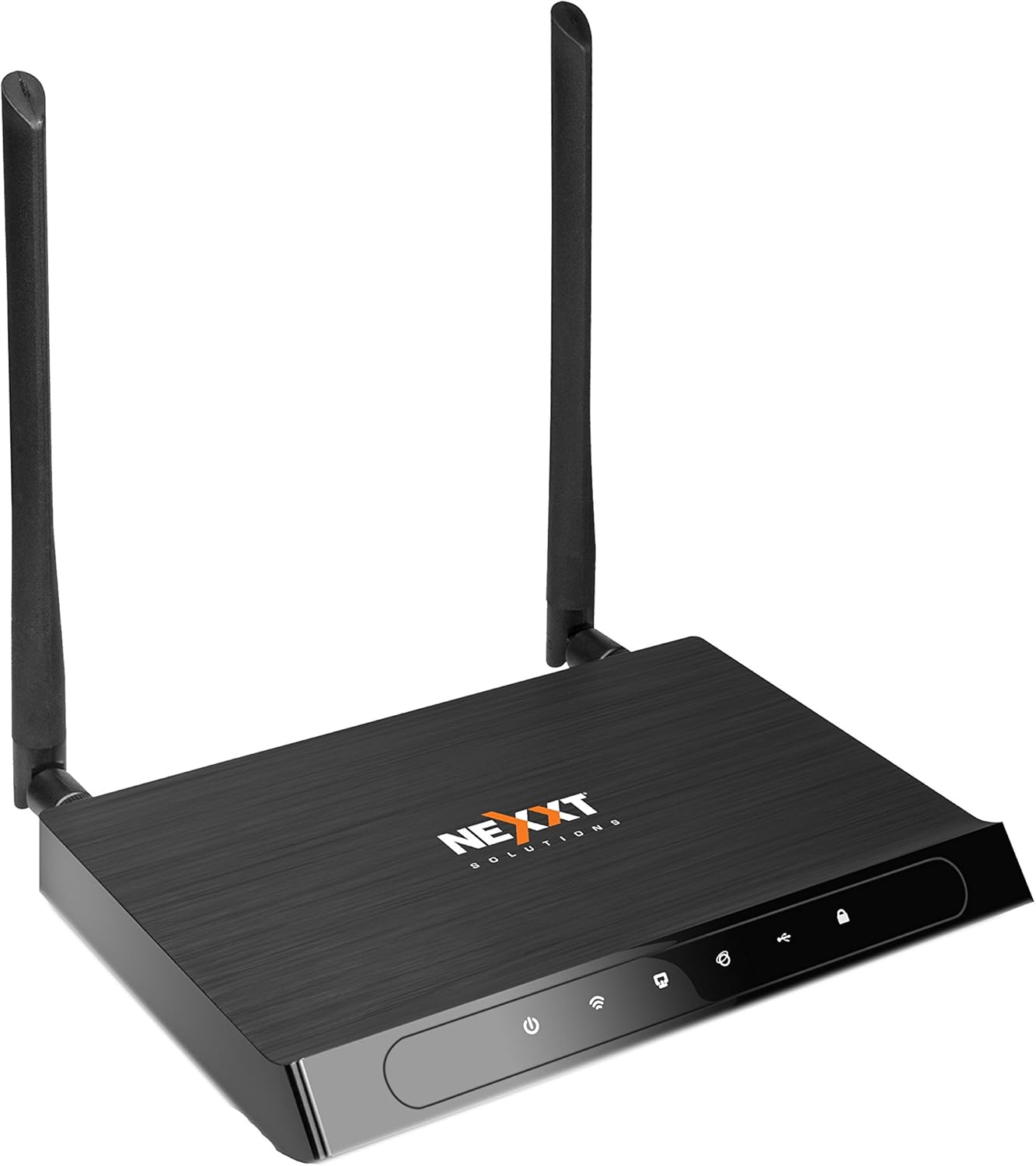
Figur 1: Forside view of the Acrux 750-AC router, showcasing its sleek design and two external antennas.
2. Produktfunktioner
- Wireless AC Router: Supports the latest 802.11ac standard for faster wireless speeds.
- Simultaneous Dual-Band: Operates on both 2.4GHz (300Mbps) and 5.0GHz (433Mbps) bands concurrently for a combined throughput of 750Mbps.
- Gigabit Ethernet-porte: Features four 10/100/1000Mbps LAN ports for high-speed wired connections.
- USB-port: Includes a USB 2.0 port for file and print sharing across the network.
- Udvidet dækning: Equipped with two detachable 5dBi omnidirectional antennas for improved signal reach and coverage.
- Beamforming teknologi: Creates a direct link for data transmission, enhancing wireless efficiency and range.
- WMM Technology: Wi-Fi Multimedia prioritizes traffic for bandwidth-intensive applications such as HD video streaming and online gaming.
- WPS (Wi-Fi Protected Setup): Allows for easy and secure connection of WPS-supported wireless adapters with the push of a button.
- Advanced Wireless Security: Supports 64/128-bit WEP and WPA/WPA2-PSK encryption protocols.
- WDS Capability: Wireless Distribution System allows for network expansion by linking multiple devices.

Figure 2: Illustration of the router's dual-band wireless coverage, showing both 2.4GHz (max range) and 5.0GHz (performance) signals within a typical home setup.
3. Hardware overview
Familiarize yourself with the ports and buttons on your Acrux 750-AC router.

Figure 3: Rear panel of the Acrux 750-AC router, detailing the various ports and controls.
- 1. WPS/Reset Button: Press briefly to activate WPS for easy wireless connection. Press and hold for 10 seconds to reset the router to factory default settings.
- 2. Wi-Fi On/Off Button: Toggles the wireless signal on or off.
- 3. WAN Port (Blue): Connects to your DSL/Cable modem or Ethernet line for internet access.
- 4. LAN Ports (Yellow, LAN1-LAN4): Fire Gigabit Ethernet-porte til tilslutning af kablede enheder såsom computere, spillekonsoller eller smart-tv'er.
- 5. USB 2.0 Port: For connecting USB storage devices for file sharing or USB printers for network printing.
- 6. Tænd/sluk-knap: Tænder eller slukker routeren.
- 7. A/C strømindgang: Tilsluttes den medfølgende strømadapter.
4. Opsætningsvejledning
4.1 Første hardwaretilslutning
- Placering: Place the router in a central location to maximize wireless coverage, away from obstructions and interference sources.
- Tilslut antenner: Screw the two detachable antennas firmly onto the connectors at the rear of the router.
- Tilslut til modemet: Connect one end of an Ethernet cable to the WAN port (blue) on the router and the other end to the Ethernet port on your DSL/Cable modem.
- Tilslut strøm: Plug the power adapter into the A/C Power Input port on the router and then into a power outlet. Press the On/Off button to power on the router.
- Bekræft indikatorer: Wait for the power, WAN, and Wi-Fi indicators on the router's front panel to stabilize, indicating a successful connection.
4.2 Adgang til Web Management interface
- Tilslut en enhed: Connect a computer to one of the LAN ports (yellow) on the router using an Ethernet cable, or connect wirelessly using the default Wi-Fi name (SSID) and password found on the router's label.
- Åben Web Browser: Start en web browser (f.eks. Chrome, Firefox, Edge).
- Indtast IP-adresse: I adresselinjen skal du indtaste routerens standard-IP-adresse (normalt
192.168.0.1or192.168.1.1, refer to the label on your router for the exact address) and press Enter. - Login: Indtast standardbrugernavn og adgangskode (normalt
adminfor begge, eller som angivet på routerens etiket). - Kør opsætningsguiden: Follow the on-screen setup wizard to configure your internet connection, wireless network names (SSIDs) for both 2.4GHz and 5GHz bands, and set strong passwords.
5. Betjeningsvejledning
5.1 Tilslutning af enheder
- Kablede enheder: Connect devices like desktop computers, smart TVs, or gaming consoles to the yellow Gigabit LAN ports using Ethernet cables.
- Trådløse enheder: On your wireless device (smartphone, tablet, laptop), search for available Wi-Fi networks. Select your router's 2.4GHz or 5GHz SSID and enter the Wi-Fi password you configured during setup.
- Brug af WPS: For WPS-compatible devices, press the WPS button on the router, then activate WPS on your device within two minutes to establish a secure connection without entering a password.
5.2 USB File Deling
The USB 2.0 port allows you to share files from a connected USB storage device (e.g., USB flash drive, external hard drive) across your network.
- Tilslut USB-enhed: Insert your USB storage device into the USB 2.0 port on the router.
- Configure Sharing: Få adgang til routerens web management interface. Navigate to the USB Sharing or Storage section to enable and configure file sharing settings, including user access permissions.
- Adgang Files: On network-connected devices, you can typically access the shared USB drive through network locations (e.g., "Network" in Windows File Explorer, "Connect to Server" in macOS Finder).
5.3 Avancerede funktioner
- WMM (Wi-Fi-multimedie): This feature is enabled by default and automatically prioritizes network traffic for applications requiring high bandwidth, such as video streaming and online gaming, to ensure a smoother experience.
- Stråleformning: This technology focuses the Wi-Fi signal directly towards connected devices, improving signal strength and range for those devices. It operates automatically with compatible devices.
- WDS (trådløst distributionssystem): Allows the router to connect wirelessly to other access points or routers to extend the wireless network coverage. Configuration for WDS is available in the router's web interface under wireless settings.
6. Vedligeholdelse
- Firmwareopdateringer: Tjek regelmæssigt den officielle Nexxt Solutions-profil webwebsted for firmwareopdateringer. Opdatering af firmwaren kan forbedre ydeevnen, tilføje nye funktioner og rette sikkerhedssårbarheder. Følg instruktionerne, der følger med firmwareopdateringen, omhyggeligt.
- Regelmæssig genstart: Genstart af din router med et par ugers mellemrum kan hjælpe med at rydde dens hukommelse og løse mindre problemer med ydeevnen. Du skal blot tage strømadapteren ud i 10-15 sekunder, og derefter sætte den i igen.
- Fysisk rengøring: Hold routeren ren og fri for støv. Brug en blød, tør klud til at tørre ydersiden af. Sørg for, at ventilationshullerne ikke er blokerede for at forhindre overophedning.
- Sikre adgangskoder: Regularly change your Wi-Fi and router login passwords to strong, unique combinations to maintain network security.
7. Fejlfinding
Almindelige problemer og løsninger:
- Ingen internetadgang:
- Check if the WAN indicator on the router is lit. If not, ensure the Ethernet cable from your modem is securely connected to the router's blue WAN port.
- Reboot your modem first, then the router. Wait for both devices to fully power on and establish connections.
- Bekræft dine internetforbindelsesindstillinger i routerens web interface. Ensure they match the settings provided by your Internet Service Provider (ISP).
- Slow Wireless Speed or Frequent Disconnections:
- Ensure the router is placed centrally and away from potential interference sources (e.g., cordless phones, microwaves, thick walls).
- Try changing the wireless channel in the router's settings to a less congested one. Use a Wi-Fi analyzer app to find optimal channels.
- Confirm your devices are connecting to the appropriate band (5GHz for closer, faster connections; 2.4GHz for longer range).
- Update the wireless drivers on your connected devices.
- Kan ikke få adgang til routerens Web Interface:
- Ensure your device is connected to the router (either via Ethernet or Wi-Fi).
- Verify you are typing the correct IP address (e.g.,
192.168.0.1) into the browser's address bar. - Ryd din browsers cache og cookies, eller prøv en anden browser.
- Deaktiver midlertidigt enhver firewall eller antivirussoftware på din computer.
- Glemt adgangskode til routeren:
- If you cannot recall your router's login password, you will need to perform a factory reset. Locate the WPS/Reset button on the back of the router. With the router powered on, press and hold this button for approximately 10 seconds until the lights flash. The router will then revert to its factory default settings, including the default login credentials (usually
admin/admin). Note: A factory reset will erase all your custom settings, requiring you to reconfigure the router.
- If you cannot recall your router's login password, you will need to perform a factory reset. Locate the WPS/Reset button on the back of the router. With the router powered on, press and hold this button for approximately 10 seconds until the lights flash. The router will then revert to its factory default settings, including the default login credentials (usually
8. Specifikationer
| Feature | Detalje |
|---|---|
| Modelnummer | ARL02754U1 |
| Trådløs Standard | IEEE 802.11ac/n/b/g |
| Trådløse frekvenser | 2.4 GHz and 5 GHz (Simultaneous Dual-Band) |
| Maksimal trådløs hastighed | Op til 750 Mbps (300 Mbps ved 2.4 GHz, 433 Mbps ved 5.0 GHz) |
| Ethernet-porte | 4 x 10/100/1000 Mbps Gigabit LAN Ports, 1 x 10/100/1000 Mbps WAN Port |
| USB-port | 1 x USB 2.0 port |
| Antenner | 2 x Detachable 5dBi Omni-directional Antennas |
| Sikkerhed | 64/128-bit WEP, WPA/WPA2-PSK encryption |
| Dimensioner | 27.94 x 22.86 x 6.35 cm (omtrentlige pakkemål) |
| Varens vægt | 726 g (1.6 pund) |
| Fabrikant | Nexxt løsninger |
9. Garanti og support
The Nexxt Solutions Acrux 750-AC router comes with a 5 års garanti, demonstrating the manufacturer's commitment to quality and reliability. For technical assistance, troubleshooting, or warranty claims, please contact Nexxt Solutions customer support. US-based technical support is available to assist you with installation and operational queries.
For the most up-to-date support information, FAQs, and contact details, please visit the official Nexxt Solutions website. You may also find additional resources by searching for "Nexxt Solutions" online or referring to the contact information provided with your product packaging.


