1. Introduktion
The Amkette Trubeats S50 is a versatile smart wireless Bluetooth speaker designed to enhance your audio experience. It features multiple connectivity options including Bluetooth, USB, Micro SD card, and AUX input, along with an integrated FM radio. The speaker also includes a digital clock with alarm functions and can be controlled via a dedicated smartphone application. Additionally, it can function as a power bank to charge your mobile devices.
2. Pakkens indhold
Markér venligst feltet for følgende elementer:
- Amkette Trubeats S50 Smart Wireless Bluetooth Speaker
- USB opladningskabel
- AUX kabel
- Brugervejledning (dette dokument)
3. Produktet er slutview
Familiarize yourself with the various parts and controls of your Amkette Trubeats S50 speaker.
3.1 Foran View

Figur 1: Forside view of the Amkette Trubeats S50 speaker, showing the speaker grille and LED display.
3.2 Øverste kontrolpanel

Figure 2: Labeled diagram of the Amkette Trubeats S50 speaker's top control buttons: Mode, Volume Down/Previous, Play/Pause/Answer Call, Volume Up/Next, Clock, and Microphone.
- MODE knap: Press to switch between Bluetooth, FM, AUX, USB, and Micro SD modes.
- K-/ Button: Press to decrease volume; long press for previous track/station.
- Play/Pause/Answer Call Button: Press to play/pause audio; press to answer/end calls.
- +/N Button: Press to increase volume; long press for next track/station.
- UR-knap: Press to set time and alarms.
- Mikrofon: Til håndfri opkald.
3.3 Rear Ports and Switch

Figure 3: Labeled diagram of the Amkette Trubeats S50 speaker's rear ports: AUX, Micro SD, USB Host, USB DC, and On/Off switch.
- AUX-indgang: Connect external audio devices using the 3.5mm AUX cable.
- Micro SD -kortplads: Insert a Micro SD card for audio playback.
- USB-værtsport: Insert a USB drive for audio playback or use as a power bank.
- USB DC Input: Connect the USB charging cable to power the speaker.
- TÆND/SLUK -kontakt: Tænd eller sluk for højttaleren.
4. Opsætning
4.1 Opladning af højttaleren
- Connect the small end of the USB charging cable to the USB DC Input porten på bagsiden af højttaleren.
- Tilslut den store ende af USB-opladerkablet til en USB-strømadapter (medfølger ikke) eller en computers USB-port.
- The LED indicator will show charging status. A full charge typically takes approximately 4 hours.
Note: The speaker does not have a visible battery level indicator. It is recommended to charge fully before first use and when the battery is low.
4.2 Tænd/sluk
- For at tænde, skub ON/OFF-knap on the rear of the speaker to the 'ON' position.
- For at slukke skal du skubbe ON/OFF-knap til 'OFF'-positionen.
5. Betjeningsvejledning
5.1 Bluetooth -parring

Figure 4: Speaker in Bluetooth pairing mode, indicated by 'BT' on the display.
- Power on the speaker. It will automatically enter Bluetooth pairing mode, indicated by 'BT' flashing on the LED display.
- Aktiver Bluetooth på din smartphone eller anden enhed.
- Søg efter available devices and select "Amkette S50" from the list.
- Once paired, the speaker will emit a confirmation tone, and 'BT' will stop flashing.
- Du kan nu afspille lyd fra din enhed via højttaleren.
5.2 Using AUX Input

Figure 5: Speaker connected to a smartphone via AUX cable for wired audio playback.
- Tilslut den ene ende af 3.5 mm AUX-kablet til AUX-indgang porten på bagsiden af højttaleren.
- Connect the other end of the AUX cable to the audio output jack of your external device (e.g., smartphone, MP3 player, laptop).
- Tryk på MODE knap repeatedly until the speaker enters AUX mode.
- Afspil lyd fra din tilsluttede enhed.
5.3 Using USB/Micro SD Card
- Insert a USB drive into the USB-værtsport or a Micro SD card into the Micro SD-kortplads bag på højttaleren.
- Sørg for din lyd files (MP3 format recommended) are stored on the drive/card.
- Tryk på MODE knap repeatedly until the speaker enters USB or Micro SD mode. Playback will begin automatically.
- Brug K-/ og +/N knapper til navigation i spor og lydstyrkekontrol.
5.4 FM-radiofunktion

Figure 6: Speaker displaying FM frequency, with app control for station selection.
- Tryk på MODE knap repeatedly until the speaker enters FM radio mode.
- Automatisk scanning: I FM-tilstand skal du trykke længe på Afspil/pause button to initiate an automatic scan for available FM stations. The speaker will save detected stations.
- Manuel indstilling: Brug K-/ og +/N knapper til at navigere gennem gemte stationer.
- For precise tuning and station management, use the Amkette Trubeats Smart Speaker App (see section 5.7).
5.5 Digital Clock and Alarm Setup

Figure 7: Speaker displaying the current time on its LED screen.
- Indstillingstid: Tryk og hold på CLOCK knap. The hour display will flash. Use the K-/ og +/N buttons to adjust the hour. Press the CLOCK knap again to set minutes, and adjust with K-/ og +/N. Trykke CLOCK knap endnu en gang for at bekræfte.
- Indstilling af alarmer: Tryk kort på CLOCK knap to cycle through Alarm 1 and Alarm 2 settings. When an alarm time is displayed, long press the CLOCK knap to enter alarm setting mode. Adjust hour and minute using K-/ og +/N, confirming each with a short press of the CLOCK knap. You can also set the alarm source (FM/SD Card/USB) via the app.
5.6 Brug som powerbank
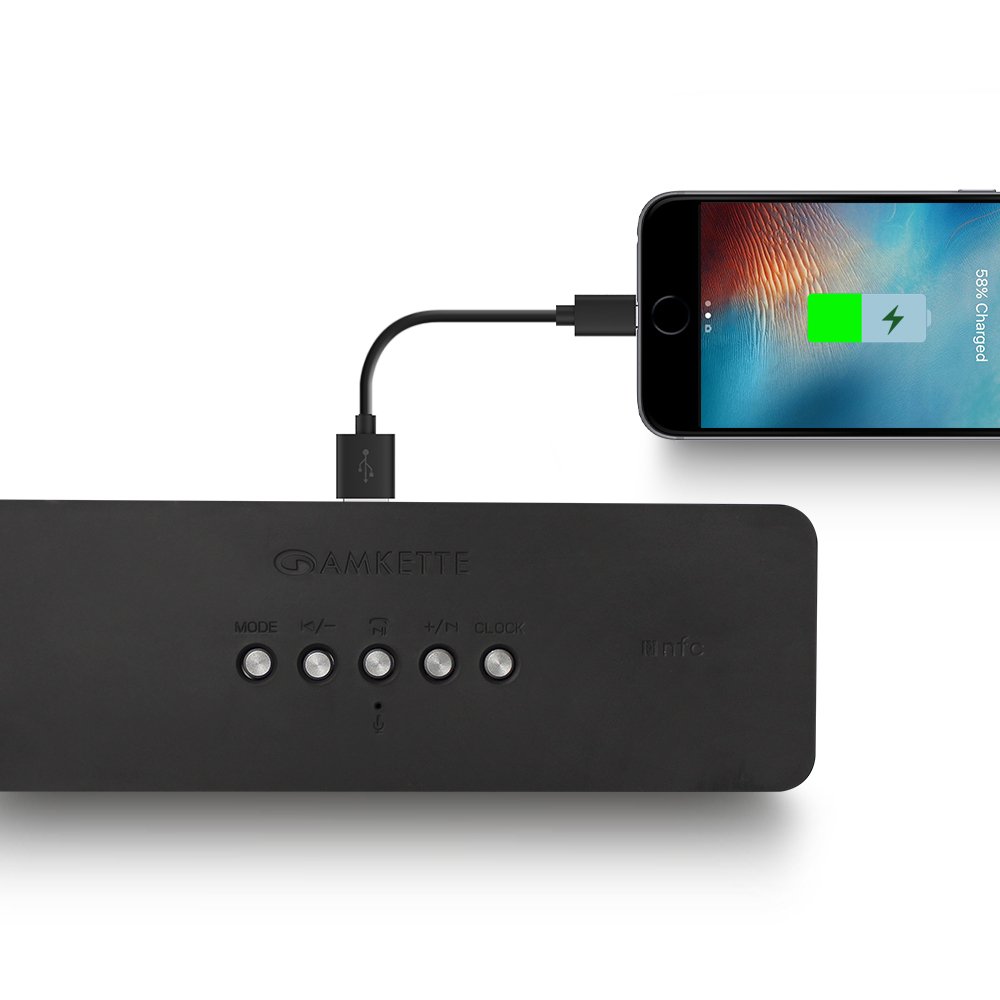
Figure 8: Speaker providing power to a smartphone through its USB Host port.
The Amkette Trubeats S50 can charge your smartphone or other USB-powered devices. Connect your device's charging cable to the USB-værtsport on the rear of the speaker. The speaker's internal battery will then supply power to your device.
5.7 App Control (Android Only)

Figure 9: Smartphone displaying the Amkette Trubeats Smart Speaker App interface.
For enhanced control, download the Amkette Trubeats Smart Speaker App from the Google Play Store (for Android phones). The app allows you to:
- Skift mellem forskellige lydtilstande.
- Control volume and track playback.
- Manage FM radio stations and perform precise tuning.
- Set and customize alarms, including alarm source.
Ensure your speaker is connected via Bluetooth to your smartphone for app functionality.
5.8 Opkaldshåndtering
When connected via Bluetooth to a smartphone, the speaker can be used for hands-free calling:
- Besvar opkald: Tryk på Play/Pause/Answer Call Button engang.
- Afslut opkald: Tryk på Play/Pause/Answer Call Button once during a call.
- Afvis opkald: Tryk længe på Play/Pause/Answer Call Button.
6. Vedligeholdelse
- Keep the speaker away from extreme temperatures, direct sunlight, and moisture.
- Rengør højttaleren med en blød, tør klud. Brug ikke slibende rengøringsmidler eller opløsningsmidler.
- Undgå at tabe højttaleren eller udsætte den for kraftige stød.
- Når højttaleren ikke er i brug i længere perioder, skal den opbevares køligt og tørt og oplades med jævne mellemrum for at opretholde batteriets sundhedstilstand.
7. Fejlfinding
| Problem | Mulig årsag | Løsning |
|---|---|---|
| Højttaleren tænder ikke. | Batteriet er afladet. | Oplad højttaleren helt. |
| Ingen lyd fra højttaleren. | Lydstyrken er for lav; forkert tilstand valgt; enheden er ikke tilsluttet korrekt. | Increase speaker and source device volume. Ensure correct mode (Bluetooth, AUX, etc.) is selected. Reconnect the device. |
| Bluetooth-parring mislykkes. | Højttaler ikke i parringstilstand; enhed for langt væk; interferens | Ensure speaker is in pairing mode ('BT' flashing). Move device closer to speaker. Turn off other Bluetooth devices. |
| Dårlig FM-radiomodtagelse. | Svagt signal; miljøforstyrrelser. | Relocate the speaker to an area with better reception. Perform an auto-scan again. |
| App not connecting to speaker. | Bluetooth not connected; app issue. | Ensure speaker is paired via Bluetooth to your phone. Restart the app and try again. |
8. Specifikationer
- Model: S50
- Mærke: Amkette
- Højttalertype: Portable Bluetooth Speaker (Outdoor)
- Forbindelse: Bluetooth, USB, Micro SD, AUX, FM-radio
- Trådløs kommunikationsteknologi: Bluetooth
- Kontrolmetode: Buttons, App (Android)
- Lydudgangstilstand: Stereoanlæg
- Audio Wattage: 10 watt
- Strømkilde: Batteridrevet
- Batterilevetid: Op til 12 timer (gennemsnit)
- Opladningstid: Cirka 4 timer
- Kompatible enheder: Laptop, Mobile, Tablet
- Dimensioner (LxBxH): 26.7 x 10.9 x 7.9 cm
- Varens vægt: 703 gram
- Vandtæt: Ja
- Monteringstype: Bordplademontering
9. Garanti og support
The Amkette Trubeats S50 Smart Wireless Bluetooth Speaker comes with a 1 års garanti fra købsdatoen. Denne garanti dækker fabrikationsfejl ved normal brug.
For warranty claims, technical assistance, or any other support inquiries, please contact Amkette customer support through their official webwebstedet eller de kontaktoplysninger, der følger med din købsdokumentation.
Gem venligst din købskvittering som købsbevis af garantiårsager.


