1. Introduktion
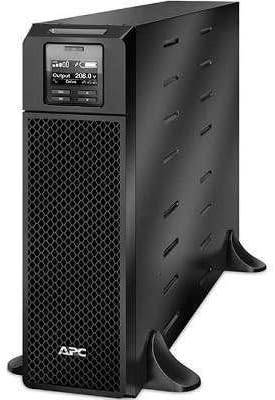
This manual provides essential instructions for the installation, operation, maintenance, and troubleshooting of your APC Smart-UPS SRT 5000VA 208V. Please read this manual thoroughly before attempting to install or operate the UPS. Retain this manual for future reference.
The APC Smart-UPS SRT 5000VA 208V is an Uninterruptible Power Supply (UPS) designed to provide protected power to electronic equipment. It safeguards connected equipment from power outagspændingsfald, overspænding og andre strømforstyrrelser.
2. Sikkerhedsoplysninger
Overhold alle advarsler og betjeningsinstruktioner i denne manual. Undladelse af at gøre dette kan medføre personskade eller beskadigelse af udstyret.
Generel sikkerhed
- Denne UPS er kun beregnet til indendørs brug.
- Brug ikke denne UPS i direkte sollys, i kontakt med væsker, eller hvor der er meget støv eller fugt.
- Sørg for, at ventilationsåbningerne på UPS'en ikke er blokerede.
- Do not connect appliances that would overload the UPS.
- Service af batterier bør udføres eller overvåges af personale, der har kendskab til batterier og de nødvendige forholdsregler.
Elektrisk sikkerhed
- The UPS contains internal batteries that may present a shock hazard even when disconnected from the AC power.
- The UPS must be connected to a grounded AC outlet.
- Do not open the UPS enclosure. There are no user-serviceable parts inside.
- Use only the specified power cords and connectors.
3. Pakkens indhold
Carefully unpack the UPS and inspect for shipping damage. If any damage is found, notify the carrier and dealer. The package should contain the following items:
- APC Smart-UPS SRT 5000VA 208V Unit
- Dokumentations-cd
- Vejledning til sikkerhedsoplysninger
- USB kabel
- Seriekabel
- Network Management Card (if included with specific model variant)
- Rackmonteringshardware (hvis relevant)
- Tower stand (if applicable)
4. Opsætning
4.1 Forberedelse af stedet
Before installing the UPS, ensure the installation site meets the following requirements:
- Temperatur: 0°C til 40°C (32°F til 104°F)
- Fugtighed: 0% til 95% relativ luftfugtighed, ikke-kondenserende
- Klarering: Allow adequate space around the UPS for proper ventilation.
- Vægt: The UPS is heavy. Use appropriate lifting techniques and personnel.
4.2 Fysisk installation
The SRT 5000VA can be installed in a tower configuration or rack-mounted. Refer to the specific installation guide for detailed rack-mounting instructions.
- Place the UPS on a stable, level surface. If using the tower stand, ensure it is securely attached.
- Ensure all ventilation openings are clear.
4.3 Tilslutning af udstyr
Connect your equipment to the output receptacles on the rear panel of the UPS. Do not overload the UPS. Refer to the specifications section for capacity details.

Image: Rear panel of the UPS, illustrating connection points for input power, output receptacles, and communication ports.
4.4 Indledende opstart
- Connect the UPS input power cord to a grounded 208V AC outlet.
- Tryk på tænd/sluk-knappen på frontpanelet for at tænde UPS'en.
- The UPS will perform a self-test. The display will show status information.
5. Betjening af UPS'en
5.1 Display på frontpanelet
The front panel LCD provides real-time status information and allows configuration of UPS settings. Use the navigation buttons to scroll through menus and select options.

Billede: Detaljeret view of the UPS front panel display, indicating current operational status and settings.
5.2 Grundlæggende funktioner
- Tænd/sluk: Press the power button to turn the UPS on or off.
- Selv test: Initiate a manual self-test through the LCD menu to verify battery and UPS functionality.
- Alarm mute: Temporarily silence audible alarms via the front panel button.
- Batteristatus: Monitor battery charge level and estimated runtime on the display.
6. Vedligeholdelse
6.1 Udskiftning af batteri
The UPS uses hot-swappable, user-replaceable battery modules. Replace batteries only with APC-approved replacement battery cartridges (RBCs). Refer to the specific battery replacement guide for detailed instructions.
Advarsel: Risk of explosion if battery is replaced by an incorrect type. Dispose of used batteries according to the manufacturer's instructions and local regulations.
6.2 Rengøring
Clean the exterior of the UPS with a soft, damp cloth. Do not use solvents or abrasive cleaners. Ensure ventilation openings are free of dust and debris.
7. Fejlfinding
This section provides solutions to common issues. If a problem persists after attempting these steps, contact APC technical support.
| Problem | Mulig årsag | Løsning |
|---|---|---|
| UPS tændes ikke | No input power; discharged battery | Verify input power connection; allow UPS to charge for several hours. |
| UPS'en bipper konstant | On battery; low battery; overload | Check input power; allow battery to charge; reduce connected load. |
| Overload indicator is lit | For meget udstyr tilsluttet | Disconnect non-essential equipment until the indicator turns off. |
| Batterilevetiden er kortere end forventet | Battery nearing end of life; high load | Perform a battery self-test; consider replacing the battery module; reduce connected load. |
8. Specifikationer
| Feature | Detalje |
|---|---|
| Model | SRT5KXLT |
| Kapacitet | 5000VA / 4500W |
| Input bindtage | 208V |
| Udgang Voltage | 208V |
| Batteritype | Blysyre |
| Dimensioner (H x B x D) | 17 cm x 5.1 cm x 28.3 cm |
| Vægt | 2 pund |
| Driftstemperatur | 0°C til 40°C (32°F til 104°F) |
9. Garanti og support
9.1 Garantioplysninger
APC tilbyder en standardgaranti for dette produkt. For specifikke garantivilkår og -betingelser henvises til garantikortet, der følger med dit produkt, eller besøg den officielle APC-side. website. Proof of purchase is required for all warranty claims.
9.2 Teknisk support
For technical assistance, troubleshooting, or service inquiries, please contact APC customer support. Have your product model number (SRT5KXLT) and serial number ready when contacting support.
You can find contact information on the APC website or in the documentation provided with your UPS.


