Indledning
This manual provides essential instructions for the setup, operation, maintenance, and troubleshooting of your NEC NP-M403H projector. Please read this manual thoroughly before using the projector to ensure proper and safe operation.
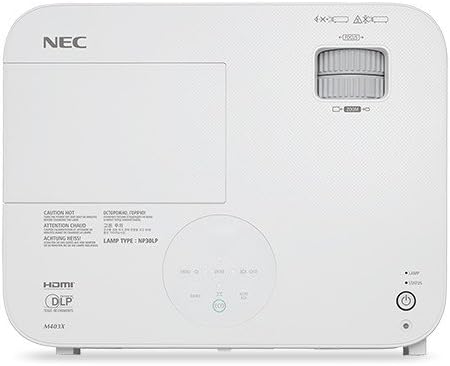
Billede: Top view of the NEC NP-M403H projector, showing the lens, control panel, and ventilation. This image illustrates the overall design and key external features from a top-down perspective.
Opsætning
Follow these steps for initial setup of your NEC NP-M403H projector.
- Udpakning: Carefully remove the projector and all accessories from the packaging. Ensure all components are present.
- Placering: Position the projector on a stable, flat surface or mount it to the ceiling. Ensure adequate ventilation around the unit. The compact and lightweight design allows for flexible placement.
- Strømtilslutning: Connect the power cord to the projector and then to a suitable electrical outlet.
- Tilslutning af inputkilder:
The projector supports various connectivity options. Use appropriate cables to connect your source devices (e.g., computer, media player) to the projector's input ports.
- HDMI: Til digital video og lyd i høj opløsning.
- VGA (Computer In): Til analoge computersignaler.
- USB: For certain data or control functions.
- Lydindgang: Til analog lydindgang.

Billede: Bagside view of the NEC NP-M403H projector, displaying the array of input and output ports including HDMI, VGA, USB, and audio connections. This image helps users identify where to connect their source devices.
- Første gang tændt: Tryk på tænd/sluk-knappen på projektoren eller fjernbetjeningen. Projektoren vil starte sin opstartssekvens.
Betjeningsvejledning
This section details the basic operation of your projector.
Tænd/sluk
- Tænd: Press the power button. The projector features a quick startup function.
- Sluk: Press the power button again. The projector supports direct power off, allowing for quick shutdown.
Billedjustering
- Fokus: Rotate the focus ring on the lens to achieve a clear image.
- Zoom: Juster zoomringen på objektivet for at ændre billedstørrelsen.
- Keystone-korrektion: Brug projektorens menu eller dedikerede knapper til at korrigere trapezformet forvrængning, hvis projektoren ikke er helt vinkelret på skærmen.

Billede: Forside view of the NEC NP-M403H projector, highlighting the lens assembly and front ventilation. This image assists users in locating the lens for focus and zoom adjustments.
Valg af inputkilde
The projector can automatically detect input signals (Autosense™). You can also manually select the input source using the "Input" button on the projector or remote control.
ECO-tilstand
At udvide lamp life and reduce power consumption, activate ECO Mode. This feature contributes to energy savings and environmental protection. The projector offers a lamp life of up to 8,000 hours in ECO Mode.
Opretholdelse
Regelmæssig vedligeholdelse sikrer optimal ydeevne og forlænger projektorens levetid.
- Lamp Udskiftning: Projektoren lamp has a life of up to 8,000 hours in ECO Mode. When the lamp reaches the end of its life, a warning indicator will appear. Refer to the full service manual for detailed lamp udskiftningsvejledning.
- Rengøring/udskiftning af filter: The projector is equipped with an air filter to prevent dust accumulation. Regularly clean the filter to maintain proper airflow and cooling. Replace the filter as needed; the projector features an extended filter life.
- Rengøring af linser: Rengør forsigtigt projektorlinsen med en blød, fnugfri klud, der er specielt designet til optiske overflader. Brug ikke slibende rengøringsmidler.
- Udvendig rengøring: Wipe the projector's exterior with a soft, dry cloth. Avoid using harsh chemicals.
Fejlfinding
This section addresses common issues you might encounter with your NEC NP-M403H projector.
| Problem | Mulig årsag | Løsning |
|---|---|---|
| Intet billede vises |
|
|
| Billedet er sløret |
|
|
| Billedet er trapezformet |
|
|
| Projektoren overopheder eller slukker |
|
|
Specifikationer
Key technical specifications for the NEC NP-M403H projector:
- Model: NP-M403H
- Mærke: NEC
- Displayteknologi: DLP
- Lysstyrke: 4000 lumen
- Native opløsning: 1920 x 1080 (1080p)
- Maksimal skærmopløsning: 1920 x 1080
- Kontrastforhold: Op til 10,000:1
- Lamp Liv: Up to 8,000 hours (ECO Mode)
- Forbindelse: HDMI, USB, VGA
- Dimensioner (B x H x D): 14.5 x 4.3 x 11.5 tommer
- Vægt: 9.8 pund
- Særlige funktioner: Lightweight, Portable, ECO Mode, Autosense™
Garanti og support
For detailed warranty information, please refer to the warranty card included with your product or visit the official NEC website. Technical support contact details are typically provided in the product packaging or on the manufacturer's support pages.


