Produkt overview
The iCarsoft FT II is a professional and powerful vehicle fault diagnosis tool designed for Fiat and Alfa Romeo vehicles. It features a 4-inch TFT LCD display and unique diagnostic software, enabling full ECU diagnosis across various systems such as engine, transmission, ABS, and SRS. The tool supports multiple test modes including CAN Bus, ISO9141, KWP2000, and J1850, allowing technicians to accurately diagnose complex automotive issues.
Nøglefunktioner omfatter:
- Reading and clearing Diagnostic Trouble Codes (DTCs) across all major systems.
- Live data stream display.
- Oil light/service reset.
- Electronic Parking Brake (EPB) system maintenance.
- Steering Angle Sensor (SAS) calibration.
- Diesel Particulate Filter (DPF) regeneration control system.
- Electronic Throttle Control (ETC) system reset.
- Comprehensive OBD II functions for all OBD II/EOBD compliant vehicles, including I/M Readiness, Freeze Frame, O2 Sensor Test, and turning off the Check Engine Light (MIL).

Figure 1: iCarsoft FT II Diagnostic Tool in use.
Pakkens indhold
Når du åbner pakken, skal du kontrollere, at alle komponenter er til stede:
- iCarsoft FT II Main Unit
- Nylon bæretaske
- TF kortlæser
- Data Cable (for vehicle connection)
- USB-kabel (til pc-forbindelse)
- TF Card (pre-installed in the main unit)
- Hardcopy User's Manual
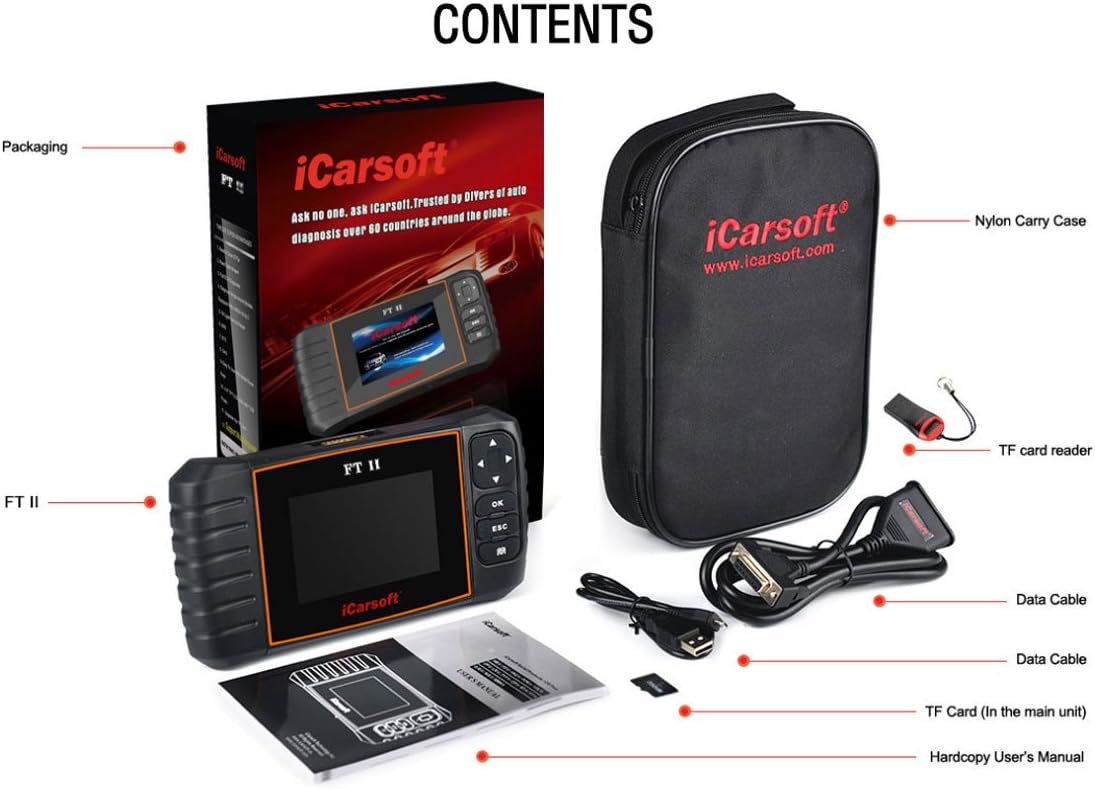
Figure 2: Included items in the iCarsoft FT II package.
Enhedslayout og kontroller
The iCarsoft FT II features a user-friendly design with clearly labeled ports and buttons for intuitive operation.

Figure 3: iCarsoft FT II Device Layout.
- OBD-port: Connects the iCarsoft FT II to the vehicle's Data Link Connector (DLC) via the diagnostic cable.
- Op/ned-knapper (▲/▼): Used to move the cursor up and down for selection within menus.
- Left/Right Buttons (◄/►): Used to move the cursor right or left for selection, or to turn pages up and down when more than one page is displayed.
- OK knap: Bekræfter et valg eller en handling fra en menuliste.
- ESC knap: Exits the current program or returns to the previous screen.
- DTC Button (Book Icon): Used to retrieve DTCs from the database.
- LCD-skærm: Indicates test results and menu options.
- USB-port: Connects to a PC for uploading data or printing test results.
- TF-kortslot: Insert the TF card here to update your tool's software.
Opsætning og førstegangsbrug
Follow these steps to set up and begin using your iCarsoft FT II diagnostic tool:
- Tænd: The device typically powers on automatically when connected to the vehicle's OBD-II port. Ensure the vehicle's ignition is in the ON position (engine off or running, depending on the test).
- Tilslut til køretøj: Locate the vehicle's OBD-II Data Link Connector (DLC), usually found under the dashboard on the driver's side. Connect the diagnostic cable from the FT II tool to the vehicle's DLC.
- Systeminitialisering: The tool will automatically establish communication with the vehicle's systems. This may take a few moments.
- Vælg køretøjsmodel: From the main menu, use the Up/Down buttons to navigate and the OK button to select your specific Fiat or Alfa Romeo model.
- Choose Diagnostic Function: Select the desired diagnostic function (e.g., "Diagnose," "Special Functions," "OBDII").
Betjeningsvejledning
Full ECU Diagnosis
This function allows for comprehensive scanning of all available electronic control units (ECUs) in the vehicle.
- From the main menu, select "Diagnose" or "Full System Diagnosis."
- The tool will automatically scan for all detectable systems (e.g., Engine, ABS, SRS, Transmission).
- Once the scan is complete, you can select a specific system to view its DTCs or live data.
Reading and Clearing DTCs
To read and clear trouble codes:
- Navigate to the desired system (e.g., Engine).
- Select "Read Codes" to display current, pending, and historic DTCs.
- To clear codes, select "Clear Codes." Confirm the action when prompted. Note: Clearing codes does not fix the underlying issue. Address the problem before clearing codes to prevent recurrence.
Live-datastrøm
View real-time sensor data and parameters:
- From a selected system, choose "Live Data."
- The tool will display various parameters. You can often select specific parameters to view graphically or in list format.
Særlige funktioner
The FT II supports several maintenance and service functions:
- Nulstilling af olielampe/service: Nulstiller tjenesten lamp after an oil change or scheduled maintenance.
- Electronic Parking Brake (EPB) System Maintenance: Deactivates and reactivates the EPB system for brake pad replacement or initialization.
- Kalibrering af styrevinkelsensor (SAS): Calibrates the steering wheel to straight ahead, or recalibrates SAS after steering part replacement.
- Diesel Particulate Filter (DPF) Regeneration Control System: Requests DPF regeneration process while DPF blockage and turns off the DPF indicator.
- Electronic Throttle Control System (ETC) Reset: Relearns the throttle valve control value after cleaning or replacement.
Access these functions from the "Special Functions" menu and follow the on-screen prompts.
OBD II Functions (for all OBD II/EOBD compliant vehicles)
The tool provides standard OBD II diagnostic capabilities:
- I/M parathed: Kontrollerer status for emissionsrelaterede overvågningssystemer.
- Datastrøm: Displays live data from various sensors.
- Frysestativ: Captures a snapshot of vehicle conditions at the moment a DTC was set.
- O2-sensortest: Henter testresultater fra O2-sensormonitoren.
- Turn off Check Engine Light (MIL): Clears the Malfunction Indicator Lamp after repairs.
Opretholdelse
To ensure the longevity and optimal performance of your iCarsoft FT II diagnostic tool, follow these maintenance guidelines:
- Rensning: Use a soft, dry cloth to clean the tool's exterior. Avoid using abrasive cleaners or solvents.
- Opbevaring: Store the tool in its nylon carry case when not in use to protect it from dust, moisture, and physical damage. Keep it in a cool, dry environment.
- Kabelpleje: Handle the diagnostic and USB cables carefully. Avoid sharp bends or kinks that could damage the internal wiring.
- Softwareopdateringer: Regularly update the tool's software via TF card or PC to ensure compatibility with the latest vehicle models and to access new features and bug fixes.

Figur 4: Forside view of the iCarsoft FT II tool.
Fejlfinding
If you encounter issues while using the iCarsoft FT II, consider the following common problems and solutions:
- Værktøjet tænder ikke:
- Ensure the diagnostic cable is securely connected to both the FT II tool and the vehicle's OBD-II port.
- Kontroller, at køretøjets tænding er i ON-positionen.
- Check the vehicle's fuse for the OBD-II port (consult your vehicle's owner's manual).
- Kommunikationsfejl med køretøj:
- Confirm the vehicle's ignition is ON.
- Ensure the diagnostic cable is not damaged and is properly connected.
- Verify that the vehicle model selected on the tool matches the vehicle you are working on.
- Some vehicles may require the engine to be running for certain diagnostic functions.
- Tool Does Not Support Specific Vehicle Year/Model:
- The iCarsoft FT II is designed for Fiat and Alfa Romeo vehicles. However, specific model year coverage may vary. For example, some users have reported that the tool's coverage for Fiat Abarth models may extend only up to certain years (e.g., 2014) and not newer models (e.g., 2015).
- Ensure your tool's software is up to date. Software updates often include expanded vehicle compatibility.
- Refer to the official iCarsoft website or contact their support for the most current compatibility list.
- Opdateringsproblemer:
- If you experience difficulties with software updates via TF card or PC, ensure you are following the update instructions precisely.
- Verify that your internet connection is stable if updating via PC.
- Sørg for, at TF-kortet er isat korrekt og ikke er beskadiget.
- If issues persist, contact iCarsoft technical support.
Specifikationer
Detailed technical specifications for the iCarsoft FT II diagnostic tool:

Figure 5: iCarsoft FT II Dimensions and Specifications.
| Feature | Detalje |
|---|---|
| Vise | 4.0" TFT LCD, with 480 * 320 Pixels |
| Driftstemperatur | 0°C – 50°C (32°F – 122°F) |
| Opbevaringstemperatur | -20 ° C - 70 ° C (-4 ° F - 158 ° F) |
| Strømindgang | 9V – 18V |
| Driftsstrøm | 150mA@12V (Typisk) |
| Strømforbrug | 1.8W (typisk) |
| Dimensioner (L x B x H) | 205 mm x 110 mm x 31 mm (8.07 x 4.33 x 1.22 tommer) |
| Vægt | 350 g (0.77 lbs) |
| Varens vægt (forsendelse) | Cirka 2.6 pund |
| Varemodelnummer | FT II |
| UPC | 616245679767 |
Garanti og support
Garantioplysninger
The iCarsoft FT II diagnostic tool comes with a et års garanti fra købsdatoen. Denne garanti dækker fabrikationsfejl og funktionsfejl ved normal brug. Gem venligst din købsbevis til garantikrav.
Softwareopdateringer
iCarsoft provides lifetime free updates for the FT II tool. Updates can be performed via TF card or by connecting the device to a PC. Regular updates ensure your tool has the latest vehicle coverage and diagnostic capabilities.
Multi-sprog support
The iCarsoft FT II supports multiple languages, enhancing usability for a global audience.
Teknisk support
For technical assistance, troubleshooting, or inquiries regarding product functionality and updates, please visit the official iCarsoft website or contact their customer support directly. Refer to the hardcopy user's manual for specific contact details or support resources.


