1. Introduktion
The Imperial DABMAN i400 is a versatile audio adapter designed to enhance your existing stereo system with modern radio and streaming capabilities. It provides access to thousands of internet radio stations, digital radio (DAB+), and traditional FM radio. Additionally, it supports audio streaming via Bluetooth, UPnP/DLNA, and USB, offering a comprehensive listening experience.
2. Sikkerhedsinstruktioner
- Strømforsyning: Brug kun den medfølgende strømadapter. Sørg for, at lydstyrkentage matcher din lokale strømforsyning.
- Vand og fugt: Udsæt ikke enheden for regn, fugt eller dryppende/sprøjtende væsker. Placer ikke genstande fyldt med væsker, såsom vaser, på enheden.
- Ventilation: Sørg for tilstrækkelig ventilation. Bloker ikke ventilationsåbningerne. Undgå at placere enheden på bløde overflader, der kan blokere luftstrømmen.
- Varmekilder: Hold enheden væk fra varmekilder såsom radiatorer, varmeapparater, komfurer eller andre varmeproducerende apparater.
- Rensning: Afbryd strømmen før rengøring. Brug en blød, tør klud. Brug ikke flydende rengøringsmidler eller aerosolrengøringsmidler.
- Service: Forsøg ikke selv at servicere dette produkt. Overlad al service til kvalificeret servicepersonale.
3. Pakkens indhold
Kontroller venligst, at alle varer er til stede i pakken:
- Imperial DABMAN i400 Internet Digital Radio
- Strømadapter
- Telescopic Antenna with F-connector
- Wire Antenna with F-connector
- RCA-kabel
- Lydkabel (3.5 mm jack)
- Fjernbetjening
- Brugervejledning (dette dokument)

Image: Imperial DABMAN i400 with its power adapter, telescopic antenna, wire antenna, RCA cable, 3.5mm audio cable, and remote control.
4. Produktet er slutview
Front View

Image: The front of the Imperial DABMAN i400, showing its display and control buttons on the top edge.
The front of the DABMAN i400 features a clear 3.2-inch LCD display for navigation and information. Control buttons are located on the top edge of the device for easy access to functions like power, mode selection, volume, and station presets.
Bag View og forbindelser
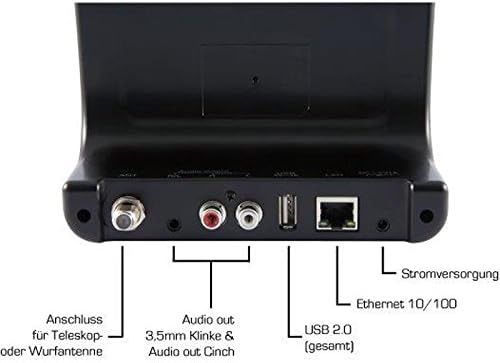
Image: The rear panel of the Imperial DABMAN i400, detailing its various connection ports. From left to right: Antenna connection (ANT), Audio output (RCA L/R and 3.5mm jack), USB 2.0 ports, Ethernet 10/100 (LAN), and Power supply (DC 5V/1A).
- MYRE: F-connector for connecting the telescopic or wire antenna for DAB+/FM reception.
- Audio Output (R/L): RCA (Cinch) stereo audio output for connecting to an amplifier eller stereoanlæg.
- Lydudgang (3.5 mm jackstik): 3.5mm stereo audio output for connecting to other audio devices.
- USB 2.0: USB port for playing media from a USB storage device.
- LAN: Ethernet port (RJ45) for wired network connection.
- DC 5V/1A: Strømindgang til den medfølgende strømadapter.
5. Opsætning
- Tilslut antenne: Screw the telescopic antenna or connect the wire antenna to the MYRE F-connector on the rear panel. Extend the telescopic antenna for optimal reception.
- Tilslut til lydsystem: Use the provided RCA cable to connect the Audio Output (R/L) on the DABMAN i400 to an available audio input (e.g., AUX, CD, LINE IN) on your amplifier or stereo system. Alternatively, use the 3.5mm audio cable if your system has a compatible input.
- Netværks forbindelse:
- Kablet (LAN): Tilslut et Ethernet-kabel fra din router til LAN port on the rear of the DABMAN i400.
- Wireless (WLAN): The device will prompt you to set up Wi-Fi during the initial startup wizard. Select your network and enter the password.
- Tilslut strøm: Sæt strømadapteren i DC 5V/1A input on the rear panel, then plug the adapter into a wall outlet. The device will power on automatically or enter standby mode.
- Initial Setup Wizard: Upon first power-on, the device will guide you through an initial setup process, including language selection, time/date settings, and network configuration. Follow the on-screen instructions.
6. Betjeningsvejledning
Grundlæggende navigation
Use the control buttons on the top of the device or the remote control to navigate menus, select options, adjust volume, and change modes.
Valg af tilstand
Press the 'Mode' button (or equivalent on remote) to switch between available modes:
- Internet radio: Access thousands of online radio stations worldwide. Browse by genre, location, or search for specific stations.
- DAB+ digitalradio: Enjoy high-quality digital radio broadcasts. The device will scan for available stations in your area.
- FM-radio: Tune into traditional analog FM radio stations.
- Bluetooth: Stream audio wirelessly from your Bluetooth-enabled smartphone, tablet, or computer.

Image: Bluetooth connectivity icon.
To pair: Select Bluetooth mode on the DABMAN i400. On your external device, search for available Bluetooth devices and select 'DABMAN i400'.
- UPnP/DLNA: Stream musik files from compatible devices on your local network (e.g., a network-attached storage (NAS) drive or a computer running a media server).

Image: UPnP (Universal Plug & Play) icon.
- USB-afspilning: Afspil lyd files (e.g., MP3) from a USB flash drive connected to the USB port on the rear of the device.

Image: MP3 music file ikon.
Forudindstillinger
Save your favorite stations as presets for quick access. Refer to the on-screen menu for instructions on how to save and recall presets.
Air Music Control App
Control your DABMAN i400 using the Air Music Control App available for smartphones and tablets. This app allows for convenient remote control and browsing of stations.

Image: Air Music Control App icon.
7. Vedligeholdelse
- Rensning: Tør enheden af med en blød, tør og fnugfri klud. Brug ikke slibende rengøringsmidler, voks eller opløsningsmidler.
- Softwareopdateringer: Periodically check for available software updates through the device's system settings menu to ensure optimal performance and access to new features.
- Opbevaring: Hvis enheden opbevares i længere tid, skal den afbrydes fra strømmen og opbevares et køligt og tørt sted.
8. Fejlfinding
- Ingen strøm:
- Sørg for, at strømadapteren er korrekt tilsluttet enheden og en fungerende stikkontakt.
- Prøv en anden stikkontakt.
- Ingen lyd:
- Check the volume level on both the DABMAN i400 and your connected audio system.
- Ensure the audio cables are correctly connected to the appropriate input on your audio system.
- Kontroller, at dit lydsystem er indstillet til den korrekte inputkilde.
- Kan ikke oprette forbindelse til Wi-Fi/internet:
- Sørg for, at din Wi-Fi-router er tændt og fungerer korrekt.
- Dobbelttjek Wi-Fi-adgangskoden.
- Try moving the device closer to your Wi-Fi router or use a wired LAN connection.
- Restart your router and the DABMAN i400.
- Poor DAB+/FM Reception:
- Ensure the antenna is fully extended and positioned for optimal reception.
- Try repositioning the device or antenna.
- Check if you are in an area with good DAB+ or FM coverage.
- Problemer med Bluetooth-parring:
- Ensure the DABMAN i400 is in Bluetooth pairing mode.
- Make sure your external device's Bluetooth is enabled and discoverable.
- Move your external device closer to the DABMAN i400.
- Prøv at ophæve parringen og parre enhederne igen.
9. Specifikationer
| Feature | Specifikation |
|---|---|
| Mærke | Kejserlig |
| Modelnummer | 22-241-00 |
| Farve | Sort |
| Skærmstørrelse | 3.2 tommer |
| Forbindelsesteknologi | Bluetooth, LAN (Ethernet), WLAN (Wi-Fi), RCA (Cinch) L/R, 3.5mm Audio Jack |
| Særlige funktioner | Portable (as an adapter), Internet Radio, DAB+, FM, UPnP/DLNA |
| Samlet USB-porte | 1 |
| Kompatible enheder | Bluetooth devices, UPnP/DLNA compatible devices |
| Strømkilde | AC (via strømadapter) |
| Understøttede radiobånd | FM, DAB, DAB+, internetradio |
| Produktdimensioner | 15L x 8.1W x 14H centimeter |
| Inkluderede komponenter | Power Adapter, Telescopic Antenna, Wire Antenna, RCA Cable, Audio Cable, Remote Control, User Manual |
| Understøttede sprog | German, English, French, Dutch |
10. Garanti og support
Producentens garanti
The Imperial DABMAN i400 comes with a manufacturer's warranty. Please refer to the warranty card included in your package or the manufacturer's official website for specific terms and conditions. Spare parts availability is guaranteed for 1 year.
Kundesupport
For technical assistance, troubleshooting beyond this manual, or warranty claims, please contact Imperial customer support. Contact information can typically be found on the manufacturer's webwebsted eller i produktemballagen.


