1. Introduktion
This manual provides essential information for the safe and effective installation, operation, and maintenance of the Schneider Electric Telemecanique ZBE-101 Normally Open (N.O.) Contact Block. Please read this manual thoroughly before attempting any installation or operation.
The ZBE-101 is a normally open contact block designed for use with push buttons in industrial control applications. It provides a momentary electrical contact closure when activated.
2. Sikkerhedsoplysninger
ADVARSEL: Electrical shock hazard. Installation and maintenance should only be performed by qualified personnel. Disconnect all power before working on electrical equipment.
- Følg altid lokale og nationale elektriske forskrifter.
- Sørg for korrekt jordforbindelse, hvor det er nødvendigt.
- Do not exceed the specified electrical ratings of the contact block.
- Inspect the contact block for damage before installation.
3. Installation
The ZBE-101 contact block is designed for panel mounting and typically attaches to a compatible push button actuator.
3.1 Mounting the Contact Block
- Ensure the power supply to the control panel is disconnected.
- Align the contact block with the mounting mechanism of the push button actuator.
- Securely attach the contact block to the actuator. Refer to the push button's specific instructions for proper attachment.
- Verify that the contact block is firmly seated and does not wobble.
3.2 Wiring the Contact Block
The ZBE-101 features screw terminals for electrical connections. It is a Normally Open (N.O.) contact, meaning the circuit is open (no current flow) in its resting state and closes when the push button is pressed.
- Identify the "NO" (Normally Open) terminals, typically labeled 3 and 4.
- Strip approximately 7-9mm of insulation from the ends of the connecting wires.
- Insert one wire into terminal 3 and the other into terminal 4.
- Tighten the screw terminals securely to ensure good electrical contact and prevent loose connections. Do not overtighten.
- Dobbelttjek alle ledninger for korrekthed og sikkerhed, før du genopretter strømmen.
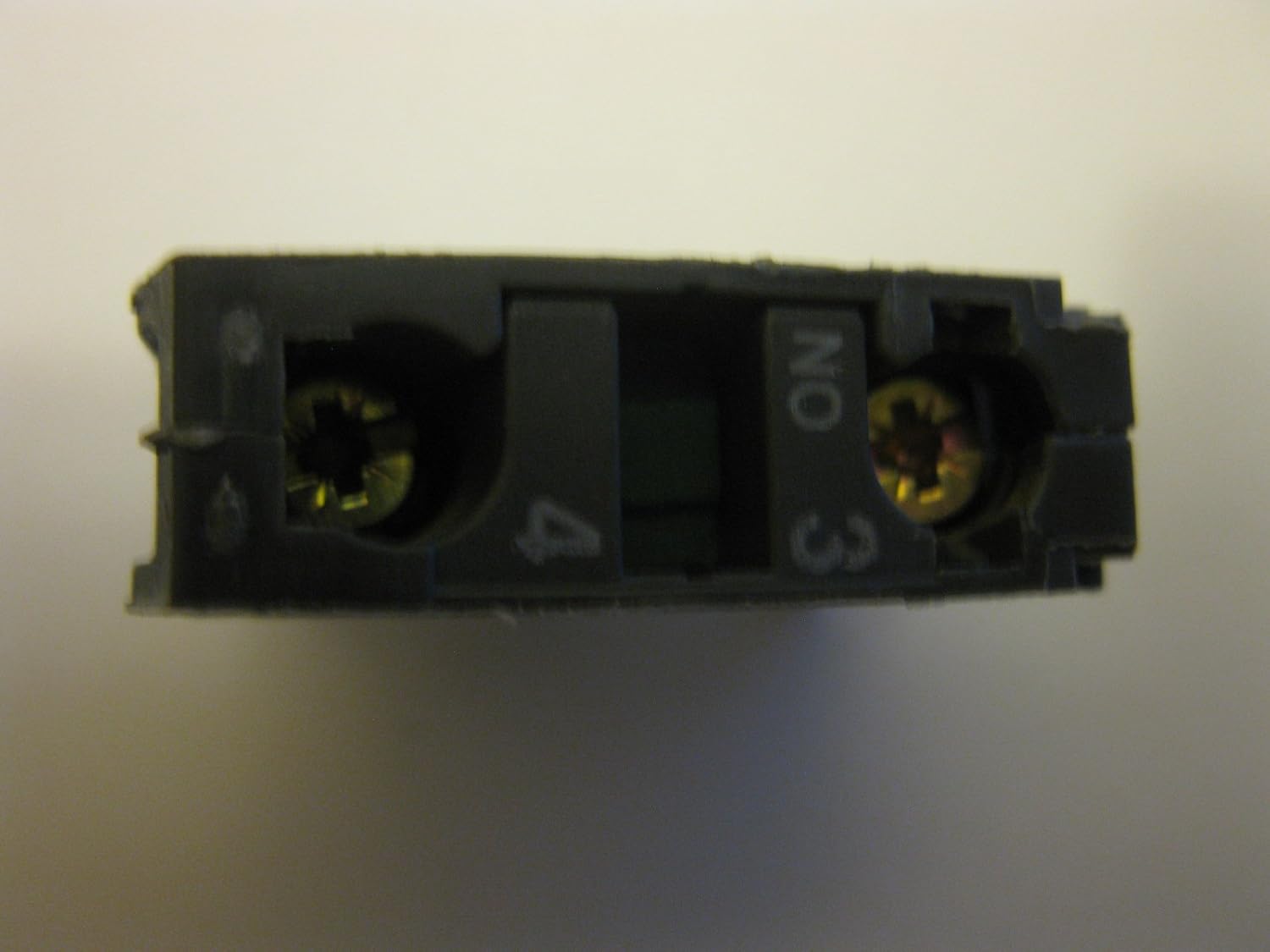
Figur 1: Nederst view of the ZBE-101 contact block, illustrating the screw terminals labeled 'NO', '3', and '4' for electrical connections.
4. Betjening
The ZBE-101 is a momentary Normally Open contact block. Its operation is directly linked to the push button actuator it is paired with.
- Resting State: When the push button is not pressed, the contact block is in its Normally Open (N.O.) state. The electrical circuit connected to terminals 3 and 4 is open, and no current flows.
- Activated State: When the push button is pressed, the internal mechanism of the contact block closes the circuit between terminals 3 and 4. This allows current to flow, activating the connected device or circuit.
- Frigøre: Upon release of the push button, the contact block returns to its Normally Open (N.O.) resting state, breaking the circuit.

Figur 2: Øverst view of the ZBE-101 contact block, showing the green plunger which is depressed by the push button actuator to close the circuit.
5. Vedligeholdelse
The ZBE-101 contact block is designed for long-term reliability with minimal maintenance. However, periodic inspection is recommended to ensure optimal performance and safety.
- Visuel inspektion: Regularly check the contact block for any signs of physical damage, such as cracks, discoloration, or loose parts.
- Forbindelsesintegritet: Verify that all wire connections to the screw terminals remain tight and secure. Loose connections can lead to overheating or intermittent operation.
- Renhed: Keep the contact block free from dust, dirt, and moisture. Use a dry, lint-free cloth for cleaning. Do not use solvents or abrasive cleaners.
- Miljøforhold: Sørg for, at driftsmiljøet forbliver inden for de angivne temperatur- og fugtighedsområder for at forhindre for tidlig slitage eller svigt.

Figur 3: Side view of a single ZBE-101 contact block, highlighting its compact form factor suitable for industrial control panels.
6. Fejlfinding
If the ZBE-101 contact block is not functioning as expected, perform the following basic checks:
| Problem | Mulig årsag | Løsning |
|---|---|---|
| Contact block does not activate (circuit remains open when button pressed). |
|
|
| Contact block remains activated (circuit stays closed when button released). |
|
|
| Intermitterende operation. |
|
|
If problems persist after performing these checks, contact qualified technical support.
7. Specifikationer
The following are the technical specifications for the Schneider Electric Telemecanique ZBE-101 Contact Block:
- Modelnummer: ZBE-101
- Mærke: Schneider Electric (Telemecanique)
- Driftstilstand: Manuel
- Kontakttype: Normalt åben (NEJ)
- Aktuatortype: Stempel
- Monteringstype: Panelmontering
- Connector Type: Skrue
- Terminal type: Skrue
- Kredittype: Parallel
- Kontaktmateriale: Metal
- International Protection Rating (IP): IP00
- Rated Thermal Current (Ith): 10A (as per image text)
- Rated Operational Current (A600-Q600): As per image text, indicating suitability for AC and DC control circuits.
- Dimensioner (omtrentlige): 4.25 x 2.28 x 1.73 inches (Package Dimensions, actual unit is smaller)
- Vægt (omtrentlig): 0.01 ounces (per unit, very light)

Figure 4: A set of ZBE-101 contact blocks, displaying the model number, N.O. designation, and electrical ratings printed on the casing.
8. Garantioplysninger
Specific warranty details for the Schneider Electric Telemecanique ZBE-101 Contact Block are typically provided at the point of purchase or can be obtained directly from Schneider Electric's official website or authorized distributors. Please retain your proof of purchase for any warranty claims.
9. Teknisk support
For technical assistance, product inquiries, or further support regarding the ZBE-101 contact block, please refer to the official Schneider Electric webwebstedet eller kontakt deres kundeserviceafdeling. Kontaktoplysninger kan normalt findes på producentens webwebsted eller produktemballage.
Du kan besøge Schneider Electric-butikken på Amazon for more information on their product range.


