1. Produktet er slutview
The Simrad S2009 Fishfinder is a dedicated marine electronics device designed for precise fish detection. It integrates a Broadband Sounder module and CHIRP technology to provide detailed underwater imaging. The unit features a 9-inch portrait display for enhanced vertical detail and is operated via a user-friendly keypad.
Nøglefunktioner omfatter:
- Integrated Broadband Sounder module and CHIRP technology for advanced fish detection.
- Deep penetration and swift ping speed for efficient underwater scanning.
- Vertical heave compensation for stable and accurate readings in varying sea conditions.
- 9-inch 480x800-pixel portrait LCD for clear viewing.
- High-brightness display suitable for outdoor use, even in direct sunlight.
- Enhanced visibility features: White Line, White Marker, and Color Erase.
- User-friendly operation with 8 direct-access menu keys.
- Versatile mounting options: bracket and flush mount (bracket included).
- Full-sized SD card slot for data logging and software updates.
- Connectivity options: Ethernet, NMEA0183, and NMEA2000.

2. Opsætning og installation
2.1 Monteringsmuligheder
The Simrad S2009 offers two primary mounting methods:
- Beslagmontering: The included bracket allows for adjustable tilt and swivel, providing flexibility in viewing angles. This is suitable for surface mounting on a dashboard or overhead console.
- Flush Mount: For a more integrated and streamlined appearance, the unit can be flush-mounted into a panel. Refer to the detailed installation guide for template and cutting instructions.
2.2 Strømtilslutning
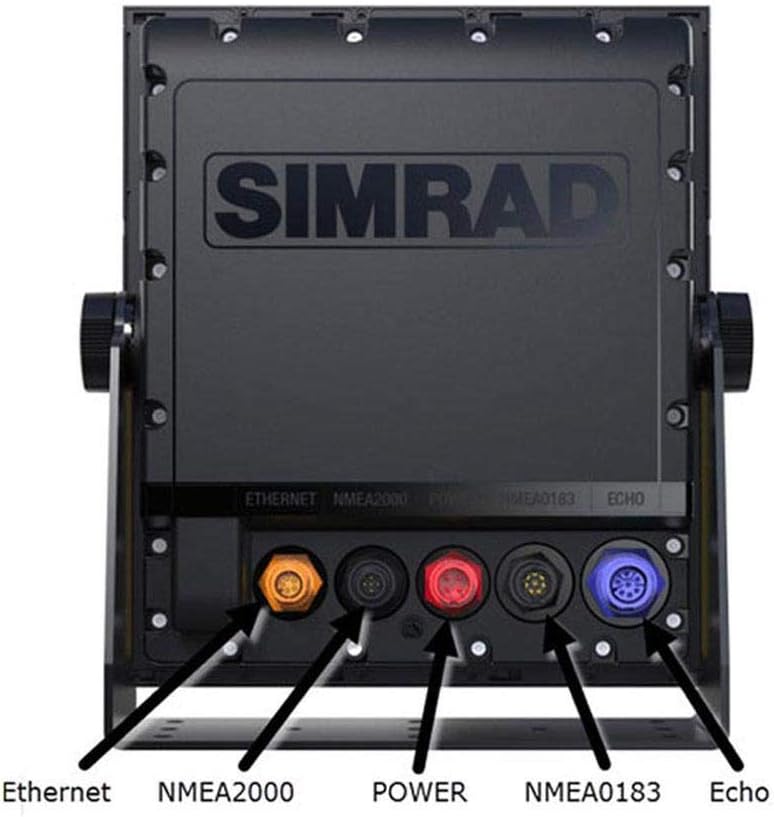
The unit requires a direct DC power source. Ensure the power supply meets the specifications outlined in the 'Specifications' section of this manual. Connect the power cable securely to the designated power port on the rear of the unit.
2.3 Transducer Connection
Connect your compatible Broadband Sounder or CHIRP transducer to the ECHO port on the rear of the S2009. Ensure the connection is tight and waterproof.
2.4 Netværksforbindelser
The S2009 supports various network connections for integration with other marine electronics:
- Ethernet: Use the Ethernet port to connect to other Simrad devices or a network switch for sharing sonar data.
- NMEA2000: Connect to an NMEA2000 network for sharing data such as GPS position, speed, and water temperature from compatible sensors.
- NMEA0183: Utilize the NMEA0183 ports for connecting to older or specific NMEA0183 compatible devices.
3. Grundlæggende betjening
3.1 Tænd/sluk
Tryk og hold på Magt button (typically marked with a circle and vertical line symbol) located on the keypad to turn the unit on or off. A brief press may access power options or backlight settings.
3.2 Tastaturnavigation
The S2009 features 8 direct-access menu keys and a rotary dial for intuitive control. Use the arrow keys to navigate menus and adjust settings. The rotary dial can be used for fine-tuning parameters like gain or zoom, and often includes a push-to-select function.
3.3 Sonar Display Interpretation
The 9-inch portrait display is optimized for vertical detail, showing a longer history of the water column. Fish arches, bait schools, and bottom structure will appear as colored representations. The color palette indicates signal strength, with warmer colors (red, orange) typically representing stronger returns.
- White Line: A feature that helps distinguish fish or structure directly on the bottom by drawing a white line at the bottom contour.
- White Marker: Used to highlight specific returns on the screen.
- Color Erase: Allows for filtering out weaker returns to focus on stronger targets.
3.4 Adjusting Sonar Settings
Access the sonar menu to adjust settings such as:
- Forstærkning/følsomhed: Controls how sensitive the sonar is to echoes. Increase for weaker returns, decrease to reduce clutter.
- Frekvens: Select between different CHIRP frequencies or traditional broadband frequencies for optimal performance in various depths and conditions.
- Rækkevidde: Adjust the depth range displayed on the screen.
- Rullehastighed: Controls how quickly the sonar history scrolls across the screen.
3.5 SD Card Functions
The full-sized SD card slot allows for:
- Datalogning: Record sonar logs for later review eller analyse.
- Softwareopdateringer: Download the latest software from the Simrad website and load it onto the unit via the SD card.
4. Vedligeholdelse
4.1 Rengøring af enheden
Rengør regelmæssigt displayet og casing med en blød, damp cloth. Avoid abrasive cleaners or solvents that could damage the screen or plastic components. For stubborn dirt, a mild soap solution can be used, followed by rinsing with fresh water and drying.
4.2 Softwareopdateringer
Periodically check the official Simrad website for software updates. Updates often include performance enhancements, new features, and bug fixes. Follow the instructions provided with the update files for installation via the SD card slot.
4.3 Forbindelsestjek
Ensure all cable connections (power, transducer, network) are secure and free from corrosion. Inspect cables for any signs of wear or damage, especially after prolonged exposure to marine environments.
5. Fejlfinding
This section provides basic troubleshooting steps for common issues. For more complex problems, refer to the comprehensive Simrad S2009 installation and operation manuals available on the official Simrad webwebsted eller kontakt kundesupport.
5.1 Enheden tænder ikke
- Check the power cable connection at both the unit and the power source.
- Verify that the vessel's battery has sufficient charge and that the circuit breaker or fuse for the unit is not tripped or blown.
- Ensure the power button is pressed and held for the required duration.
5.2 No Sonar Image
- Confirm the transducer is correctly connected to the ECHO port on the S2009.
- Check that the transducer is properly installed and submerged in water.
- Verify that the correct transducer type is selected in the unit's sonar settings.
- Adjust the gain/sensitivity settings; it may be too low.
5.3 Poor Sonar Image Quality / Clutter
- Reduce the gain/sensitivity to minimize clutter.
- Ensure the transducer face is clean and free from marine growth or obstructions.
- Check for sources of electrical interference from other onboard electronics.
- Adjust frequency settings; a higher frequency may provide better detail in shallower water, while lower frequencies offer better deep-water penetration.
6. Specifikationer
| Feature | Detalje |
|---|---|
| Mærke | Simrad |
| Modelnavn | S2009 |
| Varenummer | 000-12185-001 |
| Skærmstørrelse | 9 tommer |
| Display Type | LCD |
| Skærmopløsning | 480x800 pixels (Portrait) |
| Sonar Technology | Broadband Sounder, CHIRP |
| Strømkilde | Direkte jævnstrøm |
| Monteringstype | Bracket Mount, Flush Mount |
| Forbindelse | Ethernet, NMEA0183, NMEA2000 |
| SD-kortplads | Full-sized (for data logging, software updates) |
| Varens vægt | 2 kilo |
| Emnedimensioner (LxBxH) | 8.82 x 2.4 x 10.24 tommer |
7. Garanti og support
7.1 Garantioplysninger
For detailed warranty information, please refer to the official Simrad website or the warranty card included with your product packaging. Warranty terms typically cover manufacturing defects for a specified period from the date of purchase.
7.2 Kundesupport
If you encounter issues not covered in this manual or require further assistance, please contact Simrad customer support. Support contact details, including phone numbers and online resources, can be found on the official Simrad website. When contacting support, please have your product model (S2009) and serial number ready.
Du kan også besøge Simrad Store on Amazon for yderligere produktinformation og ressourcer.


