Indledning
This manual provides instructions for the VINABTY NS-RC4NA-16 replacement remote control. This remote is designed to function as a direct replacement for original Insignia TV remotes, requiring no programming for compatible models. Please read this manual thoroughly to ensure proper use and maintenance of your remote control.
Opsætning
1. Batteriinstallation
Fjernbetjeningen kræver to AAA-batterier (medfølger ikke) for at fungere. Følg disse trin for at installere batterierne:
- Find batterirummet på bagsiden af fjernbetjeningen.
- Tryk ned på låsen, og skub batteridækslet af.
- Isæt to AAA-batterier, og sørg for, at de positive (+) og negative (-) poler er justeret korrekt med markeringerne inde i batterirummet.
- Skub batteridækslet tilbage på plads, indtil det klikker sikkert.

Image: Back of the remote control with the battery compartment open, illustrating correct battery insertion.
2. Førstegangsbrug
This remote control is pre-programmed and ready to use with compatible Insignia TV models. No additional programming or code entry is required. Simply install the batteries, point the remote at your television, and begin operation.
Betjeningsvejledning
The NS-RC4NA-16 remote control provides full functionality for your Insignia TV. Below is a general overview of the main buttons and their functions:
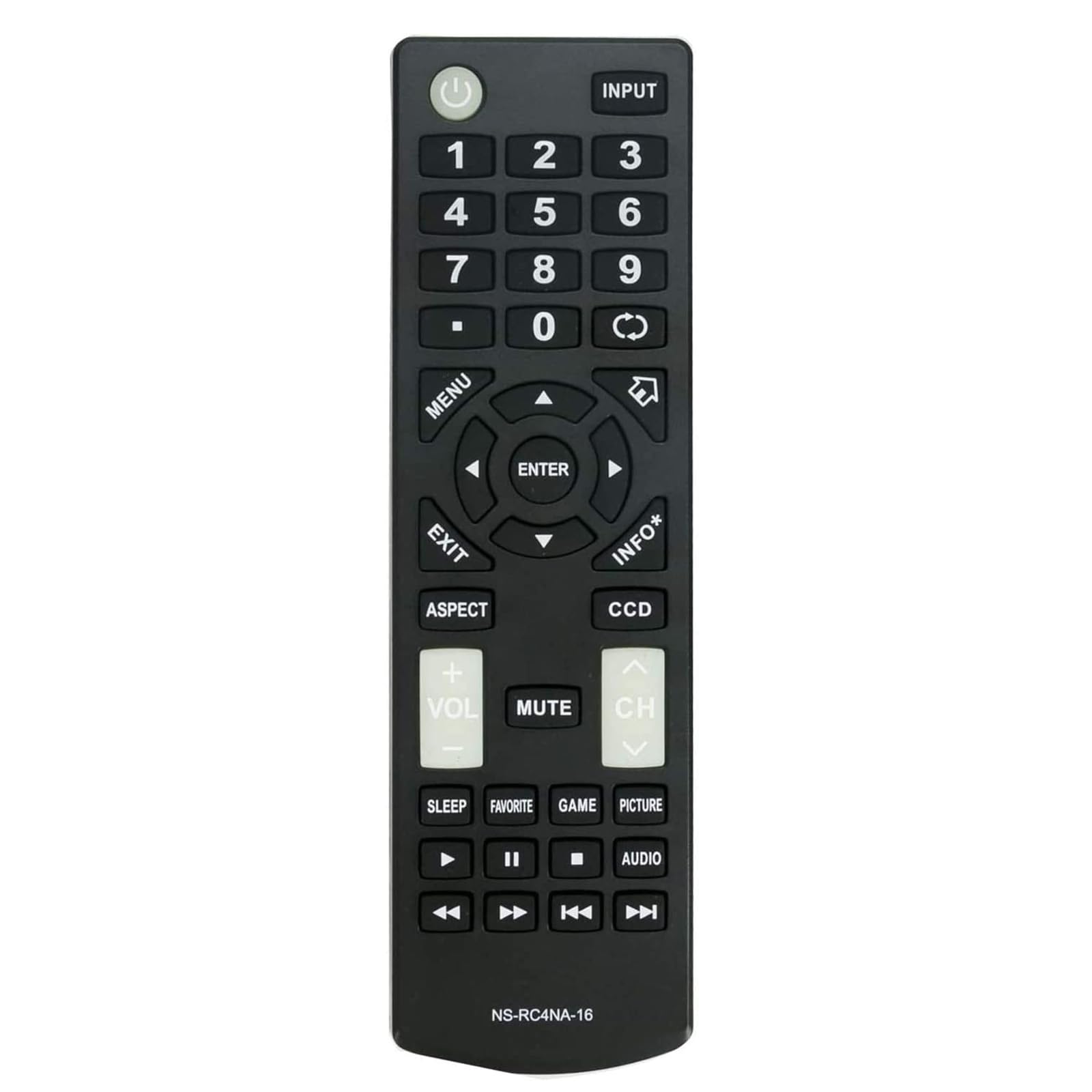
Billede: Forside view på fjernbetjeningen, hvilket fremhæver knaplayoutet.
- STRØM (⑁): Tænder eller slukker for tv'et.
- INPUT: Selects the input source (HDMI, AV, Component, etc.).
- Talknapper (0-9): Vælger kanaler direkte.
- MENU: Åbner tv'ets hovedmenu.
- Navigationstast (op, ned, venstre, højre, ENTER): Navigerer gennem menuer og bekræfter valg.
- EXIT: Afslutter den aktuelle menu eller skærmvisningen.
- INFO*: Viser oplysninger om det aktuelle program eller input.
- ASPEKT: Ændrer skærmens billedformat.
- CCD: Activates or deactivates Closed Captioning.
- VOL (+/-): Justerer lydstyrken.
- STUM: Slår lyden fra eller til på tv'et.
- CH (Op/Ned): Skifter kanal.
- SOVE: Indstiller sleeptimeren.
- FAVORIT: Giver adgang til favoritkanaler.
- SPIL: Switches to Game picture mode (if available).
- BILLEDE: Skifter mellem billedtilstande.
- LYD: Vælger lydspor eller -tilstande.
- Playback Controls (Play, Pause, Stop, Rewind, Fast Forward, Skip): Controls media playback on connected devices or TV's built-in media player.
Image: User operating the remote control with an Insignia TV.
Opretholdelse
Rengøring af fjernbetjeningen
Brug en blød, tør klud til at rengøre fjernbetjeningen. Ved genstridigt snavs, tør letampen the cloth with water or a mild cleaning solution. Do not use harsh chemicals or abrasive cleaners, as these can damage the remote's surface or internal components.
Udskiftning af batteri
Replace batteries when the remote's response becomes sluggish or stops working. Always replace both batteries at the same time with new AAA batteries. Do not mix old and new batteries, or different types of batteries, as this can lead to leakage or malfunction. Dispose of used batteries according to local regulations.
Fejlfinding
- Fjernbetjeningen svarer ikke:
- Sørg for, at batterierne er isat korrekt med den korrekte polaritet.
- Udskift gamle batterier med nye.
- Sørg for, at der ikke er nogen forhindringer mellem fjernbetjeningen og tv'ets infrarøde sensor.
- Ret fjernbetjeningen direkte mod tv'ets sensor.
- Nogle knapper virker ikke:
- This may indicate low battery power; try replacing the batteries.
- Clean the remote's surface, especially around the buttons, to remove any debris that might be obstructing them.
- Fjernbetjeningen fungerer periodisk:
- Check for strong light sources (like direct sunlight or bright fluorescent lights) that might interfere with the infrared signal.
- Ensure the remote is within the effective operating range of the TV.
Specifikationer
| Modelnummer | NS-RC4NA-16 |
| Mærke | VINABTY |
| Dimensioner | 5 x 1.9 x 0.5 tommer (12.7 x 4.8 x 1.3 cm) |
| Varens vægt | 2.08 ounce (59 gram) |
| Strømkilde | 2 x AAA batterier (medfølger ikke) |
| Kompatible tv-mærker | Insignier |
| Compatible Insignia TV Models | NS-19D220MX16, NS19D220MX16, NS-19D220NA16, NS19D220NA16, NS-24D220MX16, NS24D220MX16, NS-24D220NA16, NS24D220NA16, NS24D420NA16, NS-24D420NA16, NS28D220NA16, NS-28D220NA16, NS32D220NA16, NS-32D220NA16, NS32D420NA16, NS-32D420NA16, NS-32D421NA16, NS-32DD220NA16C, NS39D220NA16, NS-39D220NA16, NS40D420MX16, NS-40D420MX16, NS40D420NA16, NS-40D420NA16, NS43D420NA16, NS-43D420NA16, NS48D420NA16, NS-48D420NA16, NS50D420MX16, NS-50D420MX16, NS50D420NA16, NS-50D420NA16, NS50D421NA16, NS-50D421NA16, NS55D420NA16, NS-55D420NA16, NS55D421NA16 |

Image: Remote control with a list of compatible Insignia TV models.
Garantioplysninger
This VINABTY remote control is typically covered by a standard manufacturer's warranty against defects in materials and workmanship. Please refer to the product packaging or contact your retailer for specific warranty terms and duration. Keep your purchase receipt as proof of purchase for any warranty claims.
Støtte
For further assistance or inquiries regarding your VINABTY NS-RC4NA-16 remote control, please contact your retailer or the manufacturer's customer support. Contact information can usually be found on the product packaging or the manufacturer's official webwebsted.


