1. Introduktion
This manual provides essential information for the safe and effective use of your Neoteck USB Rechargeable Digital Multimeter, Model TL162-US. Please read this manual thoroughly before operation and retain it for future reference. This device is designed for measuring AC/DC voltage, AC/DC strøm, modstand, kapacitans, frekvens, diode, kontinuitet og berøringsfri voltage (NCV).
2. Sikkerhedsoplysninger
Always adhere to basic safety precautions when using this multimeter to reduce the risk of fire, electric shock, or personal injury. Incorrect use can lead to electric shock or damage to the meter.
- Overskrid ikke de maksimale inputværdier, der er angivet for hvert måleområde.
- Ensure test leads are properly connected and in good condition before use.
- Do not use the meter if it appears damaged or if the protective casing er fjernet.
- Udvis ekstrem forsigtighed, når du arbejder med voltages above 36V DC or 25V AC RMS, as these can pose a shock hazard.
- Afbryd altid strømmen til det kredsløb, der skal testes, før du måler modstand, kapacitans eller kontinuitet.
- Hold hænder og fingre bag probebarriererne under målingerne.
- Replace the battery only with the specified type and ensure correct polarity.
3. Produktet er slutview
3.1 Nøglefunktioner
- 6000 tællinger digitalt display
- 4.8-inch Large LCD Screen with Backlight
- Auto-Ranging Functionality
- USB Rechargeable (Built-in 200mA Lithium Battery)
- Non-Contact Voltage (NCV) Detektion
- Live Wire Check
- Mål AC/DC Voltage, AC/DC Current, Resistance, Capacitance, Frequency, Diode, Continuity
- Integreret lommelygte
- Data Hold-funktion
- Real-time Temperature Display
3.2 Identifikation af dele
Refer to the diagram below for identification of the multimeter's components.
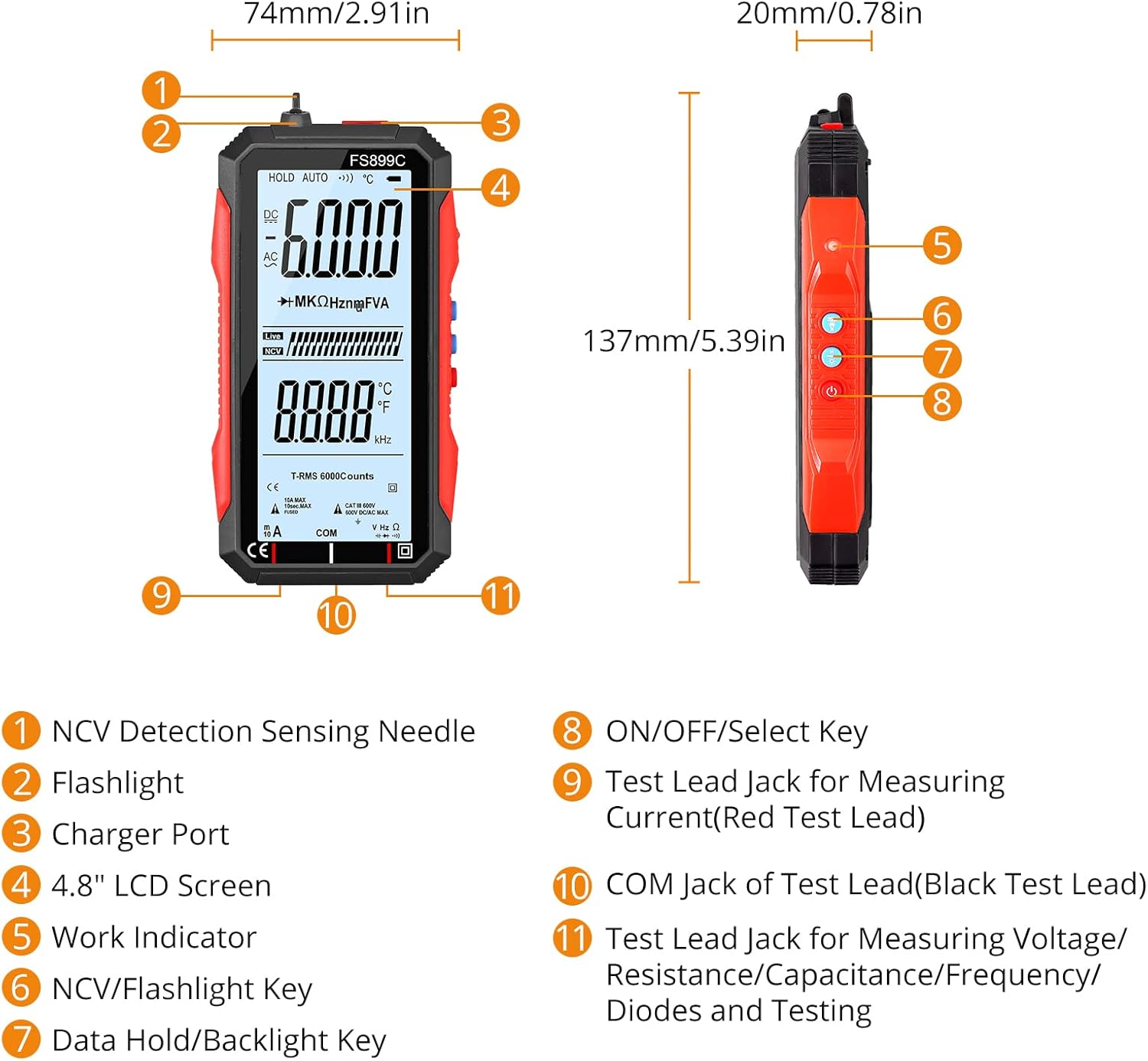
Image: Labeled diagram of the Neoteck FS899C Digital Multimeter, highlighting features such as NCV detection needle, flashlight, charger port, 4.8" LCD screen, work indicator, NCV/flashlight key, data hold/backlight key, ON/OFF/Select key, and test lead jacks for current, COM, and other measurements.
- NCV Detection Sensing Needle
- Lommelygte
- Oplader port
- 4.8" LCD-skærm
- Arbejdsindikator
- NCV/Flashlight Key
- Datahold/baggrundsbelysningsknap
- TIL/FRA/Vælg-tast
- Test Lead Jack for Measuring Current (Red Test Lead)
- COM Jack of Test Lead (Black Test Lead)
- Test Lead Jack for Measuring Voltage/Resistance/Capacitance/Frequency/Diodes and Testing
4. Opsætning
4.1 Unboxing
Upon opening the package, verify that all components are present: the multimeter, test leads, USB charging cable, and user manual.
Video: Demonstrates the unboxing process of the Neoteck 6000 Counts USB Rechargeable Digital Multimeter, showing the contents of the box including the meter, test leads, USB cable, and user manual.
4.2 Charging the Multimeter
The multimeter features a built-in rechargeable lithium battery. Connect the provided USB charging cable to the multimeter's charging port and a standard USB power adapter (not included) to charge the device. The battery indicator on the screen will show charging status.

Image: A visual representation of the Neoteck multimeter connected to a USB charger, illustrating the USB charging capability.
4.3 Tilslutning af testledninger
Insert the black test lead into the 'COM' jack and the red test lead into the appropriate measurement jack (e.g., 'VΩHz' for voltage, resistance, frequency, etc., or 'mA' for current measurements). Ensure a secure connection.
Video: Demonstrates connecting the test leads to the multimeter, showing the correct insertion into the COM and measurement jacks, followed by a DC voltage-måling example.
5. Betjeningsvejledning
5.1 Tænd/sluk
Press and hold the ON/OFF/Select key (8) to power the multimeter on or off. The device will display 'Auto' indicating its auto-ranging mode.
5.2 Auto-Ranging Function
The multimeter automatically selects the appropriate measurement range for most functions, simplifying operation. The display will show 'Auto' when this feature is active.
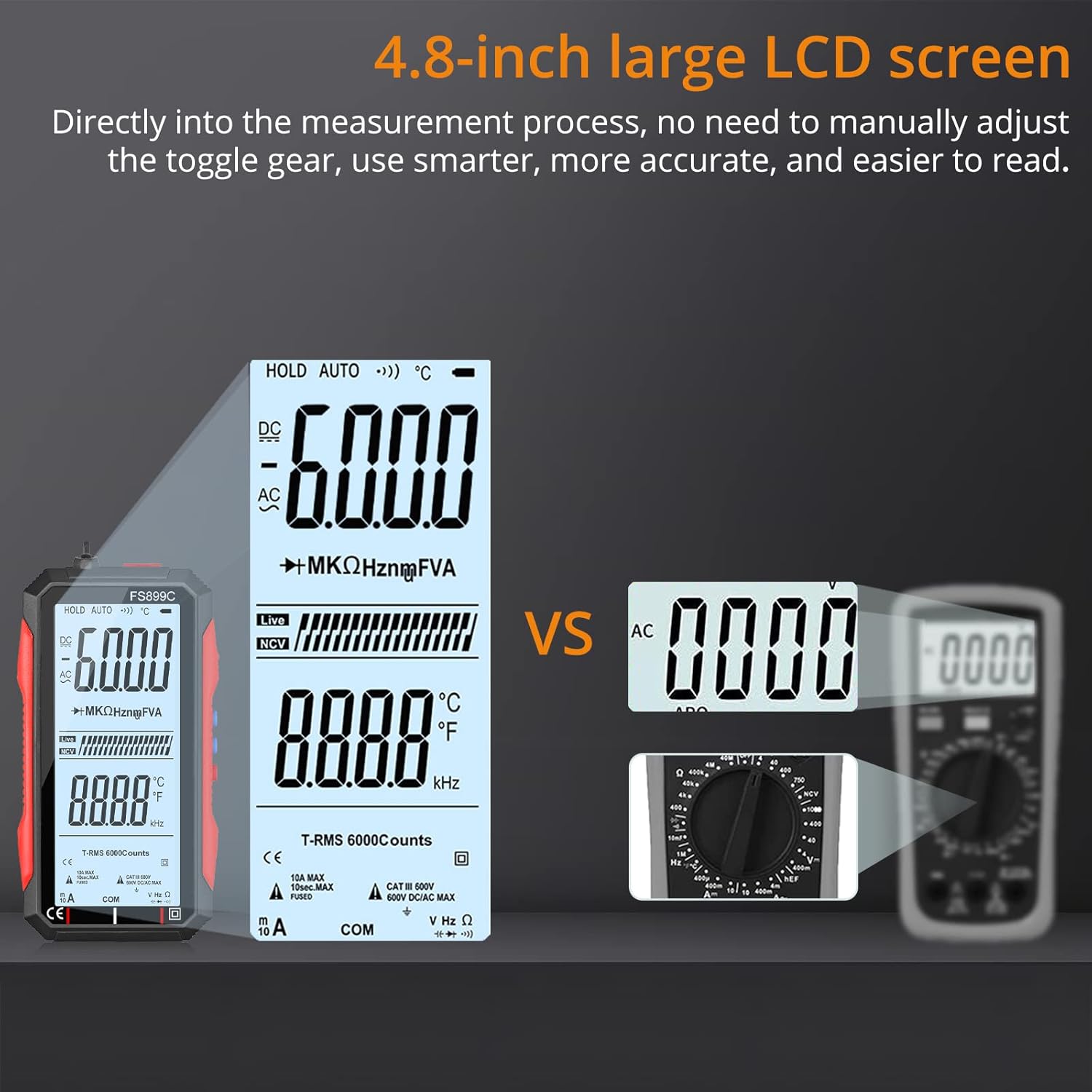
Image: Illustrates the clarity and size of the 4.8-inch large LCD screen of the Neoteck multimeter compared to a smaller, traditional multimeter display, emphasizing ease of reading.
5.3 Non-Contact Voltage (NCV) Detektion
To use NCV, press the NCV/Flashlight key (6). Place the NCV sensing needle (1) near a live wire or electrical outlet. The meter will indicate the presence of AC voltage through audible beeps and visual alerts on the screen.

Image: Shows the multimeter performing non-contact voltage detection near an electrical outlet, alongside other application examples like measuring car battery voltage and circuit testing.
5.4 Måling af DC Voltage
1. Power on the multimeter. It will automatically enter auto-ranging mode.
2. Connect the black test lead to the 'COM' jack and the red test lead to the 'VΩHz' jack.
3. Touch the test probes to the positive and negative terminals of the DC voltage source (e.g., a battery).
4. Read the DC voltage værdien vist på skærmen.

Image: Displays the multimeter measuring AC voltage from a wall outlet and DC voltage from a 9V battery, showing the respective readings on the screen.
5.5 Other Measurement Modes
The multimeter supports various other measurement functions. Use the ON/OFF/Select key (8) to cycle through modes if manual selection is required, or rely on the auto-ranging feature for common measurements.
- AC Voltage: For alternating current voltage målinger.
- AC/DC-strøm: For measuring alternating or direct current. Ensure test leads are connected to the correct current jacks.
- Modstand (Ω): For measuring electrical resistance.
- Kapacitans: For measuring the capacitance of components.
- Frekvens (Hz): For measuring the frequency of AC signals.
- Diode test: For checking the functionality of diodes.
- Kontinuitetstest: For checking if a circuit is complete (audible beep for continuity).
- Live Check: For identifying live wires.

Image: Highlights the various functions of the multimeter with icons, including DC voltage, AC voltage, resistance, AC current, DC current, capacitance, diode, True-RMS, data retention (HOLD), backlit display, continuity, non-contact voltage (NCV), fire line, frequency, low voltage prompt, flashlight, and backlit display.
5.6 LCD Backlight and Flashlight
Press the Data Hold/Backlight key (7) briefly to toggle the LCD backlight. Press and hold the NCV/Flashlight key (6) to turn the flashlight on or off.
6. Vedligeholdelse
6.1 Rengøring
Wipe the meter with a dry, soft cloth. Do not use abrasives or solvents. Keep the device free from dust and moisture.
6.2 Pleje af batterier
The multimeter uses a rechargeable lithium battery. Charge the device regularly, especially if it has not been used for an extended period, to maintain battery health. Avoid fully discharging the battery frequently.
7. Fejlfinding
- Ingen visning: Ensure the device is powered on. Check if the battery needs charging.
- Forkerte aflæsninger: Verify test lead connections. Ensure the correct measurement mode is selected (if not using auto-ranging). Check for external interference.
- Ingen NCV-detektion: Ensure the NCV function is activated. The NCV sensor needs to be close to the AC voltage kilde.
- Meter Not Responding: Try powering off and on again. If issues persist, contact customer support.
8. Specifikationer
| Specifikation | Værdi |
|---|---|
| Mærke | neotech |
| Modelnummer | TL162-US |
| Målenøjagtighed | 6000 tæller |
| Vise | 4.8 tommer LCD |
| Strømkilde | Battery Powered (USB Rechargeable Lithium Ion) |
| Varens vægt | 10.9 ounce |
| Pakkedimensioner | 6.3 x 4.92 x 1.46 tommer |
| Inkluderede komponenter | Multimeter, User Manual, Test Leads (1 pair), Charge Cable, Protect Bag |
| Certificering | CE, FCC |
9. Garanti og support
Neoteck products are designed for reliability and performance. For warranty information, technical support, or service inquiries, please refer to the contact details provided with your purchase or visit the official Neoteck webwebstedet. Behold din købskvittering som købsbevis.


