1. Introduktion
Thank you for choosing the UNIC UC18 Mini Projector. This compact and portable projector is designed to provide a versatile viewing experience for home entertainment, presentations, and more. Featuring an LED lighting system, built-in speaker, and multiple input options, the UC18 offers convenience and functionality. Please read this manual thoroughly to ensure proper setup, operation, and maintenance of your device.
2. Sikkerhedsoplysninger
- Strømforsyning: Brug kun den angivne strømadapter. Sørg for, at lydstyrkentage matcher projektorens krav.
- Ventilation: Bloker ikke ventilationsåbningerne. Sørg for tilstrækkelig plads omkring projektoren for korrekt luftgennemstrømning og for at forhindre overophedning.
- Fugtighed: Keep the projector away from water, rain, and excessive humidity. Do not operate with wet hands.
- Rensning: Afbryd strømmen før rengøring. Brug en blød, tør klud. Undgå flydende eller aerosolbaserede rengøringsmidler.
- Håndtering: Håndter projektoren forsigtigt. Undgå at tabe den eller udsætte den for kraftige stød.
- Øjenbeskyttelse: Se ikke direkte ind i projektorlinsen, når lamp er tændt, da det skarpe lys kan forårsage øjenbelastning eller skade.
- Demontering: Forsøg ikke selv at skille projektoren ad eller reparere den. Overlad al service til kvalificeret personale.
3. Pakkens indhold
Kontroller venligst pakkens indhold ved udpakning. Hvis der mangler eller er beskadigede dele, skal du kontakte din forhandler.
- UNIC UC18 Miniprojektor
- Strømkabel
- 3-i-1 AV-kabel
- Remote Control (requires lithium battery, not included)
- Brugermanual
4. Produktet er slutview
Projector Layout
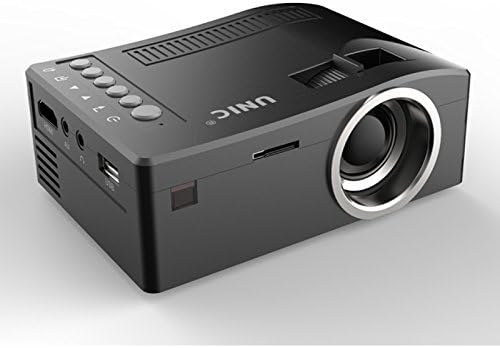
Forside og side view of the UNIC UC18 Mini Projector, showing the lens, ventilation, and various ports.
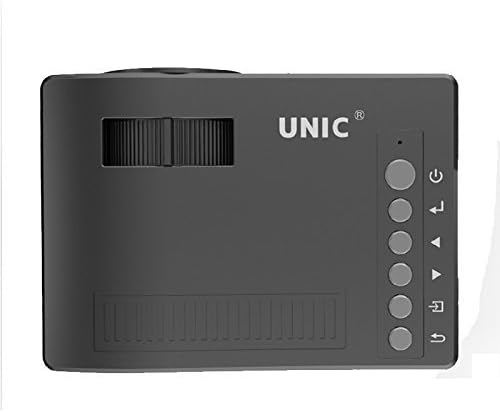
Top view of the UNIC UC18 Mini Projector, highlighting the control buttons and focus wheel.
Porte og kontroller
The UNIC UC18 Mini Projector features a range of ports and controls for easy connectivity and operation:
- Linse: Projicerer billedet på skærmen.
- Fokushjul: Manual adjustment for image clarity.
- Power knap: Tænder eller slukker for projektoren.
- Menu-knap: Giver adgang til projektorens indstillingsmenu.
- Navigationsknapper (op/ned/venstre/højre): Bruges til at navigere i menuer og justere indstillinger.
- OK knap: Bekræfter valg i menuen.
- Kildeknap: Selects the input source (HDMI, USB, AV, TF).
- USB-port: Connects USB storage devices for media playback.
- HDMI-port: Connects to HDMI-enabled devices like laptops, gaming consoles, or media players.
- AV-port: Connects to devices using the included 3-in-1 AV cable.
- TF-kortslot: Inserts a TF (Micro SD) card for media playback.
- 3.5 mm hovedtelefonstik: Connects external headphones or speakers.
- IR-modtager: Modtager signaler fra fjernbetjeningen.
5. Opsætning
5.1 Strømtilslutning
- Tilslut strømkablet til projektorens strømindgang.
- Sæt den anden ende af strømkablet i en passende stikkontakt.
- Strømindikatorlampen på projektoren vil lyse.
5.2 Tilslutning af inputenheder
- HDMI: Connect an HDMI cable from your source device (e.g., laptop, DVD player) to the projector's HDMI port.
- USB: Indsæt et USB-flashdrev i USB-porten.
- AV: Use the provided 3-in-1 AV cable to connect to devices with AV output. Match the yellow, white, and red connectors.
- TF-kort: Insert a TF (Micro SD) card into the TF card slot.
5.3 Placering af projektoren
Place the projector on a stable, flat surface. For optimal image quality, position the projector perpendicular to the projection surface (wall or screen). The throw distance can range from 0.48 to 2.43 meters, producing a picture size from 12 to 66 inches.
6. Betjeningsvejledning
6.1 Tænd/sluk
Press the Power button on the projector or the remote control to turn the device on or off.
6.2 Justering af fokus
After powering on, if the image appears blurry, rotate the manual focus wheel located near the lens until the image becomes clear and sharp.

Close-up of the manual focus wheel on the UNIC UC18 Mini Projector, located near the lens.
6.3 Valg af indgangskilde
Press the 'Source' button on the projector or remote control. Use the navigation buttons to select your desired input source (HDMI, USB, AV, TF) and press 'OK' to confirm.
6.4 Menunavigation
Press the 'Menu' button to access the projector's settings. Use the navigation buttons to browse options and 'OK' to select. Press 'Menu' again to exit.
6.5 Lydudgang
The projector has a built-in speaker. For private listening or connecting to external audio systems, plug headphones or external speakers into the 3.5mm headphone jack.
7. Vedligeholdelse
7.1 Rengøring af linsen
Brug en blød, fnugfri klud, der er specielt designet til optiske linser. Tør forsigtigt linsen af for at fjerne støv eller snavs. Undgå at bruge slibende materialer eller barske kemikalier.
7.2 Rengøring af projektorhuset
Tør projektorens yderside af med en blød, tør klud. Brug ikke flydende rengøringsmidler eller opløsningsmidler.
7.3 Opbevaring
Når projektoren ikke er i brug i længere perioder, skal den opbevares køligt og tørt, væk fra direkte sollys og ekstreme temperaturer. Dæk linsen til for at beskytte den mod støv.
8. Fejlfinding
| Problem | Mulig årsag | Løsning |
|---|---|---|
| Intet billede vises | Strøm ikke tilsluttet; Forkert inputkilde; Løs kabelforbindelse | Check power cable; Select correct input source; Reconnect cables securely |
| Billedet er sløret | Fokus ikke justeret; Projektor for tæt på/for langt væk | Adjust the focus wheel; Reposition the projector within recommended throw distance |
| Ingen lyd | Volume too low; Muted; Audio cable not connected; Source device audio issue | Increase volume; Unmute; Check audio cable connection; Verify audio output on source device |
| Fjernbetjening virker ikke | Batteries low/incorrectly inserted; Obstruction between remote and projector | Replace batteries (lithium battery required); Ensure clear line of sight to IR receiver |
| Projektoren overophedes | Blokeret ventilation; Langvarig brug i varmt miljø | Ensure ventilation openings are clear; Operate in a well-ventilated area; Allow to cool down |
9. Specifikationer
Tekniske specifikationer
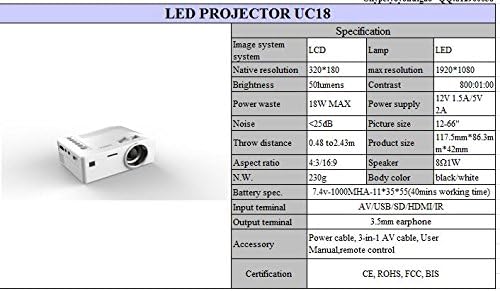
Detailed technical specifications for the UNIC UC18 Mini Projector, including resolution, contrast, and dimensions.
| Feature | Specifikation |
|---|---|
| Mærke | UNIC |
| Modelnavn | UC18 |
| Displayteknologi | QVGA (LCD) |
| Indfødt opløsning | 320 x 240 pixels |
| Maksimal understøttet opløsning | 1920 x 1080 pixels (1080P) |
| Lysstyrke | 50 lumen |
| Kontrastforhold | 500:1 |
| Aspektforhold | 16:9 (also supports 4:3) |
| Kasteafstand | 0.48m - 2.43m (1.57ft - 7.97ft) |
| Billedstørrelse | 12-66 tommer |
| Indgangsterminaler | AV, USB, SD (TF), HDMI, IR |
| Outputterminal | 3.5mm øretelefonstik |
| Særlige funktioner | Indbygget højttaler, bærbar |
| Strømforbrug | 24 watt (maks. 18 W) |
| Strømforsyning | 12V 1.5A / 5V 2A |
| Støjniveau | <25dB |
| Produktmål (L x B x H) | 117.5 mm x 86.3 mm x 42 mm |
| Nettovægt | 230 g |
| Monteringstype | Vægmontering |
| Fjernbetjening | Yes (battery not included) |
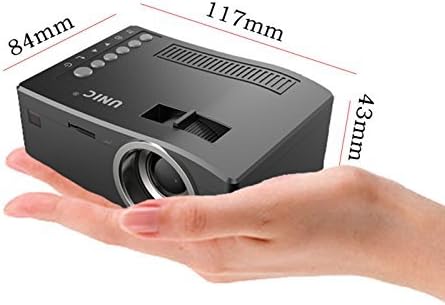
The UNIC UC18 Mini Projector held in a hand, illustrating its compact size and dimensions (117mm x 84mm x 43mm).
10. Garanti og support
For garantioplysninger eller teknisk support henvises til den dokumentation, der blev leveret ved køb, eller kontakt din forhandler. Gem din købsbevis i tilfælde af garantikrav.


