1. Introduktion og produktoversigtview
The Oreck WK15500B Air Refresh is a versatile 2-in-1 appliance designed to improve indoor air quality and comfort. It combines a HEPA air purifier with an ultrasonic humidifier, suitable for small rooms up to 115 square feet, such as bedrooms, dens, or nurseries.
Nøglefunktioner:
- Dobbelt funktionalitet: Operates as both an air purifier and an ultrasonic humidifier, or as an air purifier independently.
- 2-Stage Filtrering: Features a HEPA media filter to capture 99% of dust and allergens, and a charcoal filter to reduce odors.
- Ultrasonic Humidification: Releases a cool mist to add moisture to dry air without using hot steam.
- Stille drift: Designed with silence technology for minimal noise during use.
- Rumstørrelse: Effektiv til rum op til 115 kvadratmeter.
2. Vigtige sikkerhedsinstruktioner
Please read all instructions carefully before operating this appliance to reduce the risk of fire, electric shock, or injury.
- Tag altid stikket ud af apparatet før rengøring, vedligeholdelse eller når det ikke er i brug.
- Brug ikke noget apparat med en beskadiget ledning eller stik.
- Hold netledningen væk fra opvarmede overflader.
- Må ikke bruges udendørs eller på våde overflader.
- Do not allow children to operate the appliance without supervision.
- Only use clean, cool tap water in the humidifier tank. Do not add essential oils or other additives.
- Ensure the water tank is securely placed before operating the humidifier function.
- Bloker ikke luftåbninger.
- Use only Oreck recommended replacement filters.
3. Pakkens indhold
Bekræft at alle varer er til stede i pakken:
- Oreck WK15500B Air Refresh Unit
- HEPA Media Filter (pre-installed or separate)
- Charcoal Filter (pre-installed or separate)
- Brugervejledning (dette dokument)
4. Produktkomponenter

Figur 4.1: Front view of the Oreck WK15500B Air Refresh unit, showcasing its sleek grey design and top control panel.

Figur 4.2: Vinklet view of the Oreck WK15500B Air Refresh unit, highlighting its modern profile.

Figur 4.3: Side view of the Oreck WK15500B Air Refresh unit, showing its slim design.
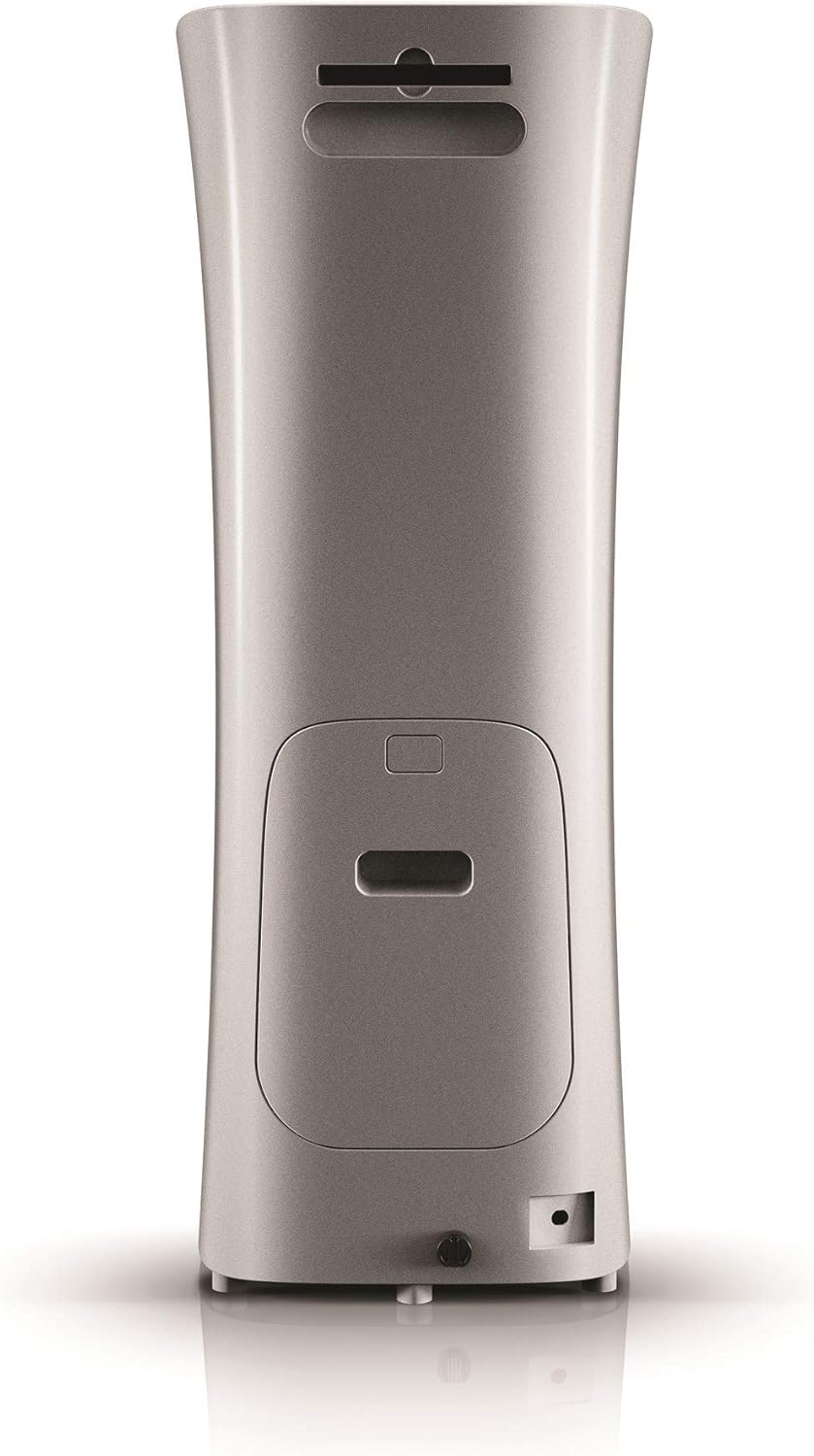
Figur 4.4: Tilbage view of the Oreck WK15500B Air Refresh unit, indicating the filter access panel and power input.

Figur 4.5: Close-up of the top control panel with digital display and buttons for Sleep, Humidity, Timer, Speed, and On/Off, along with a 'Reset filter' indicator.

Figur 4.6: Diagram illustrating the internal filter system, showing the outer casing removed to reveal the charcoal filter and HEPA media filter, designed to capture dust, allergens, and odors.

Figur 4.7: The Oreck WK15500B Air Refresh unit positioned in a nursery, demonstrating its suitability for small rooms and quiet operation.

Figur 4.8: The Oreck WK15500B Air Refresh unit actively emitting cool mist, illustrating its ultrasonic humidification function.

Figur 4.9: The Oreck WK15500B Air Refresh unit integrated into a living room environment, showcasing its compact and aesthetic design.
5. Opsætningsvejledning
- Pak enheden ud: Carefully remove the Oreck WK15500B from its packaging. Retain packaging for future storage or transport.
- Filterinstallation:
- Locate the filter access panel on the back of the unit (refer to Figure 4.4).
- Open the panel and ensure the HEPA and charcoal filters are correctly seated. Remove any protective plastic packaging from the filters if present.
- Luk filteradgangspanelet sikkert.
- Placering: Place the unit on a firm, level surface, ensuring there is at least 6 inches of clearance from walls or furniture for optimal airflow.
- Fill Water Tank (for Humidifier function):
- Fjern vandtanken fra enheden.
- Skru hætten af i bunden af tanken.
- Fyld tanken med rent, koldt vand fra hanen. Overskrid ikke den maksimale påfyldningslinje.
- Securely screw the cap back on and place the water tank firmly into the unit.
- Strømtilslutning: Sæt netledningen i en almindelig stikkontakt.
6. Betjeningsvejledning
6.1. Kontrolpanel overview (Se figur 4.5)
- On/Off knap: Tænder eller slukker for enheden.
- Hastighedsknap: Adjusts the fan speed for air purification (Low, Medium, High).
- Timer knap: Sets the operating time (e.g., 2, 4, 8 hours) after which the unit will automatically turn off.
- Fugtighedsknap: Activates or deactivates the humidifier function and adjusts mist output levels.
- Sleep knap: Reducerer ventilatorhastigheden og dæmper displaylysene for at sikre stille drift under søvn.
- Nulstil filterindikator: Illuminates when it's time to check or replace filters.
6.2. Grundlæggende betjening
- Tænd/sluk: Tryk på Til/Fra knappen for at tænde enheden. Tryk igen for at slukke.
- Juster blæserhastighed: Mens enheden er tændt, skal du trykke på Hastighed button repeatedly to cycle through fan speeds (Low, Medium, High).
- Activate Humidifier:
- Sørg for, at vandtanken er fyldt.
- Tryk på Fugtighed button to turn on the humidifier.
- Tryk på Fugtighed button again to adjust mist output levels if available, or to turn off the humidifier function while air purification continues.
- Indstil timer: Tryk på Timer button to select a desired operating duration. The unit will automatically shut off after the set time.
- Sove mode: Tryk på Sove button for quiet operation. The fan speed will decrease, and display lights will dim. Press any button to exit Sleep Mode.
7. Vedligeholdelse
Regular maintenance ensures optimal performance and extends the lifespan of your Oreck WK15500B.
7.1. Udskiftning af filter
The 'Reset filter' indicator light will illuminate when it's time to check or replace the filters. Filter lifespan varies based on usage and air quality.
- Tag enheden ud af stikkontakten.
- Open the filter access panel on the back of the unit.
- Remove the old HEPA and charcoal filters. Dispose of them properly.
- Insert new Oreck genuine replacement filters, ensuring they are correctly oriented.
- Luk filteradgangspanelet sikkert.
- Plug the unit back in. With the unit powered on, press and hold the 'Reset filter' button (if available, otherwise refer to manual for specific reset procedure) for 3-5 seconds until the indicator light turns off.
7.2. Rengøring af vandtank
Clean the water tank regularly to prevent mineral buildup and bacterial growth.
- Tag stikket ud af stikkontakten.
- Fjern vandtanken og tøm eventuelt resterende vand.
- Rinse the tank thoroughly with clean water. For mineral buildup, use a solution of white vinegar and water, let it soak, then rinse well.
- Wipe the inside of the tank and cap dry before refilling.
7.3. Udvendig rengøring
Tør ydersiden af enheden af med en blød, damp klæde. Brug ikke slibende rengøringsmidler eller opløsningsmidler.
8. Fejlfinding
| Problem | Mulig årsag | Løsning |
|---|---|---|
| Enheden tænder ikke. | Ikke tilsluttet; fejl i stikkontakten; fejl i enheden. | Sørg for, at netledningen er sat korrekt i en fungerende stikkontakt. Prøv en anden stikkontakt. Hvis problemet fortsætter, skal du kontakte kundesupport. |
| No mist from humidifier. | Water tank empty; tank not seated correctly; humidifier function not activated. | Refill water tank. Ensure tank is securely placed. Press the Humidity button to activate. |
| Luftrensning virker ineffektiv. | Filters are dirty or clogged; unit is too small for the room; air inlets/outlets blocked. | Check and replace filters if necessary. Ensure unit is placed in a room within its recommended size. Clear any obstructions around the unit. |
| Usædvanlig støj under drift. | Loose filter; foreign object inside; unit not on a level surface. | Check that filters are securely installed. Unplug and inspect for foreign objects. Place unit on a stable, level surface. |
9. Specifikationer
| Modelnavn | Air Refresh |
| Modelnummer | WK15500B |
| Mærke | Oreck |
| Produktdimensioner | 26.7D x 27.9B x 73.7H Centimeter |
| Varens vægt | 6.8 kg |
| Dækning af gulvareal | 115 kvadratmeter |
| Speciel funktion | Ultralydsteknologi |
| Materiale | Plast |
| Farve | Grå |
| Inkluderede komponenter | Luftrenser enhed |
10. Garanti og kundesupport
For information regarding warranty coverage, technical support, or to purchase replacement parts and filters, please contact Oreck customer service. Refer to the official Oreck webwebstedet eller din købsdokumentation for kontaktoplysninger.
Webwebsted: www.oreck.com


