Indledning
Genius LuxeMate 100 er et omkostningseffektivt USB-tastatur designet til komfortabel og stille skrivning. Det har en flad profile, et tysk standard QWERTZ-layout og justerbare fødder for ergonomisk placering. Denne manual indeholder vigtige oplysninger om opsætning, betjening, vedligeholdelse og fejlfinding af dit tastatur.
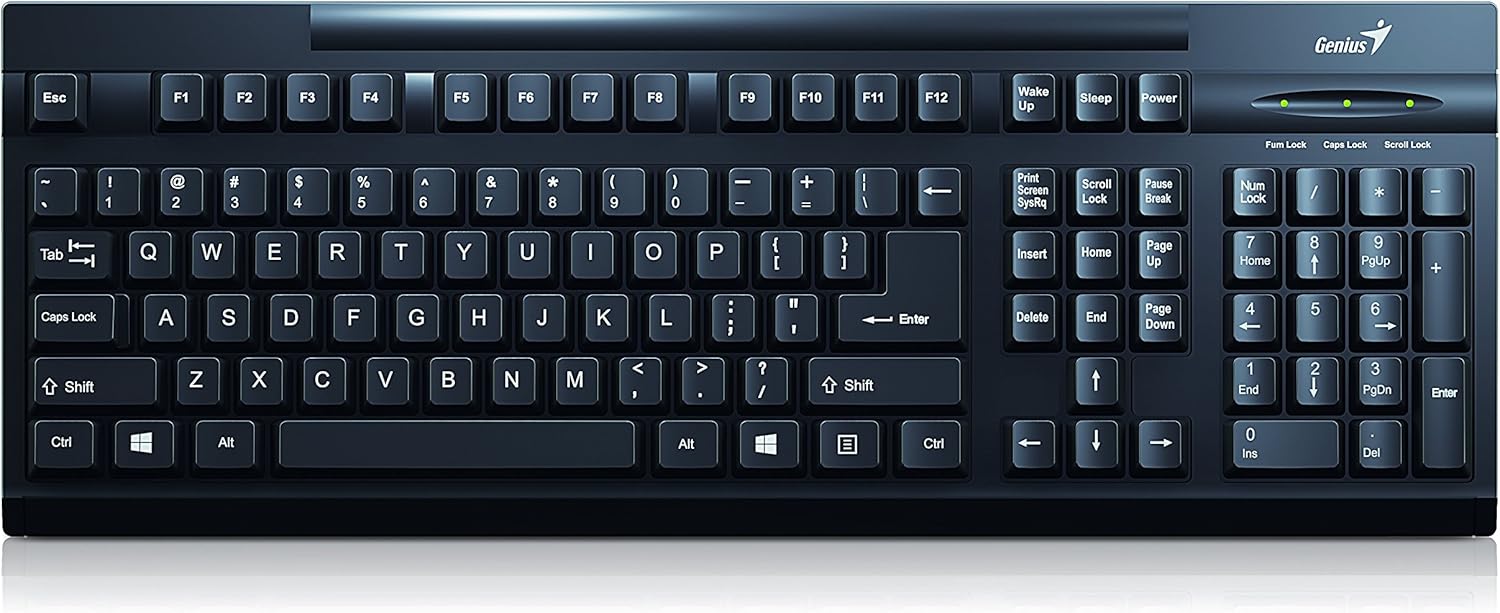
Figur 1: Øverst view af Genius LuxeMate 100-tastaturet, der viser det fulde tyske standardlayout.
Opsætningsvejledning
LuxeMate 100-tastaturet er designet til enkel plug-and-play-installation og kræver ingen yderligere softwaredrivere. Følg disse trin for at tilslutte dit tastatur:
- Find en ledig USB-port på din computer (stationær pc, bærbar computer osv.).
- Sæt USB-stikket på LuxeMate 100-tastaturet godt fast i USB-porten.
- Dit operativsystem (f.eks. Windows) vil automatisk registrere og installere de nødvendige drivere. Denne proces tager normalt et par sekunder.
- Når installationen er færdig, er tastaturet klar til brug.

Figur 2: Vinklet view af tastaturet, hvilket fremhæver dets kompakte design og USB-tilslutningspunkt.
For forbedret skrivekomfort kan du justere tastaturets vinkel ved hjælp af de integrerede fødder på undersiden. Træk forsigtigt fødderne ud, indtil de klikker på plads, for at hæve bagsiden af tastaturet.

Figur 3: Side view af tastaturet med de justerbare fødder udstrakt, hvilket giver en ergonomisk skrivevinkel.
Betjeningsvejledning
LuxeMate 100-tastaturet har et standard tysk QWERTZ-layout, der indeholder alle de vigtigste taster til daglige computeropgaver. Dets lavprofessionellefile Tasterne giver en behagelig og stille skriveoplevelse.

Figur 4: Nærbillede view af tastaturtasterne, der viser det tyske QWERTZ-layout og tastaturdesign.
Nøglefunktioner:
- Standard alfanumeriske taster: Bruges til at skrive bogstaver, tal og symboler.
- Funktionstaster (F1-F12): Disse taster udfører forskellige funktioner afhængigt af applikationen eller operativsystemet.
- Windows startskærmknap: Aktiverer Windows Start-menuen eller -skærmen.
- Numerisk tastatur: Placeret på højre side for effektiv dataindtastning. Sørg for, at Num Lock er aktiv (indikeret af en LED-lampe over tastaturet).
- Indikatorer for Caps Lock, Num Lock og Scroll Lock: LED-lys over det numeriske tastatur angiver status for disse funktioner.
Tastaturets slanke profile bidrager til dens lette design, hvilket gør den nem at integrere i ethvert arbejdsområde.

Figur 5: Sideprofile af tastaturet, hvilket illustrerer dets ultratynde og slanke design.
Pleje og vedligeholdelse
For at sikre dit Genius LuxeMate 100-tastaturs lange levetid og optimale ydeevne, skal du følge disse enkle vedligeholdelsesretningslinjer:
- Rensning: Tør regelmæssigt tastaturoverfladen af med en blød, tør og fnugfri klud. Ved genstridigt snavs, tør let afampRengør kluden med vand eller en mild, ikke-slibende rengøringsopløsning. Undgå for meget fugt.
- Fjernelse af støv: Brug trykluft til at fjerne støv og snavs mellem tasterne.
- Undgå væsker: Spild ikke væske på tastaturet. Hvis der spildes væske, skal du straks afbryde forbindelsen til computeren og lade det tørre helt, før du tilslutter det igen.
- Opbevaring: Når tastaturet ikke er i brug i længere perioder, skal det opbevares et rent, tørt sted væk fra direkte sollys og ekstreme temperaturer.
- Håndtering: Undgå at tabe tastaturet eller udsætte det for hårde stød, da dette kan beskadige de interne komponenter.
Fejlfinding
Hvis du støder på problemer med dit LuxeMate 100-tastatur, kan du prøve følgende fejlfindingstrin:
- Tastaturet reagerer ikke:
- Sørg for, at USB-kablet er korrekt tilsluttet en fungerende USB-port på din computer.
- Prøv at tilslutte tastaturet til en anden USB-port.
- Genstart din computer.
- Test tastaturet på en anden computer for at afgøre, om problemet skyldes tastaturet eller computerens opsætning.
- Taster virker ikke eller sidder fast:
- Kontrollér for synligt snavs eller fremmedlegemer under tasterne. Brug trykluft til at fjerne dem.
- Sørg for, at tastaturet er rent og fri for spild.
- Num Lock/Caps Lock/Scroll Lock-lamperne virker ikke:
- Tryk på den respektive tast (Num Lock, Caps Lock, Scroll Lock) for at skifte dens status. Hvis lyset ikke ændrer sig, skal du se trinene i "Tastaturet reagerer ikke".
Hvis disse trin ikke løser problemet, henvises der til supportafsnittet.
Tekniske specifikationer
| Feature | Specifikation |
|---|---|
| Mærke | Genialt |
| Modelnummer | 31300725108 |
| Forbindelsesteknologi | USB (USB-A) |
| Tastaturlayout | Tysk standard (QWERTZ) |
| Knapform | Konkav |
| Farve | Sort |
| Dimensioner (BxHxD) | 306 x 155 x 20 mm (ifølge beskrivelsen) / 34.9 x 18 x 3 cm (ifølge specifikationerne) |
| Vægt | 320 g |
| Materiale | Plast |
| Kompatible enheder | Laptop, PC |
| Operativsystem | Windows |
| Pakkeindhold | LuxeMate 100-tastatur, flersproget hurtigguide |
Bemærk: Dimensioner kan variere en smule afhængigt af målemetoden. Beskrivelsen angiver 306 x 155 x 20 mm, mens specifikationerne angiver 34.9 x 18 x 3 cm. Se produktemballagen for de mest nøjagtige mål.
Garanti og support
For garantioplysninger og teknisk support vedrørende dit Genius LuxeMate 100-tastatur henvises til den dokumentation, der følger med dit produkt, eller besøg den officielle Genius-webside. webKontaktoplysninger til kundeservice findes typisk i hurtigguiden eller på producentens supportside.
Når du kontakter support, bedes du have dit produktmodelnummer (31300725108) og købsoplysninger klar.


