1. Introduktion
The Pabobo Moon 5-in-1 Day-Night Educational Alarm Clock is designed to help children understand when it is time to sleep and when it is time to wake up. This device combines a night light, lullaby player, and an animated display to guide children through their daily routines. It is suitable for use from birth, offering various functions to support healthy sleep habits.

Figur 1: Forside view of the Pabobo Moon 5-in-1 Day-Night Educational Alarm Clock.
2. Sikkerhedsoplysninger
- Dette produkt er ikke legetøj. Voksenopsyn anbefales, især for små børn.
- Keep the device away from water and moisture to prevent electric shock.
- Udsæt ikke enheden for ekstreme temperaturer eller direkte sollys.
- Ensure batteries are inserted correctly according to polarity markings. Do not mix old and new batteries, or different types of batteries.
- Bortskaf batterier ansvarligt i henhold til lokale regler.
- Forsøg ikke at åbne eller reparere enheden selv. Overlad al service til kvalificeret personale.
3. Pakkens indhold
Kontroller venligst, at alle varer er til stede i pakken:
- Pabobo Moon 5-in-1 Day-Night Educational Alarm Clock
- Instruktionsmanual (dette dokument)
- USB Cable (for power, if applicable)
Note: 3 AA batteries are required and are not included.
4. Produktet er slutview
The Pabobo Moon alarm clock features a main circular display with animated characters (a rabbit) and a smaller integrated LCD screen for digital time display. Buttons for control are typically located on the back or sides of the unit.
Nøglekomponenter:
- Hoveddisplay: Shows the animated day (sun/awake rabbit) and night (moon/sleeping rabbit) scenes.
- LCD skærm: Displays the current time and settings.
- Kontrolknapper: Used for setting time, alarms, lullabies, and other functions. (Specific button functions will be detailed in the Operating Instructions section).
- Højttaler: For lullabies and alarm sounds.
- Batterirum: Placeret på bagsiden af enheden.
- USB-port: Til strømtilslutning.
5. Opsætning
5.1. Tænder
- Find batterirummet på bagsiden af enheden.
- Åbn dækslet til rummet.
- Indsæt 3 AA-batterier, og sørg for korrekt polaritet (+/-).
- Luk batterirummets dæksel forsvarligt.
- Alternatively, connect the device using the provided USB cable to a compatible USB power adapter (not included) or port.
5.2. Indstilling af starttidspunkt
Upon first power-on or after battery replacement, you may need to set the current time.
- Tryk og hold på SÆT button (or equivalent) until the time display starts flashing.
- Brug UP og NED buttons (or equivalent) to adjust the hours.
- Trykke SÆT again to move to minutes, then adjust using UP og NED.
- Fortsæt med at trykke SÆT to cycle through other settings like 12/24-hour format, and date (if applicable), adjusting as needed.
- Trykke SÆT one last time to confirm and exit the setting mode.
6. Betjeningsvejledning
6.1. Day/Night Display Function
The core function of the Pabobo Moon is its animated day-night display, which visually indicates to your child whether it's time to sleep or wake up.
- Sengetid: When the sun animation goes down and the moon appears with a sleeping rabbit, it signifies that it is time for bed.
- Vågnende tid: In the morning, as the moon starts to set and the sun appears with an awake rabbit, it indicates that it is time to get up.
The duration of these transitions can be adjusted in the settings menu.

Figure 2: The alarm clock displaying the night scene with a sleeping rabbit and moon.
6.2. Natlys funktion
The device includes a night light feature that can be used from birth.
- To activate the night light, press the LYS button (or equivalent).
- Pressing the button repeatedly may cycle through different brightness levels or turn the light off.
- The night light often illuminates the main display, enhancing the visual cues for sleep or wakefulness.
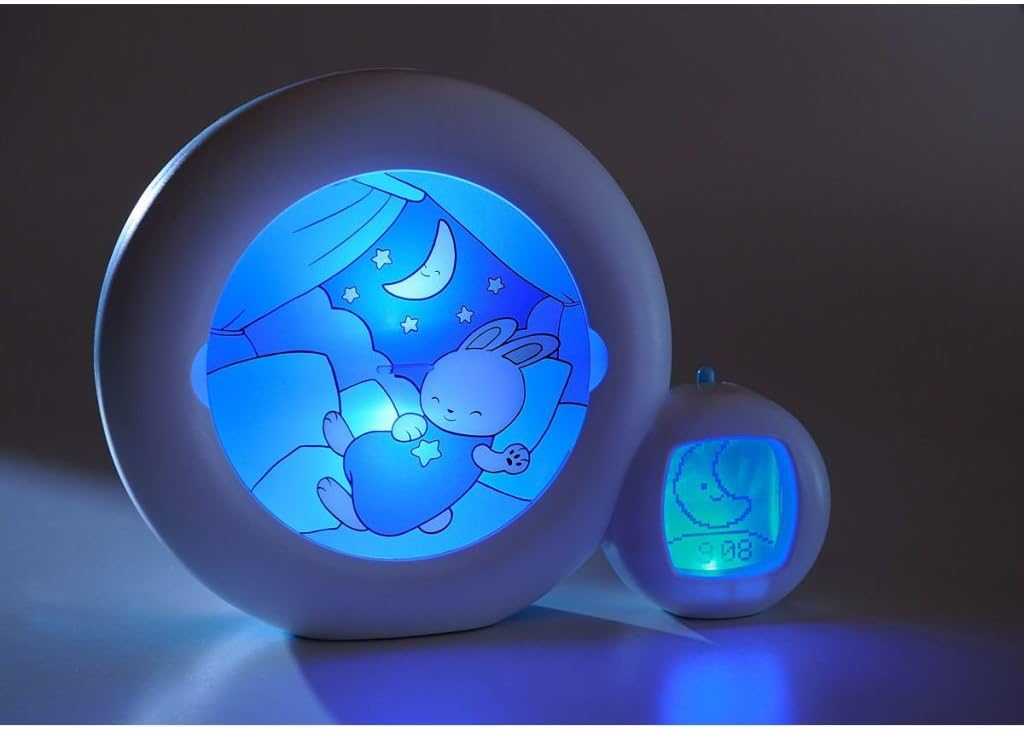
Figure 3: The alarm clock with its blue night light activated, showing a sleeping rabbit.
6.3. Lullaby Function
The Pabobo Moon offers four lullabies, including one that reproduces intrauterine heartbeats, to help soothe your child to sleep.
- Tryk på MUSIK button (or equivalent) to start playing a lullaby.
- Pressing the button again may cycle through the available lullabies.
- For at justere lydstyrken skal du bruge LYDSTYRKE +/- buttons (if available).
- Lullabies typically play for a set duration (e.g., 3 minutes) and then automatically turn off.

Figure 4: The alarm clock in operation, indicating music playback with musical notes.
6.4. Scheduling Nap and Night Times
The device allows for scheduling up to three different times for naps and night, as well as a specific setting for weekends.
- Access the scheduling menu by pressing and holding the ALARM or SKEMA knap.
- Brug UP og NED buttons to select the alarm slot (e.g., Alarm 1, Alarm 2, Alarm 3, Weekend).
- Trykke SÆT to confirm the slot and then adjust the desired wake-up time for that slot.
- Repeat for all desired nap and night schedules, including weekend settings.
- Ensure each alarm is activated within the menu if there is an ON/OFF option.
6.5. Remote Control (If Applicable)
Some versions of the Pabobo Moon may include a remote control for convenient operation. Refer to the remote control's specific instructions for pairing and function details.
6.6. USB Functionality (If Applicable)
The USB port is primarily for powering the device. It may also be used for firmware updates or other functions depending on the model. Consult the manufacturer's website for any advanced USB features.
7. Vedligeholdelse
7.1. Rensning
- Tør enheden af med en blød, tør eller let fugtet kludamp klæde.
- Brug ikke slibende rengøringsmidler, opløsningsmidler eller stærke kemikalier.
- Ensure the device is unplugged and batteries are removed before cleaning.
7.2. Udskiftning af batteri
Når displayet bliver svagere, eller funktionerne bliver uregelmæssige, er det tid til at udskifte batterierne.
- Åbn batterirummet på bagsiden.
- Fjern de gamle batterier.
- Isæt 3 nye AA-batterier, og sørg for at polerne vender korrekt.
- Luk rummet forsvarligt.
7.3. Opbevaring
If storing the device for an extended period, remove the batteries to prevent leakage and damage.
8. Fejlfinding
- Enheden tænder ikke: Check battery installation and charge level. Ensure USB cable is securely connected if using external power.
- Skærmen er svag eller tom: Replace batteries. If using USB power, try a different cable or power adapter.
- Lullabies not playing: Check volume settings. Ensure the music function is activated.
- Time not holding: Replace batteries. If the issue persists, a factory reset might be necessary (consult manufacturer support for specific reset procedures).
- Day/Night animation not changing: Verify that the wake-up and sleep times are correctly set in the scheduling menu.
Hvis problemerne fortsætter efter at have forsøgt disse fejlfindingstrin, bedes du kontakte kundesupport.
9. Specifikationer
| Feature | Specifikation |
|---|---|
| Mærke | Pabobo |
| Modelnummer | Kid'sleep (CLK0014) |
| Produktdimensioner | 9.06" D x 2.36" B x 7.09" H |
| Varens vægt | 0.78 kilo (1.72 pund) |
| Materiale | Plast |
| Farve | Blue (Moon Gray shade) |
| Lyskildetype | LED |
| Strømkilde | Batteridrevet (3 AA-batterier kræves, medfølger ikke) |
| Særlige funktioner | Night Light, Remote Control (if applicable), USB |
| Kontrolmetode | Trykknap |
| Værelsestype | Børneværelse |
| Installationstype | Bordplade |
| Indendørs/Udendørs brug | Indendørs |
10. Garanti og support
Pabobo products are manufactured to high-quality standards. For specific warranty information, please refer to the warranty card included with your purchase or visit the official Pabobo website. In case of any issues or questions not covered in this manual, please contact Pabobo customer support through their official channels.
- Online support: Besøg den officielle Pabobo webwebsted for ofte stillede spørgsmål, produktregistrering og kontaktoplysninger.
- Købsbevis: Keep your receipt or proof of purchase for warranty claims.


