1. Introduktion
This manual provides essential information for the safe and efficient installation, operation, and maintenance of your FANTECH prioAir 8 Inline Mixed Flow Duct Fan. Please read these instructions thoroughly before installation and retain this manual for future reference.
The FANTECH prioAir 8 is an 8-inch inline mixed flow duct fan designed for ventilation applications. It features a compact design, high efficiency, and quiet operation, making it suitable for various residential and light commercial settings. Constructed from a special composite material, the fan is lightweight and durable.
2. Vigtige sikkerhedsinstruktioner
ADVARSEL: For at reducere risikoen for brand, elektrisk stød eller personskade skal følgende overholdes:
- Læs alle instruktioner før installation eller servicering af denne ventilator.
- Installationen skal udføres af en kvalificeret elektriker i overensstemmelse med alle lokale og nationale el-forskrifter.
- Always disconnect power at the service panel before wiring, cleaning, or servicing the unit.
- Sørg for, at ventilatoren er korrekt jordforbundet.
- Brug ikke denne ventilator med nogen form for solid-state hastighedsstyringsenhed, medmindre den er specifikt designet til denne ventilator.
- Do not use this fan in potentially explosive atmospheres.
- Keep fingers and foreign objects away from the fan blades during operation.
- This fan is for general ventilating use only. Do not use to exhaust hazardous or explosive materials and vapors.
3. Hvad er der i æsken
Ved udpakning skal du kontrollere, at alle komponenter er til stede og ubeskadigede:
- FANTECH prioAir 8 Inline Mixed Flow Duct Fan unit
- Mounting hardware (e.g., screws, brackets) - (Specific hardware may vary, refer to packaging)
- Brugervejledning (dette dokument)

Figure 1: FANTECH prioAir 8 Inline Mixed Flow Duct Fan unit.
4. Tekniske specifikationer
| Feature | Specifikation |
|---|---|
| Modelnummer | prioAir 8 |
| Produktdimensioner | 6 x 5 x 7 tommer |
| Vægt | 8 pund |
| Mærke | FANTECH |
| Voltage | 120 volt |
| Wattage | 35 watt |
| Afkølingsmetode | tvungen luft |
| Støjniveau | 45 decibel |
| Materiale | Komposit |
| Maksimal rotationshastighed | 2400 RPM |
| Luftmængde kapacitet | 647 kubikfod pr. minut (CFM) |
| Strømstik type | 3-benet |
5. Installation og opsætning
5.1 Tjekliste før installation
- Ensure the installation location is suitable for an 8-inch duct fan.
- Verify that the power supply matches the fan's requirements (120V).
- Gather necessary tools: screwdriver, wire strippers, drill, duct tape/clamps.
5.2 Montering af ventilatoren
The prioAir 8 fan is designed for inline installation within ductwork. It can be mounted at any angle.
- Select a secure location in your duct system where the fan can be easily accessed for maintenance.
- Cut a section of the ductwork to accommodate the fan's length. Ensure the cut is clean and straight.
- Insert the fan into the ductwork. The fan can be oriented to push or pull air, depending on your ventilation needs. Observe the airflow direction arrow on the fan housing.
- Secure the fan to the ductwork using appropriate duct clamps or heavy-duty duct tape to ensure an airtight seal.
- If additional support is needed, use the provided mounting brackets to secure the fan to a joist or other structural element.
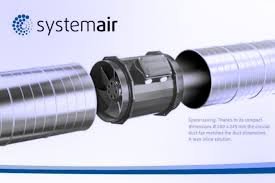
Figur 2: Eksample of the prioAir 8 fan installed inline with ductwork.
5.3 Elektrisk tilslutning
CAUTION: Ensure power is disconnected at the circuit breaker before proceeding with electrical wiring.
- Locate the electrical connection box on the fan housing.
- Open the cover of the connection box.
- Connect the power supply wires to the fan's terminals according to the wiring diagram provided inside the connection box cover. Typically, this involves connecting Live (L), Neutral (N), and Ground (G) wires. The fan uses a 3-pin power connector type.
- Sørg for, at alle forbindelser er sikre og korrekt isolerede.
- Close the connection box cover securely.

Figur 3: Eksploderet view illustrating the internal structure and location of the electrical connection box.

Figur 4: Detaljeret view of the fan's internal components, including the impeller and motor housing.
6. Betjeningsvejledning
Once the FANTECH prioAir 8 fan is properly installed and wired, operation is straightforward:
- Restore power to the circuit at the service panel.
- If connected to a wall switch or thermostat, activate the switch or set the thermostat to the desired operating conditions.
- The fan will begin to operate, moving air through the duct system.
The prioAir 8 is designed for continuous operation. Monitor the airflow and noise level to ensure proper function.
7. Vedligeholdelse
WARNING: Always disconnect power to the fan at the service panel before performing any maintenance or cleaning.
Regular maintenance ensures optimal performance and extends the lifespan of your fan.
7.1 Cleaning the Fan Blades and Housing
Dust and debris can accumulate on the fan blades and inside the housing, reducing efficiency. Clean the fan periodically, depending on the operating environment.
- Disconnect power to the fan.
- Carefully remove the fan from the ductwork or access the internal components if possible.
- Use a soft brush or a vacuum cleaner with a brush attachment to remove dust and debris from the fan blades and the interior of the housing.
- For stubborn dirt, a damp cloth with mild detergent can be used, ensuring no moisture enters the motor or electrical components.
- Allow all parts to dry completely before reassembling or restoring power.

Figur 5: Nærbillede view of the fan's impeller, highlighting the blades that require periodic cleaning.
7.2 Motorsmøring
The fan motor is permanently lubricated and does not require additional lubrication.
8. Fejlfinding
Before contacting technical support, please review følgende almindelige problemer og løsninger:
| Problem | Mulig årsag | Løsning |
|---|---|---|
| Ventilator starter ikke | Ingen strømforsyning Løs ledningsforbindelse Faulty switch/thermostat | Check circuit breaker and power source Verify all electrical connections are secure (with power off) Test or replace switch/thermostat |
| Reduceret luftgennemstrømning | Clogged fan blades/housing Ductwork obstruction Forkert ventilatorretning | Rengør ventilatorblade og -hus Inspect ductwork for blockages Ensure fan is oriented for desired airflow direction |
| Usædvanlig støj eller vibrationer | Løs montering Affald i ventilator Beskadiget pumpehjul | Spænd monteringsbeslagene Disconnect power and remove any debris Contact FANTECH support if impeller is damaged |
9. Garanti og support
FANTECH products are manufactured to high-quality standards and are backed by a manufacturer's warranty. For specific warranty terms and conditions, please refer to the warranty card included with your product or visit the official FANTECH webwebsted.
For technical assistance, replacement parts, or warranty claims, please contact FANTECH customer support:
- Webwebsted: www.fantech.net
- Telefon: Refer to the FANTECH webwebsted for regionale kontaktnumre.
When contacting support, please have your product model number (prioAir 8) and purchase date available.


