1. Introduktion
This manual provides instructions for the setup, operation, and maintenance of your Insignia RC-801-0A LCD TV Remote Control. This remote is designed for use with various Insignia LCD TV models, ensuring seamless control over your television's functions.
2. Pakkens indhold
- 1 x Insignia RC-801-0A Remote Control
Note: Batteries and a user manual are not included in the package.
3. Opsætning
3.1 Batteriinstallation
- Find batterirummet på bagsiden af fjernbetjeningen.
- Skub batteridækslet nedad for at åbne det.
- Isæt to (2) AAA-batterier, og sørg for, at de positive (+) og negative (-) poler er korrekt justeret med markeringerne inde i batterirummet.
- Skub batteridækslet tilbage på plads, indtil det klikker sikkert.
Important: The remote requires 2 AAA batteries (not included).
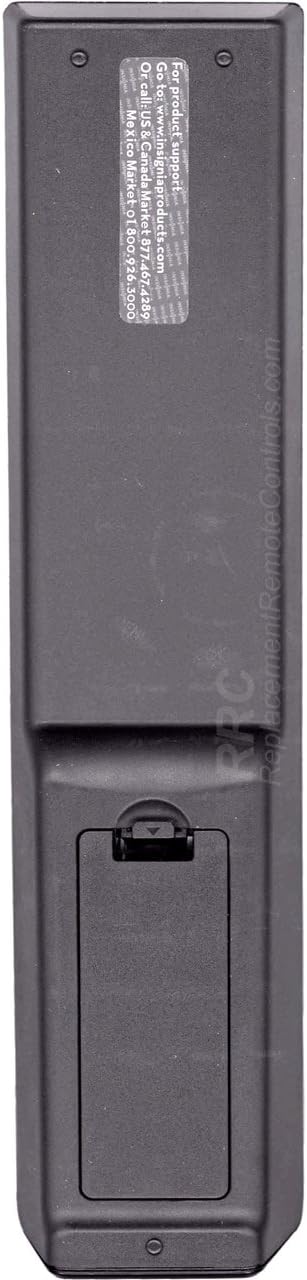
Figur 1: Tilbage view of the Insignia RC-801-0A remote control, showing the battery compartment at the bottom. The compartment cover is designed to slide open for battery insertion.
3.2 Førstegangsbrug
The Insignia RC-801-0A remote control is pre-programmed for compatible Insignia LCD TV models. No additional programming or setup is typically required. Once batteries are installed, the remote should function immediately with your television.
4. Betjeningsvejledning
Familiarize yourself with the buttons on your remote control to effectively operate your Insignia LCD TV.

Figur 2: Front view of the Insignia RC-801-0A remote control, displaying all control buttons. Key sections include power, input selection, number pad, volume/channel controls, menu navigation, and media playback buttons.
4.1 Key Button Functions
- Strøm (●): Tænder eller slukker for tv'et.
- COMP/AV, HDMI, TV: Selects the video input source.
- Nummertastatur (0-9): Indtaster kanalnumre direkte.
- MINDE OM: Vender tilbage til det tidligere viewed kanal.
- VOL (+/-): Justerer lydstyrken.
- CH (▲/▼): Ændrer TV-kanalen op eller ned.
- STUM: Slår lyden fra på tv'et.
- INPUT: Blader gennem tilgængelige inputkilder.
- MENU: Åbner tv'ets hovedmenu.
- Navigation Buttons (▲▼◀▶): Navigerer gennem menupunkter.
- ENTER/OK: Bekræfter valg i menuer.
- AFSLUT: Closes the current menu or on-screen display.
- GUIDE: Viser den elektroniske programguide (hvis tilgængelig).
- Media Playback Buttons (◀◀, ▶, ▮▮, ▶▶): Controls playback of connected media devices (e.g., DVD player, USB).
- ZOOM: Adjusts the screen zoom level.
5. Vedligeholdelse
5.1 Udskiftning af batteri
Replace batteries when the remote's response becomes inconsistent or stops working. Follow the battery installation steps in Section 3.1. Always replace both batteries at the same time with new AAA batteries.
5.2 Rengøring
For at rengøre fjernbetjeningen skal du forsigtigt tørre dens overflade af med en blød, tør klud. Ved genstridigt snavs skal du let tørre den af.ampen the cloth with water. Avoid using harsh chemicals or abrasive cleaners, as these can damage the remote's finish or internal components.
6. Fejlfinding
- Fjernbetjeningen svarer ikke:
- Sørg for, at batterierne er isat korrekt med den korrekte polaritet.
- Udskift gamle batterier med nye.
- Kontroller, om der er forhindringer mellem fjernbetjeningen og tv'ets IR-sensor.
- Ret fjernbetjeningen direkte mod tv'ets IR-sensor.
- Specifikke knapper virker ikke:
- Clean the remote's surface, especially around the non-functional buttons, to remove any debris.
- If the issue persists after battery replacement and cleaning, the remote may require replacement.
7. Specifikationer
| Modelnummer | RC-801-0A |
| Mærke | INSIGNIA |
| Produktdimensioner | 8 x 2 x 1 tommer |
| Varens vægt | 3.67 ounce |
| Strømkilde | 2 x AAA batterier (medfølger ikke) |
| Kompatible enheder | Insignia LCD Televisions |
| Farve | Sort |
8. Garanti og support
8.1 Garantioplysninger
This product comes with a Six Months Warranty from the date of purchase. Please retain your proof of purchase for warranty claims. The warranty covers manufacturing defects but does not cover damage caused by misuse, accidents, or unauthorized modifications.
8.2 Kundesupport
For product support or warranty inquiries, please refer to the contact information provided by your retailer or the manufacturer's official website. The back of the remote may contain specific support details (see Figure 3).

Figur 3: Tilbage view of the Insignia RC-801-0A remote control, showing a sticker with support information. The text indicates to visit www.insigniaproducts.com for product support and provides phone numbers for US/Canada and Mexico.
Specific support details from the remote's back sticker:
- For product support: Go to www.insigniaproducts.com
- Call US & Canada: 1-877-467-4289
- Mexico: 01-800-926-3000


