Indledning
The Wasabi Mango UHD430 Real 4K HDMI 2.0 Monitor is a high-performance display featuring a 43-inch LG AH-IPS panel, delivering stunning 3840 x 2160 UHD 4K resolution. Designed for clarity and vibrant colors, this monitor supports 10-bit color depth and offers wide viewing vinkler.
Nøglefunktioner omfatter:
- 43-inch LG AH-IPS LED Backlit Panel for superior image quality.
- UHD 4K (3840 x 2160) resolution for incredibly detailed visuals.
- 1.06 billion colors (10-bit) for rich and accurate color reproduction.
- Multiple connectivity options: HDMI 2.0 (x2), HDMI 1.4a (x2), DisplayPort 1.2 (x1), D-Sub, USB 3.0 Hub.
- 60Hz refresh rate via DisplayPort 1.2 and HDMI 2.0 for smooth motion.
- Built-in 10W + 10W speakers for integrated audio.

Billede: Forside view of the Wasabi Mango UHD430 4K monitor, showcasing its sleek design and a remote control for operation.
Pakkens indhold
Markér venligst feltet for følgende elementer:
- Wasabi Mango UHD430 Monitor
- DisplayPort-kabel
- HDMI kabel
- Remote Control (Note: Text on remote may be in Korean)
- Power Cable (110~240V adapter + US plug)
- USB Hub kabel
- Screws for stand
- Optisk lydkabel
- Brugermanual
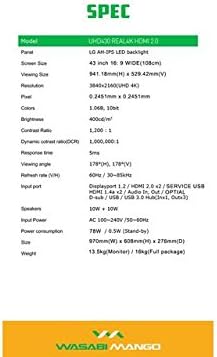
Image: A visual representation of the monitor's dimensions and a list of all accessories included in the package, such as various cables, remote control, and stand screws.
Opsætning
1. Samling af stativet
- Placer forsigtigt skærmen med forsiden nedad på en blød, ren overflade for at undgå ridser.
- Attach the stand base to the monitor using the provided screws. Ensure it is securely fastened.
2. Tilslutning til en strømkilde
- Connect the power cable to the monitor's power input port.
- Sæt den anden ende af strømkablet i en jordet stikkontakt.
3. Connecting to a Source Device
The monitor supports various input types. Choose the appropriate cable for your device:
- DisplayPort 1.2: For optimal 4K @ 60Hz performance, use the included DisplayPort cable. Connect one end to the monitor's DisplayPort input and the other to your computer's DisplayPort output.
- HDMI 2.0: For 4K @ 60Hz, use an HDMI 2.0 cable. Connect to one of the HDMI 2.0 ports on the monitor.
- HDMI 1.4a: Supports 4K @ 30Hz. Connect to one of the HDMI 1.4a ports.
- D-Sub: For analog connections.
- USB 3.0 Hub: Connect the USB Hub cable from your computer to the monitor's USB 3.0 input to enable the monitor's USB ports.
Note: Using a longer (over 1.5m) or low-quality DisplayPort/HDMI cable may limit the refresh rate to 30Hz at 4K resolution.
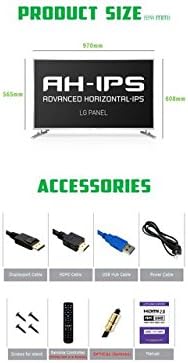
Image: The back panel of the monitor, illustrating the arrangement of power input, DisplayPort, HDMI, D-Sub, and USB ports for connection.
Betjening af monitoren
Tænd/sluk
- Press the power button on the monitor or the remote control to turn the monitor on or off.
Valg af input
- Use the "Input" button on the remote control to cycle through available input sources (DisplayPort, HDMI1, HDMI2, HDMI3, HDMI4, D-Sub).
On-Screen Display (OSD) menu
The OSD menu allows you to adjust various display settings. Use the remote control to navigate:
- Press the "Menu" button to open the OSD.
- Use the arrow keys (Up/Down/Left/Right) to navigate through menu options.
- Press "OK" or "Enter" to select an option or confirm a setting.
- Press "Exit" or "Menu" again to close the OSD.
Almindelige OSD-indstillinger inkluderer:
- Billedindstillinger: Brightness, Contrast, Color Temperature, Sharpness.
- Lydindstillinger: Lydstyrke, Slå fra.
- Indgangsvalg: Manual input source selection.
- OSD-indstillinger: OSD Language, OSD Transparency, OSD Timeout.
- Andre indstillinger: Aspect Ratio, ECO Mode.

Image: The monitor displaying content, with the remote control visible, indicating its use for navigating the monitor's functions and settings.
Opretholdelse
Rengøring af skærmen
- Tag altid stikket ud af stikkontakten før rengøring.
- Brug en blød, fnugfri klud lidt damprengøres med vand eller et ikke-slibende skærmrensemiddel.
- Sprøjt ikke rengøringsmiddel direkte på skærmen.
- Avoid using benzene, thinner, ammonia, or abrasive cleaners, as these can damage the display surface.
- Tør forsigtigt skærmen af for at fjerne støv og snavs.
Almen pleje
- Hold skærmen væk fra direkte sollys, varmekilder og for meget støv.
- Sørg for korrekt ventilation omkring skærmen for at forhindre overophedning.
- Placer ikke tunge genstande på skærmen eller dens kabler.
- Undgå at tabe skærmen eller udsætte den for kraftige stød.
Fejlfinding
| Problem | Mulig årsag | Løsning |
|---|---|---|
| Ingen strøm | Strømkabel ikke tilsluttet; Strømudtag virker ikke. | Sørg for, at strømkablet er korrekt tilsluttet skærmen og stikkontakten. Test stikkontakten med en anden enhed. |
| Intet signal / Blank skærm | Incorrect input source selected; Video cable loose or faulty; Source device not powered on. | Press "Input" button on remote to select correct source. Check video cable connections. Ensure source device is on and outputting video. |
| Image is distorted or blurry | Incorrect resolution setting; Faulty video cable; Graphics card driver issue. | Set display resolution to 3840x2160. Try a different video cable. Update graphics card drivers. |
| Ingen lyd | Volume too low or muted; Audio cable not connected (if using external speakers); Incorrect audio output selected on source device. | Increase volume or unmute. Ensure audio is routed correctly from source device to monitor. |
| Fjernbetjening virker ikke | Batteries are dead or incorrectly inserted; Obstruction between remote and monitor. | Replace batteries. Ensure clear line of sight to the monitor's IR receiver. |
Specifikationer
| Feature | Detalje |
|---|---|
| Modelnavn | UHD430 Real 4K HDMI 2.0 |
| Paneltype | LG AH-IPS LED Backlight |
| Skærmstørrelse | 43 inches (109.2 cm), 16:9 Wide |
| Opløsning | 3840 x 2160 UHD 4K |
| Farver | 1.06 Billion (10-bit) |
| Kontrastforhold | 1200:1 |
| Dynamisk kontrastforhold | 1,000,000:1 |
| Lysstyrke | 400 cd/m² |
| Svartid | 5 ms (G til G) |
| Viewi vinkel | 178 grader vandret, 178 grader lodret |
| Opdateringshastighed | 60 Hz (DisplayPort 1.2 & HDMI 2.0), 30 Hz (HDMI 1.4a) |
| Indgangsporte | DisplayPort 1.2 x1, HDMI 2.0 x2, HDMI 1.4a x2, D-Sub x1, USB 3.0 Hub (In x1, Out x3) |
| Lyd | 10W + 10W Speakers |
| Strømindgang | AC 100-240V / 50-60Hz |
| Strømforbrug | 78W (Operating) / 0.5W (Stand-by) |
| Dimensioner (B x H x D) | 970 mm x 608 mm x 276 mm (med stativ) |
| Vægt | 13.5 kg (Monitor) / 18 kg (Full package) |
Image: A graphic detailing the technical specifications of the UHD430 monitor, such as screen size, resolution, and refresh rate.
Garanti og support
The Wasabi Mango UHD430 monitor comes with a manufacturer's warranty. Please refer to the warranty card included in your package for specific terms and conditions.
Defective Pixel Policy: For the UHD430 SE model, 0-15 defective pixels (including dead/stuck/sub pixels) are permitted under the warranty policy.
For technical support or service inquiries, please contact your retailer or the official Wasabi Mango support channels. Keep your purchase receipt and product serial number handy for faster service.


