1. Introduktion
This manual provides detailed instructions for the installation, operation, and maintenance of your Pyle PLDNAND621 In-Dash GPS Navigation System. Please read this manual thoroughly before using the product to ensure proper functionality and to prevent damage.
1.1 Produkt overview
The Pyle PLDNAND621 is an advanced in-dash audio/video system featuring a 6-inch multi-touch capacitive display. It integrates GPS navigation with preloaded maps, Bluetooth connectivity, and multimedia playback capabilities, including CD/DVD, USB, and microSD. The system is designed to enhance your driving experience with turn-by-turn navigation and various entertainment options.
1.2 Nøglefunktioner
- 6-inch Multi-Touch Capacitive Display (800 x 480 resolution)
- Integrated GPS Navigation with Preloaded Maps
- Bluetooth til håndfri opkald og lydstreaming
- CD/DVD-afspiller
- AM/FM Tuner with 30 Station Memory
- USB and MicroSD Card Slots for Media Playback
- Support for various audio, video, and image file formats (MP3, MP4, AVI, WAV, JPEG)
- Bagview Backup kamera support
- Steering Wheel Button Control Support
- Anti-Shock Mechanism (ESP Function)
- Internet connectivity via Wi-Fi (tethering or hotspot)
- Access to Android applications
2. Sikkerhedsoplysninger
Overhold følgende sikkerhedsretningslinjer for at forhindre personskade eller beskadigelse af enheden:
- Betjen ikke systemet på en måde, der distraherer dig fra kørslen. Prioritér altid trafiksikkerhed.
- Ensure proper installation by a qualified professional to avoid electrical hazards or vehicle damage.
- Enheden må ikke skilles ad eller ændres. Dette kan forårsage funktionsfejl eller elektrisk stød.
- Hold lydstyrken på et niveau, der gør det muligt at høre trafiklyde udefra.
- Rengør skærmen med en blød, tør klud. Undgå slibende rengøringsmidler.
- Ensure the parking brake is engaged when watching videos or accessing certain features to comply with safety regulations.
3. Pakkens indhold
Kontroller, at alle varer er til stede i kassen:

Figur 3.1: Components included in the Pyle PLDNAND621 package.
This image displays the Pyle PLDNAND621 Android Stereo Receiver (rear view shown), power and wiring harness, Bluetooth microphone, two USB extension cables, mounting brackets and hardware, and a remote control.
- Pyle PLDNAND621 Android Stereo Receiver
- Strøm- og ledningsnet
- Bluetooth-mikrofon
- (2) USB Extension Cables
- Monteringsbeslag & hardware
- Fjernbetjening
- GPS antenne
- Brugervejledning (dette dokument)
4. Installation
Installation of the Pyle PLDNAND621 requires technical knowledge and should ideally be performed by a professional installer. Incorrect installation can lead to damage to the unit or your vehicle.
4.1 Ledningsdiagram
Refer to the detailed wiring diagram provided with the unit's physical manual for specific connections. Key connections typically include:
- Magt: Konstant 12V (Gul), Tilbehør 12V (Rød), Jord (Sort).
- Højttalere: Connect to vehicle's speaker wires (Front Left, Front Right, Rear Left, Rear Right).
- Antenne: Connect the radio antenna and GPS antenna.
- Hjælpeindgange/udgange: RCA connections for external audio/video devices, subwoofer output.
- Bakkameraindgang: Connect to a rearview camera for automatic display when reversing.
- Ratstyring: Connect to vehicle's steering wheel control interface (if applicable).
- USB-porte: Til USB-enheder og opladning.
4.2 Montering
Use the provided mounting brackets and hardware to secure the unit into your vehicle's dashboard. Ensure the unit is firmly seated and does not obstruct any vehicle controls or airbags.
5. Indledende opsætning
After installation, power on the unit and follow the on-screen prompts for initial configuration.
5.1 Sprog- og tidsindstillinger
Naviger til systemindstillingerne for at vælge dit foretrukne sprog, indstille den korrekte tidszone og justere dato og klokkeslæt.
5.2 Wi-Fi-forbindelse
To access online features and download applications, connect the unit to a Wi-Fi network. This can be done via a mobile hotspot from your smartphone or a local Wi-Fi network.
- Gå til Indstillinger.
- Vælge Wi-Fi.
- Turn Wi-Fi On.
- Vælg det ønskede netværk, og indtast adgangskoden, hvis du bliver bedt om det.
5.3 GPS-kalibrering
Sørg for, at GPS-antennen er korrekt installeret og har en klar view of the sky. The system will automatically acquire satellite signals. For optimal navigation, allow the system to calibrate its position upon first use.
6. Betjeningsvejledning
This section details the primary functions and how to operate your Pyle PLDNAND621 system.
6.1 Berøringsskærmsgrænseflade

Figur 6.1: Main interface of the Pyle PLDNAND621 with touch interaction.
This image displays the 6-inch touch screen display of the Pyle PLDNAND621, featuring various application icons such as DVR, Downloads, DVD, Email, Music, Explorer, YouTube, Bluetooth, and Video. A hand is shown interacting with the screen, demonstrating its touch functionality.
The unit features a responsive multi-touch capacitive display. Navigate through menus and applications by tapping, swiping, and pinching gestures, similar to a smartphone or tablet.
6.2 GPS-navigation

Figur 6.2: Pyle PLDNAND621 highlighting key features including GPS.
This image displays the Pyle PLDNAND621 unit with graphical icons representing its core functionalities: USB connectivity, CD/DVD playback, GPS navigation, Radio tuner, Android operating system, and Full HD 1080 video support.
The system comes with preloaded maps and supports turn-by-turn navigation. Access the navigation application from the main screen.
- Tryk på Navigation ikonet på startskærmen.
- Indtast din destination ved hjælp af skærmtastaturet.
- Select your preferred route and start navigation.
- Følg stemmemeddelelserne og instruktionerne på skærmen.
6.3 Bluetooth-forbindelse
Tilslut din smartphone eller andre Bluetooth-aktiverede enheder for håndfri opkald og lydstreaming.
- Gå til Indstillinger og vælg Bluetooth.
- Slå Bluetooth til On.
- On your mobile device, search for available Bluetooth devices and select "Pyle PLDNAND621".
- Bekræft parringskoden på begge enheder.
- Når den er parret, kan du foretage/modtage opkald og streame lyd gennem enheden.
6.4 Multimedia Playback (CD/DVD, USB, MicroSD)
Enheden understøtter forskellige mediekilder til afspilning af lyd og video.
- CD/DVD: Insert a disc into the slot. The system will automatically switch to the CD/DVD player mode.
- USB: Connect a USB flash drive to one of the USB ports. Access media files gennem Musik or Video applikationer.
- MicroSD: Insert a microSD card into the designated slot. Media files can be accessed similarly to USB.
6.5 Radio Tuner (AM/FM)
Få adgang til Radio application to listen to AM/FM broadcasts.
- Brug skærmknapperne til at søge efter stationer, indstille manuelt eller vælge mellem gemte forudindstillinger.
- The unit has memory for up to 30 stations.
6.6 Applications and Internet Access

Figur 6.3: Pyle PLDNAND621 demonstrating app download and web browsing capabilities.
This image illustrates the Pyle PLDNAND621's ability to "Surf the WEB & download Apps." It shows the unit's display with various app icons and mentions compatibility with both Apple App Store and Google Play for downloading applications.
The PLDNAND621 operates on an Android platform, allowing you to download and use various applications. Connect to Wi-Fi to access the internet and the Google Play Store.
- Åbn Google Play Butik app.
- Gennemse eller søg efter ønskede applikationer.
- Download and install apps as you would on an Android smartphone.
6.7 Mirror Link / Air Play
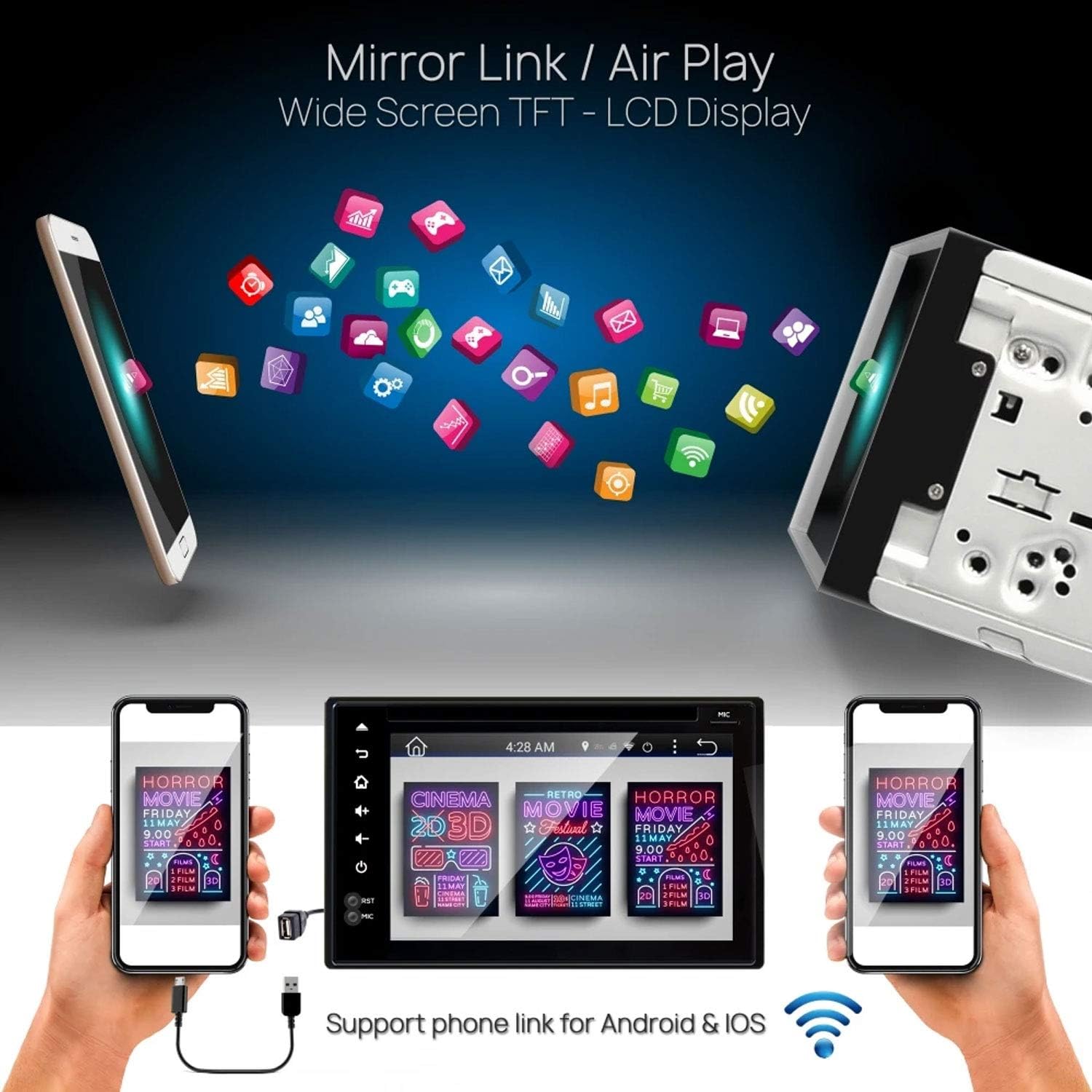
Figur 6.4: Pyle PLDNAND621 supporting Mirror Link / Air Play functionality.
The image shows the Pyle PLDNAND621 unit connected to both Android and iOS smartphones, illustrating its "Mirror Link / Air Play" feature. This allows content from the phone to be displayed on the unit's wide-screen TFT-LCD display.
The unit supports Mirror Link (for Android) and Air Play (for iOS) to mirror your smartphone's screen onto the unit's display. This feature allows you to view compatible apps and content from your phone on the larger screen.
- Connect your smartphone to the unit via USB or Wi-Fi (refer to specific app instructions on your phone).
- Activate the Mirror Link or Air Play function on the unit.
- Følg anvisningerne på skærmen for at etablere forbindelsen.
6.8 bagview Backup kamera support

Figur 6.5: Pyle PLDNAND621 with active rearview backup camera display.
This image shows the Pyle PLDNAND621 unit installed in a car dashboard, displaying a live feed from a rearview backup camera. Green and red guidelines are visible on the screen, assisting with parking and maneuvering.
Hvis en kompatibel bagendeview camera is connected, the display will automatically switch to the camera feed when the vehicle is put into reverse gear. This feature aids in safe parking and maneuvering.
6.9 Steering Wheel Button Control

Figur 6.6: Pyle PLDNAND621 highlighting Steering Wheel Button Control and Anti-Shock features.
The image depicts the Pyle PLDNAND621 unit alongside an icon representing steering wheel controls, indicating compatibility. Below, an illustration shows the unit with a cracked ground effect, emphasizing its "Anti-Shock Mechanism-ESP Function" for durability.
The unit supports connection to your vehicle's existing steering wheel controls. This allows you to operate basic functions like volume, track change, and mode selection without taking your hands off the steering wheel. Configuration may be required in the system settings.
7. Vedligeholdelse
Proper maintenance ensures the longevity and optimal performance of your Pyle PLDNAND621.
- Rengøring af skærmen: Brug en blød, fnugfri klud til forsigtigt at tørre skærmen af. Ved genstridige pletter, tør let afampRengør kluden med vand eller et skærmsikkert rengøringsmiddel. Undgå skrappe kemikalier eller slibende materialer.
- Rengøring af enheden: Tør enhedens yderside af med en blød, tør klud.
- Softwareopdateringer: Periodically check for software updates through the system settings or Pyle's official webwebstedet for at sikre, at du har de nyeste funktioner og fejlrettelser.
- Diskpleje: Handle CDs/DVDs by their edges to avoid fingerprints and scratches. Keep discs clean and store them in their cases when not in use.
8. Fejlfinding
If you encounter issues with your Pyle PLDNAND621, refer to the following common problems and solutions:
| Problem | Mulig årsag | Løsning |
|---|---|---|
| Enheden tænder ikke. | Forkert ledningsføring, sprunget sikring, problem med bilens batteri. | Check power connections (Yellow, Red, Black wires). Inspect vehicle fuses. Ensure vehicle battery is charged. |
| Ingen lyd fra højttalere. | Forkert højttalerkabelføring, lydstyrke for lav, mute aktiveret, forkert lydkilde. | Kontroller højttalertilslutninger. Skru op for lydstyrken. Kontroller, om lydløs er aktiv. Vælg den korrekte lydkilde. |
| GPS-signal mistet eller unøjagtigt. | GPS-antennen er blokeret eller forkert tilsluttet. | Sørg for, at GPS-antennen har en fri view af himlen. Kontroller antenneforbindelsen. |
| Bluetooth-parring mislykkes. | Device not in pairing mode, incorrect password, interference. | Ensure both devices are in pairing mode. Re-enter password. Move closer to the unit. Restart Bluetooth on both devices. |
| Berøringsskærmen reagerer ikke. | Systemfryser, midlertidig softwarefejl. | Perform a soft reset (refer to manual for reset button location, often a small pinhole). If persistent, consult support. |
| DVD/CD not playing. | Disc dirty, scratched, or incompatible format. | Rengør disken. Prøv en anden disk. Sørg for, at diskformatet understøttes. |
9. Specifikationer
Detailed technical specifications for the Pyle PLDNAND621:
- Modelnummer: PLDNAND621
- Skærmtype: LCD, Multi-Touch Capacitive
- Skærmstørrelse: 6 tommer
- Opløsning: 800 x 480 pixels
- Forbindelse teknologi: Bluetooth, USB, Wi-Fi, Micro SD, Auxiliary Input
- Medieafspilning: CD, DVD, USB Flash Drive, Micro SD Card
- Radiotuner: AM/FM with 30 station memory
- Særlige funktioner: GPS Navigation, Touchscreen, Bluetooth, Rearview Camera Support, Steering Wheel Control Support, Anti-Shock Mechanism (ESP)
- Dimensioner (produkt): 25.4 x 18.42 x 31.12 cm (10 x 7.25 x 12.25 tommer)
- Vægt (produkt): 2.27 kg (5 lbs)
- Fabrikant: PYLE-CAR AUDIO/VIDEO
10. Garanti og support
For warranty information and technical support, please refer to the warranty card included with your product or visit the official Pyle webwebstedet. Behold din købskvittering som købsbevis.
Pyle Officiel Webwebsted: www.pyleusa.com
Contact customer service for assistance with installation, troubleshooting, or product inquiries not covered in this manual.


