1. Introduktion
This user manual provides detailed instructions for the setup, operation, maintenance, and troubleshooting of your Telefunken MC1003N DAB+ Music System. Please read this manual thoroughly before using the device to ensure proper functionality and to maximize your listening experience. Keep this manual for future reference.
2. Vigtige sikkerhedsinstruktioner
- Strømkilde: Tilslut kun enheden til en stikkontakt med vekselstrøm med den angivne lydstyrke.tage.
- Ventilation: Sørg for tilstrækkelig ventilation. Bloker ikke ventilationsåbningerne.
- Vand og fugt: Udsæt ikke enheden for regn, fugt eller dryppende/sprøjtende væsker. Placer ikke genstande fyldt med væsker oven på enheden.
- Varme: Hold enheden væk fra varmekilder såsom radiatorer, varmeapparater, komfurer eller andre apparater (herunder ampløftere), der producerer varme.
- Rensning: Tag stikket ud af stikkontakten før rengøring. Brug en blød, tør klud. Brug ikke flydende rengøringsmidler eller sprayrengøringsmidler.
- Service: Forsøg ikke selv at servicere dette produkt. Overlad al service til kvalificeret servicepersonale.
3. Pakkens indhold
Bekræft, at alle nedenstående varer er inkluderet i din pakke:
- Telefunken MC1003N Compact Music System
- Fjernbetjening
- Strømadapter
- Brugervejledning (dette dokument)
4. Produktet er slutview
Familiarize yourself with the various parts and controls of your Telefunken MC1003N music system.
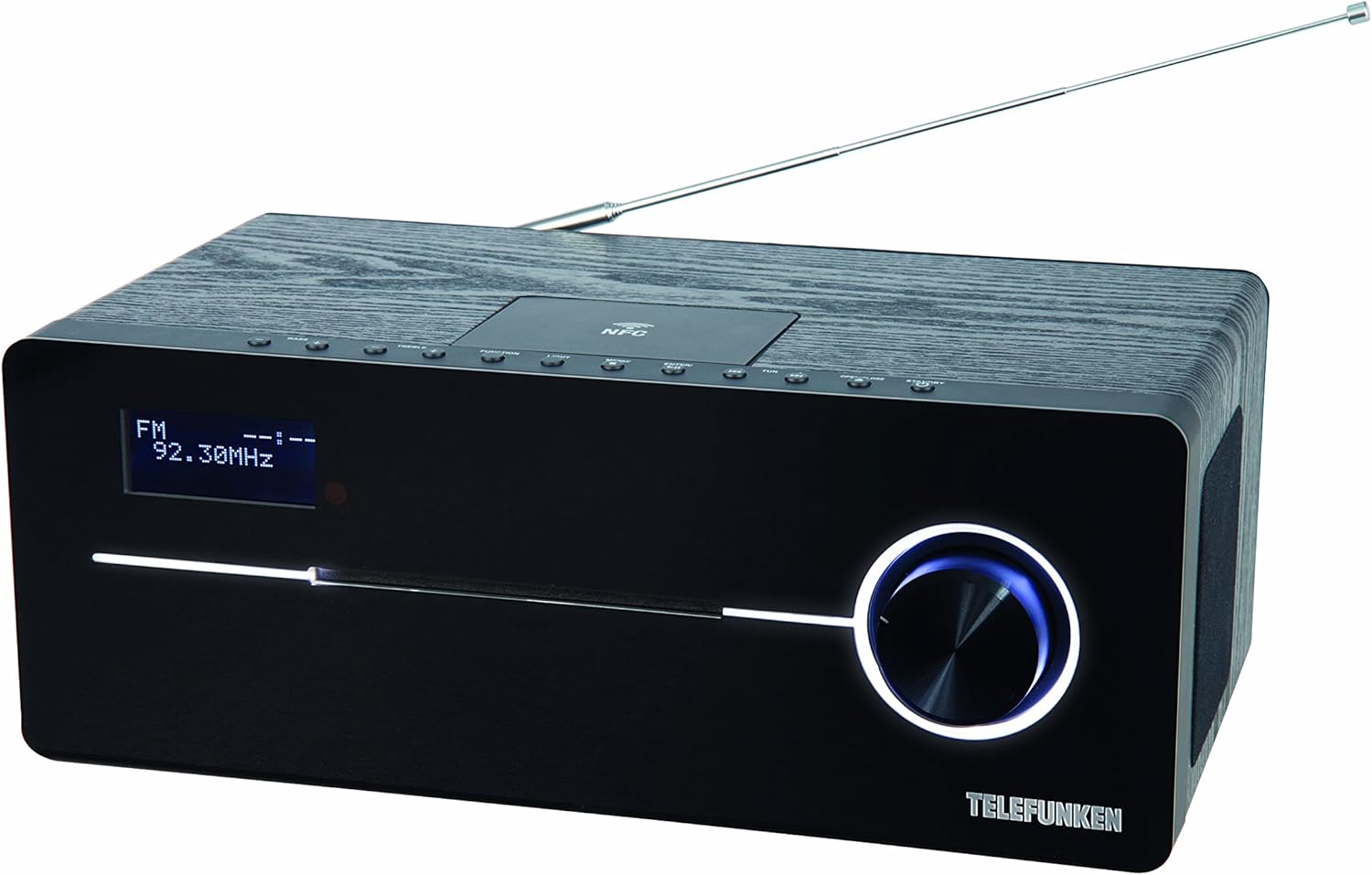
This image displays the Telefunken MC1003N compact music system. The front panel features a digital display showing 'FM 92.30MHz', a large illuminated control knob on the right, and a CD tray slot. The top panel includes several small control buttons and an NFC tag area. A telescopic antenna extends from the rear top of the unit.
4.1 Frontpanel
- Digital skærm: Shows current mode, frequency, track information, and menu options.
- CD Tray Slot: Til isætning og udtagning af lyd-cd'er.
- Betjeningsknap: Multi-functional knob for volume adjustment, menu navigation, and selection.
4.2 Toppanel
- Tænd/Standby-knap: Tænder eller slukker for enheden.
- Funktionsknap: Switches between input modes (DAB+, FM, CD, Bluetooth, USB, AUX-in).
- Lys knap: Controls display backlight or illumination.
- Menu-knap: Giver adgang til systemindstillinger og -valgmuligheder.
- Enter/Pair Button: Confirms selections or initiates Bluetooth pairing.
- TUN+/- Buttons: Tunes radio frequencies or navigates tracks/folders.
- Åbn/Luk-knap: Opens and closes the CD tray.
- NFC Tag Areal: Til hurtig parring med NFC-aktiverede enheder.
4.3 Rear Panel / Side Connections
- Teleskopantenne: Til modtagelse af DAB+ og FM-radio.
- Strømindgang: Tilslutter strømadapteren.
- AUX-in (3.5mm): Tilslutter eksterne lydenheder.
- USB-port: Connects USB storage devices for MP3 playback.
- Hovedtelefonstik (3.5 mm): Til privat lytning.
5. Indledende opsætning
5.1 Placering
Place the music system on a stable, flat surface. Ensure there is sufficient space around the unit for proper ventilation. Avoid placing it near strong magnetic fields or direct sunlight.
5.2 Antenneforbindelse
Extend the telescopic antenna fully for optimal DAB+ and FM radio reception. Adjust its position to improve signal strength if needed.
5.3 Strømtilslutning
Connect the supplied power adapter to the DC IN socket on the rear of the unit, then plug the adapter into a standard wall outlet.
6. Betjeningsvejledning
6.1 Tænd/sluk
- Tryk på Strøm/Standby button on the top panel or remote control to turn the unit on or off.
6.2 Valg af tilstand
- Tryk på Fungere button repeatedly to cycle through available modes: DAB+, FM, CD, Bluetooth, USB, AUX-in.
6.3 DAB+ radiobetjening
6.3.1 Automatisk scanning
- I DAB+-tilstand skal du trykke på Menu button, then use the control knob or TUN+/- buttons to select 'Full Scan'. Press Indtast to start scanning for available DAB+ stations.
6.3.2 Manuel indstilling
- Brug TUN+/- buttons to manually browse through available DAB+ ensembles.
6.3.3 Storing and Recalling Presets
- To store a station, press and hold the Forudindstillet button (if available, or refer to manual for specific preset steps).
- Tryk på for at hente en gemt station Forudindstillet knap og brug TUN+/- for at vælge det ønskede forudindstillede nummer.
6.4 FM-radiofunktion
6.4.1 Automatisk scanning
- I FM-tilstand skal du trykke på og holde nede TUN+/- button for a few seconds to automatically scan for the next available station.
6.4.2 Manuel indstilling
- Tryk på TUN+/- button briefly to adjust the frequency step by step.
6.4.3 Storing and Recalling Presets
- Similar to DAB+ presets, use the Forudindstillet function to store and recall your favorite FM stations. The system supports 30 station memories.
6.5 CD-afspilning
6.5.1 Loading a CD
- Tryk på Åbn/luk knappen for at åbne CD-skuffen.
- Place a CD (CD/CD-R) with the label side up into the tray.
- Tryk på Åbn/luk knappen igen for at lukke bakken. Afspilningen starter automatisk.
6.5.2 Afspilningskontroller
- Use the control knob or remote for Play/Pause, Skip Track, and Fast Forward/Rewind functions.
6.6 Bluetooth -parring
6.6.1 Activating Bluetooth
- Skift enheden til Bluetooth-tilstand ved hjælp af Fungere button. The display will show 'BT' or 'Bluetooth' and indicate pairing mode.
6.6.2 Parring med en enhed
- Aktiver Bluetooth på din smartphone eller tablet, og søg efter tilgængelige enheder.
- Select 'Telefunken MC1003N' from the list.
- Once paired, you can stream audio from your device to the music system.
6.7 NFC-parring
6.7.1 Using NFC
- Ensure NFC is enabled on your compatible smartphone or tablet.
- Tap your device gently on the NFC tag area on the top panel of the music system.
- Confirm the pairing request on your device.
6.8 USB-afspilning
6.8.1 Tilslutning af en USB-enhed
- Insert a USB storage device containing MP3 files i USB-porten.
- Switch the unit to USB mode using the Fungere knap.
6.8.2 File Navigation
- Use the control knob or remote to navigate through folders and select MP3 tracks.
6.9 AUX-in Connection
6.9.1 Connecting External Audio Devices
- Tilslut en ekstern lydenhed (f.eks. MP3-afspiller) til AUX-indgang porten ved hjælp af et 3.5 mm lydkabel.
- Switch the unit to AUX-in mode using the Fungere knap.
- Styr afspilning fra din eksterne enhed.
6.10 Lydindstillinger
6.10.1 Equalizer Presets
- Tryk på EQ button (if available, or navigate via Menu) to cycle through sound modes: Flat, Classic, Pop, Rock, Jazz.
7. Vedligeholdelse
7.1 Pleje og rengøring
- Tag altid stikket ud af stikkontakten før rengøring.
- Brug en blød, tør og fnugfri klud til at tørre de udvendige overflader af.
- Brug ikke slibende rengøringsmidler, voks eller opløsningsmidler, da de kan beskadige finishen.
- Brug en specialiseret CD-linserenser til CD-linser.
8. Fejlfinding
If you encounter any issues with your Telefunken MC1003N, refer to the table below for common problems and solutions.
| Problem | Løsning |
|---|---|
| Ingen strøm | Check if the power adapter is securely connected to the unit and the wall outlet. Try a different outlet. |
| Ingen lyd | Adjust the volume. Check if headphones are connected. Ensure the correct input mode is selected. |
| Dårlig radiomodtagelse | Extend and adjust the telescopic antenna. Move the unit to a location with better signal. Perform a full scan for DAB+ stations. |
| Bluetooth-parring mislykkes | Ensure the unit is in Bluetooth pairing mode. Make sure Bluetooth is enabled on your device and it's within range. Forget previous pairings on your device and try again. |
| CD'en afspiller ikke | Ensure the CD is clean and inserted correctly (label side up). Check if the CD is scratched or damaged. Try a different CD. |
| USB ikke genkendt | Ensure the USB device is formatted correctly (FAT32) and contains supported MP3 files. Try a different USB device. |
9. Tekniske specifikationer
- Model: MC1003N
- Mærke: Telefunken
- Udgangseffekt: 100 Watts (50 Watts per speaker)
- Forbindelse: Bluetooth 3.0, NFC, USB, AUX-in (3.5mm), Headphone Jack (3.5mm)
- Tuner: Digital PLL-tuner (DAB+, FM)
- Forudindstillede stationer: 30 (for FM/DAB+)
- CD-kompatibilitet: CD, CD-R
- Understøttede lydformater: MP3, CD-DA, DAB
- Lydkontrol: Equalizer presets (Flat, Classic, Pop, Rock, Jazz)
- Strømkilde: Elektrisk med ledning
- Dimensioner (L x B x H): 35.1 x 13.6 x 21.4 cm
- Vægt: 3.65 kg
10. Garanti og support
Your Telefunken MC1003N DAB+ Music System is covered by a manufacturer's warranty. Please refer to the warranty card included in your package for specific terms and conditions. For technical support, service, or warranty claims, please contact your retailer or the authorized Telefunken service center in your region.


