1. Introduktion
The Muse M-192 CR is a versatile clock radio designed to provide reliable timekeeping, alarm functions, and FM radio reception. It features a large, easy-to-read digital display, dual alarms, and convenient functions such as snooze, sleep, and NAP. This manual provides detailed instructions for the proper setup, operation, and maintenance of your device.
2. Sikkerhedsinstruktioner
- Læs alle instruktioner omhyggeligt, før du betjener enheden.
- Keep the device away from water or moisture.
- Bloker ikke ventilationsåbninger. Sørg for tilstrækkelig plads omkring enheden for korrekt luftgennemstrømning.
- Use only the AC adapter supplied with the unit.
- Undgå at udsætte enheden for ekstreme temperaturer, direkte sollys eller høj luftfugtighed.
- Forsøg ikke at skille enheden ad eller ændre den. Overlad al service til kvalificeret personale.
3. Pakkens indhold
Tjek venligst pakken for følgende varer:
- 1 x Muse M-192 CR Clock Radio
- 1 x vekselstrømsadapter
- 1 x Brugsanvisning (dette dokument)
4. Produktet er slutview
Familiarize yourself with the various parts and controls of your Muse M-192 CR Clock Radio.

Figur 1: Forfra vinklet view of the Muse M-192 CR Clock Radio, showcasing dets store digitale display og kontrolknapper.
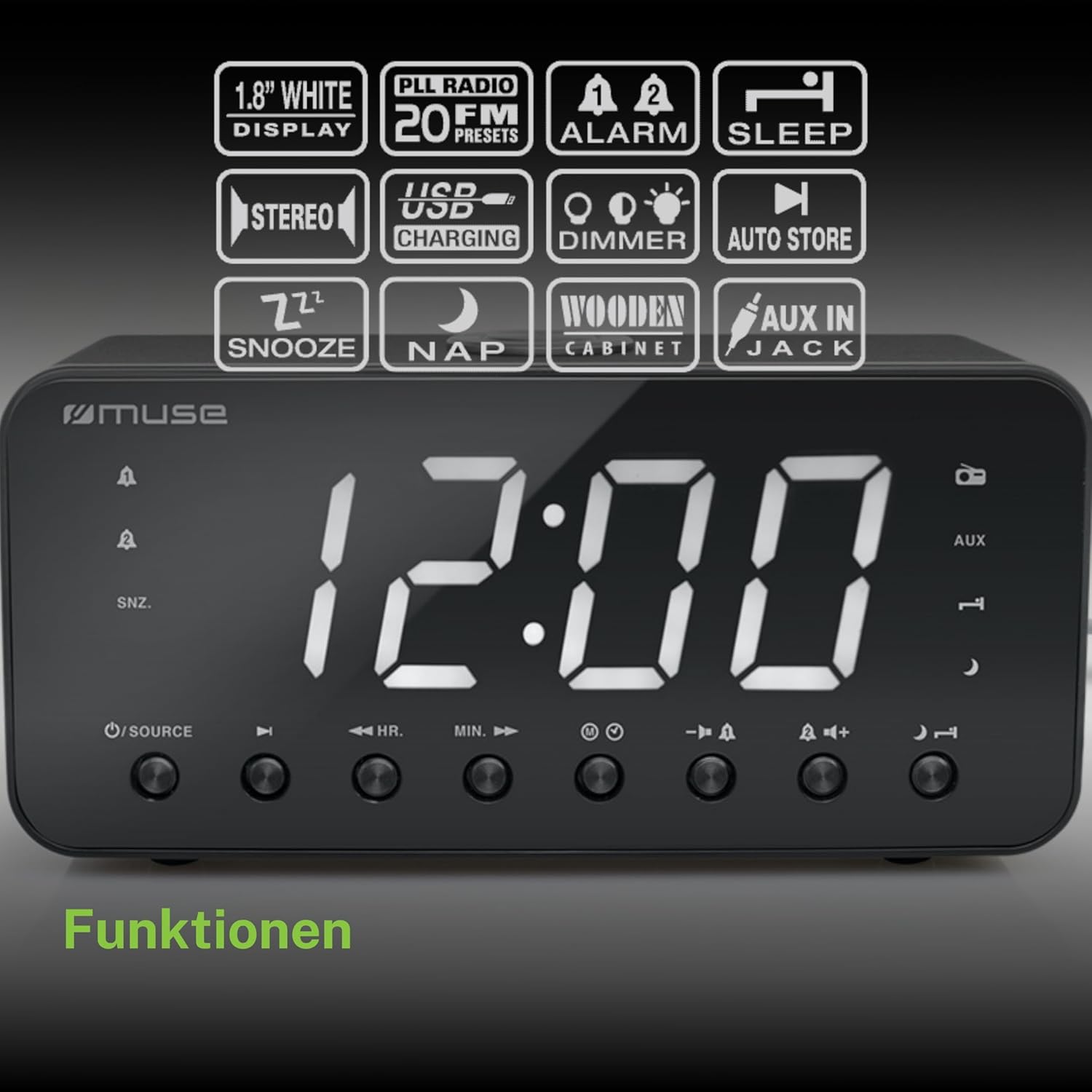
Figure 2: Diagram illustrating the key features and control buttons on the Muse M-192 CR Clock Radio, including the 1.8-inch white display, PLL FM radio with 20 presets, dual alarms, sleep, snooze, NAP functions, USB charging, dimmer, auto store, and AUX input jack.
Kontrol på frontpanelet:
- Vise: Large 1.8-inch white LED display for time and status.
- SOURCE knap: Selects between FM radio and AUX input.
- HR (Hour) Button: Adjusts hour for time and alarm settings.
- MIN (Minute) Button: Adjusts minute for time and alarm settings.
- ALARM 1-knap: Sets and activates/deactivates Alarm 1.
- ALARM 2-knap: Sets and activates/deactivates Alarm 2.
- SNOOZE/DIMMER-knap: Activates snooze during an alarm; adjusts display brightness (High/Low/Off) when not alarming.
- SLEEP knap: Sets the sleep timer for radio playback.
- NAP Button: Sets a short nap alarm.
- Knapper til lydstyrke op / ned: Justerer lydstyrken.
Tilslutninger bagpanel:
- AUX IN -stik: Tilslutter eksterne lydenheder.
- USB opladningsport: Provides power to charge compatible devices.
- DC IN-stik: Connects the AC adapter for power.
- Batterirum: Holds backup batteries.
5. Opsætning
5.1 Strømtilslutning
- Insert the small plug of the supplied AC adapter into the DC IN jack on the rear of the clock radio.
- Plug the AC adapter into a standard wall outlet. The display will light up.
5.2 Installation af batteribackup
The clock radio requires 2 x 1.5V AAA batteries (not included) for backup power. These batteries maintain the time and alarm settings during a power outage.
- Åbn batteridækslet i bunden af enheden.
- Isæt to AAA-batterier, og overhold den korrekte polaritet (+ og -) som angivet inde i batterirummet.
- Luk batterirummets dæksel forsvarligt.
Note: Battery backup only preserves settings; the display will not illuminate and alarms will not sound during a power outage if only running on battery backup.
6. Betjeningsvejledning
6.1 Indstilling af klokkeslæt
- In standby mode (when the radio is off), press and hold the TIDSINDSTILLING button (if available, otherwise use HR/MIN directly or a dedicated time set button not explicitly listed but implied by HR/MIN). If no dedicated button, proceed to step 2.
- Tryk på HR knappen for at justere timen.
- Tryk på MIN knappen for at justere minutter.
- Release the buttons to confirm the time. The time will automatically set after a few seconds of inactivity.
6.2 Indstilling af alarmer (Alarm 1 og Alarm 2)
The Muse M-192 CR features two independent alarms.
- Tryk og hold på ALARM 1 button until the alarm time flashes on the display.
- Brug HR og MIN knapperne for at indstille det ønskede alarmtidspunkt.
- Tryk på ALARM 1 knappen igen for at vælge alarmkilden: Summer or Radio.
- Tryk på ALARM 1 button a third time to confirm and activate Alarm 1. An alarm icon will appear on the display.
- Gentag processen for ALARM 2 ved hjælp af ALARM 2 knap.
For at deaktivere en alarm skal du trykke på den tilsvarende knap ALARM knappen, indtil ikonet forsvinder fra displayet.
6.3 Snooze -funktion
Når en alarm lyder, skal du trykke på SNOOZE / DIMMER knappen for midlertidigt at afbryde alarmen. Alarmen lyder igen efter cirka 9 minutter.
6.4 Dvalefunktion
Sleep-funktionen giver dig mulighed for at falde i søvn til radioen, som automatisk slukker efter et bestemt tidsrum.
- Mens radioen spiller, skal du trykke på SOVE knappen gentagne gange for at gennemgå de tilgængelige sovetider (f.eks. 90, 60, 30, 15 minutter eller FRA).
- Radioen vil spille i den valgte varighed og derefter slukke automatisk.
6.5 NAP Function
The NAP function sets a short alarm for a specified duration.
- Tryk på LUR button repeatedly to select a nap duration (e.g., 10, 20, 30, 60, 90, 120 minutes, or OFF).
- The alarm will sound after the selected duration.
6.6 Radiobetjening (FM)
- Tryk på KILDE -knappen for at vælge FM-radiotilstand.
- Tryk og hold på HR or MIN button to automatically scan for the next available station. Briefly press to manually tune.
- Juster lydstyrken ved hjælp af Lydstyrke op/ned knapper.
Indstilling af radioforudindstillinger:
The unit supports up to 20 FM radio presets.
- Stil ind på din ønskede FM-station.
- Tryk og hold på FORUDINDSTILLING button (often combined with a number or memory button, if not explicitly labeled, refer to the full manual for specific button). If no dedicated PRESET button, the HR/MIN buttons might serve this function in radio mode.
- Brug HR or MIN buttons to select a preset number (P01-P20).
- Tryk på FORUDINDSTILLING knappen igen for at gemme stationen.
- To recall a preset, briefly press the FORUDINDSTILLING knappen og brug derefter HR or MIN for at vælge det ønskede forudindstillede nummer.
6.7 AUX-indgang
Connect an external audio device (e.g., MP3 player, smartphone) to the AUX IN jack on the rear of the unit using a 3.5mm audio cable (not included).
- Connect one end of the audio cable to your external device's headphone jack.
- Connect the other end to the AUX IN jack on the clock radio.
- Tryk på KILDE button to select AUX mode. The display will show "AUX".
- Play audio from your external device. Adjust volume using the clock radio's Lydstyrke op/ned buttons and your external device's volume control.
6.8 USB -opladning
The USB port on the rear of the unit can be used to charge compatible devices.

Figure 3: The Muse M-192 CR Clock Radio highlighting its jumbo white display and the USB charging port located on the rear of the unit.
- Connect your device's USB charging cable to the USB charging port on the clock radio.
- Sørg for, at clockradioen er tændt.
- Din enhed burde begynde at oplade.
Note: The USB port is for charging only and does not support data transfer or audio playback.
6.9 Skærmdæmper
Adjust the brightness of the display to suit your preference.
- I standbytilstand skal du trykke på SNOOZE / DIMMER knappen gentagne gange.
- Cycle through the brightness levels: High, Low, and Off.
7. Vedligeholdelse
- Rensning: Tør enheden af med en blød, tør klud. Brug ikke slibende rengøringsmidler, voks eller opløsningsmidler.
- Ventilation: Hold ventilationsåbningerne fri for støv og snavs.
- Opbevaring: If storing the unit for an extended period, disconnect it from the power outlet and remove the backup batteries.
8. Fejlfinding
| Problem | Mulig årsag | Løsning |
|---|---|---|
| Ingen strøm / Skærm slukket | Netadapteren er ikke tilsluttet eller defekt. | Sørg for, at AC-adapteren er korrekt tilsluttet enheden og en fungerende stikkontakt. |
| Alarmen lyder ikke | Alarmen er ikke aktiveret eller indstillet forkert. | Verify alarm time and source are set correctly and the alarm icon is visible on the display. |
| Dårlig FM-radiomodtagelse | Antennen er ikke strakt ud, eller der er interferens. | Extend the FM wire antenna fully. Reposition the unit to improve reception. |
| Skærmen er for lys/dæmpet | Dæmperindstillingen skal justeres. | Tryk på SNOOZE / DIMMER knappen for at skifte mellem lysstyrkeniveauerne. |
9. Specifikationer

Figure 4: Technical drawing illustrating the dimensions of the Muse M-192 CR Clock Radio (226mm length, 86mm width, 108mm height).
- Model: M-192 CR
- Vise: 1.8-inch White Digital LED
- Radio: FM PLL Radio with 20 Presets
- Alarmfunktioner: Dual Alarm, Snooze, Sleep, NAP
- Alarmkilde: Radio or Buzzer
- Forbindelse: AUX-in, USB Charging Port
- Magt: AC Power (Adapter Included), Battery Backup (2 x 1.5V AAA batteries, not included)
- Udgangseffekt: 2 watt
- Dimensioner (L x B x H): 22.6 x 8.6 x 10.8 cm
- Vægt: 800 g
10. Garanti og support
For detailed warranty information and technical support, please refer to the documentation provided with your purchase or contact your retailer. Keep your proof of purchase for any warranty claims.


