1. Introduktion
Tak for købetasing the iPega PG-9023 Wireless Bluetooth Game Controller. This device is designed to enhance your mobile gaming experience by providing precise control and comfortable ergonomics. It features a telescopic stand to accommodate various smartphone and tablet sizes, offering broad compatibility with Android and iOS devices, as well as Windows PCs.
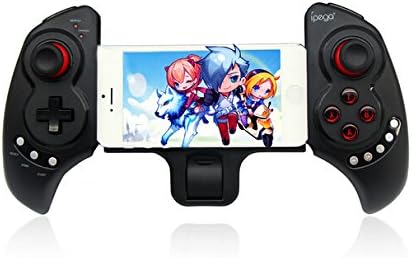
Figur 1.1: The iPega PG-9023 controller with a smartphone securely mounted in its telescopic holder, ready for gaming.
2. Nøglefunktioner
- Wireless Bluetooth 3.0 Connectivity: Provides a stable connection up to 8 meters (26 feet) without the need for drivers.
- Telescopic Stand: Adjustable holder supports smartphones and tablets from 5 to 10 inches in size.
- Bred kompatibilitet: Supports Android 3.2+, iOS 4.3+, Windows 7/8, and Android TV Boxes with Bluetooth functionality.
- Indbygget genopladeligt batteri: 380mAh lithium battery offers up to 20 hours of continuous play on a single charge.
- Ergonomisk design: Engineered for comfortable and extended gaming sessions.
- Flere driftstilstande: Supports Gamepad Mode, Keyboard Mode, and Mouse Mode for versatile use.
3. Pakkens indhold
Tjek venligst pakken for følgende varer:
- iPega PG-9023 Wireless Bluetooth Game Controller
- USB opladningskabel
- Brugermanual

Figur 3.1: The iPega PG-9023 controller, its USB charging cable, and the included user manual as found in the product packaging.
4. Opsætning og tilslutning
4.1 Opladning af controlleren
Before first use, fully charge the controller. Connect the supplied USB cable to the controller's charging port and the other end to a USB power source (e.g., computer USB port, USB wall adapter). The LED indicator will show charging status and turn off when fully charged.
4.2 Tænd og parring
The PG-9023 supports different modes for various operating systems. To enter pairing mode, press and hold the corresponding button combination until the LED indicator flashes rapidly.
- Android Gamepad Mode: Tryk og hold "X" + "HOME". The Gamepad LED will flash.
- Android Keyboard Mode: Tryk og hold "A" + "HJEM". The Keyboard LED will flash.
- Android Mouse Mode: Tryk og hold "B" + "HJEM". The Mouse LED will flash.
- iOS Gamepad Mode: Tryk og hold "Y" + "HJEM". The Gamepad LED will flash.
Once the LED is flashing, enable Bluetooth on your device (smartphone, tablet, PC) and search for "PG-9023". Select it to pair. The LED will become solid when successfully connected.
4.3 Tilslutning af din enhed
The controller features a telescopic stand that can extend to securely hold your smartphone or tablet.
- Gently pull the two halves of the controller apart to extend the telescopic arm.
- Carefully place your smartphone or tablet into the holder, ensuring it is centered and secure. The holder supports devices from 5 to 10 inches.
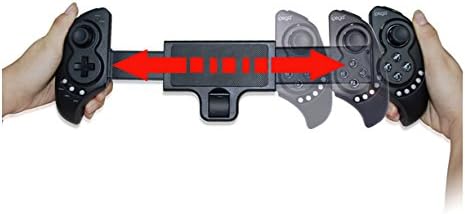
Figur 4.1: The telescopic mechanism of the iPega PG-9023, demonstrating how it expands to accommodate different device sizes.

Figur 4.2: The iPega PG-9023 controller holding a tablet, illustrating its capability to support larger devices for an immersive gaming experience.
5. Betjeningsvejledning
5.1 Spilkompatibilitet
The iPega PG-9023 supports a wide range of games. Game compatibility may vary depending on the operating system and the game itself. Many games offer native gamepad support, while others may require mapping or specific modes.
- iOS Games: Compatible with games such as Gunman Clive, Helium Boy, League of Evil 1 & 2, Muffin Knight Free, Stardash, Temple Run, etc.
- Android Games: Compatible with games such as Wild Blood, Dungeon Hunter, Zombie, FC simulator, Shadow Gun, Riptide GP, etc.
- Mouse Mode Games: Suitable for games like Fruit Ninja, Flappy Bird, Angry Bird, Sky Force, etc., where touch or mouse input is primary.
5.2 Using Mouse Mode (Android Only)
In Android Mouse Mode (activated by "B" + "HJEM"), the left analog stick controls the mouse cursor, and the A/B/X/Y buttons act as mouse clicks. This mode is useful for navigating menus or playing games that primarily rely on touch input.
5.3 Strømbesparende tilstand
The controller will automatically enter power-saving mode if it remains disconnected or inactive for a period of time. To reactivate, press the "HJEM" knap.
6. Vedligeholdelse og pleje
- Hold controlleren tør. Undgå udsættelse for fugt eller væsker.
- Udsæt ikke controlleren for ekstreme temperaturer.
- Rengør controlleren med en blød, tør klud. Brug ikke skrappe kemikalier eller slibende rengøringsmidler.
- Opbevar controlleren på et køligt, tørt sted, når den ikke er i brug.
- Undgå at tabe controlleren eller udsætte den for kraftige stød.
7. Fejlfinding
7.1 Controlleren opretter ikke forbindelse
- Sørg for, at controlleren er fuldt opladet.
- Bekræft, at Bluetooth er aktiveret på din enhed.
- Make sure the controller is in the correct pairing mode for your operating system (refer to Section 4.2).
- Forget "PG-9023" from your device's Bluetooth settings and attempt to re-pair.
- Genstart både controlleren og din enhed.
7.2 Knapper eller joysticks reagerer ikke
- Ensure the controller is properly connected and in the correct operating mode for the game.
- Check if the game itself supports gamepad input. Some games may require specific settings or may not support external controllers.
- Try restarting the controller and the game application.
7.3 Kort batterilevetid
- Sørg for, at controlleren er fuldt opladet før brug.
- The battery life can be affected by usage patterns and environmental factors.
- Hvis problemet fortsætter, kan batteriet være ved at blive slidt.
8. Specifikationer
| Feature | Detalje |
|---|---|
| Model | PG-9023 |
| Forbindelse | Bluetooth 3.0 |
| Wireless Range | 6-8 meter (ca. 20-26 fod) |
| Batterikapacitet | 380mAh lithium batteri |
| Spilletid | Op til 20 timer (kontinuerlig) |
| Opladningstid | Cirka 2 timer |
| Understøttet enhedsstørrelse | 5-10 inches (telescopic holder) |
| Understøttet OS | Android 3.2+, iOS 4.3+, Win7/Win8, Android TV Box |
9. Garanti og support
This product is manufactured by iPega. For warranty information and technical support, please refer to the contact details provided with your purchase documentation or visit the official iPega webwebsted. Gem din købsbevis til garantikrav.
For yderligere assistance, kontakt venligst din forhandler eller producentens kundeservice.


