1. Introduktion
This manual provides detailed instructions for the safe and effective use of your ILM Bluetooth Integrated Modular Flip-up Full Face Motorcycle Helmet. Designed for enhanced safety and communication, this helmet integrates Bluetooth technology for seamless connectivity while riding.
The ILM Model 953/953 PRO helmet meets or exceeds FMVSS-218 and DOT Safety Standards, ensuring a high level of protection. Please read this manual thoroughly before using your helmet to ensure proper operation and to maximize your riding experience.
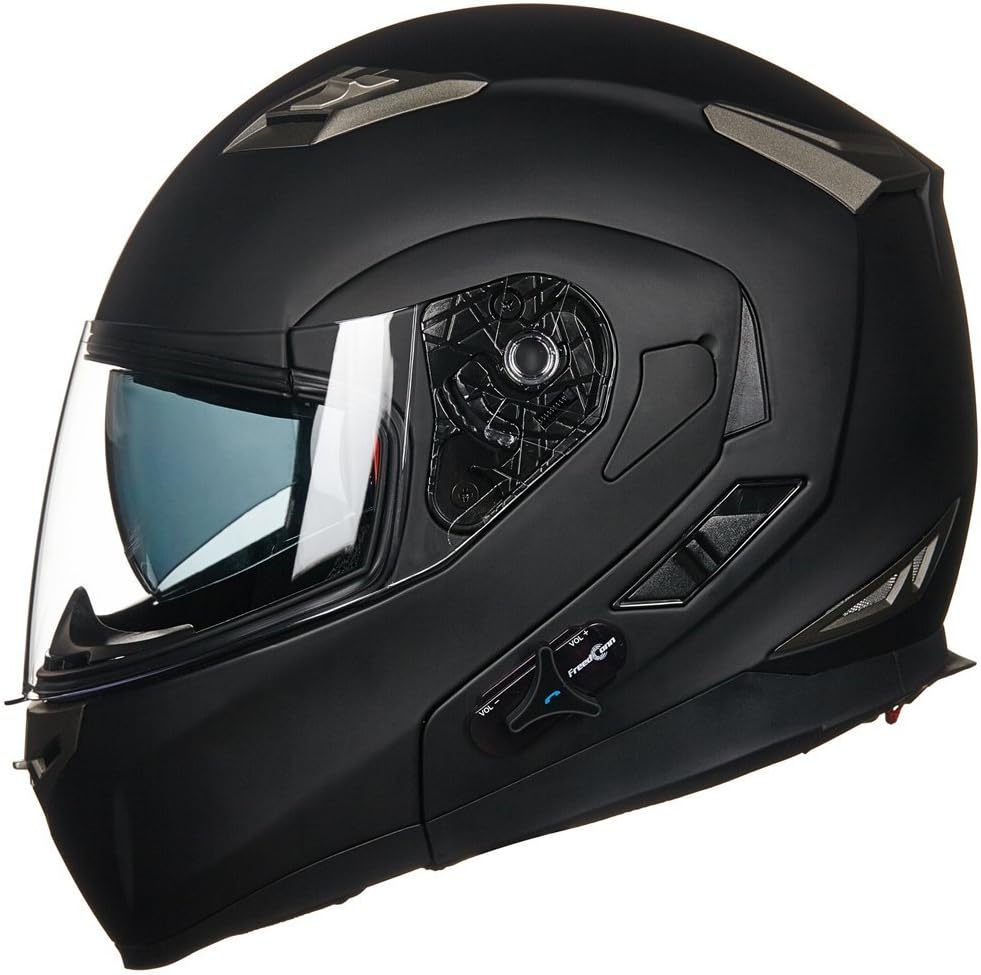
Figure 1: ILM Bluetooth Integrated Modular Motorcycle Helmet (Matte Black)
Video 1: Overståetview of ILM Bluetooth Integrated Modular Helmet features and design.
2. Pakkens indhold
Verify that all items listed below are included in your helmet package:
- ILM Bluetooth Integrated Modular Helmet
- Bluetooth Module (pre-installed or separate)
- Lithium batteri
- USB Charger (Wall Adapter)
- USB opladningskabel
- Brugervejledning (dette dokument)

Figure 2: Included accessories with the ILM Helmet.
3. Helmet Features
3.1 Modulært design
The helmet features a modular flip-up design, allowing the chin bar and visor to be raised for convenience when not riding at speed. This provides flexibility for communication or brief stops.

Figure 3: Helmet in flip-up modular configuration.
3.2 Visir og solskærm
The helmet is equipped with a clear outer visor and an integrated sun shield. The sun shield can be easily deployed or retracted to adapt to changing light conditions. Please note that the helmet comes with normal visors, not anti-fog visors.

Figur 4: Forside view af hjelmen.
3.3 Ventilationssystem
Adjustable vents are strategically placed on the helmet to provide optimal airflow, helping to keep you cool and comfortable during your ride.

Figur 5: Øverst view highlighting ventilation.
3.4 Indvendig foring
The helmet features a fully washable microfiber lining for hygiene and comfort. The lining is designed to be easily removable for cleaning.

Figur 6: Interiør view of the helmet lining.
4. Størrelser og pasform
Due to the built-in Bluetooth module, this helmet runs approximately one size smaller than standard helmets. Please refer to the size chart below to select the appropriate size for your head circumference.

Figure 7: ILM Helmet Size Chart.
If the size is not appropriate after purchase, a replacement liner may be available. The liner determines the internal sizing of the helmet.
5. Opsætning
5.1 Bluetooth Module Installation (if not pre-installed)
If your Bluetooth module is not pre-installed, carefully insert it into the designated slot at the rear-left base of the helmet. Ensure the connectors align properly and the module clicks securely into place.

Figure 8: Location of the Bluetooth module slot.
5.2 Indledende opladning
Before first use, fully charge the helmet's Bluetooth battery. Connect the USB charging cable to the module's charging port and plug the USB charger into a power outlet. The indicator light on the module will show charging status.
Note: If the Bluetooth system has not been used for a long time, the battery may enter a deep sleep mode. Charge the battery for about half an hour to wake it up. The Bluetooth function will be restored after charging.
6. Operating Bluetooth Features
6.1 Tænd/sluk
- Tænd: Press and hold the power button on the Bluetooth module for approximately 3 seconds until you hear an audible confirmation.
- Sluk: Press and hold the power button for approximately 5 seconds until you hear an audible confirmation.
6.2 Device Pairing (Single Rider)
To pair your helmet with a mobile device (e.g., smartphone, GPS):
- Ensure the helmet's Bluetooth is off.
- Press and hold the power button for about 8 seconds until the red and blue indicator lights flash alternately, indicating pairing mode.
- Aktiver Bluetooth på din mobilenhed, og søg efter tilgængelige enheder.
- Select "BM2-S" (or similar ILM model name) from the list.
- Once paired, the indicator light on the helmet will change to a solid blue or flash slowly.
6.3 Multi-Rider Intercom Pairing
The helmet supports intercom communication between two riders (Model 953) or up to 6-8 riders (Model 953 PRO) within a maximum distance of 1680 feet.
Video 2: Instructions for multiplayer intercom pairing with ILM 953 Bluetooth Helmets.
For detailed multi-rider pairing instructions, refer to the specific steps outlined in the video above or the included instruction manual.
Video 3: Demonstration of ILM Bluetooth Integrated Modular Motorcycle Helmet intercom features.
6.4 Opkaldskontrol
The helmet features One Touch Control for managing phone calls:
- Besvar opkald: Tryk én gang på multifunktionsknappen.
- Afvis opkald: Tryk og hold multifunktionsknappen nede i 2 sekunder.
- Afslut opkald: Tryk én gang på multifunktionsknappen under et opkald.
- Genopkald sidste nummer: Double-tap the multi-function button.
Incoming phone calls will override intercom, music, FM radio, and GPS navigation audio.
6.5 Music and Audio Playback
Enjoy full stereo sound through the two high-quality built-in speakers. Once paired with your device, you can stream music, listen to FM radio, or receive GPS navigation audio.
- Afspil/pause: Tryk én gang på multifunktionsknappen.
- Lydstyrkejustering: Rotate the volume knob on the module.
- Næste / forrige nummer: Use the volume knob (specific rotation/press combination may vary, refer to manual).
The helmet features DSP Echo Cancellation and Noise Suppression Technology for clear voice quality at high speeds.
7. Vedligeholdelse
7.1 Cleaning the Helmet Exterior
Clean the helmet exterior with a soft, damp cloth and mild soap. Avoid abrasive cleaners or solvents that could damage the finish or materials.
7.2 Cleaning the Visor
The clear visor should be cleaned with a soft cloth and water. Do not use harsh chemicals or abrasive materials, as this can scratch or damage the visor. For anti-fog visors, please obtain one by searching B06XJV59QB on Amazon.
7.3 Rengøring af indvendig beklædning
The microfiber lining is fully washable. Carefully remove the lining from the helmet (refer to the included manual for specific removal steps). Hand wash with mild soap and water, then air dry completely before re-installing.
8. Fejlfinding
8.1 Bluetooth Device Not Available / Not Turning On
If the Bluetooth system has not been used for a long time, the battery may enter a deep sleep mode. Charge the battery for about half an hour to wake it up. The Bluetooth function will be restored after charging.
8.2 Parringsproblemer
Ensure both devices are in pairing mode (red and blue lights flashing alternately). Keep devices close during pairing. If issues persist, try resetting both the helmet's Bluetooth module and your mobile device's Bluetooth settings.
8.3 Intercom Compatibility
Rider-to-rider communication is only compatible between ILM brand Bluetooth helmets and is not compatible across other brands.
9. Specifikationer
| Feature | Specifikation |
|---|---|
| Modelnavn | 953 |
| Bluetooth version | 3.0 |
| Taletid | 8 timer |
| Standby tid | 110 timer |
| Intercom afstand | Max 1680 feet (between two riders) |
| Sikkerhedsstandarder | Meets or Exceeds FMVSS-218 and DOT |
| Skaltype | Hård |
| Ydermateriale | Acrylonitril Butadien Styren (ABS) |
| Varens vægt | 4.4 pund |
10. Garanti og support
ILM products are manufactured to high-quality standards. For specific warranty information, please refer to the warranty card included with your purchase or visit the official ILM webwebsted.
If there are any missing small parts of the item received, or for any other inquiries, please contact ILM customer service for assistance. Contact details can typically be found on the ILM brand store page or their official webwebsted.


