Indledning
This manual provides comprehensive instructions for the operation and maintenance of your ONN X5 HiFi Music Player. Please read this manual thoroughly before using the device to ensure proper functionality and to maximize your listening experience. The ONN X5 is designed to deliver high-fidelity audio playback in a compact and user-friendly format.
Produkt overview
The ONN X5 is a portable HiFi music player featuring a 2.0-inch TFT screen and an aluminum alloy shell. It supports a wide range of audio formats, including lossless files, and offers expandable storage via a MicroSD card.
Nøglefunktioner:
- High-Fidelity-lyd: Supports WAV, FLAC, ALAC, APE, OGG lossless formats, and high-definition music up to 24Bit/192 KHz.
- Vise: 2.0-inch TFT screen (176x220 pixels) for clear navigation and information display.
- Opbevaring: 8GB internal memory, expandable up to 32GB with a MicroSD/TF card.
- Holdbart design: Lightweight aluminum alloy body (60g) for enhanced durability and reduced external interference noise.
- Brugergrænseflade: Intuitive key-based operation.
- Yderligere funktioner: FM Radio support.
- Batteri: High-capacity rechargeable lithium polymer battery.
- Flersproget support: English, Russian, Korean, German, Japanese, Polish, Indonesian, Chinese.
Enhedslayout:

Billede: Forside view of the ONN X5 HiFi Music Player, showing its display and control buttons. The screen displays track information, audio quality (e.g., 24BIT, 88HHZ), and playback status.

Billede: Side view of the ONN X5 HiFi Music Player, illustrating the location of the MicroSD card slot on the right side of the device.

Billede: Forside og bagside view of the ONN X5 HiFi Music Player. The back panel shows the model number "X5" and branding information.
Opsætning
1. Opladning af enheden:
- Connect the ONN X5 to a power source using the provided USB cable.
- Batteriindikatoren på skærmen viser opladningsstatus.
- A full charge is recommended before first use. The device uses a high-capacity rechargeable lithium polymer battery.
2. Inserting a MicroSD/TF Card:
- Locate the MicroSD/TF card slot on the side of the player.
- Gently insert a compatible MicroSD/TF card (up to 32GB) into the slot until it clicks into place.
- Sørg for, at kortet er isat korrekt for at undgå skader.

Image: Contents of the ONN X5 package, showing the player, USB charging cable, and other accessories. This illustrates the components available for setup.
3. Overførsel af musik Files:
- Connect the ONN X5 to your computer using the USB cable.
- Enheden vil vises som et flytbart lagerdrev.
- Træk og slip den ønskede lyd files (MP3, WMA, APE, FLAC, WAV, ALAC, OGG) into the player's internal storage or the MicroSD card.
- Tag enheden sikkert ud af computeren, før du frakobler USB-kablet.
Betjeningsvejledning
Tænd/sluk:
- To power on, press and hold the power button (usually marked with a universal power symbol) until the screen illuminates.
- For at slukke skal du trykke på tænd/sluk-knappen og holde den nede, indtil enheden lukker ned.
Navigation:
The ONN X5 uses physical buttons for navigation. Refer to the device layout for button identification.
- BIND: Justerer lydstyrken.
- M (Menu): Accesses menus and confirms selections.
- Pileknapper (< / >): Navigate through menus, select tracks, or fast forward/rewind during playback.
- Power knap: Also functions as a play/pause button during music playback.
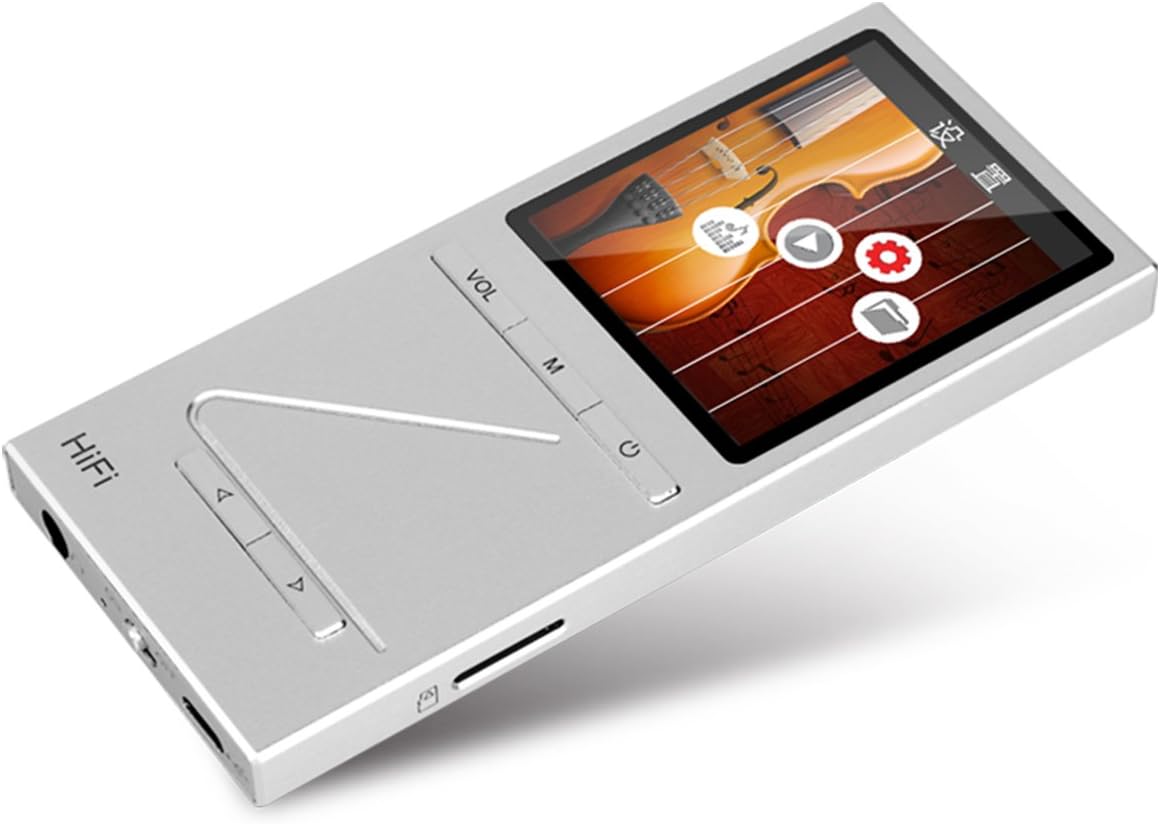
Billede: Vinklet view of the ONN X5 HiFi Music Player, showing the screen with various menu icons, indicating the user interface for navigation.
Musikafspilning:
- From the main menu, navigate to "Music" or "Files".
- Browse through your folders and select a track to play.
- Press the Power/Play button to start or pause playback.
- Use the arrow buttons to skip tracks or fast forward/rewind.
- Adjust volume using the VOL button.
FM-radio:
- Navigate to the "FM Radio" option from the main menu.
- Brug navigationsknapperne til at søge efter stationer eller manuelt stille ind på en frekvens.
- Ensure headphones are connected as they often act as the antenna for FM radio.
Sprogindstillinger:
Enheden understøtter flere sprog. Sådan ændrer du sproget:
- Go to "Settings" from the main menu.
- Select "Language" and choose your preferred language from the list (English, Russian, Korean, German, Japanese, Polish, Indonesian, Chinese).
Opretholdelse
- Rensning: Brug en blød, tør klud til at rengøre enheden. Undgå flydende rengøringsmidler eller slibende materialer.
- Opbevaring: Opbevar afspilleren et køligt, tørt sted væk fra direkte sollys og ekstreme temperaturer.
- Batteripleje: For at forlænge batteriets levetid bør du undgå at aflade batteriet helt ofte. Oplad enheden regelmæssigt, selvom den ikke er i brug i længere perioder.
- Undgå påvirkning: The aluminum alloy shell provides durability, but avoid dropping the device or subjecting it to strong impacts.
- Vandeksponering: Denne enhed er ikke vandtæt. Undgå udsættelse for vand eller høj luftfugtighed.
Fejlfinding
Device Will Not Power On:
- Sørg for, at batteriet er opladet. Tilslut enheden til en strømkilde, og lad den oplade i mindst 30 minutter, før du forsøger at tænde den igen.
- Try performing a hard reset (if applicable, refer to manufacturer's specific instructions for hard reset, usually involves holding power button for an extended period).
Ingen lyd:
- Kontroller lydstyrkeniveauet, og sørg for, at det ikke er slået fra.
- Verify that headphones or external speakers are properly connected.
- Test with different headphones or audio output devices.
- Sørg for lyden file is not corrupted or in an unsupported format.
Kan ikke overføres Files:
- Sørg for, at USB-kablet er korrekt tilsluttet til både afspilleren og computeren.
- Prøv en anden USB-port på din computer eller et andet USB-kabel.
- Verify that the device is recognized by your computer as a removable drive.
- Check if the MicroSD card is properly inserted and not full.
Skærmen svarer ikke / fryser:
- Tryk og hold tænd/sluk-knappen nede i cirka 10-15 sekunder for at fremtvinge en genstart.
- Hvis problemet fortsætter, skal du sørge for, at batteriet er opladet.
Specifikationer
| Feature | Detalje |
|---|---|
| Modelnummer | X5 |
| Mærke | ONN |
| Skærmstørrelse | 2.0 Inches TFT (176x220 PIXEL) |
| Intern hukommelse | 8 GB |
| Udvidelig opbevaring | MicroSD/TF card up to 32 GB |
| Understøttede lydformater | APE, FLAC, ALAC, WAV, WMA, OGG, MP3 (up to 24Bit/192 KHz) |
| Forbindelsesteknologi | Aux, USB |
| Speciel funktion | FM radio |
| Batteri | 1 Lithium Ion battery required (High-capacity rechargeable lithium polymer) |
| Varens vægt | 7 ounces (ca. 0.2 kilogram) |
| Pakkedimensioner | 6.21 x 4.7 x 1.2 tommer |
| Fabrikant | SZTZWY |
Garanti og support
For detailed warranty information, please refer to the warranty card included with your purchase or visit the official ONN product support website. For technical assistance or further inquiries, please contact ONN customer support through their official channels.


