1. Introduktion
The Excelvan BP-9502BL is a versatile Bluetooth wireless USB laser barcode scanner designed for efficient data entry and storage. It supports both wireless Bluetooth and wired USB modes, offering flexible connectivity options for various devices and environments. This manual provides detailed instructions for setup, operation, and maintenance of your barcode scanner.

Figure 1: Excelvan BP-9502BL Barcode Scanner. This image shows the main view of the black barcode scanner with a yellow trigger button.

Figure 2: Labeled components of the Excelvan BP-9502BL Barcode Scanner. Key parts include LED Lights, Handle, Rebound button (trigger), and Scan Window.
2. Pakkens indhold
- 1x Wireless Bluetooth Barcode Scanner
- 1x USB Cable (approximately 135cm / 4.43ft)
- 1x 3.0 Bluetooth Receiver
- 1x Paperclip
- 1x brugermanual

Figure 3: Barcode scanner with included USB cable and Bluetooth receiver. This image displays the main scanner unit alongside its essential connectivity accessories.
3. Opsætning og tilslutning
The Excelvan BP-9502BL scanner offers multiple connectivity options to suit various devices.
3.1. Desktop Computer (Bluetooth Wireless Mode)
- Insert the included Bluetooth receiver into an available USB port on your desktop computer.
- Install any necessary drivers (typically, the system will install them automatically).
- Tænd stregkodescanneren.
- Press and hold the yellow button on the scanner for approximately 10 seconds to enter pairing mode.
- Follow your computer's Bluetooth pairing instructions to connect to the scanner.
3.2. Desktop Computer (Wired Mode)
- Insert the included Bluetooth receiver into an available USB port on your desktop computer.
- Connect the USB cable from the scanner to the Bluetooth receiver.
- The scanner will automatically switch to wired mode and be ready for use.
3.3. Laptop Computer (Bluetooth Wireless Mode)
If your laptop has built-in Bluetooth:
- Ensure your laptop's Bluetooth is enabled.
- Tænd stregkodescanneren.
- Press and hold the yellow button on the scanner for approximately 10 seconds to enter pairing mode.
- Follow your laptop's Bluetooth pairing instructions to connect to the scanner. The external Bluetooth receiver is not required for laptops with integrated Bluetooth.
3.4. Mobile Phone (Bluetooth Wireless Mode)
- Tænd stregkodescanneren.
- Aktiver Bluetooth på din mobiltelefon.
- Press and hold the yellow button on the scanner for approximately 10 seconds to enter pairing mode.
- On your phone, search for available Bluetooth devices and select the scanner to pair.

Figure 4: Diagram illustrating various connection methods for the barcode scanner, including mobile phone via Bluetooth, laptop with or without receiver via Bluetooth, and desktop computer via Bluetooth (wireless) or USB (wired).
4. Betjeningsvejledning
Once connected, the scanner is ready to read barcodes.
4.1. Scanning a Barcode
- Point the scanner's beam at the barcode you wish to read.
- Ensure the beam covers the entire barcode.
- Press the yellow trigger button (Rebound button) to activate the laser.
- A successful scan is typically indicated by an audible beep and/or a visual confirmation from the LED indicator.
4.2. Best Scanning Practices
- Vinkel: Maintain a slight bevel (angle) between the scanner and the barcode for optimal reading. Avoid holding the scanner at a 90-degree angle directly perpendicular to the barcode, as this can prevent successful reading.
- Dækning: The laser beam must fully cover the barcode from end to end. Partial coverage may result in reading errors.
- Afstand: The optimal scanning width is between 5cm and 30cm. Adjust the distance to the barcode for best performance.

Figur 5: Eksamples of the barcode scanner in use, demonstrating scanning a document barcode and its application in a point-of-sale environment.
5. Vedligeholdelse
To ensure the longevity and optimal performance of your Excelvan BP-9502BL barcode scanner, follow these maintenance guidelines:
- Rensning: Brug en blød, tør klud til at rengøre scannerens yderside. Brug en fnugfri klud, der er let tørret af scanningsvinduet.amprengøres med et mildt, ikke-slibende rengøringsmiddel. Undgå skrappe kemikalier eller slibende materialer.
- Opbevaring: Store the scanner in a cool, dry place away from direct sunlight, extreme temperatures, and excessive dust.
- Håndtering: Undgå at tabe scanneren eller udsætte den for kraftige stød, da dette kan beskadige de interne komponenter.
- Batteri: The scanner has an internal Li 800mAh/3.7V power source. Charge the device when the battery is low. Charging time is approximately 30 minutes.
6. Fejlfinding
Hvis du støder på problemer med din stregkodescanner, kan du se følgende almindelige problemer og løsninger:
- Scanner does not connect via Bluetooth:
- Sørg for, at scanneren er tændt.
- Confirm Bluetooth is enabled on your host device (computer, laptop, phone).
- Press and hold the yellow button on the scanner for 10 seconds to enter pairing mode.
- If using a desktop, ensure the Bluetooth receiver is properly inserted and drivers are installed.
- Prøv at genstarte både scanneren og værtsenheden.
- Scanneren læser ikke stregkoder:
- Ensure the laser beam fully covers the entire barcode.
- Adjust the angle of the scanner relative to the barcode. Avoid a 90-degree perpendicular angle; a slight bevel is recommended.
- Check the scanning distance (optimal 5cm-30cm).
- Ensure the barcode is not damaged, smudged, or poorly printed.
- Verify the scanner is properly connected to your device (either wirelessly or via USB).
- Ingen dataoutput efter scanning:
- Confirm the scanner is successfully paired/connected to your device.
- Open a text editor or application where scanned data should appear to test functionality.
- Check if the host device's input method is correctly configured.
7. Specifikationer
| Feature | Detalje |
|---|---|
| Mærke | Excelvan |
| Model | BP-9502BL |
| Varenummer | SZLG0109 |
| Forbindelsesteknologi | Bluetooth, USB-kabel |
| Kompatible enheder | Desktop Computer, Laptop Computer, Tablet, Mobile Phone |
| Driftskraft | 250mW (operation), 35mW (standby), 500mW (max) |
| Strømkilde | Internal Li 800mAh/3.7V battery |
| Scanningsbredde | 5 cm - 30 cm |
| Decoding Speed | 300 scanninger/sek |
| Opladningstid | Cirka 30 minutter |
| Materiale | ABS+PC+TPE |
| Produktdimensioner | 21.84 x 17.78 x 8.89 cm |
| Produktets vægt | 294.84 g |
| UPC | 723120423060 |
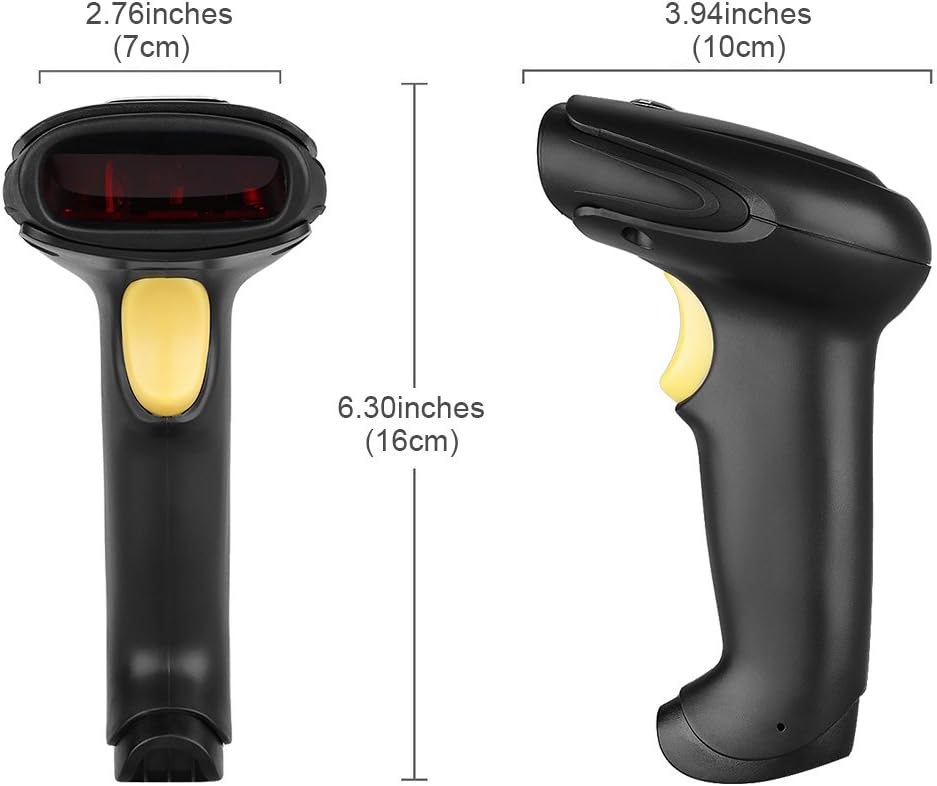
Figur 6: Dimensionel overview of the Excelvan BP-9502BL Barcode Scanner, showing measurements in both inches and centimeters for width (7cm / 2.76in), height (16cm / 6.30in), and depth (10cm / 3.94in).
8. Garanti og support
Information regarding product warranty and customer support is not available in the provided data. Please refer to the product packaging or the seller's website for details on warranty coverage and how to obtain technical assistance.


