1. Introduktion
This manual provides detailed instructions for the setup, operation, and maintenance of your S.M.S.L Q5 Pro Digital Amplifier. Please read this manual thoroughly before using the device to ensure proper functionality and to maximize your audio experience. Keep this manual for future reference.

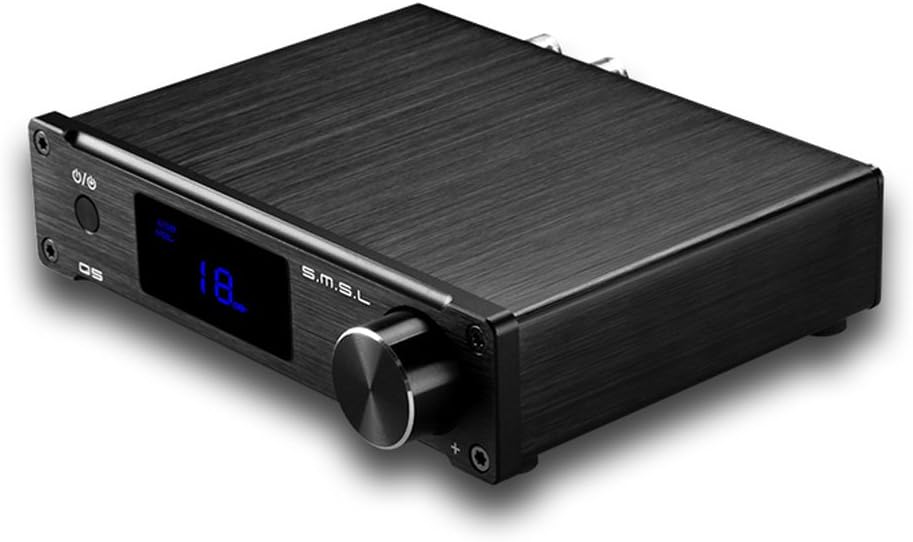
Front view of the S.M.S.L Q5 Pro Digital Ampløfter, showcasing dens kompakte design og kontrolknap.
2. Produktet er slutview
2.1 Nøglefunktioner
- Pure digital amplification technology, supporting optical fiber, coaxial, computer USB, and analog inputs.
- Features patented Easy Start technology for precise power supply control, enhancing system reliability.
- Meets high-definition Blu-ray and HD DVD audio interface standards with sampling rates from 44.1-192KHz.
2.2 Pakkens indhold
Bekræft at alle varer er til stede i pakken:
- 1x S.M.S.L Q5 Pro Amplifier enhed
- 1 x USB-kabel
- 1x Brugermanual (dette dokument)
- 1x strømadapter
- 1x fjernbetjening

The S.M.S.L Q5 Pro amplifier unit, power adapter, and other accessories as packaged.
3. Opsætning
3.1 Tilslutning af strøm
- Connect the power adapter to the DC 19V input port on the rear panel of the Q5 Pro amplivligere.
- Sæt strømadapteren i en passende stikkontakt.

The included power adapter for the S.M.S.L Q5 Pro amplivligere.
3.2 Tilslutning af højttalere
Connect your passive speakers to the speaker terminals on the rear panel. Ensure correct polarity (red to red, black to black) for optimal sound quality.
3.3 Tilslutning af indgangskilder
The Q5 Pro supports multiple input types:
- Optisk indgang: Connect an optical cable from your source device (e.g., TV, CD player) to the OPTICAL input.
- Koaksial indgang: Connect a coaxial cable from your source device to the COAXIAL input.
- USB-indgang: Connect the provided USB cable from your computer (Windows, Mac OS X compatible) to the USB input.
- Analog Input (AUX): Connect a 3.5mm audio cable from your analog source to the AUX input.
3.4 Subwooferudgang
For enhanced bass, connect a powered subwoofer to the SW OUTPUT using an RCA cable.
Rear panel of the S.M.S.L Q5 Pro, showing all input and output connections.
4. Betjeningsvejledning
4.1 Tænd/sluk
Tryk på tænd/sluk-knappen på frontpanelet eller fjernbetjeningen for at tænde amplivligere til eller fra.
4.2 Indgangsvalg
Use the input selector button on the front panel or the remote control to cycle through the available input sources (Optical, Coaxial, USB, AUX).
4.3 Lydstyrkekontrol
Rotate the large knob on the front panel or use the volume up/down buttons on the remote control to adjust the volume level.
4.4 Tone Control (Bass/Treble)
Press the volume knob on the front panel to access tone control settings. The LCD screen will display 'Bass' or 'Treble'. Rotate the knob to adjust the levels. These settings can also be adjusted via the remote control.
4.5 Fjernbetjening
The included remote control provides convenient access to all amplifier functions, including power, input selection, volume, and tone controls. Ensure the remote has 2 AAA batteries installed.
5. Vedligeholdelse
- Behold ampOpbevar apparatet på et tørt, godt ventileret sted, væk fra direkte sollys, varmekilder og fugt.
- Clean the unit with a soft, dry cloth. Do not use liquid cleaners or solvents.
- Sørg for tilstrækkelig luftgennemstrømning omkring enheden for at forhindre overophedning.
- Undgå at placere tunge genstande oven på amplivligere.
6. Fejlfinding
- Ingen lyd:
- Check all cable connections (power, input, speakers).
- Sørg for, at den korrekte inputkilde er valgt.
- Kontroller, at lydstyrken ikke er indstillet til minimum eller slået fra.
- Confirm that the source device is playing audio.
- Fjernbetjeningen virker ikke:
- Check if the batteries (2 AAA) are correctly inserted and not depleted.
- Sørg for, at der ikke er nogen forhindringer mellem fjernbetjeningen og ampliferens IR-modtager.
- Forvrænget lyd:
- Reducer lydstyrken.
- Kontroller højttalerforbindelserne for løse ledninger eller forkert polaritet.
- Sørg for, at lydkilden ikke overstyrer inputtet.
- If using USB, ensure your computer's audio settings are configured correctly.
- Unit Gets Warm:
Det er normalt for amplifier to generate some heat during operation. Ensure adequate ventilation around the unit to prevent excessive heat buildup.
7. Specifikationer
| Input | Optical, Coaxial, Analog (AUX), Computer USB |
| Produktion | 2-channel (Stereo), Subwoofer Out |
| Sampling Rate (Optical/Coaxial) | 44.1-192KHz |
| Sampling Rate (Computer USB) | 44.1-96KHz |
| Bitdybde | 16-24 bit |
| Frekvensrespons | 20Hz-22KHz |
| Impedance Adaptation | 4-8 ohm |
| Maximum Output Power (4 Ohm) | 45W + 45W |
| Maximum Output Power (8 Ohm) | 25W + 25W |
| Dynamisk rækkevidde | 102dB |
| SNR | 81dB |
| USB Audio Specification | 16-24 bit/44.1KHz-96KHz |
| USB-kompatibilitet | Windows, Mac OS X |
| Strømforbrug (maksimalt) | 102W |
| Dimensions (excluding bulge) | 137 x 103 x 33mm (5.4 x 4.1 x 1.3 inches) |
| Nettovægt | 1.1 kg (2.1 pund) |
| Batterier til fjernbetjening | 2 AAA-batterier påkrævet |
8. Garanti og support
For warranty information, technical support, or service inquiries, please refer to the warranty card included with your product or contact your retailer or the manufacturer directly. Keep your purchase receipt as proof of purchase.


