1. Introduktion
Tak for købetasing the Thomson WS03 Portable Wireless Speaker. This manual provides important information regarding the setup, operation, and maintenance of your device. Please read this manual thoroughly before using the speaker and keep it for future reference.
2. Sikkerhedsoplysninger
For at sikre sikker drift og forhindre skader, bedes du overholde følgende sikkerhedsforanstaltninger:
- Udsæt ikke højttaleren for ekstreme temperaturer, fugtighed eller direkte sollys.
- Højttaleren må ikke skilles ad eller ændres. Dette vil ugyldiggøre garantien.
- Brug kun det medfølgende eller anbefalede opladningskabel.
- Hold højttaleren væk fra vand og andre væsker. Den er ikke vandtæt.
- Rengør højttaleren med en blød, tør klud. Brug ikke slibende rengøringsmidler.
- Undgå at lytte ved høje lydstyrker i længere perioder for at forhindre høreskader.
3. Pakkens indhold
Bekræft at alle varer er til stede i pakken:
- Thomson WS03 Portable Wireless Speaker
- 3.5 mm lydkabel
- Micro USB opladningskabel
- Brugervejledning (dette dokument)
4. Produktet er slutview
Familiarize yourself with the components of your Thomson WS03 speaker.

Figur 4.1: Front view of the Thomson WS03 Portable Wireless Speaker, showcasing its silver grille, white base, and brown leather carrying handle.
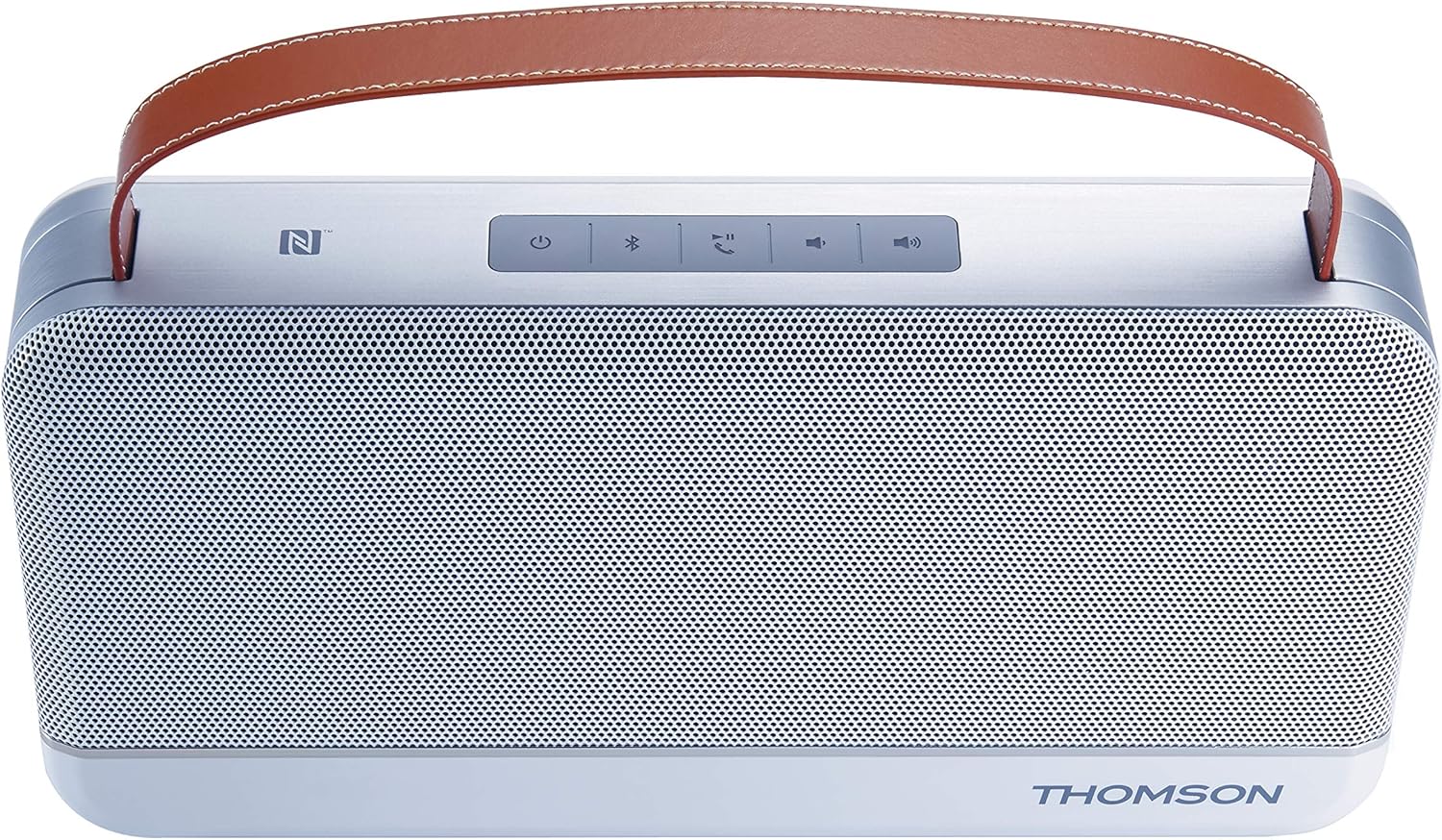
Figur 4.2: Top view of the Thomson WS03 speaker, highlighting the control panel with buttons for power, Bluetooth pairing, call management, volume control, and NFC tag.
4.1. Kontroller og indikatorer
- Power knap: Tryk og hold nede for at tænde eller slukke for højttaleren.
- Bluetooth-parringsknap: Tryk på for at gå ind i Bluetooth-parringstilstand.
- Call Management Button: Answer/end calls when connected to a phone.
- Lydstyrke ned-knap: Sænk afspilningslydstyrken.
- Lydstyrke op-knap: Øg afspilningslydstyrken.
- NFC Tag: Til hurtig parring med NFC-aktiverede enheder.
- LED-indikator: Viser strømstatus, opladningsstatus og Bluetooth-forbindelsesstatus.
4.2. Havne
- Micro USB -port: Til opladning af højttaleren.
- 3.5mm Aux-in Port: Til kablet lydforbindelse.
5. Opsætning
5.1. Opladning af højttaleren
- Connect the Micro USB charging cable to the speaker's Micro USB port.
- Tilslut den anden ende af kablet til en USB-strømadapter (medfølger ikke) eller en computers USB-port.
- LED-indikatoren viser opladningsstatus.
- Når det er fuldt opladet, skal du frakoble ladekablet.
The speaker has a 4400 mAh rechargeable battery.
6. Betjeningsvejledning
6.1. Tænd/sluk
- To turn on: Press and hold the Power button until the LED indicator lights up.
- To turn off: Press and hold the Power button until the LED indicator turns off.
6.2. Bluetooth-forbindelse
- Ensure the speaker is powered on. The LED indicator will flash, indicating it's in pairing mode.
- Aktiver Bluetooth på din Bluetooth-aktiverede enhed (smartphone, tablet, computer) og søg efter tilgængelige enheder.
- Select "Thomson WS03" from the list of devices.
- Once connected, the LED indicator will turn solid, and you may hear a confirmation tone.
- Hvis du bliver bedt om en adgangskode, skal du indtaste "0000".
The speaker supports Bluetooth 4.0.
6.3. NFC Pairing (Near Field Communication)
For NFC-enabled devices:
- Sørg for, at NFC er aktiveret på din enhed, og at højttaleren er tændt.
- Tap your NFC-enabled device gently against the NFC tag area on the speaker.
- Bekræft parringsanmodningen på din enhed.
- Højttaleren vil oprette forbindelse automatisk.
6.4. Aux-in-tilslutning
To connect a device via the 3.5mm audio cable:
- Connect one end of the 3.5mm audio cable to the Aux-in port on the speaker.
- Tilslut den anden ende til hovedtelefonstikket eller lydudgangen på din enhed.
- Højttaleren skifter automatisk til Aux-in-tilstand.
6.5. Opkaldsstyring
Når den er tilsluttet en smartphone via Bluetooth:
- Besvar opkald: Press the Call Management button once.
- Afslut opkald: Press the Call Management button once during a call.
- Afvis opkald: Press and hold the Call Management button.
The speaker features a built-in microphone for hands-free calling.
7. Vedligeholdelse
- Rensning: Use a soft, dry, lint-free cloth to clean the speaker's surface. Do not use liquid or aerosol cleaners.
- Opbevaring: Når højttaleren ikke er i brug i længere perioder, skal den opbevares køligt og tørt, væk fra direkte sollys og ekstreme temperaturer.
- Batteripleje: For at forlænge batteriets levetid bør du undgå at aflade batteriet helt ofte. Oplad højttaleren regelmæssigt, selvom den ikke er i brug.
8. Fejlfinding
| Problem | Mulig årsag | Løsning |
|---|---|---|
| Højttaleren tænder ikke. | Batteriet er afladet. | Oplad højttaleren med Micro USB-kablet. |
| Kan ikke parres via Bluetooth. | Højttaleren er ikke i parringstilstand; Enhedens Bluetooth er slået fra; Højttaleren er for langt fra enheden. | Ensure speaker is in pairing mode (flashing LED). Turn on Bluetooth on your device. Move speaker closer to your device (within 10 meters). |
| Ingen lyd. | Volume is too low; Device is not connected; Incorrect input mode. | Increase volume on both speaker and connected device. Ensure Bluetooth or Aux-in connection is established. Verify correct input mode. |
| Lydforvrængning. | Lydstyrken er for høj; Enheden er for langt fra højttaleren; Interferens. | Lower the volume. Move device closer to speaker. Avoid sources of strong electromagnetic interference. |
9. Specifikationer
| Feature | Detalje |
|---|---|
| Modelnummer | TH343755 |
| Forbindelse | Bluetooth 4.0, NFC, 3.5mm Aux-in |
| Udgangseffekt | 30 watt |
| Batterikapacitet | 4400 mAh |
| Komponenter inkluderet | Audio cable (3.5 mm), Micro USB cable, User manual |
| Farve | Sølv |
| Vægt | 1.8 kilo |
| Særlige funktioner | Integrated Microphone, USB Port (for charging) |
| Højttaler type | Subwoofer |
| Kompatible enheder | Personal computer, smartphone, laptop, tablet, television |
10. Garanti og support
For warranty information and technical support, please refer to the warranty card included with your product or visit the official Thomson webwebsted. Gem din købsbevis i tilfælde af garantikrav.
Information regarding spare parts availability and software updates is not available at this time.


