1. Introduktion
This manual provides essential information for the safe and effective operation, maintenance, and troubleshooting of your Ryobi P411 ONE+ 18-Volt 5-inch Cordless Random Orbit Sander. Please read and understand all instructions before use.

Figure 1: Ryobi P411 ONE+ 18-Volt 5-inch Cordless Random Orbit Sander with dust bag attached.
2. Sikkerhedsoplysninger
Følg altid grundlæggende sikkerhedsforanstaltninger, når du bruger elværktøj, for at reducere risikoen for brand, elektrisk stød og personskade.
- Øjenbeskyttelse: Brug altid øjenbeskyttelse, der er mærket i overensstemmelse med ANSI Z87.1.
- Høreværn: Brug høreværn ved længere tids brug.
- Åndedrætsværn: Use a dust mask or respirator, especially when sanding wood or other materials that produce fine dust.
- Arbejdsområde: Hold dit arbejdsområde rent og godt oplyst. Brug ikke elværktøj i eksplosive atmosfærer, f.eks. i nærheden af brandfarlige væsker, gasser eller støv.
- Sikkert arbejdsemne: Fastgør altid emnet for at forhindre bevægelse under slibning.
- Afbryd batteriet: Remove the battery pack from the tool before making any adjustments, changing accessories, or storing the tool.
- Undgå at overrække: Oprethold korrekt fodfæste og balance til enhver tid.
3. Komponenter overview
Familiarize yourself with the main parts of your random orbit sander:
- Slibepude: The circular base where sanding discs are attached.
- Støvopsamlingspose: Attaches to the exhaust port to collect sanding dust.
- Batteriport: Location for inserting the Ryobi ONE+ 18-Volt battery.
- Tænd/sluk-knap: Activates and deactivates the sander.
- Ergonomic GripZone™ Overmold: Provides enhanced comfort and control.

Figur 2: Side view of the sander, highlighting the dust collection bag and ergonomic grip.
4. Opsætning
4.1 Batteriinstallation
The Ryobi P411 is a tool-only product and requires a Ryobi ONE+ 18-Volt Lithium-Ion battery (sold separately) for operation.
- Ensure the sander's On/Off switch is in the OFF position.
- Juster ribberne på batteripakken med rillerne i værktøjets batteriport.
- Slide the battery pack into the tool until it latches securely in place.
- To remove, press the latch button on the battery pack and slide it out.

Figure 3: The Ryobi P411 is sold as a tool-only unit; battery and charger are separate.
4.2 Sanding Pad Attachment
The sander uses 5-inch sanding discs with a hook-and-loop fastening system.
- Ensure the battery pack is removed from the sander.
- Align the holes on the sanding disc with the holes on the sander's base pad. This alignment is crucial for effective dust collection.
- Press the sanding disc firmly onto the base pad to secure it.
- To remove, simply peel the disc off the base pad.
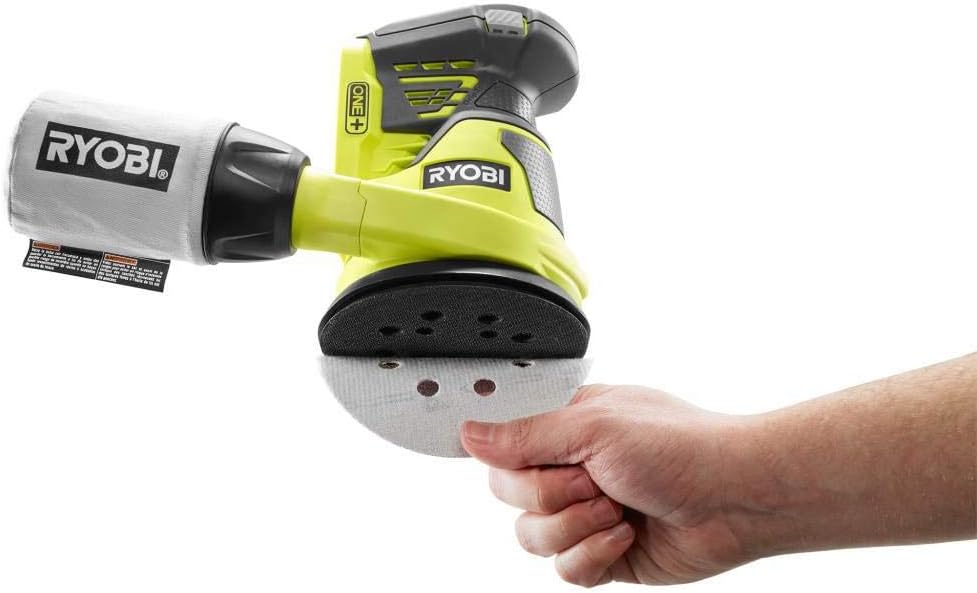
Figure 4: Proper attachment of a sanding disc, ensuring hole alignment for dust extraction.
4.3 Montering af støvpose
The included dust collection bag helps maintain a clean workspace.
- Align the dust bag's opening with the sander's dust exhaust port.
- Push the dust bag firmly onto the port until it is securely seated.
- Ensure the bag is properly attached to prevent dust leakage.
5. Betjeningsvejledning
5.1 Tænd/sluk
The sander features a simple push-button On/Off switch.
- To turn ON, slide the switch to the 'I' position.
- To turn OFF, slide the switch to the 'O' position.
5.2 Slibeteknikker
Achieve a smooth, swirl-free finish by following these guidelines:
- Hold altid slibemaskinen fast med begge hænder.
- Placer slibemaskinen fladt på emnet, før du tænder den.
- Turn the sander ON and allow it to reach full speed (10,000 orbits per minute).
- Move the sander slowly and evenly over the surface, using smooth, overlapping passes.
- Avoid applying excessive downward pressure; let the tool's weight and orbital action do the work. Excessive pressure can reduce efficiency and damage the workpiece or sander.
- Lift the sander from the workpiece before turning it OFF.

Figure 5: Demonstrating the Ryobi P411 sander in active use on a wooden surface.
6. Vedligeholdelse
Regular maintenance ensures optimal performance and extends the life of your sander.
6.1 Cleaning the Dust Bag
Empty the dust bag frequently to maintain efficient dust collection and prevent clogging.
- Fjern støvposen fra slibemaskinen.
- Shake out accumulated dust into a waste receptacle.
- For thorough cleaning, the dust bag can be washed with mild soap and water, then allowed to air dry completely before reattaching.
6.2 Replacing Sanding Pads
Replace sanding discs when they become worn or clogged to maintain effective sanding.
- Remove the old sanding disc by peeling it off the hook-and-loop base pad.
- Attach a new sanding disc, ensuring the holes are aligned for dust collection.
6.3 Generel rengøring
- Keep the tool's ventilation openings clear and free of debris.
- Tør værktøjets yderside af med en blød, tør klud.amp klæde. Brug ikke skrappe kemikalier eller slibende rengøringsmidler.
7. Fejlfinding
Se dette afsnit for løsninger på almindelige problemer.
| Problem | Mulig årsag | Løsning |
|---|---|---|
| Sander tænder ikke | Batteriet er ikke opladet eller installeret forkert. | Ensure battery is fully charged and securely inserted into the tool. |
| Dårlig slibeydelse | Worn or clogged sanding disc; incorrect grit for task. | Replace sanding disc. Use appropriate grit for the material and desired finish. |
| Excessive dust in work area | Dust bag full, improperly attached, or holes not aligned. | Empty and reattach dust bag securely. Ensure sanding disc holes align with base pad holes. |
8. Specifikationer
| Feature | Specifikation |
|---|---|
| Mærke | RYOBI |
| Model | P411 |
| Voltage | 18 volt |
| Strømkilde | Batteridrevet |
| Diskens diameter | 5 tommer |
| Maksimal rotationshastighed | 10000 RPM |
| Varens vægt | 2.5 pund |
| Produktdimensioner | 7.6 cm L x 7.3 cm B x 7.4 cm H |
| Materiale | Plast, Stål |
9. Garanti og support
The Ryobi P411 ONE+ 18-Volt 5-inch Cordless Random Orbit Sander comes with a Tre års begrænset garanti.

Figure 6: Ryobi Three Year Limited Warranty.
For warranty claims, technical assistance, or further support, please refer to the official Ryobi webwebstedet eller kontakt deres kundeservice direkte. Gem din købsbevis for at validere garantien.


