
Indledning
Thank you for choosing the Calypso K5684/6 Digital Watch. This manual provides essential information for the proper setup, operation, and maintenance of your watch. Please read it carefully to ensure optimal performance and longevity of your device.
The Calypso K5684/6 is a sporty and fashionable digital multifunction watch featuring a clear LCD display, 10 ATM (100 meters) water resistance, a durable plastic strap, chronograph, alarm, and dual time zone functions.
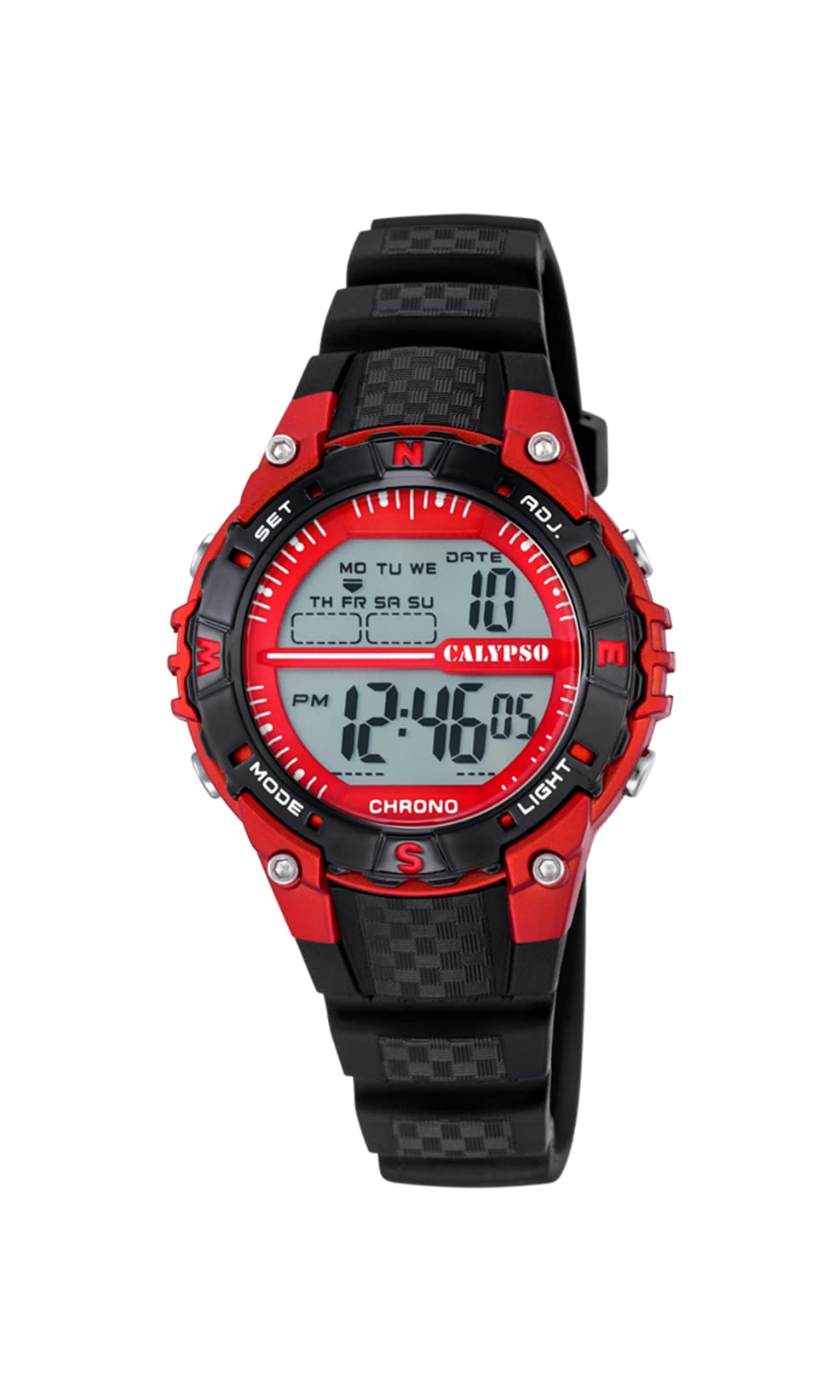
En front view of the Calypso K5684/6 digital watch, showcasing its LCD display, black plastic case, and strap. The display shows time, date, and mode indicators.
Indledende opsætning
Knapfunktioner overview
Your Calypso K5684/6 watch features four primary control buttons:
- KØRSELSVEJLEDNING: Cycles through different display modes (Time, Alarm, Chronograph, Dual Time).
- SÆT: Used to enter and confirm settings in various modes.
- ADJ (Adjust): Used to adjust values (increment/decrement) during setting. Also functions as Start/Stop for Chronograph.
- LYS: Aktiverer baggrundsbelysningen for at sikre synlighed under dårlige lysforhold.

Et nærbillede view of a Calypso digital watch, highlighting the 'MODE', 'SET', 'ADJ', and 'LIGHT' buttons on the sides of the watch case. The display shows 'MON 12:44 8-17 06'.
Betjeningsvejledning
1. Indstilling af tid og dato
- Fra den normale tidsvisning skal du trykke på MODE knappen gentagne gange, indtil sekunderne begynder at blinke. Dette indikerer, at du er i tidsindstillingstilstand.
- Tryk på SÆT knappen for at gennemgå indstillingerne: Sekunder → Timer → Minutter → År → Måned → Dag.
- Mens en værdi blinker, skal du bruge ADJ button to increase or decrease the value. Hold ADJ for hurtigere justering.
- Når alle indstillinger er korrekte, skal du trykke på MODE knappen for at afslutte indstillingstilstanden og vende tilbage til den normale tidsvisning.
2. Alarm funktion
- Tryk på MODE button until the alarm time is displayed (usually indicated by 'AL' or a bell icon).
- Tryk og hold på SÆT knappen, indtil alarmtimerne begynder at blinke.
- Brug ADJ knappen for at indstille den ønskede alarmtime.
- Trykke SÆT again to move to the alarm minutes, then use ADJ for at indstille minutterne.
- Trykke SÆT for at bekræfte og afslutte alarmindstillingen.
- For at aktivere/deaktivere alarmen skal du i alarmtilstand trykke på ADJ knappen. Et alarmikon vil vises/forsvinde på displayet.
3. Kronograf (Stopur)
- Tryk på MODE button until 'CHRONO' or 'STW' is displayed. The display will show '00:00:00'.
- Tryk på ADJ knappen for at starte kronografen.
- Trykke ADJ igen for at stoppe kronografen.
- For at nulstille kronografen skal du trykke på SÆT knappen, mens kronografen er stoppet.
4. Dobbelt tidszone
- Tryk på MODE button until 'DT' or 'DUAL TIME' is displayed.
- Tryk og hold på SÆT knappen, indtil timerne begynder at blinke.
- Brug ADJ knappen for at indstille den ønskede time for den anden tidszone.
- Trykke SÆT again to move to the minutes, then use ADJ to set the minutes (minutes are usually synchronized with the main time zone).
- Trykke SÆT to confirm and exit the dual time setting.
5. Baggrundsbelysning
Tryk på LYS button to illuminate the display for a few seconds. This feature is useful in dark environments.
Pleje og vedligeholdelse
1. Rensning
- Tør urkassen og remmen regelmæssigt af med en blød, tør klud for at fjerne snavs og fugt.
- For genstridigt snavs, brug en let damp en klud med en mild sæbe, og tør derefter straks af.
- Undgå at bruge kemiske rengøringsmidler, opløsningsmidler eller slibende materialer, da disse kan beskadige urets finish og forseglinger.
2. Forholdsregler vedrørende vandtæthed
Your Calypso K5684/6 watch is water-resistant up to 10 ATM (100 meters), making it suitable for swimming and snorkeling. However, please observe the following:
- Betjen ikke nogen knapper, mens uret er nedsænket i vand. This can compromise the water resistance.
- Avoid exposing the watch to hot water, steam, or extreme temperature changes, as this can affect the seals.
- Efter udsættelse for saltvand, skyl uret med ferskvand og tør det grundigt.
3. Udskiftning af batteri
When the display becomes dim or the watch stops functioning, the battery may need replacement. It is recommended to have the battery replaced by a qualified watch technician to ensure the water resistance is maintained.
Fejlfinding
| Problem | Mulig årsag | Løsning |
|---|---|---|
| Skærmen er tom eller svag. | Lavt eller afladet batteri. | Udskift batteriet. Kontakt en professionel urtekniker. |
| Knapperne reagerer ikke. | Uret er muligvis i låst tilstand, eller batteriet er lavt. | Try pressing the MODE button to cycle through modes. If unresponsive, consider battery replacement. |
| Tidspunktet er forkert. | Time was not set correctly or watch was exposed to strong magnetic fields. | Refer to the "Time and Date Setting" section to reset the time. |
| Vand inde i uret. | Water resistance compromised (e.g., buttons pressed underwater, damaged seals). | Immediately take the watch to a professional watch repair service to prevent further damage. |
Produktspecifikationer
| Feature | Detalje |
|---|---|
| Modelnummer | K5684/6 |
| Mærke | Calypso |
| Display Type | Digital LCD |
| Etui materiale | Polycarbonate with Stainless Steel Back |
| Remmateriale | Plast |
| Vandmodstand | 10 ATM (100 meter) |
| Funktioner | Time, Date, Day, Alarm, Chronograph, Dual Time Zone, Backlight |
| Produktmål (L x B x H) | 17.4 x 8.99 x 8.2 cm |
| Varens vægt | 50 gram |
| Oprindelsesland | Spanien |
Garantioplysninger
Calypso watches typically come with a manufacturer's warranty covering defects in materials and workmanship. The specific terms and duration of your warranty are usually provided with your purchase documentation. Please retain your proof of purchase for any warranty claims.
The warranty does not cover damage resulting from improper use, accidents, unauthorized repairs, or normal wear and tear.
Kundesupport
For further assistance, technical support, or service inquiries regarding your Calypso K5684/6 Digital Watch, please contact your retailer or the official Calypso customer service in your region. Contact details can often be found on the Calypso official webstedet eller i emballagematerialerne.


