1. Introduktion
The TRENDnet TI-G50 is a robust 5-Port Hardened Industrial Gigabit DIN-Rail Switch designed for demanding industrial environments. It features a 10 Gbps switching capacity and an IP30-rated metal enclosure, ensuring reliable network connectivity in extreme temperatures ranging from -40 to 75 °C (-40 to 167 °F). This unmanaged switch is built to withstand shock and vibration, making it suitable for critical applications requiring high durability and performance.
2. Sikkerhedsoplysninger
- Strømforsyning: This device requires a separate power supply (model TI-M6024 recommended). Ensure the power supply meets the specified voltage og nuværende krav.
- Jording: Proper grounding is essential for safe operation and to prevent electrical interference. Connect the grounding point to a reliable earth ground.
- Miljø: Install the switch in a location that complies with the specified operating temperature and humidity ranges. Avoid exposure to direct sunlight, excessive moisture, or corrosive substances.
- Installation: Follow all local and national electrical codes during installation. Ensure the device is securely mounted to prevent accidental dislodgement.
- Opretholdelse: Do not open the device enclosure. Refer all servicing to qualified personnel.
3. Pakkens indhold
Bekræft at alle varer er til stede i pakken:
- TRENDnet TI-G50 Industrial Gigabit DIN-Rail Switch
- Hurtig installationsvejledning
- Aftagelig terminalblok
- DIN-Rail Mount
- Wall Mount Plates (2)
4. Produktet er slutview
The TI-G50 features a compact, hardened metal housing designed for durability. Below is an overview of its key components and indicators.
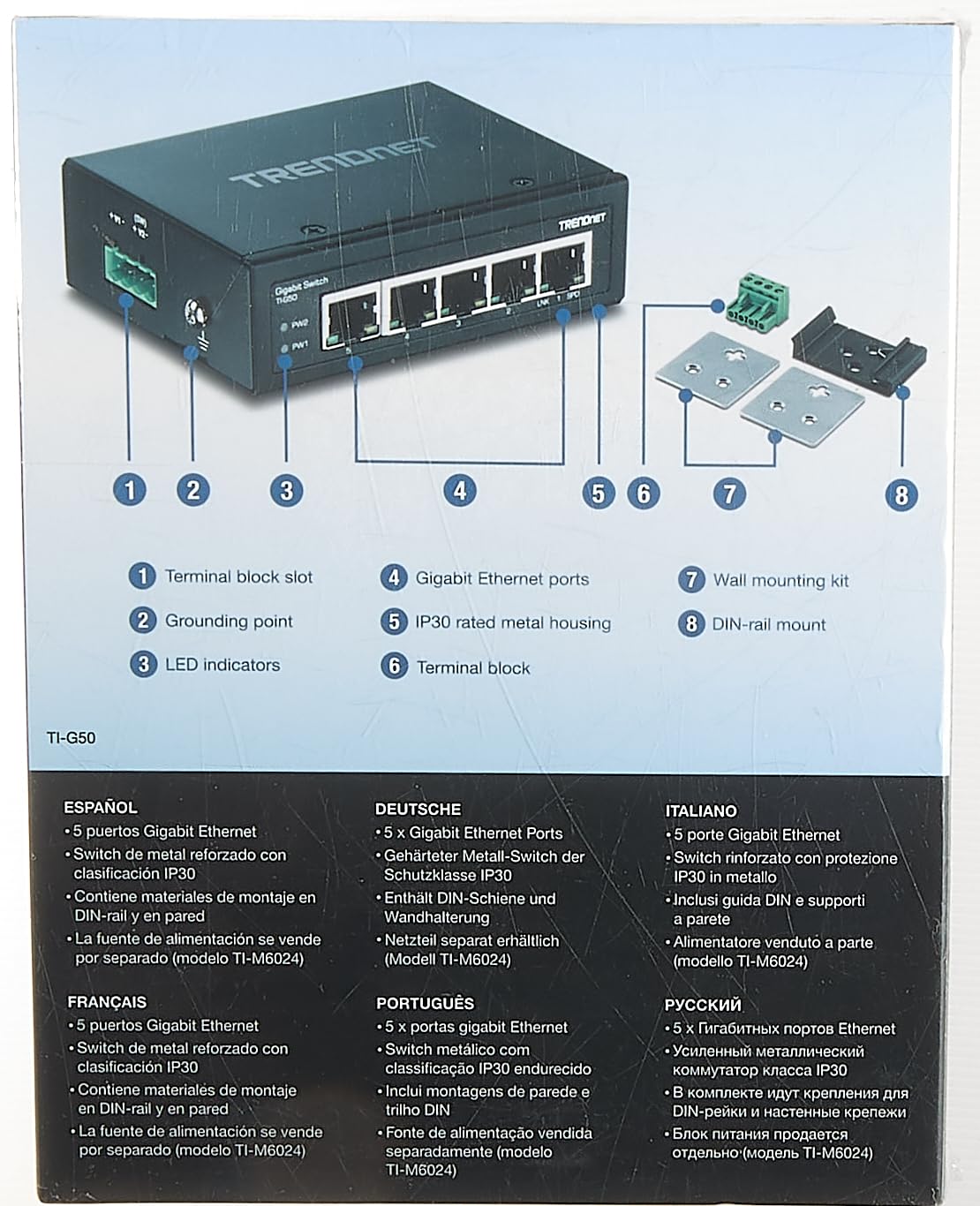
Figure 4.1: TI-G50 Component Diagram. This image illustrates the various parts of the switch, including the power input, Ethernet ports, and mounting accessories.
4.1 Frontpanel
- Gigabit Ethernet Ports (1-5): Five 10/100/1000 Mbps auto-negotiating RJ-45 ports for network connections.
- LED-indikatorer:
- PWR1/PWR2: Indicates power status for redundant power inputs. Lit when power is supplied.
- LINK/SPD (per port): Indicates link status and speed. Green for Gigabit link, Amber for 10/100 Mbps link. Blinking indicates data activity.
4.2 Toppanel
- Terminal Block Slot: Connection point for the removable terminal block, providing dual redundant power inputs.
- Grounding Point: Screw terminal for connecting the device to earth ground.
4.3 Fysiske dimensioner

Figure 4.2: TI-G50 Dimensions. The compact size of the switch allows for flexible installation in various industrial settings.
5. Opsætning og installation
The TI-G50 can be mounted on a DIN-rail or directly to a wall using the included accessories.
5.1 Strømtilslutning
The switch supports dual redundant power inputs (12-48 V DC) via the removable terminal block. A power supply is sold separately (e.g., TRENDnet TI-M6024).
- Ensure the power source is turned off before connecting.
- Connect the positive (+) and negative (-) wires from your DC power supply to the corresponding terminals on the removable terminal block.
- Insert the terminal block into the slot on the top panel of the switch.
- For redundant power, repeat steps 2 and 3 for the second power input.
- Connect the grounding wire from your installation to the grounding screw on the top panel of the switch.
- Turn on the power source. The PWR1/PWR2 LEDs should illuminate.
5.2 DIN-skinnemontering
Attach the DIN-rail mount to the back of the switch and secure it to a standard DIN-rail.

Figure 5.1: Mounting Accessories. The switch comes with both DIN-rail and wall mount options for versatile installation.
5.3 Vægmontering
Use the included wall mount plates to secure the switch directly to a flat surface.
- Attach the two wall mount plates to the sides of the switch using the provided screws.
- Marker det ønskede monteringssted på væggen.
- Drill pilot holes and insert appropriate wall anchors if necessary.
- Secure the switch to the wall using screws through the holes in the wall mount plates.
6. Betjening af kontakten
The TI-G50 is an unmanaged switch, meaning it operates plug-and-play without requiring configuration. Once powered on, it is ready to forward Ethernet traffic.
- Connect your network devices (e.g., computers, servers, IP cameras) to any of the five Gigabit Ethernet ports using standard RJ-45 Ethernet cables.
- The corresponding LINK/SPD LED for each connected port will illuminate, indicating an active network link.
- The LED will blink to show data activity.
Video 6.1: TRENDnet Hardened Industrial Switches OverviewDenne video giver et generelt overblikview of TRENDnet's industrial switch line, highlighting their robust features and applications in harsh environments.
7. Vedligeholdelse
Regular maintenance helps ensure the longevity and optimal performance of your TI-G50 switch.
- Rensning: Rengør regelmæssigt ydersiden af kontakten med en blød, tør klud. Brug ikke flydende rengøringsmidler eller rengøringsmidler på sprayform.
- Ventilation: Ensure that the switch's ventilation openings are clear of obstructions to allow for proper heat dissipation.
- Kabelstyring: Keep network cables organized and free from kinks or excessive tension to prevent damage and maintain signal integrity.
- Firmware: As an unmanaged switch, the TI-G50 does not typically require firmware updates.
8. Fejlfinding
If you encounter issues with your TI-G50 switch, refer to the following common troubleshooting steps:
- Ingen strøm:
- Check the power supply connection to the terminal block and ensure it is securely inserted.
- Kontroller, at strømkilden er aktiv og leverer den korrekte lydstyrke.tage (12-48 V DC).
- Ensure the PWR1/PWR2 LEDs are lit. If not, test with a different compatible power supply.
- Ingen linklampe:
- Ensure the Ethernet cable is securely connected to both the switch port and the network device.
- Verify that the connected network device is powered on and functioning correctly.
- Prøv et andet Ethernet-kabel.
- Test with a different port on the switch.
- Langsom netværkshastighed:
- Check the LINK/SPD LED for the connected port. If it's Amber, the connection is 10/100 Mbps. Ensure both the switch and the connected device support Gigabit Ethernet.
- Verify the quality of the Ethernet cable. Use Cat5e or Cat6 cables for Gigabit speeds.
- Ensure there are no excessive network broadcasts or loops in your network.
9. Specifikationer
| Feature | Beskrivelse |
|---|---|
| Modelnummer | TI-G50 |
| Ethernet Port Interface | 5 x Gigabit Ethernet-porte |
| Skiftekapacitet | 10 Gbps |
| Bedømmelse af kabinet | IP30 Rated Metal Housing |
| Driftstemperatur | -40 til 75 °C (-40 til 167 °F) |
| Strømindgang | Dual Redundant (12-48 V DC, power supply sold separately) |
| Monteringsmuligheder | DIN-Rail and Wall Mount |
| Dimensioner (L x B x H) | 9 x 3 x 7 tommer (Produkt) |
| Vægt | 5.92 ounce |
| Overholdelse | FCC Part 15 Subpart B Class A, CE EN 55022 Class A, IEC 60068-2-27 (Shock), IEC 60068-2-32 (Freefall), IEC 60068-2-6 (Vibration) |
10. Garanti og support
TRENDnet stands by the quality of its products.
- Lifetime Protection: The TI-G50 5-Port Hardened Industrial Gigabit DIN-Rail Switch comes with Lifetime Manufacturer Protection from TRENDnet (U.S. and Canada Only). Please refer to the official TRENDnet webwebsted for fulde garantivilkår og -betingelser.
- Teknisk support: For technical assistance, contact TRENDnet's English-speaking support team during normal business hours. Contact information can be found on the official TRENDnet webwebstedet eller produktemballagen.
- Online ressourcer: Additional resources, including updated drivers, firmware, and FAQs, may be available on the TRENDnet support webwebsted.


