Indledning
The Drucker Diagnostics Benchtop Model 614B Centrifuge is designed for efficient and reliable sample processing in various laboratory settings. This unit offers a fixed g-force of 1,100 xg and an adjustable mechanical timer ranging from 1 to 30 minutes, simplifying operation by eliminating complex setting selections. It is engineered to provide consistent and accurate results for chemistry and coagulation spins, making it suitable for doctor's offices, small clinics, laboratories, and other facilities performing on-site specimen analysis.
Opsætningsinstruktioner
1. Udpakning
Carefully remove the centrifuge from its packaging. Inspect the unit for any signs of damage that may have occurred during transit. Retain all packaging materials for future transport or storage.
2. Placering
Place the centrifuge on a stable, level, and sturdy surface capable of supporting its weight. Ensure there is adequate clearance around the unit for proper ventilation and heat dissipation. Avoid placing the centrifuge in direct sunlight or near heat sources.
3. Strømtilslutning
Connect the power cord to the centrifuge's power inlet and then plug it into a grounded electrical outlet with the correct voltage and frequency as specified on the unit's rating label.
4. Rotor Installation (if applicable)
If the rotor is not pre-installed, carefully place it onto the motor shaft, ensuring it is seated correctly. Secure the rotor according to the specific instructions provided with the rotor assembly, typically by tightening a central nut or screw.
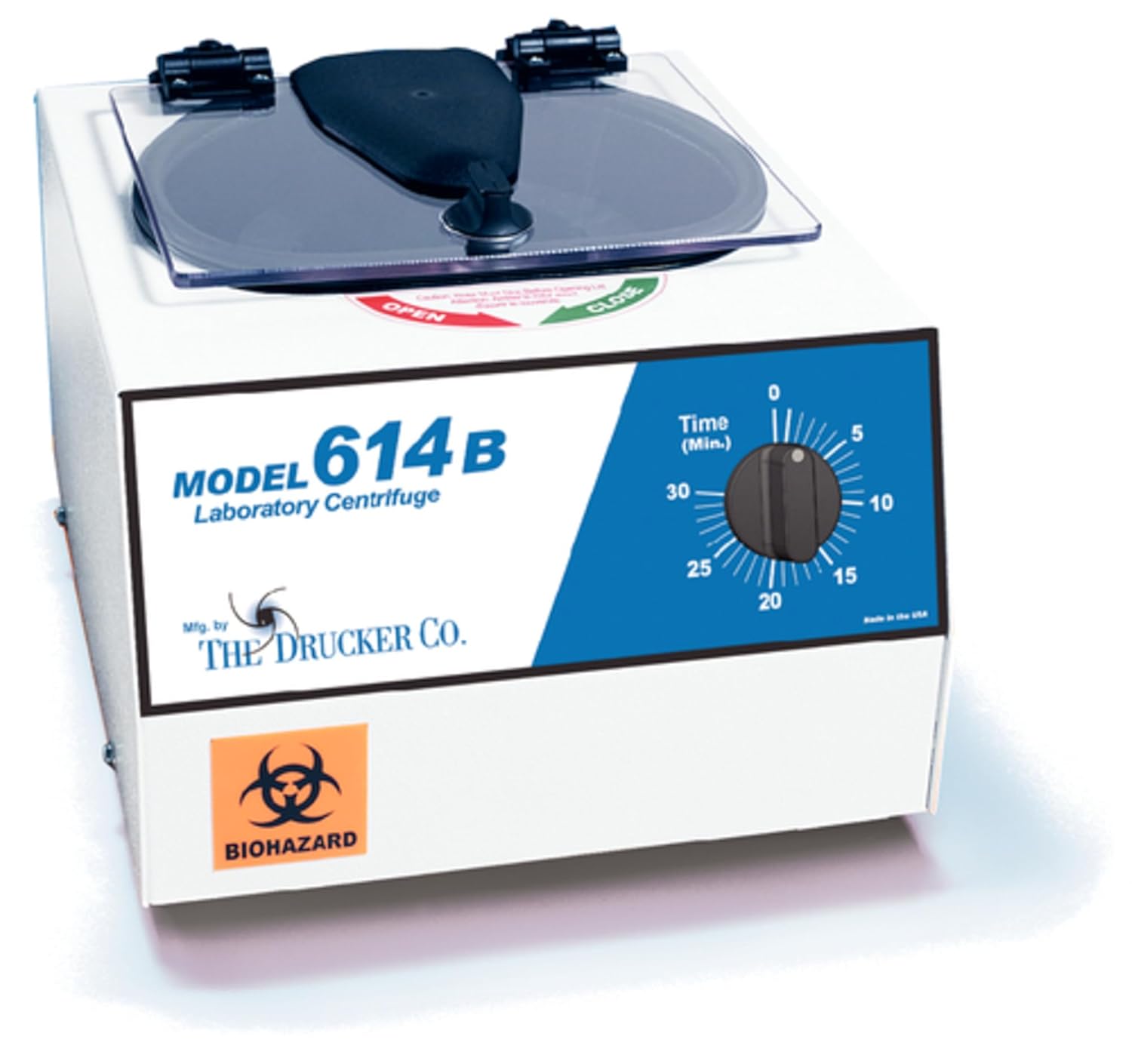
Figure 1: Drucker Diagnostics Model 614B Benchtop Centrifuge. This image shows the Drucker Diagnostics Model 614B Benchtop Centrifuge. It is a compact, white laboratory device with a clear lid. The front panel features the model name 'MODEL 614B Laboratory Centrifuge', the manufacturer 'Mfg. by THE DRUCKER CO.', and a biohazard symbol. On the right side of the front panel, there is a blue section with a black rotary dial for setting the timer from 0 to 30 minutes. The lid has 'OPEN' and 'CLOSE' indicators.
Betjeningsvejledning
1. Indlæser Samples
Open the centrifuge lid. Place sample tubes into the rotor's tube holders. Ensure that samples are balanced by placing tubes of equal weight directly opposite each other in the rotor. Imbalanced loads can cause excessive vibration and damage to the unit.
2. Indstilling af timeren
The Model 614B features a mechanical timer. Rotate the timer dial to the desired run time, ranging from 1 to 30 minutes. The centrifuge will automatically shut off once the set time has elapsed.
3. Lukning af låget
Securely close the centrifuge lid. Ensure it latches properly before starting operation. The unit will not operate if the lid is not fully closed and locked.
4. Opstart af drift
Once the lid is closed and the timer is set, the centrifuge will begin operation. The unit operates at a fixed g-force of 1,100 xg.
5. Standsning af drift
The centrifuge will automatically stop when the set time on the mechanical timer expires. Allow the rotor to come to a complete stop before attempting to open the lid.
6. Aflæsning Samples
Once the rotor has stopped, open the lid and carefully remove the processed sample rør.
Opretholdelse
1. Rensning
Regularly clean the exterior surfaces of the centrifuge with a mild, non-abrasive detergent and a soft cloth. For the rotor and rotor chamber, use a disinfectant solution appropriate for laboratory equipment. Ensure no liquids enter the motor or electrical components. Always unplug the unit before cleaning.
2. Inspektion
Periodically inspect the power cord for damage, the lid latch for proper function, and the rotor for any signs of wear or corrosion. If any issues are found, contact customer support.
3. Opbevaring
When not in use for extended periods, store the centrifuge in a clean, dry environment, away from extreme temperatures and direct sunlight. It is recommended to keep the lid slightly ajar to allow for air circulation and prevent moisture buildup.
Fejlfinding
| Problem | Mulig årsag | Løsning |
|---|---|---|
| Centrifuge does not start. |
|
|
| Overdreven vibration under drift. |
|
|
| Lid will not open after run. |
|
|
Specifikationer
- Modelnummer: 00-004-009-001
- Mærke: Drucker Diagnostik
- Produktdimensioner: 12.5 x 11 x 8.5 tommer
- Varens vægt: 14 pund
- Fixed G-Force: 1,100 xg
- Timerområde: 1 to 30 minutes (mechanical)
- Fabrikant: Drucker Diagnostik
- Dato først tilgængelig: 8. august 2013
Garanti og support
For information regarding warranty coverage, technical support, or service inquiries for your Drucker Diagnostics Benchtop Model 614B Centrifuge, please contact Drucker Diagnostics directly or the authorized distributor from whom the unit was purchased.
You can find more information about Drucker Diagnostics products and support on their official webwebsted: Drucker Diagnostik.


