1. Introduktion
The BOSS DD-500 Digital Delay Stompbox is a high-performance effects pedal designed for guitarists and other musicians seeking advanced delay capabilities. This unit integrates cutting-edge BOSS technology to deliver a wide array of delay types, from vintage emulations to modern, complex textures. With its intuitive interface, comprehensive editing options, and robust construction, the DD-500 provides a versatile tool for sound shaping and creative expression.

Figur 1: Forside view of the BOSS DD-500 Digital Delay Stompbox, showing controls and display.
2. Nøglefunktioner
- Studio-Level Sound: Features class-leading 32-bit AD/DA conversion, 32-bit floating point processing, and a 96 kHz sampling rate for pristine audio quality.
- 12 Versatile Delay Modes: Offers a wide range of delay types, including Standard, Analog, Tape, Vintage Digital, Dual, Pattern, Reverse, Tera Echo, Slow Attack, Filter, Shimmer, and SFX, providing extensive creative possibilities.
- Unrivaled Real-Time Expression: Customizable control settings for onboard and external switches allow for dynamic performance adjustments.
- Graphic LCD: A clear graphic LCD facilitates easy and intuitive operation during both performance and editing.
- Onboard Patch Memories: Store and recall numerous custom delay settings.
- MIDI-forbindelse: Full MIDI I/O for advanced control and integration with other gear.
- Selectable Bypass: Choose between buffered or true-bypass operation.
3. Opsætning
3.1 Strømtilslutning
Connect a BOSS PSA series AC adapter (sold separately) to the DC IN jack. Ensure the adapter is rated for 9V DC and provides sufficient current. Alternatively, the unit can be powered by four AA batteries (included), though an AC adapter is recommended for stable performance and extended use.
3.2 Lydforbindelser
Connect your instrument to the INPUT A/MONO jack. For stereo output, connect OUTPUT A/MONO and OUTPUT B to your amplifier(s) or audio interface. For mono output, use only the OUTPUT A/MONO jack. The DD-500 supports various input/output configurations, including stereo in/stereo out, mono in/stereo out, and mono in/mono out.
3.3 External Control Connections
The CTL 1,2/EXP jack allows connection of an external footswitch (FS-5U, FS-6, FS-7) or an expression pedal (EV-30, FV-500L/H, Roland EV-5) for expanded real-time control. MIDI IN and OUT ports enable integration with MIDI-compatible devices for patch changes, parameter control, and synchronization.

Figure 2: Rear panel of the DD-500, illustrating input, output, CTL/EXP, MIDI, and DC IN connections.
4. Operating the DD-500
4.1 Grundlæggende betjening
To turn on the unit, ensure power is connected and press the power switch. The graphic LCD will display the current patch name and delay mode. Use the TIME/VALUE, FEEDBACK, E. LEVEL, TONE, and MOD DEPTH knobs to adjust the primary parameters of the selected delay effect. The MODE knob allows selection of the 12 distinct delay types.
4.2 Fodpedalfunktioner
The DD-500 features three integrated footswitches: A, B, and TAP/CTL. By default, A and B select patches within a bank, while TAP/CTL controls tap tempo or other assigned functions. These footswitches can be flexibly configured to perform various actions, such as bank switching, looper control, or specific parameter toggles.
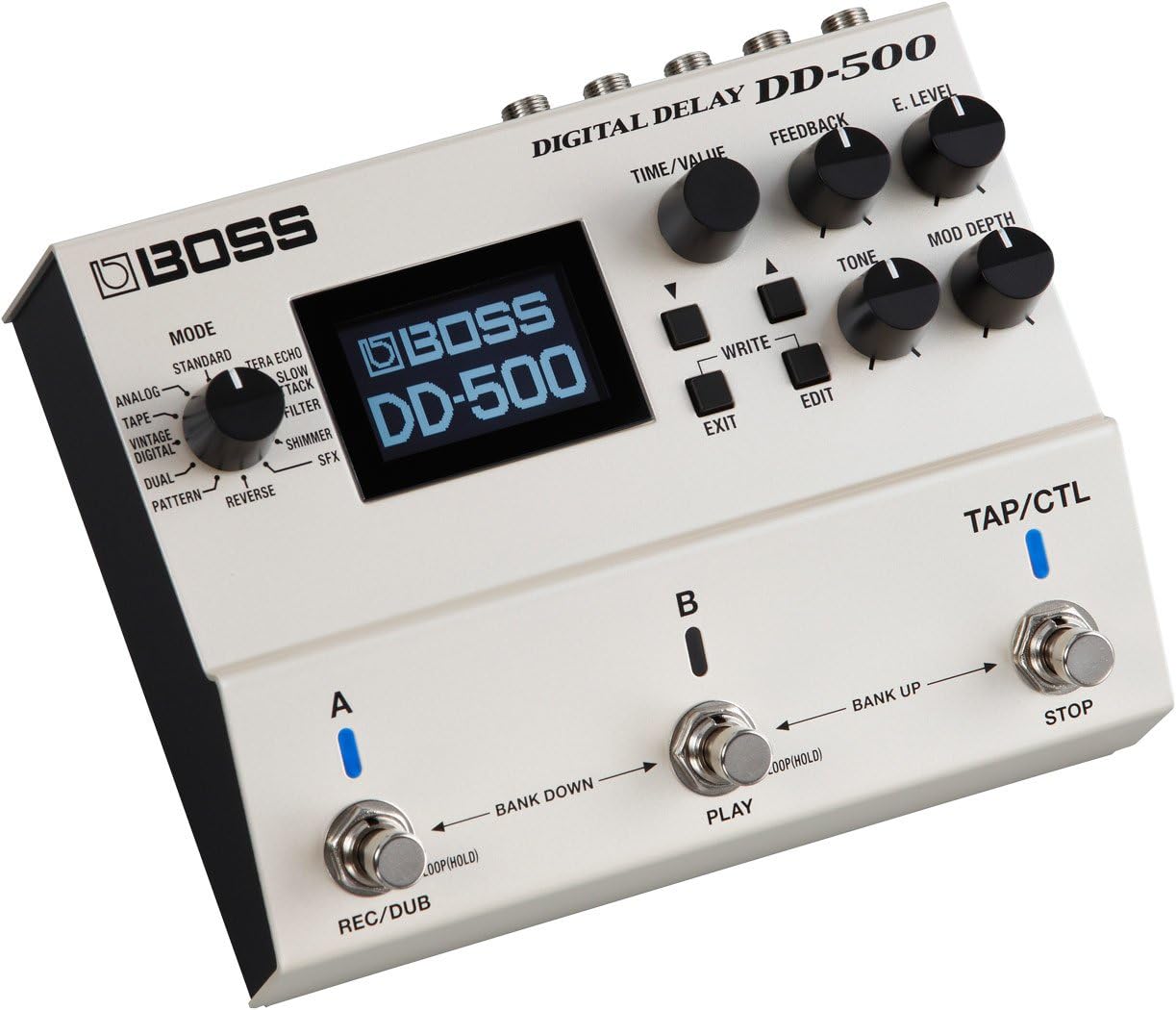
Figur 3: Vinklet view highlighting the main control knobs and footswitches.
4.3 Saving and Recalling Patches
After adjusting parameters to your desired sound, press the WRITE button to save your settings as a patch. Use the BANK UP/DOWN footswitches or the EDIT menu to navigate through patch banks and recall saved sounds. The DD-500 offers a substantial number of user-definable patch locations.
5. Avancerede funktioner
5.1 Deep Editing and Customization
The DD-500 allows for extensive customization of its delay algorithms and control assignments. Access the EDIT menu via the dedicated button to delve into detailed parameters for each delay mode. This includes fine-tuning modulation, filtering, and other characteristics to craft unique delay effects.
5.2 Editor/Librarian Software
Connect the DD-500 to a computer via USB to utilize the dedicated editor/librarian software. This software provides a graphical interface for intuitive editing of all parameters, patch management, and firmware updates. It simplifies complex adjustments and allows for easy organization of your custom sounds.
Video 1: En overview of the BOSS DD-500 Digital Delay Stompbox, demonstrating its features and sound capabilities.
6. Vedligeholdelse
To ensure the longevity and optimal performance of your DD-500, follow these maintenance guidelines:
- Rensning: Wipe the unit with a soft, dry cloth. Avoid abrasive cleaners or solvents.
- Opbevaring: Opbevar enheden et tørt, køligt sted væk fra direkte sollys og ekstreme temperaturer.
- Udskiftning af batteri: If using batteries, replace them promptly when the low battery indicator appears to prevent leakage.
- Firmwareopdateringer: Tjek BOSS med jævne mellemrum webwebsted for firmwareopdateringer for at sikre, at du har de nyeste funktioner og fejlrettelser.
7. Fejlfinding
If you encounter issues with your DD-500, consider the following common troubleshooting steps:
- Ingen strøm: Verify that the AC adapter is securely connected and functioning, or that the batteries are fresh and correctly inserted.
- Ingen lyd: Check all audio cable connections. Ensure your instrument and amplifier are working correctly. Confirm the E. LEVEL knob is not set to zero.
- Uventet adfærd: Perform a factory reset (refer to the full owner's manual for instructions) if the unit behaves erratically. This will erase all user patches, so back up important settings first.
- Støj: Ensure all cables are shielded and properly connected. Try using a different power outlet or power supply to rule out electrical interference.
For more detailed troubleshooting and advanced solutions, please refer to the comprehensive owner's manual available on the official BOSS webwebsted.
8. Specifikationer
| Feature | Specifikation |
|---|---|
| Varens vægt | 2.2 pund (998 gram) |
| Produktdimensioner | 10.1 x 8 x 4.6 tommer (6.69" L x 5.43" B x 2.44" H) |
| Varemodelnummer | DD-500 |
| Batterier | 4 AA-batterier påkrævet (medfølger) |
| Strømkilde | Battery Powered or AC Adapter |
| Voltage | 9 volt |
| Connector Type | USB |
| Hardware-interface | USB |
| Signalformat | Analog |
| Farve | Hvid |
9. Vigtige sikkerhedsoplysninger
Please read and retain all safety instructions. Do not attempt to disassemble or modify the unit. Avoid exposing the unit to extreme temperatures, humidity, or direct sunlight. Use only the specified power adapter and batteries. Keep out of reach of children. Disconnect power during lightning storms or when unused for long periods.
10. Garanti og support
The BOSS DD-500 Digital Delay Stompbox comes with a manufacturer's warranty. For detailed warranty information, product registration, and technical support, please visit the official BOSS webwebstedet eller kontakt din lokale BOSS-distributør. Gem din købskvittering som købsbevis i tilfælde af garantikrav.
For additional resources and the full owner's manual, please visit the BOSS-butik på Amazon.


