Indledning
The ASTRO Gaming A40 TR Headset and MixAmp Pro TR are designed to provide a high-fidelity audio experience for gaming on PlayStation 4 and PC. The A40 TR headset offers user customization, allowing transformation from an open-back to a closed-back noise-canceling headset with optional Mod Kits. The MixAmp Pro TR features all-digital components for clear, interference-free audio and voice communication, with customizable settings via the ASTRO Command Center software.

Image: The ASTRO Gaming A40 TR Headset and MixAmp Pro TR, showcasing both components together. The headset is black with gold accents, and the MixAmp is a compact black unit with control dials.
Pakkens indhold
Bekræft, at alle nedenstående varer er inkluderet i din produktemballage:
- ASTRO A40 TR Headset
- ASTRO MixAmp Pro TR
- A40 TR Inline Mute Cable (2.0m)
- TOSlink Optical Cable (3.0m)
- Micro-USB Cable (3.0m)
- Digital Daisy Chain Cable (0.5m)
- Swappable Microphone
Opsætning
Forbindelse til PlayStation 4 (PS4)
- Tilslut TOSlink Optical Cable from the MixAmp Pro TR's OPTICAL port to the PS4's Optical Out port.
- Tilslut Mikro-USB-kabel from the MixAmp Pro TR's USB port to an available USB port on the PS4.
- Tilslut A40 TR Inline Mute Cable from your A40 TR Headset to the headset port on the front of the MixAmp Pro TR.
- På din PS4 skal du navigere til Settings > Sound and Screen > Audio Output Settings.
- Sæt Primær udgangsport til Digital udgang (optisk).
- Vælge Dolby Digital (Bitstream) for the audio format.
- Gå til Indstillinger> Enheder> Lydenheder.
- Sæt Indgangsenhed til USB Headset (ASTRO MixAmp Pro TR).
- Sæt Udgangsenhed til USB Headset (ASTRO MixAmp Pro TR).
- Tilpasse Lydstyrkekontrol (hovedtelefoner) til maksimum.
- Sæt Udgang til hovedtelefoner til Chat -lyd or Alle lyd as preferred.
Tilslutning til pc
- Tilslut Mikro-USB-kabel from the MixAmp Pro TR's USB port to an available USB port on your PC.
- Tilslut A40 TR Inline Mute Cable from your A40 TR Headset to the headset port on the front of the MixAmp Pro TR.
- On your PC, ensure the MixAmp Pro TR is selected as the default playback and recording device in your sound settings.
- Download og installer ASTRO Command Center software from the official ASTRO Gaming website to customize settings, update firmware, and manage EQ presets.
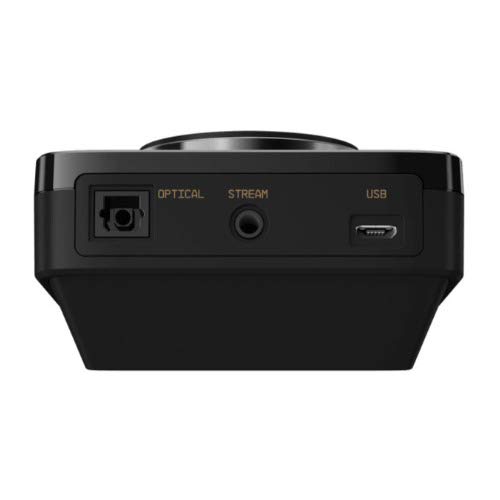
Billede: Bagside view of the ASTRO MixAmp Pro TR, highlighting the Optical, USB, AUX, and Stream ports for various connections.
Operating the MixAmp Pro TR
BlandingenAmp Pro TR provides intuitive controls for managing your audio experience:
- Master volumenknap: The large dial on the left controls the overall volume of your headset. Rotate clockwise to increase volume, counter-clockwise to decrease.
- Game/Voice Balance Dial: The smaller dial on the right allows you to adjust the balance between game audio and voice chat.
- Rotate towards "GAME" to prioritize game audio.
- Rotate towards "VOICE" to prioritize voice chat.
- EQ Presets Button: Located in the center, this button cycles through four customizable equalizer presets. The active preset is indicated by the illuminated icon (star, headphone, etc.). These presets can be configured using the ASTRO Command Center software.
- Dolby Button: Activates or deactivates Dolby Surround Sound. When active, the Dolby logo will illuminate.
- Mikrofon mute knap: Located on the A40 TR Inline Mute Cable, this switch mutes or unmutes your microphone. When muted, the MixAmp's volume dials will typically glow red.
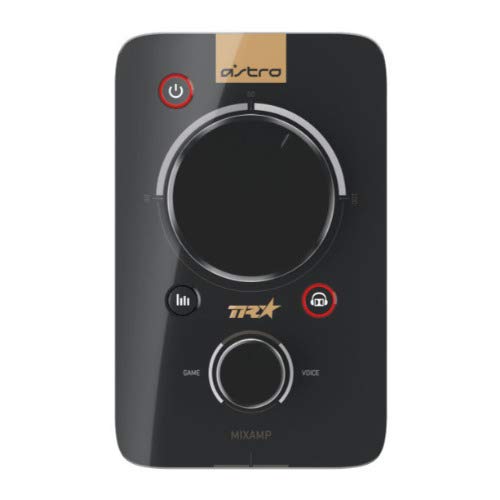
Billede: Top view of the ASTRO MixAmp Pro TR, showing the large master volume dial, the smaller game/voice balance dial, and the EQ preset buttons.
Opretholdelse
- Rensning: Use a soft, dry cloth to clean the headset and MixAmpUndgå slibende rengøringsmidler eller opløsningsmidler.
- Opbevaring: Store the headset and MixAmp på et køligt, tørt sted væk fra direkte sollys og ekstreme temperaturer.
- Kabelpleje: Håndter kablerne forsigtigt for at forhindre skader. Undgå skarpe bøjninger eller overdreven trækkraft.
- Ørepuder: Periodically check ear cushions for wear and tear. Replacement cushions are available from ASTRO Gaming.
Fejlfinding
If you encounter issues with your ASTRO Gaming A40 TR Headset or MixAmp Pro TR, try the following solutions:
| Problem | Løsning |
|---|---|
| Ingen lyd fra headsettet. |
|
| Mikrofon virker ikke. |
|
| Forvrænget eller dårlig lydkvalitet. |
|
For more detailed troubleshooting, please refer to the official ASTRO Gaming support resources.
Specifikationer
- Modelnummer: 939-001511
- Frekvensrespons: 20 - 20,000 Hz
- Nominel impedans: 48 ohm
- Pandebåndstryk: 2.6N
- Produktdimensioner: 9.06 x 13.87 x 4.33 tommer
- Varens vægt: 1.06 pund
- Forbindelse: Optisk, USB
- Kompatibilitet: PlayStation 4, PC
Garanti og support
For detailed warranty information and product support, please visit the official ASTRO Gaming website or refer to the provided documentation:
Ensure you register your product on the ASTRO Gaming website for the latest updates and support.


