1. Introduktion
Tak for købetasing the eKids Li-B17 Millennium Falcon Bluetooth Speaker. This portable wireless speaker allows you to stream audio from your Bluetooth-enabled devices and enjoy hands-free calling. Its unique design, inspired by the iconic Millennium Falcon, includes light effects and plays the Star Wars theme. Please read this manual carefully to ensure proper use and maintenance of your speaker.
2. Sikkerhedsoplysninger
- Aldersanbefaling: Velegnet til alderen 3 år og opefter.
- Udsæt ikke enheden for ekstreme temperaturer, direkte sollys eller fugt.
- Forsøg ikke at skille enheden ad eller ændre den. Dette vil ugyldiggøre garantien.
- Brug kun det medfølgende opladningskabel eller et tilsvarende certificeret kabel.
- Hold enheden væk fra stærke magnetiske felter.
3. Pakkens indhold
Sørg for at alle varer er til stede i pakken:
- eKids Li-B17 Millennium Falcon Bluetooth Speaker
- USB opladningskabel

Figur 1: eKids Li-B17 Millennium Falcon Bluetooth Speaker on its clear stand, showcasing its detailed design and illuminated blue engine lights.
4. Produktfunktioner
- Bluetooth Wireless Audio: Stream musik trådløst fra kompatible enheder.
- Håndfri funktion: Answer and end calls directly from the speaker.
- Lyseffekter: Integrated lights illuminate during operation.
- Genopladeligt batteri: Built-in lithium battery provides up to 6 hours of playback.
- Star Wars Theme: Plays the iconic Star Wars main theme.
- AUX-indgang: Connect non-Bluetooth devices via the auxiliary port.

Figur 2: The eKids Li-B17 Millennium Falcon Bluetooth Speaker with text indicating powerful sound performance and illuminated engine lights, alongside a smartphone displaying music playback.
5. Opsætning
5.1 Opladning af højttaleren
- Connect the small end of the included USB charging cable to the USB charging port on the speaker.
- Connect the larger end of the USB charging cable to a powered USB port (e.g., computer, USB wall adapter).
- Opladningsindikatorlampen lyser. Når den er fuldt opladet, kan lampen skifte farve eller slukke.
- En fuld opladning giver cirka 6 timers spilletid.
5.2 Tænd/sluk
Locate the 3-position switch on the side of the speaker (refer to Figure 3).
- Til magten ON in Bluetooth mode, slide the switch to the Bluetooth symbol position.
- Til magten ON in AUX mode, slide the switch to the AUX position.
- Til magten SLUKKET, skub kontakten til SLUKKET (midterste) position.
5.3 Bluetooth -parring
- Ensure the speaker is charged and powered ON in Bluetooth mode. The speaker will automatically enter pairing mode if no previously paired device is found.
- Aktiver Bluetooth på din Bluetooth-aktiverede enhed (smartphone, tablet osv.) og søg efter tilgængelige enheder.
- Vælg "eKids Li-B17" (or similar name) from the list of devices.
- Once paired, the speaker will indicate a successful connection (e.g., a tone or voice prompt).
- To pair a new device or re-enter pairing mode, press and hold the Bluetooth button on the top of the speaker.
5.4 AUX-forbindelse
For devices without Bluetooth, you can use the AUX input:
- Slide the 3-position switch to the AUX position.
- Connect one end of a 3.5mm audio cable (not included) to your audio device's headphone jack.
- Connect the other end of the 3.5mm audio cable to the AUX port on the speaker (refer to Figure 3).
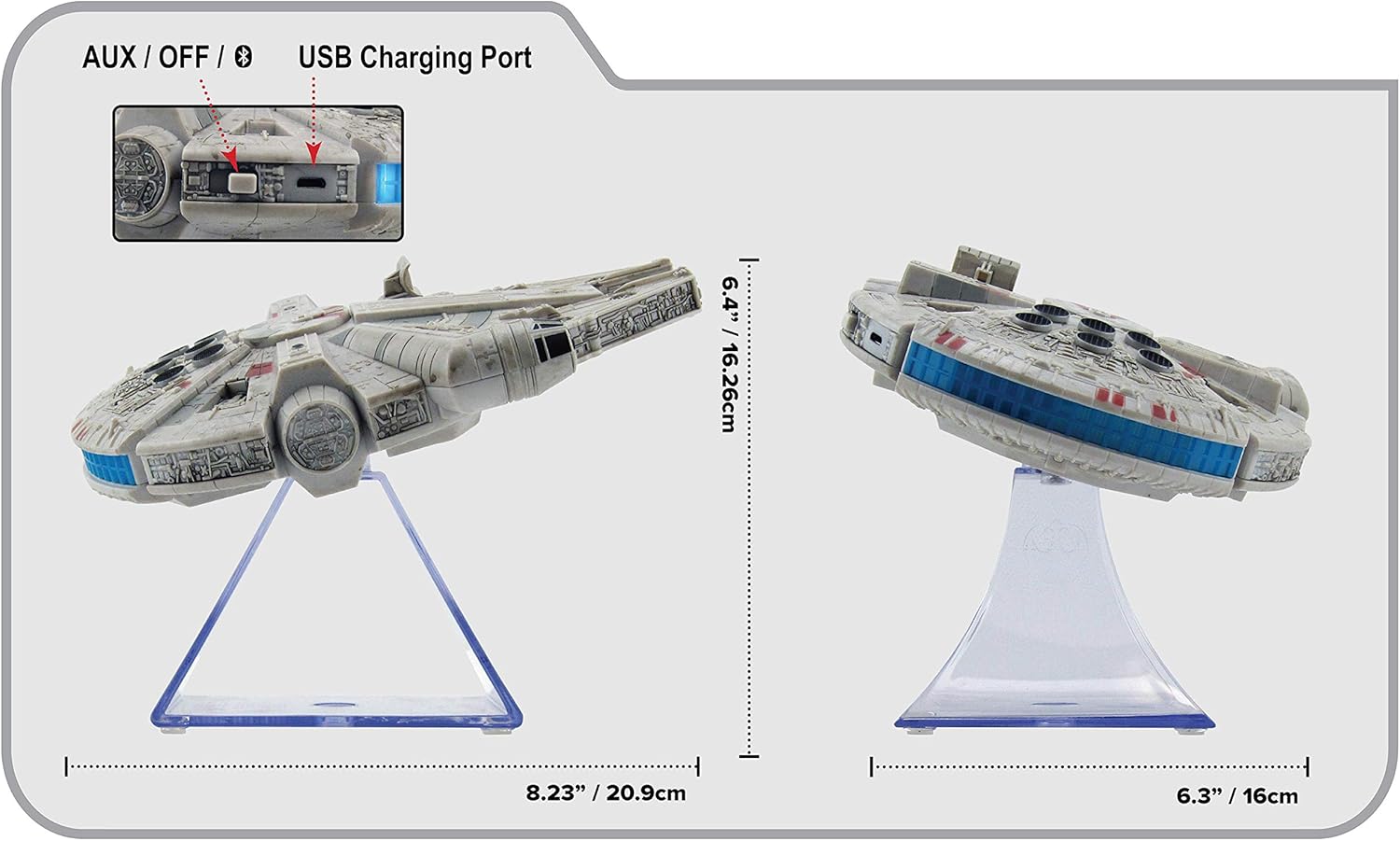
Figur 3: Side view of the eKids Li-B17 Millennium Falcon Bluetooth Speaker, highlighting the AUX/OFF/Bluetooth switch, USB charging port, and product dimensions.

Figur 4: Image illustrating the eKids Li-B17 Millennium Falcon Bluetooth Speaker's compatibility with multiple devices including mobile phones, tablets, notebooks, smartwatches, game devices, and PCs.
6. Betjeningsvejledning
6.1 Afspilning af lyd
- Once connected via Bluetooth or AUX, start playing audio from your source device.
- Adjust the volume using the controls on your connected device. The speaker itself does not have volume controls.
6.2 Håndfri opkald
Når den er tilsluttet via Bluetooth til en smartphone:
- Besvare et opkald: Press the designated call button on the speaker (often integrated with the Bluetooth button or a separate small button near the main blaster area).
- Afslutning af et opkald: Press the call button again.
- Foretag et opkald: Initiate the call from your smartphone; audio will route through the speaker.
6.3 lyseffekter
The speaker features integrated blue engine lights that illuminate when the speaker is powered on and in use, enhancing the visual experience.
6.4 Star Wars Theme Playback
Press the large button located on the top of the speaker (the top blaster area) to play the Star Wars main theme.
7. Vedligeholdelse
- Clean the speaker with a soft, dry cloth. Do not use liquid cleaners or abrasive materials.
- Opbevar højttaleren på et køligt, tørt sted, når den ikke er i brug.
- Undgå at tabe højttaleren eller udsætte den for kraftige stød.
8. Fejlfinding
| Problem | Mulig årsag | Løsning |
|---|---|---|
| Højttaleren tænder ikke. | Batteriet er afladet. | Oplad højttaleren ved hjælp af det medfølgende USB-kabel. |
| Kan ikke parres via Bluetooth. | Højttaleren er ikke i parringstilstand, eller enhedens Bluetooth er slået fra. | Ensure speaker is in Bluetooth mode and press the Bluetooth button to enter pairing. Turn Bluetooth on your device and search again. |
| Ingen lyd fra højttaleren. | Volume too low, incorrect input mode, or device not playing. | Increase volume on your device. Ensure speaker is in correct mode (Bluetooth/AUX). Check if your device is playing audio. |
| Dårlig lydkvalitet. | Device too far from speaker, interference, or low battery. | Move device closer to speaker (within 30 feet). Avoid obstacles. Charge the speaker. |
9. Specifikationer
| Feature | Specifikation |
|---|---|
| Modelnummer | Li-B17 |
| Forbindelsesteknologi | Bluetooth |
| Wireless Range | Op til 30 fod (ca. 9 meter) |
| Strømkilde | Lithium-Polymer Battery (rechargeable) |
| Batterilevetid | Op til 6 timer |
| Maksimal højttalerudgangseffekt | 25 watt |
| Lydudgangstilstand | Stereoanlæg |
| Materiale | Plast |
| Monteringstype | Bordplade |
| Dimensioner (L x B x H) | 18.29 x 26.42 x 24.13 cm (7.2 x 10.4 x 9.5 tommer) |
| Inkluderede komponenter | Millennium Falcon Bluetooth Speaker, USB Charging Cable |
10. Garanti og support
Dette produkt leveres med en Begrænset garanti. For specific details regarding warranty coverage, duration, and how to obtain service, please refer to the warranty card included with your purchase or contact eKids customer support.
For technical support or further inquiries, please visit the official eKids webwebsted eller kontakt deres kundeserviceafdeling.


