1. Introduktion
The Crenova PT100A is a 720P HD WIFI Surveillance IP Camera designed for home security and monitoring. It features Pan-Tilt-Zoom (PTZ) capabilities, night vision, two-way audio, and support for wireless alarm sensors, providing comprehensive surveillance and communication functionalities.
This manual provides detailed instructions for setting up, operating, and maintaining your Crenova PT100A camera to ensure optimal performance and security.
2. Nøglefunktioner
- One-Key Wi-Fi Configuration: Simple and quick setup via sound.
- HD-opløsning: 720P resolution with a 1.0 MP CMOS sensor for clear images and video.
- Nattesyn: Ceramic infrared light provides optimal visibility in low-light conditions.
- PTZ kontrol: Pan 355 degrees horizontally and tilt 120 degrees vertically for wide area coverage.
- Sikkerhedsadvarsler: Supports up to 64 wireless alarm sensors, with siren, mobile phone calls, and email photo alerts.
- Tovejs lyd: Real-time communication with the monitored area.
- Lokal opbevaring: Supports up to a 128GB TF card for continuous recording.
3. Pakkens indhold
Kontroller venligst, at alle varer er til stede i din pakke:
- 1 x Crenova Smart IP Camera (PT100A)
- 1 x USB-kabel
- 1 x strømadapter
- 1 x Mounting Basket Panel
- 1 x brugermanual
4. Produktet er slutview

Billede 4.1: Diagram of the Crenova PT100A IP Camera with its main components labeled. This includes the lens, ceramic lamp, speaker, antenna, network cable interface, TF card slot, reset button, and power interface.
Gør dig bekendt med kameraets komponenter:
- Linse: Optager video og billeder.
- Keramisk Lamp: Giver infrarød belysning til nattesyn.
- Højttaler: Outputs audio for two-way communication and alarm siren.
- Antenne: Til Wi-Fi-forbindelse.
- PT (Pan/Tilt) Mechanism: Muliggør fjernjustering af kameravinkel.
- Network Cable Interface: Til kabelbaseret Ethernet-forbindelse (valgfrit).
- TF-kortslot: Indsæt et MicroSD-kort til lokal videolagring.
- Nulstil knap: Bruges til at gendanne fabriksindstillinger.
- Strømgrænseflade: Tilsluttes strømadapteren.
5. Opsætningsvejledning
Follow these steps to set up your Crenova PT100A IP Camera:

Billede 5.1: Visual guide for the quick setup process, illustrating connecting power, downloading the app, performing one-key Wi-Fi setup, and adding the camera.
- Tilslut strøm: Plug the power adapter into the camera's power interface and then into a wall outlet. The camera will power on and initiate its startup sequence.
- Download appen: Søg efter the official Crenova camera application on your smartphone's app store (e.g., Apple App Store for iOS or Google Play Store for Android). Download and install the application.
- Registrer en konto: Åbn appen, og følg instruktionerne på skærmen for at registrere en ny brugerkonto.
- One-Key Wi-Fi Setup: Within the app, select the option for 'One-Key Wi-Fi Configuration' or 'SmartLink'. Follow the prompts to connect the camera to your Wi-Fi network. Ensure your smartphone is connected to the same 2.4GHz Wi-Fi network you intend to use for the camera. The app will use sound waves to transmit network information to the camera.
- Tilføj kamera: Once the Wi-Fi setup is complete, the app will guide you to add the camera to your account. You may need to scan a QR code on the camera or manually enter its ID.
- Placering: Position the camera in your desired monitoring area. The included mounting basket panel can be used for wall or ceiling installation.
6. Betjeningsvejledning
6.1. Fjernbetjening Viewog PTZ-styring
After successful setup, open the app on your smartphone to view the live feed from your camera. Use the on-screen controls to remotely pan (horizontal rotation) and tilt (vertical rotation) the camera lens.

Billede 6.1: Illustration of the camera's Pan-Tilt-Zoom (PTZ) capabilities, demonstrating 355 degrees of horizontal rotation and 120 degrees of vertical rotation for comprehensive area coverage.
- Vandret rotation: The camera supports 355 degrees of horizontal movement.
- Lodret rotation: The camera supports 120 degrees of vertical movement.
6.2. Motion Detection and Alarm Alerts
The camera can detect motion and trigger various alarm responses. Configure these settings within the camera app.

Billede 6.2: A smartphone displaying a motion detection alarm notification from the camera, indicating an event has occurred.
- Alarm Sensor Support: The camera can integrate with up to 64 wireless alarm sensors.
- Alarm Methods: When an alarm is triggered, the camera can:
- Emit a loud siren.
- Call up to five pre-configured mobile phone numbers.
- Capture photos and send them via email.
6.3. Tovejslyd
Brug den indbyggede mikrofon og højttaler til tovejskommunikation i realtid.

Billede 6.3: The camera depicted alongside an icon representing two-way audio functionality, with sound waves indicating active communication.
- Tryk på mikrofonikonet i appen for at tale gennem kameraets højttaler.
- Kameraets mikrofon opfanger lyd fra det overvågede område.
6.4. Videooptagelse
The camera supports local video recording to a TF (MicroSD) card.
- Insert a TF card (up to 128GB) into the designated slot on the camera.
- Configure recording settings (e.g., continuous recording, motion-activated recording) within the camera app.
- Footage kan være reviewdirekte fra appen.
7. Specifikationer
| Feature | Specifikation |
|---|---|
| Model | PT100A |
| Billedsensor | 1.0 MP HD CMOS Sensor |
| Opløsning | 720P (1280 x 720) |
| Forbindelse | Wi-Fi (Wireless), Wired Ethernet |
| PTZ Angles | Panorer 355°, vip 120° |
| Nattesyn | Ceramic Infrared Light |
| Opbevaring | Understøtter op til 128 GB TF-kort |
| Alarm Sensor Support | Up to 64 wireless channels |
| Strømkilde | Cable eléctrico (Power Cable) |
| Dimensioner (L x B x H) | 20.57 x 15.49 x 13.21 cm (ca. 8.1 x 6.1 x 5.2 tommer) |
| Vægt | 657.7 g (ca. 1.45 lbs) |
| Certificeringer | CE, FCC, ROHS |
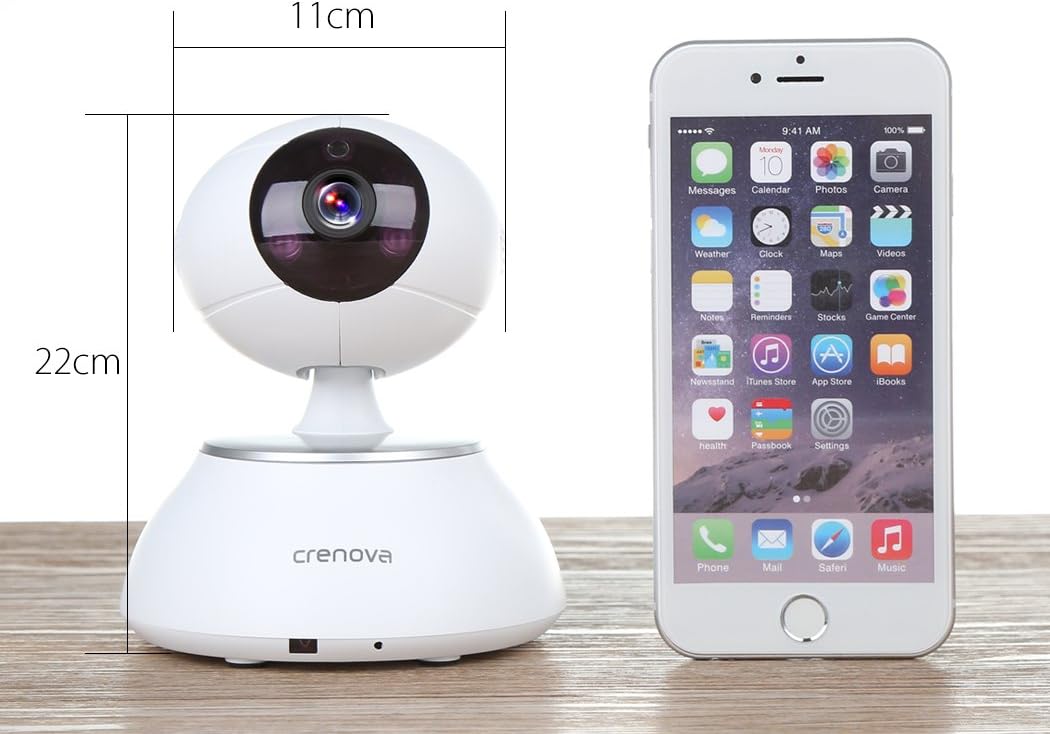
Billede 7.1: The Crenova PT100A IP Camera shown next to a smartphone, with its approximate dimensions indicated as 11cm in width and 22cm in height.
8. Vedligeholdelse
- Rensning: Use a soft, dry cloth to clean the camera's exterior. Do not use liquid cleaners or aerosols directly on the camera.
- Linsepleje: Gently wipe the lens with a microfiber cloth designed for optics to avoid scratches.
- Placering: Sørg for, at kameraet er placeret et stabilt sted, væk fra direkte sollys, ekstreme temperaturer og høj luftfugtighed.
- Firmwareopdateringer: Periodically check the camera app for available firmware updates to ensure optimal performance and security.
9. Fejlfinding
- Kameraet opretter ikke forbindelse til Wi-Fi:
- Sørg for, at dit Wi-Fi-netværk er 2.4 GHz. Kameraet understøtter muligvis ikke 5 GHz-netværk.
- Verify the Wi-Fi password is entered correctly in the app.
- Flyt kameraet tættere på din Wi-Fi-router.
- Reset the camera using the reset button and attempt setup again.
- Dårlig billedkvalitet:
- Tjek din internetforbindelses hastighed. En langsom forbindelse kan påvirke streamingkvaliteten.
- Rengør kameralinsen for støv eller snavs.
- Ensure adequate lighting in the monitored area, especially for optimal night vision performance.
- No Alarm Alerts:
- Verify motion detection and alarm settings are enabled in the app.
- Check app notification settings on your smartphone to ensure alerts are not blocked.
- Ensure wireless alarm sensors (if used) are properly paired and functioning.
- Tovejslyd virker ikke:
- Check microphone and speaker permissions for the app on your smartphone.
- Sørg for, at lydstyrken på din smartphone og i appen er skruet op.
- Kontroller, at der ikke er nogen forhindringer, der blokerer kameraets mikrofon eller højttaler.
10. Garanti og support
For warranty information and technical support, please refer to the documentation included with your purchase or contact Crenova customer service directly. Details for contacting support are typically available on the manufacturer's official webwebstedet eller i produktemballagen.


