1. Produktet er slutview
The Dell AC Spare Adapter 130W is designed to provide reliable power to compatible Dell laptops. This adapter ensures your device receives the necessary power for optimal performance and charging.
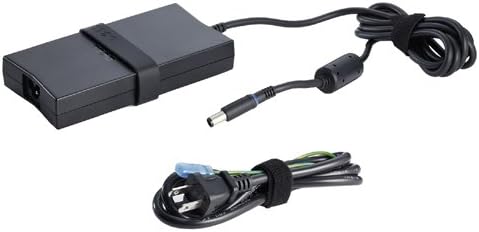
Figure 1: Dell AC Spare Adapter 130W. This image shows the main adapter unit, its attached DC output cable with a barrel connector, and a separate AC input power cable.
Nøglefunktioner
- Power capacity: 130W
- Included accessories: 1 x AC Power Cable
- Compatible with various Dell Latitude and Precision models.
- 1 års garanti for ro i sindet.
2. Opsætningsvejledning
2.1 Pakkens indhold
Kontroller venligst, at alle varer er til stede i pakken:
- 1 x Dell AC Spare Adapter 130W
- 1 x AC strømkabel
2.2 Tilslutning af adapteren
- Connect the AC power cable to the adapter's AC input port.
- Plug the other end of the AC power cable into a wall outlet or surge protector.
- Connect the adapter's DC output cable (with the barrel connector) to the power input port on your compatible Dell laptop.
- Ensure all connections are secure. The laptop should begin charging or receive power.
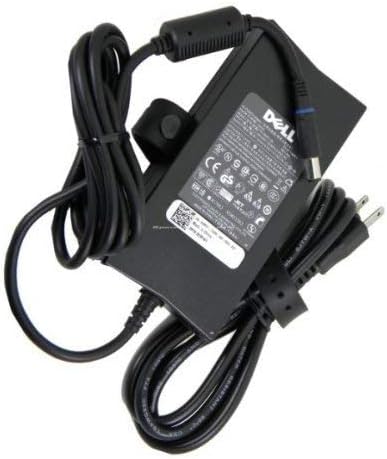
Figure 2: Adapter Back View. This image displays the back of the Dell AC Spare Adapter 130W, showing the product label with specifications and certifications. The DC output cable is visible, coiled and secured.
3. Betjeningsvejledning
3.1 Tænd/sluk
Once connected, the adapter automatically supplies power to your laptop. There is no manual on/off switch on the adapter itself. Your laptop's power button controls its power state.
3.2 Charging Status Indicators
Refer to your Dell laptop's user manual for specific information regarding charging status indicators (e.g., LED lights) on your device. The adapter itself typically does not have external indicators.
4. Vedligeholdelse og pleje
To ensure the longevity and proper functioning of your Dell AC Spare Adapter 130W, follow these guidelines:
- Hold det rent: Regularly wipe the adapter and cables with a soft, dry cloth. Avoid using liquid cleaners.
- Undgå fysisk skade: Do not drop, bend, or expose the adapter to excessive force.
- Korrekt kabelstyring: Avoid sharp bends or kinks in the cables. When storing, coil the cables loosely.
- Miljøforhold: Use and store the adapter in a dry environment, away from extreme temperatures and direct sunlight.
- Tag stikket ud, når det ikke er i brug: If you will not be using the adapter for an extended period, unplug it from both the wall outlet and your laptop.

Figure 3: Adapter Close-up. A close-up view of the Dell AC Spare Adapter 130W, highlighting its textured casing and a black cable management strap wrapped around the adapter body.
5. Fejlfinding
If you encounter issues with your adapter, refer to the table below for common problems and solutions.
| Problem | Mulig årsag | Løsning |
|---|---|---|
| Bærbar computer oplader ikke | Loose connection, faulty outlet, adapter issue, laptop issue | Check all cable connections. Try a different wall outlet. Test the adapter with another compatible device if possible. If the issue persists, contact support. |
| Adapteren er varm | Normal operation, poor ventilation, overload | It is normal for adapters to get warm during use. Ensure adequate ventilation around the adapter. If it becomes excessively hot or emits smoke/smell, unplug immediately and contact support. |
| Strømkabel beskadiget | Fysisk slitage | Discontinue use immediately. Replace with an official Dell AC power cable. |
6. Produktspecifikationer
| Specifikation | Detalje |
|---|---|
| Mærke | Dell |
| Modelnummer | AC Spare Adapter 130W |
| Wattage | 130 W |
| Input bindtage | 240 volt |
| Connector Type | Proprietary Barrel Connector (7.4mm*5.0mm) |
| Type hovedstrømstik | 2-benet |
| Kompatible enheder | Latitude: 3330, E5250, E5420m, E5430, E5440, E5450, E5530, E5540, E5550, E6230, E6330, E6430, E6430s, E6530, E6540, E7240, E7440, XT3; Precision: M2800, M4600 |
| Pakkedimensioner | 32 x 20.6 x 5 cm |
| Vægt | 679.99 g |
| ASIN | B0132I7QRG |
| Første ledige dato | 2015/07/30 |
7. Garanti og support
7.1 Garantioplysninger
This Dell AC Spare Adapter 130W comes with a 1-year limited warranty from the date of purchase. Please retain your proof of purchase for warranty claims. For detailed warranty terms and conditions, refer to the documentation included with your product or visit the Dell support webwebsted.
7.2 Kundesupport
For technical assistance, troubleshooting, or warranty inquiries, please contact Dell support through the following channels:
- Chat (LINE) Support: https://page.line.me/391vsisb (LINE Account Name: Dell Technologies / LINE ID: @dell / Available: 9:00-21:00, Monday-Saturday, including holidays)
- Telefonsupport: https://www.dell.com/support/incidents-online/ja-jp/contactus/Dynamic
- Additional Dell Product Information: https://www.amazon.co.jp/b?node=10290183051
Note: Manufacturer support is primarily for products sold directly by Amazon.co.jp. For products sold by other vendors, please contact the respective vendor for support.


