1. Introduktion
Thank you for choosing the DBPOWER 10.5-inch Portable DVD Player. This manual provides essential information for the safe and efficient operation of your device. Please read it thoroughly before use and keep it for future reference.
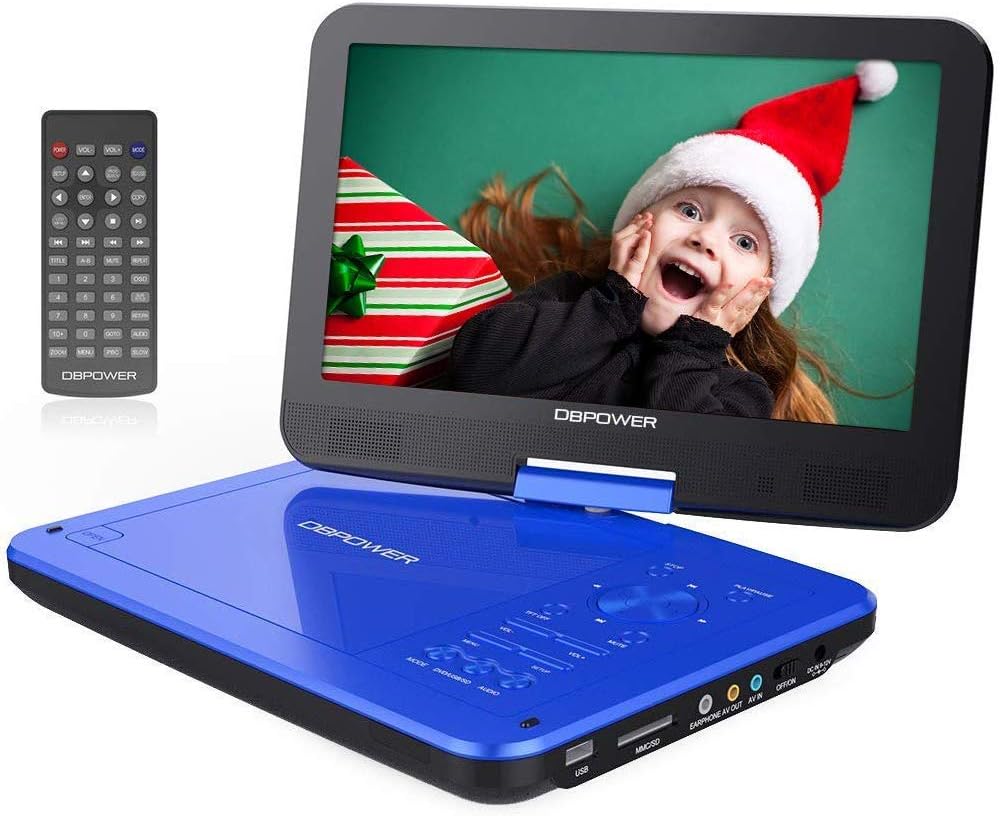
Image: The DBPOWER 10.5-inch Portable DVD Player in blue, shown with its remote control. The screen is open, displaying a vibrant image.
2. Sikkerhedsoplysninger
- Avoid touching the laser lens directly.
- Do not use scratched or damaged discs, as this may harm the player.
- It is normal to hear a slight sound during the first 15 seconds of disc playback.
- If the player displays "no disc," remove the disc and try another one.
- Hold enheden væk fra vand, fugt og ekstreme temperaturer.
- Forsøg ikke selv at skille eller reparere enheden. Kontakt kvalificeret servicepersonale.
3. Pakkens indhold
Sørg for at alle varer er til stede i pakken:
- DBPOWER Portable DVD Player
- Brugervejledning
- Car Charger (DC9-12V)
- Power Adapter (DC9-12V)
- Fjernbetjening (2 AAA-batterier medfølger ikke)
- AV Cable (3.5mm, for connecting player to TV/projector)

Image: An illustration showing the complete package contents, including the DVD player, user manual, car charger, AV cable, power adapter, and remote control.
4. Produktet er slutview
4.1 Nøglefunktioner
- 10.5-tommer drejelig skærm: The screen can swivel and rotate 360 degrees for optimal viewing vinkler.
- Lang batterilevetid: Upgraded battery provides up to 5 hours of playback time.
- Multi-format support: Plays CD/DVD/CD-R/CD-RW/VCD/SVCD/CVD/DVD-R/DVD+R/DVD-RW/DVD+RW discs (excluding Blu-ray).
- USB & SD Card Playback: Afspil medier direkte files from USB drives and SD cards.
- Stødbestandig: Designet til at modstå mindre stød.
- Flere strømindstillinger: Can be powered by the included AC adapter, car charger, or built-in battery.
- AV Output/Input: Connect to a TV or another player for shared viewing.
4.2 Understøttede formater
| Kategori | Understøttede formater |
|---|---|
| Diskformater | CD, DVD, CD-R, CD-RW, VCD, SVCD, CVD, DVD-R, DVD+R, DVD-RW, DVD+RW (Blu-ray-diske understøttes ikke) |
| Lydformater | MP3, WMA, OGG, AAC (Bit rate: 32-192 kbps) |
| Videoformater | AVI, MPG, MP4, VOB, FLV, RMVB, MPEG1, MPEG2 (Resolution not exceeding 720x576) |
| Billedformater | JPG |
| Tekstformater | TXT |

Image: Visual representation of the 1024x600 TFT-LCD screen and icons for supported media formats including USB, SD card, and various disc types.

Billede: Et nærbillede view of the side of the DVD player, highlighting the USB port, SD card slot, earphone jack, AV OUT/IN ports, ON/OFF switch, and DC power input.
5. Opsætning
5.1 Opladning af batteriet
Before first use, fully charge the player's built-in lithium battery. You can use either the AC power adapter or the car charger.
- Connect the power adapter or car charger to the DC IN port on the player.
- Plug the adapter into a wall outlet or the car charger into your vehicle's cigarette lighter socket.
- Opladningsindikatorlampen lyser. Den slukker eller skifter farve, når opladningen er færdig.

Image: This image illustrates the three power options for the portable DVD player: the internal 2500mAh battery, the car charger, and the standard power adapter.
5.2 Indsættelse af en disk
- Åbn forsigtigt diskdækslet.
- Place the disc onto the spindle with the label side facing up.
- Tryk forsigtigt ned på midten af disken, indtil den klikker på plads.
- Luk diskdækslet godt.
5.3 Using USB/SD Card
- Insert your USB flash drive into the USB port or your SD card into the SD card slot.
- Ensure the device is inserted correctly.

Image: A visual showing an SD card and a USB drive, indicating their compatibility with the portable DVD player for direct media playback.
6. Betjeningsvejledning
6.1 Grundlæggende afspilning
- Turn on the player using the ON/OFF switch.
- The player will automatically detect and begin playing the inserted disc or media from the USB/SD card.
- Use the remote control or the buttons on the player to control playback (Play, Pause, Stop, Fast Forward, Rewind, Next/Previous Track).
- The "OK" button functions as both Play and Stop.

Image: This image illustrates the "Last Memory Function," showing the player resuming from where it left off after being powered off and on again.
6.2 Screen Rotation and Swivel
The screen can be rotated up to 270 degrees and flipped 180 degrees to achieve various viewing angles, including a tablet-like mode.

Image: Diagrams demonstrating the 270-degree rotation and 180-degree flip capabilities of the screen, along with an image of the player mounted on a car headrest.
6.3 Connecting to External Devices (TV/Projector/Another Player)
Use the included AV cable to connect the portable DVD player to a larger screen or another compatible player.
- Connect one end of the AV cable to the AV OUT port on the portable DVD player.
- Connect the other end of the AV cable to the corresponding AV IN ports (Yellow for Video, Red/White for Audio) on your TV or projector.
- Select the correct AV input source on your TV/projector.

Image: A family watching the portable DVD player's content mirrored on a large television screen via an AV cable connection.

Image: This composite image demonstrates how to sync the portable DVD player's screen to a TV, a projector, or even another similar portable player for a shared viewoplevelse.
6.4 Lydudgang
The player features built-in stereo speakers. For private listening, connect headphones to the EARPHONE jack. You can also connect external speakers for enhanced audio.

Image: The portable DVD player with visual representations of sound waves emanating from its dual built-in speakers, emphasizing its loud volume capability.

Image: This image shows the portable DVD player connected to both headphones and an external speaker, illustrating its versatile audio output options in addition to its built-in speakers.
7. Vedligeholdelse
- Rensning: Use a soft, dry cloth to clean the player's surface. For the screen, use a screen-specific cleaning solution and a microfiber cloth.
- Diskpleje: Handle discs by their edges. Store them in their cases to prevent scratches. Clean discs with a soft, lint-free cloth from the center outwards.
- Opbevaring: Når afspilleren ikke er i brug i længere perioder, skal den opbevares køligt og tørt, væk fra direkte sollys og ekstreme temperaturer.
- Batteri: For at forlænge batteriets levetid, undgå at aflade batteriet helt ofte. Oplad det regelmæssigt, selvom det ikke er i brug.
8. Fejlfinding
| Problem | Mulig årsag | Løsning |
|---|---|---|
| Afspilleren tænder ikke. | Battery is depleted; Power adapter/car charger not connected properly. | Charge the battery; Ensure power connections are secure. |
| "No Disc" message appears. | Disc is scratched, dirty, or inserted incorrectly; Unsupported disc format. | Clean or replace the disc; Ensure disc is inserted correctly; Check if disc format is supported. |
| Ingen lyd. | Volume is too low; Mute function is on; Headphones/external speakers not connected properly. | Increase volume; Disable mute; Check audio connections. |
| Dårlig billedkvalitet. | Disc is dirty/damaged; Screen settings need adjustment; AV cable issues. | Clean or replace disc; Adjust sharpness/brightness/contrast in settings; Check AV cable connection. |
| Fjernbetjening virker ikke. | Batterierne er døde eller isat forkert; Blokering mellem fjernbetjening og afspiller. | Replace batteries (2 AAA); Ensure correct polarity; Remove obstructions. |
9. Specifikationer
- Modelnummer: NS-101B
- Skærmstørrelse: 10.5 tommer
- Skærmopløsning: 1024x600 TFT-LCD
- Batteri: 2500mAh lithium
- Batterilevetid: Op til 5 timer
- Understøttede diskformater: CD, DVD, CD-R, CD-RW, VCD, SVCD, CVD, DVD-R, DVD+R, DVD-RW, DVD+RW
- Understøttet File Formats (USB/SD): AVI, MPG, MP4, VOB, FLV, RMVB, MPEG1, MPEG2 (Video); MP3, WMA, OGG, AAC (Audio); JPG (Image); TXT (Text)
- USB-porte: 1
- AV Ports: AV UD, AV IND
- Hovedtelefonstik: 3.5 mm
- Strømindgang: DC 9-12V
- Vægt: 1.44 kilo
- Farve: Blå
10. Garanti og support
DBPOWER is committed to providing excellent customer support. While specific warranty details are not provided in this manual, please retain your proof of purchase for any warranty claims.
For technical assistance, troubleshooting beyond this guide, or warranty inquiries, please contact DBPOWER customer support. Refer to the contact information provided with your product packaging or visit the official DBPOWER webwebsted.
"Feel free to let us know any problems you have with our player." - DBPOWER Support Team


