Indledning
Tak for købetasing the Madison FREESOUND-VR40R Vintage Portable Radio. This device combines a classic retro design with modern audio technology, offering versatile listening options. This manual provides detailed instructions on how to set up, operate, and maintain your radio to ensure optimal performance and longevity.
The FREESOUND-VR40R is a portable, USB-rechargeable radio designed for those who appreciate a vintage aesthetic combined with modern audio technologies. It features an analog dial tuner, Bluetooth, USB, AUX, and FM connectivity, bass enhancement, and a convenient dual metal handle for portability.
Sikkerhedsinstruktioner
Læs venligst disse sikkerhedsinstruktioner omhyggeligt, inden du bruger enheden, og gem dem til senere brug. Forkert brug kan resultere i elektrisk stød, brand eller andre farer.
- Udsæt ikke enheden for regn eller fugt for at forhindre brand eller elektrisk stød.
- Udsæt ikke enheden for direkte sollys eller ekstreme temperaturer.
- Åbn ikke c'enasing. Der er ingen dele indeni, som kan serviceres af brugeren. Overlad al service til kvalificeret personale.
- Use only the specified power adapter/charging cable.
- Hold enheden væk fra stærke magnetiske felter.
- Clean the device only with a dry, soft cloth. Do not use liquid cleaners.
- Sørg for tilstrækkelig ventilation omkring enheden. Bloker ikke ventilationsåbninger.
Produkt overview
Familiarize yourself with the components and features of your Madison FREESOUND-VR40R radio.

Figur 1: Forside View. Shows the analog dial tuner, speaker grille, Madison logo, and control knobs for volume and source selection.
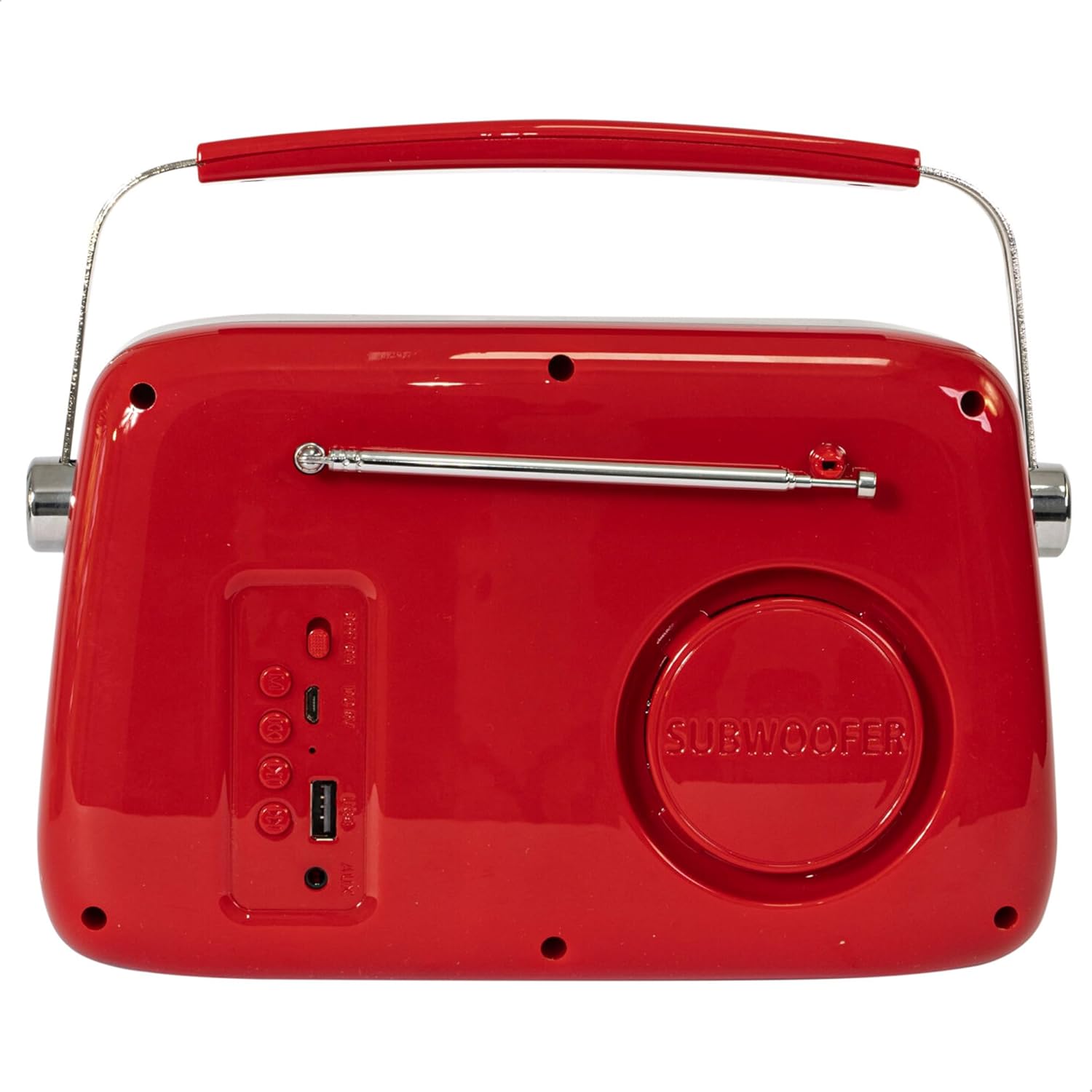
Figur 2: Bagside View. Displays the subwoofer, USB port, AUX input, and power/mode buttons.
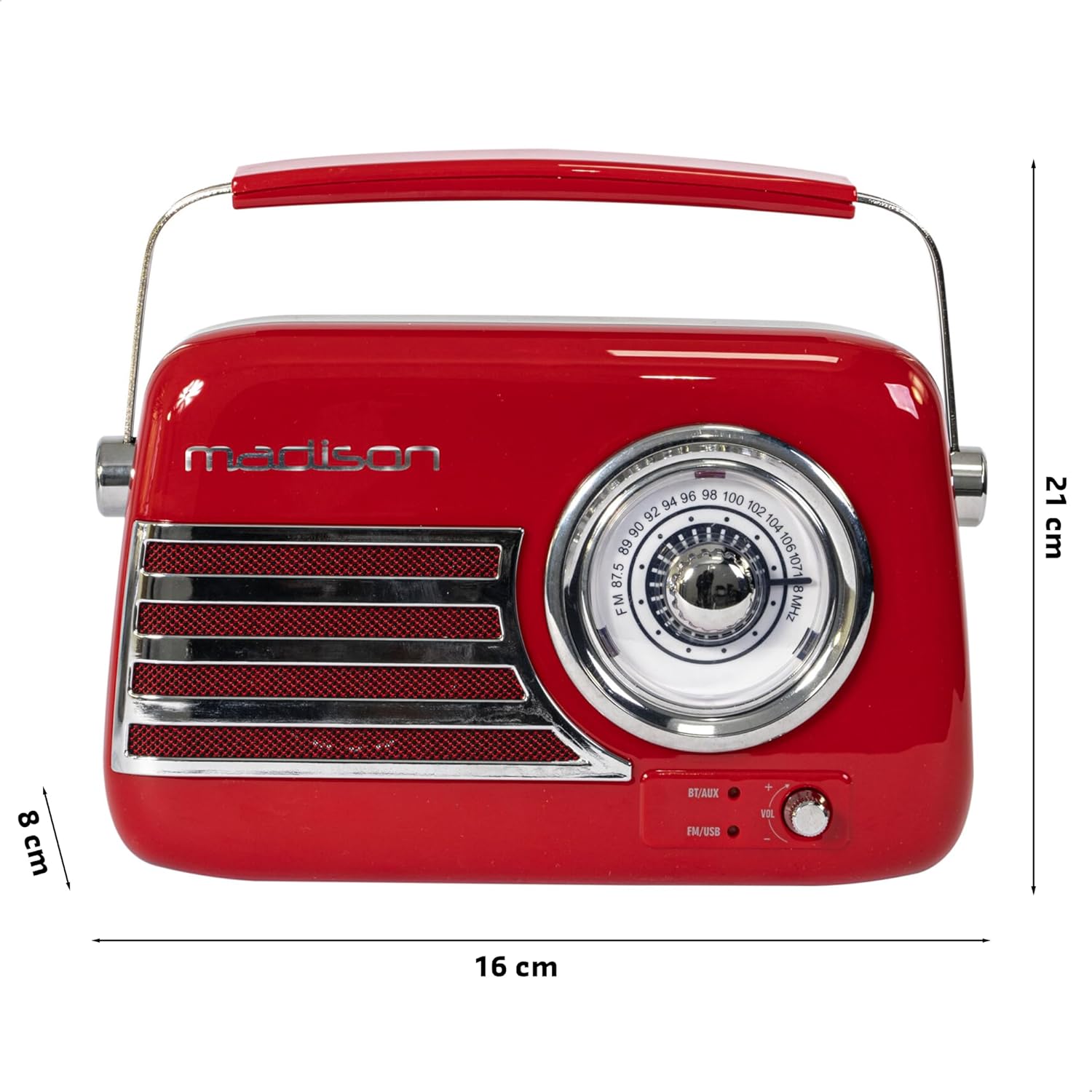
Figur 3: Produktmål. Illustrates the radio's approximate dimensions: 21 cm length, 8 cm width, and 16 cm height.

Figur 4: Bagside View with Antenna Extended. Shows the telescopic antenna fully extended for improved FM reception.
Nøglefunktioner:
- Analog Dial Tuner: For classic FM radio tuning.
- Bluetooth-forbindelse: Stream audio wirelessly from your smartphone or tablet.
- USB-afspilning: Afspil musik direkte fra et USB-drev.
- AUX-indgang: Tilslut eksterne lydenheder via et 3.5 mm lydkabel.
- FM-radio: Enjoy your favorite FM stations with the retractable antenna.
- Basforstærkning: Integrated subwoofer for richer bass sound.
- Genopladeligt batteri: Built-in long-lasting battery for portable use.
- Bærbart design: Lightweight with a dual metal handle for easy carrying.
Opsætning
Opladning af batteriet:
- Locate the USB charging port on the rear of the radio.
- Connect the provided USB charging cable to the radio's USB port.
- Tilslut den anden ende af USB-kablet til en kompatibel USB-strømadapter (medfølger ikke) eller en computers USB-port.
- Opladningsindikatorlampen lyser. Når den er fuldt opladet, kan lampen skifte farve eller slukke, afhængigt af modellen.
- En fuld opladning tager typisk flere timer.
Første gang tændt:
- Ensure the radio is sufficiently charged.
- Press and hold the Power/Mode button (usually located on the rear or front panel) to turn on the radio.
- The front indicator lights will show the currently selected source.
Betjeningsvejledning
Lydstyrkekontrol:
Drej på Bind knob (VOL) on the front panel to adjust the sound level. Turn clockwise to increase volume, counter-clockwise to decrease.
Selecting a Source:
Tryk på Kilde/tilstand button (often labeled BT/AUX or FM/USB) repeatedly to cycle through the available input modes: Bluetooth, AUX, FM Radio, and USB.
- Bluetooth-tilstand:
- Switch the radio to Bluetooth mode. The Bluetooth indicator light will blink, indicating it's ready for pairing.
- Aktiver Bluetooth på din smartphone eller tablet, og søg efter tilgængelige enheder.
- Select "FREESOUND-VR40R" (or similar name) from the list.
- Once paired, the Bluetooth indicator light will become solid, and you can stream audio from your device.
- FM -radiotilstand:
- Switch the radio to FM mode.
- Træk teleskopantennen helt ud for optimal modtagelse.
- Drej på Indstillingsskive on the front panel to manually select your desired FM radio station.
- USB-afspilningstilstand:
- Indsæt et USB-flashdrev med MP3-lyd files i USB-porten på bagsiden af radioen.
- Switch the radio to USB mode. The radio will automatically begin playing the audio files.
- Use the playback controls (if available, usually on the rear panel) to skip tracks or pause/play.
- AUX-indgangstilstand:
- Connect one end of a 3.5mm audio cable (not included) to the AUX input port on the rear of the radio.
- Connect the other end of the cable to the headphone jack or audio output of your external device (e.g., MP3 player, CD player).
- Switch the radio to AUX mode. Audio from your external device will now play through the radio.
Opretholdelse
Rensning:
For at bevare din radios udseende og funktionalitet:
- Tør de udvendige overflader af med en blød, tør og fnugfri klud.
- Brug ikke slibende rengøringsmidler, voks eller opløsningsmidler, da de kan beskadige finishen.
- Avoid spraying liquids directly onto the radio.
Opbevaring:
If you plan to store the radio for an extended period:
- Oplad batteriet helt før opbevaring.
- Opbevar radioen et køligt, tørt sted, væk fra direkte sollys og ekstreme temperaturer.
- For optimal battery health, recharge the battery every 3-6 months, even if not in use.
Fejlfinding
| Problem | Mulig årsag | Løsning |
|---|---|---|
| Ingen strøm / Radioen tænder ikke. | Batteriet er afladet. | Charge the radio using the provided USB cable. |
| Ingen lyd. | Lydstyrken er for lav eller slået fra. Forkert kilde valgt. | Increase the volume. Ensure the correct input source (Bluetooth, FM, USB, AUX) is selected. |
| Dårlig FM-modtagelse. | Antenna not extended. Weak signal. | Fully extend the telescopic antenna. Try repositioning the radio for better signal. |
| Bluetooth-enheden kan ikke parres. | Radio not in pairing mode. Device too far. Bluetooth disabled on source device. | Ensure radio is in Bluetooth pairing mode (blinking light). Move device closer. Enable Bluetooth on your smartphone/tablet. |
| USB-afspilning virker ikke. | USB drive not inserted correctly. Unsupported file format. | Ensure USB drive is fully inserted. Check if audio files er i MP3-format. |
Specifikationer
| Modelnummer: | 10-5567MA |
| Produktmål (L x B x H): | 21 x 8 x 16 cm |
| Vægt: | 635 gram |
| Farve: | Rød |
| Materiale: | Plast |
| Strømkilde: | Internal Rechargeable Battery (via USB) |
| Batteritype: | 1 litiumpolymer (inkluderet) |
| Forbindelse: | Bluetooth, USB, AUX |
| Radiobånd: | FM |
| Særlige funktioner: | Telescopic antenna, Analog dial tuner, Bass enhancement |
| Inkluderede komponenter: | USB opladningskabel |
| Fabrikant: | Lotronic S.A. |
| Oprindelsesland: | Kina |
Garanti og support
For warranty information and customer support, please refer to the warranty card included with your product or visit the official Madison webwebsted. Gem din købsbevis i tilfælde af garantikrav.
For technical assistance or troubleshooting beyond this manual, please contact Madison customer service.
Note: Availability of spare parts is not specified in the product information.


