Indledning
Thank you for choosing the Altec Lansing MZX856-WHT Bluetooth Active Earbuds. These earbuds are designed to provide high-quality audio and durability for an active lifestyle. Featuring IPX67 waterproof protection and a long-lasting battery, they are suitable for various environments and activities. This manual provides detailed instructions on setup, operation, maintenance, and troubleshooting to ensure optimal performance of your earbuds.
Produkt overview
Pakkens indhold
- Altec Lansing MZX856-WHT Bluetooth Active Earbuds
- 3 sets of Freebit ear tips (Small, Medium, Large)
- Flat tangle-free cable
- Bæretaske
Nøglefunktioner
- IPX67 Waterproof / Everything Proof: Designed to withstand water immersion and other elements, and they float.
- 20 Hours Battery Life: Extended playback time with spoken battery level notifications.
- 33' Wireless Range: Maintain connection from a significant distance.
- 9mm Neodymium Drivers: For clear and powerful audio.
- Freebit Ear Tips: Ensures a comfortable and secure fit for active use.
Komponentidentifikation

Figur 1: Overview of the Altec Lansing MZX856-WHT Bluetooth Active Earbuds, showing the earbuds, inline remote control, and the battery pack.
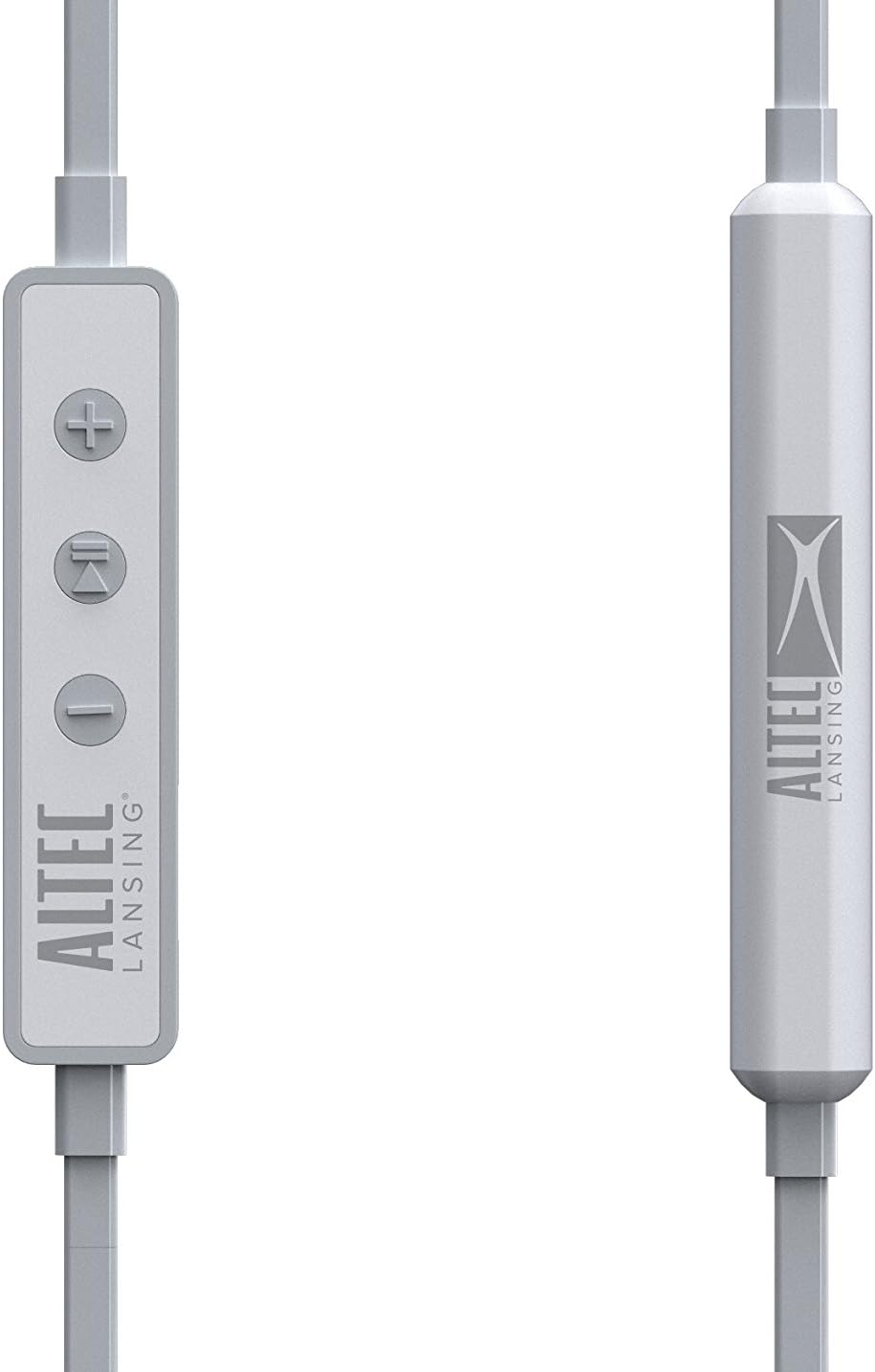
Figur 2: Detaljeret view of the inline remote control, featuring volume up (+), multi-function (play/pause/call), and volume down (-) buttons. The battery pack is also visible.

Figure 3: The three included sizes of Freebit ear tips (Small, Medium, Large) designed for a secure and comfortable fit.

Figure 4: The earbuds with the Freebit ear tips attached, illustrating how they provide stability in the ear.
Opsætning
Opladning af øretelefoner
Before first use, fully charge your earbuds. Connect the USB charging cable (not explicitly listed as included, but implied by 'USB' headphones jack) to the USB port on the earbuds and to a power source. The charging indicator light will show the charging status. A full charge provides approximately 20 hours of battery life.
Tænd/sluk
- For at tænde: Press and hold the multi-function button (center button on the inline remote) until the indicator light illuminates and you hear an audible prompt.
- For at slukke: Press and hold the multi-function button until the indicator light turns off and you hear an audible prompt.
Bluetooth-parring
Sådan forbinder du dine ørepropper til en Bluetooth-aktiveret enhed:
- Sørg for, at ørepropperne er slukkede.
- Press and hold the multi-function button for approximately 5-7 seconds until the indicator light flashes rapidly (usually blue and red), indicating pairing mode.
- Aktiver Bluetooth på din enhed (smartphone, tablet, computer) og søg efter tilgængelige enheder.
- Select "MZX856-WHT" from the list of found devices.
- Once connected, the indicator light on the earbuds will typically flash slowly or turn solid blue, and you will hear a confirmation tone.
- Hvis du bliver bedt om en adgangskode, skal du indtaste "0000".
Ørepropperne vil automatisk forsøge at genoprette forbindelsen til den sidst parrede enhed, når de tændes.
Betjeningsvejledning
Musikafspilning
- Afspil/pause: Tryk én gang på multifunktionsknappen.
- Lydstyrke op: Tryk på '+'-knappen.
- Skrue ned for lyden: Tryk på '-' knappen.
- Næste nummer: Tryk på '+'-knappen og hold den nede.
- Forrige nummer: Tryk på '-'-knappen og hold den nede.
Opkaldsstyring
- Besvar/afslut opkald: Press the multi-function button once during an incoming call or during an active call.
- Afvis opkald: Press and hold the multi-function button for approximately 2 seconds during an incoming call.
- Stemmeassistent: Double-press the multi-function button to activate your device's voice assistant (e.g., Siri, Google Assistant).
Iført øretelefoner
Select the Freebit ear tips that provide the most comfortable and secure fit for your ears. The ear tips are designed to sit snugly within the outer ear to prevent the earbuds from falling out during movement. Experiment with the different sizes (Small, Medium, Large) to find your ideal fit.
Pleje og vedligeholdelse
- Rensning: Regularly clean the earbuds and ear tips with a soft, dry cloth. For the ear tips, you may use a slightly damp klud og mild sæbe, og sørg for, at de er helt tørre, inden de sættes på igen.
- Vandtæt vurdering: The MZX856-WHT earbuds are IPX67 rated, meaning they are protected from dust ingress and can withstand immersion in water up to 1 meter for 30 minutes. Ensure the USB port cover is securely closed before exposing the earbuds to water.
- Opbevaring: When not in use, store the earbuds in the provided carry pouch to protect them from dust and damage. Avoid storing in extreme temperatures.
- Kabelpleje: The flat tangle-free cable is designed to resist tangling. Avoid sharp bends or excessive pulling on the cable.
Fejlfinding
| Problem | Mulig årsag | Løsning |
|---|---|---|
| Ørepropperne tænder ikke. | Lav eller ingen batteriopladning. | Charge the earbuds fully using the USB cable. |
| Kan ikke parres med enheden. | Øretelefoner er ikke i parringstilstand; Bluetooth slukket på enheden; enheden er for langt væk. | Ensure earbuds are in pairing mode (flashing red/blue). Turn Bluetooth on your device. Move device closer to earbuds (within 33 feet). Forget previous pairings on your device and try again. |
| Ingen lyd eller lav lydstyrke. | Volume too low on earbuds or device; earbuds not properly connected. | Increase volume on both earbuds and connected device. Re-pair the earbuds. Ensure earbuds are securely seated in your ears. |
| Lyden skærer ind og ud. | Interferens; enhed for langt væk; lavt batteri. | Move closer to the connected device. Avoid environments with strong Wi-Fi or other wireless interference. Charge the earbuds. |
| Ear tips keep coming off. | Incorrect size or improper attachment. | Ensure ear tips are securely attached to the earbuds. Try a different size of Freebit ear tips for a better fit. |
Tekniske specifikationer
| Feature | Specifikation |
|---|---|
| Modelnavn | MZX856-WHT |
| Forbindelsesteknologi | Trådløs (Bluetooth) |
| Wireless Range | 33 fod (ca. 10 meter) |
| Batterilevetid | Op til 20 timer |
| Vandmodstandsniveau | IPX67 (vandtæt) |
| Driver størrelse | 9 mm neodym |
| Kontroltype | Mediekontrol |
| Øreplacering | In Ear |
| Formfaktor | In Ear |
| Hovedtelefonstik | USB (til opladning) |
| Materiale | Plast |
| Varens vægt | 8.8 ounce (ca. 249 gram) |
| Produktdimensioner | 4.5 x 2.3 x 5.8 tommer |
| Fabrikant | Sakar International, Inc. |
Garanti og support
For warranty information and customer support, please refer to the documentation included with your product or visit the official Altec Lansing website. You may also contact Sakar International, Inc., the manufacturer, for assistance. Keep your proof of purchase for any warranty claims.
En digital version af brugervejledningen kan muligvis findes på: Altec Lansing MZX856 User Guide (PDF)


