1. Introduktion
This manual provides detailed instructions for the installation, operation, and maintenance of your Pyle PLVW92U 9-inch In-Wall/In-Vehicle Video Monitor. Please read this manual thoroughly before using the product to ensure proper function and longevity.

Image 1: Pyle PLVW92U 9-inch video monitor with its remote control, showcasing its display capabilities with multiple camera feeds.
2. Produktfunktioner
- Full HD 1080p Support: Features a widescreen LCD display with full HD 1080p support, providing vivid and crisp picture quality. Suitable for surveillance display applications.
- Universal montering: Designed for in-wall or in-console mounting. Includes a removable decorative frame for a clean installation and convenient access to front panel controls.
- Flere indgange: Equipped with HDMI, VGA, and two RCA video input connectors. Also includes RCA (L/R) audio output jacks for external sound system connection.
- Front Panel Buttons & Remote Control: Control the monitor using either the front panel buttons (mode, analog -/+, menu, power) or the included wireless remote control.
- Holdbar stålramme: Features a rugged steel monitor housing frame with cut-out holes for easy mounting. The frame is stain-resistant and paintable.
3. Hvad er der i æsken
Kontroller, at alle komponenter er til stede, før du fortsætter installationen.
- Pyle PLVW92U Flat Panel Monitor
- Fjernbetjening
- RCA Video/Audio Cables
- HDMI kabel
- VGA-kabel
- Decorative Frame Cover
- Monteringsskruer
- Power Supply Cable (Note: Power supply adapter sold separately)

Image 2: Visual representation of the items included with the Pyle PLVW92U monitor. The power supply is explicitly marked as a separate purchase.
4. Opsætning og installation
The Pyle PLVW92U monitor is designed for versatile installation, including in-wall or in-vehicle applications. The steel frame provides durability and features cut-out holes for secure mounting.
4.1 Monteringsmuligheder
- Indbygning i væg: The monitor can be flush-mounted into a wall. Use the provided template (if included) to mark and cut the appropriate opening. The decorative frame covers the housing for a finished look.
- Installation i køretøjet: For vehicle use, the monitor can be integrated into the console or mounted to a headrest (ensure proper fit and secure mounting).

Image 3: The Pyle PLVW92U monitor seamlessly integrated into a wall, demonstrating its use as a surveillance display.
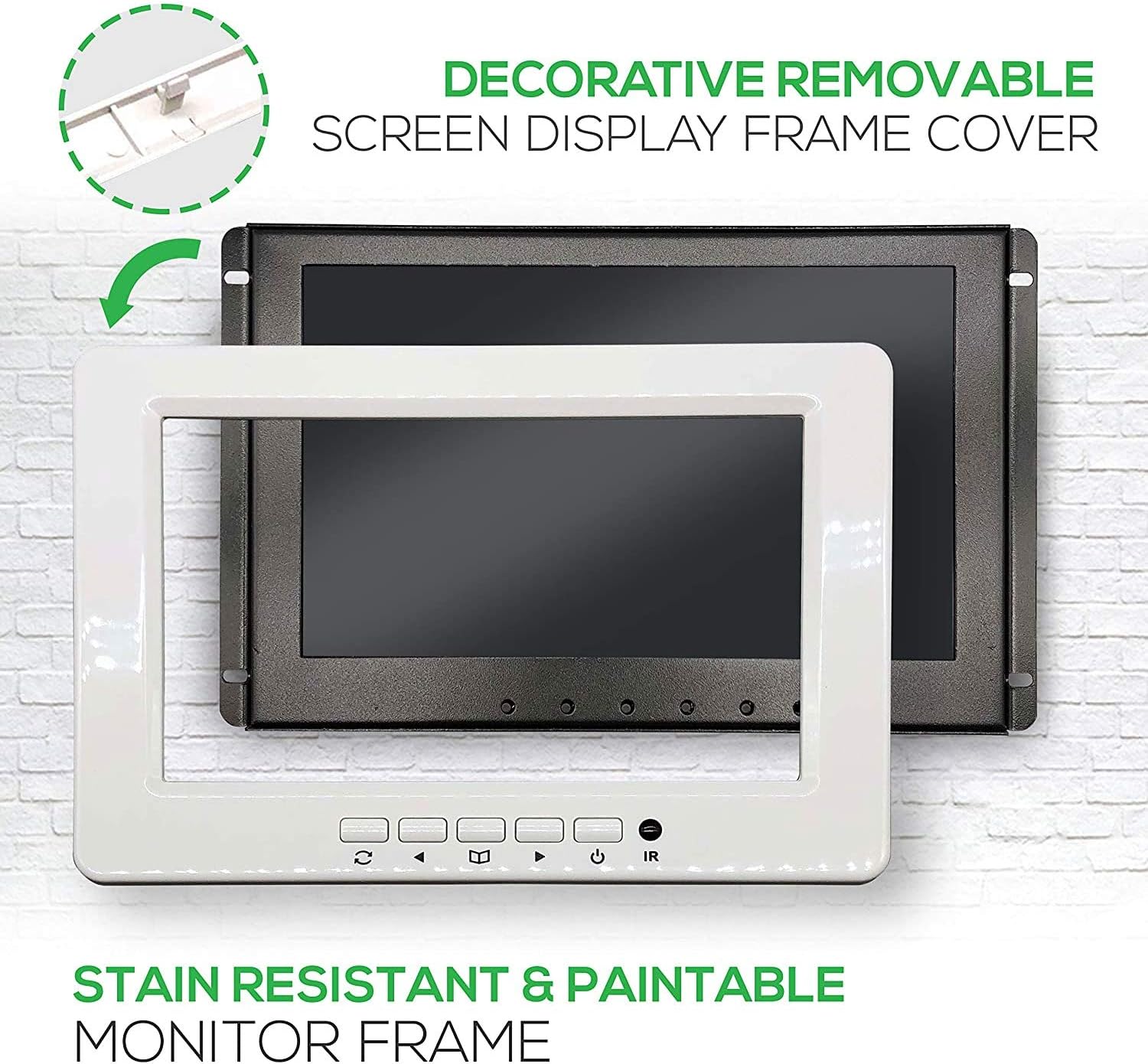
Image 4: The monitor's robust metal panel and the removable decorative frame, which can be painted to match surroundings.
4.2 Strømtilslutning
The monitor operates on 12V DC power. For in-vehicle use, it can be wired directly to a 12V power source (e.g., cigarette lighter circuit) or an ignition-switched power line. For home use, a 12V DC power adapter (sold separately) is required.
The power cable includes an in-line fuse for protection. Ensure proper polarity when connecting: red wire for positive (+), black wire for negative (-).
4.3 Video- og lydforbindelser
- HDMI: Connect an HDMI cable from your video source to the monitor's HDMI input for high-definition digital video and audio.
- VGA: Use a VGA cable to connect to a computer or other VGA-compatible device for analog video input.
- RCA Video (2 Inputs): Connect composite video sources using RCA cables (yellow connector).
- RCA Audio Output (L/R): For audio, connect the RCA (red/white) audio output jacks to an external sound system or amplifier, as the monitor does not have built-in speakers.
5. Betjeningsvejledning
The monitor can be operated using the front panel buttons or the included wireless remote control.
5.1 Betjeningselementer på frontpanelet
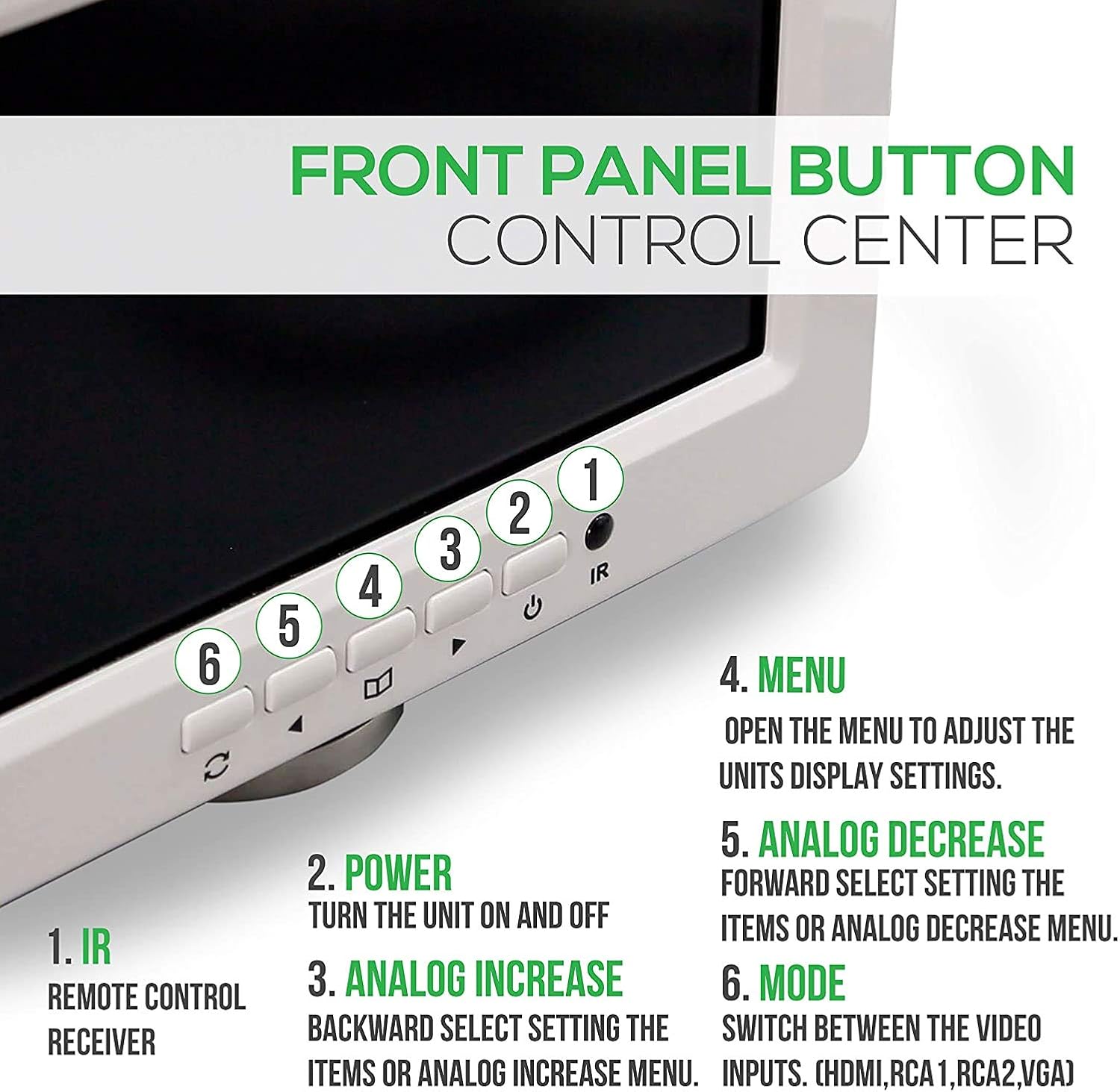
Billede 5: Detaljeret view of the front panel buttons and their corresponding functions for direct control.
- IR: Infrarød modtager til fjernbetjeningen.
- Power knap: Tænder eller slukker for enheden.
- Analog - (Decrease): Navigates backward through menu items or decreases analog settings.
- Menu-knap: Opens the on-screen display (OSD) menu to adjust settings.
- Analog + (Increase): Navigates forward through menu items or increases analog settings.
- Mode knap: Switches between available video input sources (HDMI, RCA1, RCA2, VGA).
5.2 Fjernbetjening

Image 6: The wireless remote control, providing convenient access to all monitor functions from a distance.
The remote control duplicates most functions of the front panel buttons, allowing for convenient operation. Point the remote directly at the IR receiver on the monitor's front panel.
- Afbryderen: Tænder eller slukker for skærmen.
- Analog Increase/Decrease: Adjusts settings within the menu or changes values.
- HDMI/RCA/VGA Switch: Skifter gennem inputkilder.
- Menu: Åbner OSD-menuen.
- Mode: Selects different display modes or aspect ratios.
5.3 Menunavigation
Press the "Menu" button to access the on-screen display. Use the "Analog -" and "Analog +" buttons to navigate through options and adjust values. Press "Menu" again to exit.
6. Vedligeholdelse
To ensure optimal performance and longevity of your Pyle PLVW92U monitor, follow these maintenance guidelines:
- Rensning: Use a soft, dry cloth to clean the screen and exterior. For stubborn marks, lightly dampRengør kluden med vand eller et mildt, ikke-slibende skærmrensemiddel. Undgå skrappe kemikalier.
- Ventilation: Ensure adequate airflow around the monitor, especially if it's in an enclosed space, to prevent overheating.
- Miljøforhold: Avoid exposing the monitor to extreme temperatures, direct sunlight for prolonged periods, or high humidity.
- Kabelstyring: Kontrollér regelmæssigt alle kabler for sikre forbindelser og tegn på slid eller beskadigelse.
7. Fejlfinding
If you encounter issues with your Pyle PLVW92U monitor, refer to the following common troubleshooting steps:
- Ingen strøm:
- Kontrollér alle strømforbindelser for at sikre, at de er sikre.
- Verify the power source is active (e.g., vehicle ignition on, wall outlet working).
- Inspect the in-line fuse on the power cable. Replace if blown.
- If using a separate power adapter, ensure it is the correct voltage (12V DC) and functioning.
- Intet videosignal:
- Ensure the correct input source is selected using the "Mode" button or remote.
- Check all video cables (HDMI, VGA, RCA) for secure connections at both the monitor and the source device.
- Verify the video source device is powered on and outputting a signal.
- Prøv et andet videokabel eller en anden kildeenhed for at isolere problemet.
- No Audio (from external system):
- Confirm the RCA (L/R) audio output cables are correctly connected to your external sound system.
- Check the external sound system's power and input selection.
- Adjust the volume on your external sound system.
- Dårlig billedkvalitet:
- Kontroller kabelforbindelserne for løse eller beskadigede.
- Adjust display settings (brightness, contrast, color) via the OSD menu.
- Ensure the video source is outputting a compatible resolution.
If the issue persists after attempting these steps, contact Pyle customer support for further assistance.
8. Specifikationer
| Feature | Specifikation |
|---|---|
| Mærke | Pyle |
| Modelnummer | PLVW92U |
| Skærmstørrelse | 9 tommer |
| Opløsningsstøtte | Full HD 1080p, HD |
| Aspektforhold | 1.33:1 (Displaying 16:9) |
| Indgangsstik | HDMI, VGA, 2x RCA Video |
| Output Stik | RCA (L/R) Audio |
| Strømforbrug | Mindre end 5.5 watt |
| Strømforsyning | 12V DC (Adapter sold separately) |
| Varens vægt | 4 pund |
| Produktdimensioner | 12.2 x 11.1 x 17.9 tommer |
| Skærmoverflade | Blank |

Image 7: Visual representation of the monitor's physical dimensions and weight.
9. Garanti og support
Pyle products are designed for reliability and performance. For warranty information, please refer to the warranty card included with your product or visit the official Pyle website. For technical support or service inquiries, please contact Pyle customer service.
Webwebsted: www.pyleusa.com
Forslag 65 Advarsel: Dette produkt indeholder kemikalier, der af staten Californien vides at forårsage kræft og fødselsdefekter eller anden reproduktionsskade.


