1. Introduktion
The VTech Write & Learn Creative Center is an interactive learning toy designed to help children aged 3 to 6 years develop early writing and drawing skills. This manual provides comprehensive instructions for setting up, operating, and maintaining your Creative Center to ensure a fun and educational experience.
Key features include animated demonstrations for letter stroke order, customizable name writing, drawing activities with progressive difficulty, and musical engagement.
2. Opsætning
2.1 Udpakning
Carefully remove all contents from the packaging. Ensure you have the VTech Write & Learn Creative Center unit and the attached stylus.

Image: The VTech Write & Learn Creative Center in its retail packaging, showing the product and its features.
2.2 Batteriinstallation
The unit requires 2 AA batteries. Batteries are included for demonstration purposes only; new batteries are recommended for regular use. Locate the battery compartment on the back of the unit. Use a screwdriver to open the compartment, insert the batteries according to the polarity markings (+/-), and secure the cover.
2.3 Indledende tænding
Press the green power button located at the top right of the control panel to turn on the device. You will hear a welcome sound and see the VTech logo on the screen.
3. Betjeningsvejledning
3.1 Overview af Kontrolpanel

Billede: En top-down view of the VTech Write & Learn Creative Center, highlighting the screen, various activity buttons, and the magnetic drawing board.
The control panel features a central LCD screen, various activity buttons, and a full alphabet keypad. The magnetic drawing board is located below the screen, with a stylus attached by a string.
3.2 Learning Modes
- Brevskrivning: Press an alphabet button to see an animated demonstration of how to write uppercase and lowercase letters. Follow the strokes on the magnetic board with the stylus.
- Navneskrivning: Customize the device to teach your child how to write their own name step-by-step. Refer to the product's internal settings for this feature.
- Tegneaktiviteter: Select a drawing activity to learn how to draw various objects, progressing from simple lines and shapes to more complex designs.
- Musiktilstand: Engage with cheerful music while drawing or playing.
- Guess the Picture: The device draws a picture, and the child guesses what it is.
3.3 Using the Magnetic Drawing Board
Use the attached stylus to draw on the magnetic board. To clear the board, slide the eraser bar located at the bottom of the drawing area from left to right.
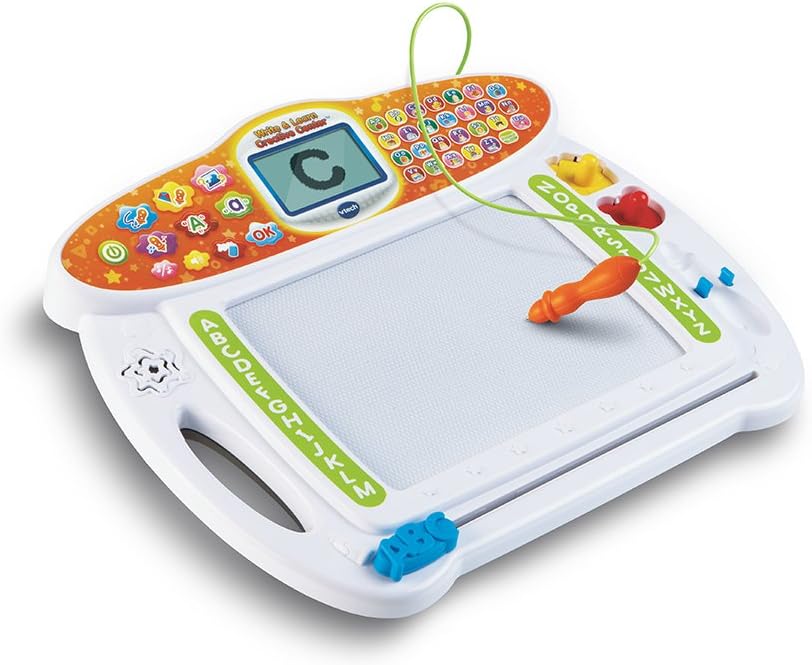
Billede: En vinklet view of the VTech Write & Learn Creative Center, demonstrating the stylus in use on the magnetic drawing board, with a letter 'C' displayed on the screen.
3.4 Lydstyrkekontrol
Adjust the volume using the dedicated volume buttons on the control panel to suit the environment.
3.5 Sluk
To conserve battery life, the unit will automatically power off after a period of inactivity. You can also manually turn it off by pressing the power button again.
4. Vedligeholdelse
4.1 Rengøring
Tør enheden af med en let damp cloth. Do not immerse the unit in water or use harsh cleaning agents. Ensure the unit is dry before storage or next use.
4.2 Opbevaring
Store the Creative Center in a cool, dry place away from direct sunlight and extreme temperatures. Remove batteries if the unit will not be used for an extended period.
5. Fejlfinding
| Problem | Mulig årsag | Løsning |
|---|---|---|
| Enheden tænder ikke. | Lave eller døde batterier; forkert batteriinstallation. | Udskift batterierne med nye, og sørg for korrekt polaritet. |
| Skærmen er tom eller reagerer ikke. | Unit may be in sleep mode; software glitch. | Press any button to wake up. If unresponsive, remove and reinsert batteries to reset. |
| Drawing board not clearing completely. | Eraser bar not fully slid across. | Ensure the eraser bar is slid completely from one end to the other. |
6. Specifikationer
- Produktdimensioner: 12.09 x 14.39 x 2.76 tommer
- Varens vægt: 1.75 pund
- Modelnummer: 80-169300
- Anbefalet alder: 36 måneder - 6 år
- Batterier: 2 AA-batterier (medfølger til demonstration)
- Materiale: Plast
- Farve: Hvid
- Fabrikant: VTech
- Udgivelsesdato: 18. maj 2015
7. Garanti og support
For warranty information and customer support, please visit the official VTech webwebstedet eller kontakt deres kundeserviceafdeling. Gem din købskvittering som købsbevis i tilfælde af garantikrav.
For yderligere ressourcer og produktinformation kan du besøge VTech-butik på Amazon.


