Indledning
The BIOS Professional Wireless Meat Thermometer is designed to accurately measure the internal temperature of various meats during cooking. It features a wireless monitor that receives temperature readings from a stainless steel probe, allowing you to monitor your food from a distance. This manual provides instructions for setup, operation, maintenance, and troubleshooting to ensure optimal performance of your device.

Image: The BIOS Professional Wireless Meat Thermometer, showing the main display unit, the stainless steel probe connected by a wire, and the base unit.
Produktkomponenter
Your BIOS Professional Wireless Meat Thermometer package includes the following components:
- Wireless Display Unit: The main unit with a digital screen for displaying temperature and timer.
- Rustfri stålsonde: A durable probe designed to be inserted into meat for temperature measurement.
- Probekabel: Connects the stainless steel probe to the display unit.
- Base Unit/Stand: Provides stability for the display unit and may house the wireless transmitter.
- Bælteklips: Located on the back of the display unit for easy portability.

Billede: Et nærbillede view of the stainless steel meat probe and its connecting cable.
Opsætning
- Batteri installation:
Locate the battery compartment on the back of the wireless display unit. Insert the required batteries (typically AAA, not included) ensuring correct polarity (+/-). Close the battery compartment securely.
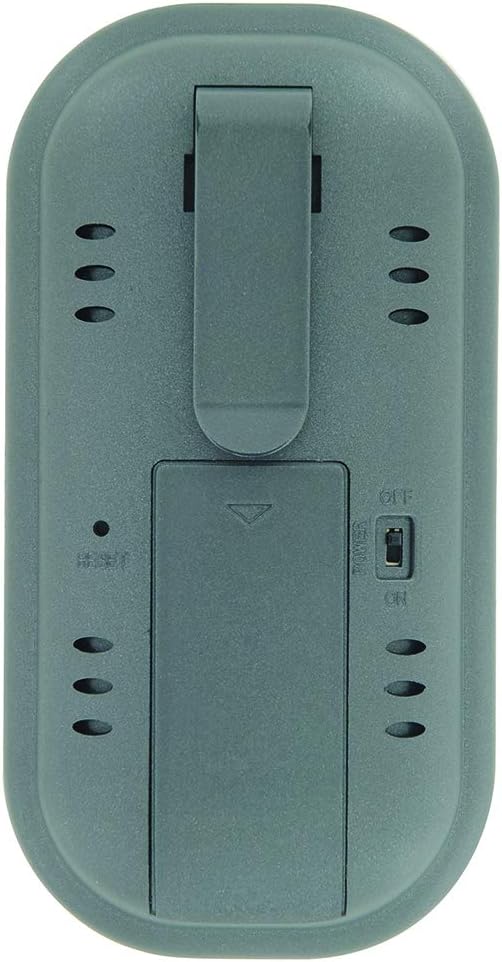
Image: The rear side of the thermometer, displaying the battery compartment cover and the integrated belt clip.
- Probeforbindelse:
Insert the jack end of the stainless steel probe cable firmly into the designated port on the side of the wireless display unit. Ensure a secure connection for accurate readings.
- Tænd:
Slide the ON/OFF switch, usually located on the back or side of the unit, to the "ON" position. The display should illuminate.
Betjeningsvejledning
1. Selecting Meat Type and Doneness (Pre-programmed Settings)
- Tryk på KØD button to cycle through different meat types (e.g., Beef, Poultry, Pork, Fish).
- Once the desired meat type is selected, press the SMAG button to select the desired doneness level (e.g., Rare, Medium, Well Done). The target temperature will automatically adjust based on your selection.
2. Manual Temperature Setting
If you prefer to set a custom target temperature:
- Tryk på MODE button until the target temperature setting is highlighted or blinking.
- Brug MIN og SEC buttons (or up/down arrows if present) to adjust the target temperature to your desired value.
- Trykke MODE again to confirm the setting or to exit the setting mode.
3. Brug af timerfunktionen
The thermometer includes a count up/down timer:
- To set a countdown timer: Tryk på MIN og SEC buttons to set the desired time. Press START/STOP at begynde.
- To use as a count-up timer: Ensure the timer is at 0:00, then press START/STOP.
- Trykke KLAR for at nulstille timeren.
4. Indsættelse af sonden
Carefully insert the stainless steel probe into the thickest part of the meat, avoiding bones or gristle. Ensure the probe tip is fully embedded for accurate internal temperature readings.
5. Monitoring Temperature and Alarm
The current internal temperature of the meat will be displayed on the screen. When the meat reaches the set target temperature, an alarm will sound to notify you. The wireless range is approximately 30 meters (100 feet), allowing you to monitor from a distance.
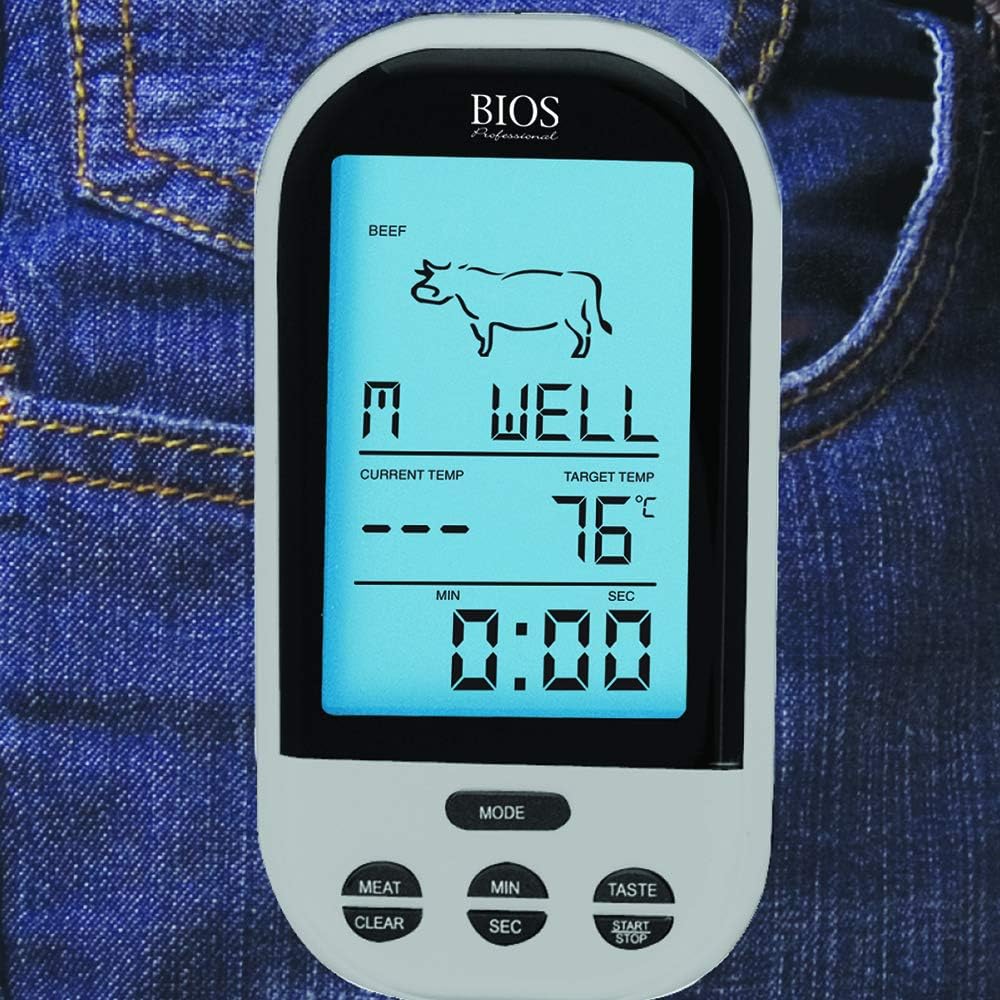
Image: The wireless display unit shown clipped to a jeans pocket, demonstrating its portability during use.
Opretholdelse
- Rengøring af sonden: After each use, carefully clean the stainless steel probe with warm, soapy water. Wipe thoroughly with a damp klud og tør helt. Do not immerse the probe cable or the display unit in water. The product care instructions specify "Hand Wash Only" for the probe.
- Rengøring af displayenheden: Wipe the display unit with a soft, damp klæde. Brug ikke slibende rengøringsmidler eller nedsænk i vand.
- Opbevaring: Opbevar termometeret og sonden et rent og tørt sted, når de ikke er i brug.
- Udskiftning af batteri: Replace batteries when the display becomes dim or the unit stops functioning correctly. Remove batteries if storing for extended periods to prevent leakage.
Fejlfinding
| Problem | Mulig årsag | Løsning |
|---|---|---|
| Intet display eller svagt display | Low or dead batteries; Incorrect battery installation. | Replace batteries with new ones; Check battery polarity. |
| Upræcise temperaturmålinger | Probe not fully inserted; Probe tip touching bone/gristle; Damaged probe or cable. | Re-insert probe into thickest part of meat, away from bones; Inspect probe and cable for damage. If damaged, replace probe. |
| Ingen trådløs forbindelse | Out of range; Obstructions between units; Interference. | Move display unit closer to the probe; Reduce obstructions; Avoid strong electromagnetic sources. |
| Alarmen lyder ikke | Alarm function not enabled; Volume too low. | Ensure alarm is activated in settings; Check for volume controls if available. |
Specifikationer
| Feature | Detalje |
|---|---|
| Modelnummer | 4745928 |
| Mærke | Bios |
| Forbindelsesteknologi | Trådløs |
| Wireless Range | Op til 30 m (100 fod) |
| Display Type | Digital |
| Materiale | Stainless Steel (Probe), Plastic (Unit) |
| Særlige funktioner | Temperature Alarm, Count up/down timer, Pre-programmed settings, Manual temperature setting, Easy-Use Belt Clip |
| Produktdimensioner | 5.08 x 6.6 x 13.51 cm (ca. 2 x 2.6 x 5.3 tommer) |
| Varens vægt | 185 g (ca. 0.4 lbs) |
| Strømkilde | Batteri |
Garanti og support
For information regarding warranty coverage, product support, or to purchase replacement parts, please refer to the manufacturer's official webwebstedet eller kontakt deres kundeserviceafdeling. Gem din købskvittering som købsbevis i tilfælde af garantikrav.
Manufacturer: Thermor LTD


