1. Introduktion
Tak for købetasing the QFX SBX-1518BTL 2-Way Bluetooth Cabinet Speaker. This manual provides essential information for the safe and efficient operation of your speaker. Please read it thoroughly before use and retain it for future reference.
The SBX-1518BTL is a versatile audio system featuring Bluetooth streaming, USB/SD/FM playback and recording, a 5-band graphic equalizer, and multiple input/output options for various audio sources and connectivity needs.
2. Sikkerhedsinstruktioner
- Strømkilde: Sørg for, at højttaleren er tilsluttet en strømkilde, der matcher lydstyrkentage angivet på enheden.
- Ventilation: Do not block ventilation openings. Maintain adequate space around the speaker for proper airflow.
- Vand og fugt: Do not expose the speaker to rain, moisture, or liquids. This product is not waterproof.
- Varmekilder: Hold højttaleren væk fra varmekilder såsom radiatorer, varmeapparater, komfurer eller andre apparater, der producerer varme.
- Rensning: Tag stikket til højttaleren ud af stikkontakten før rengøring. Brug en tør klud til rengøring.
- Service: Forsøg ikke selv at servicere dette produkt. Overlad al service til kvalificeret servicepersonale.
- Placering: Placer højttaleren på en stabil, flad overflade for at forhindre den i at falde.
- Bind: Undgå langvarig lytning ved høj lydstyrke for at forhindre høreskader.
3. Pakkens indhold
Kontroller venligst, at alle nedenstående varer er inkluderet i din pakke:
- QFX SBX-1518BTL Cabinet Speaker
- Fjernbetjening
- Strømledning
- Instruktionsmanual (dette dokument)
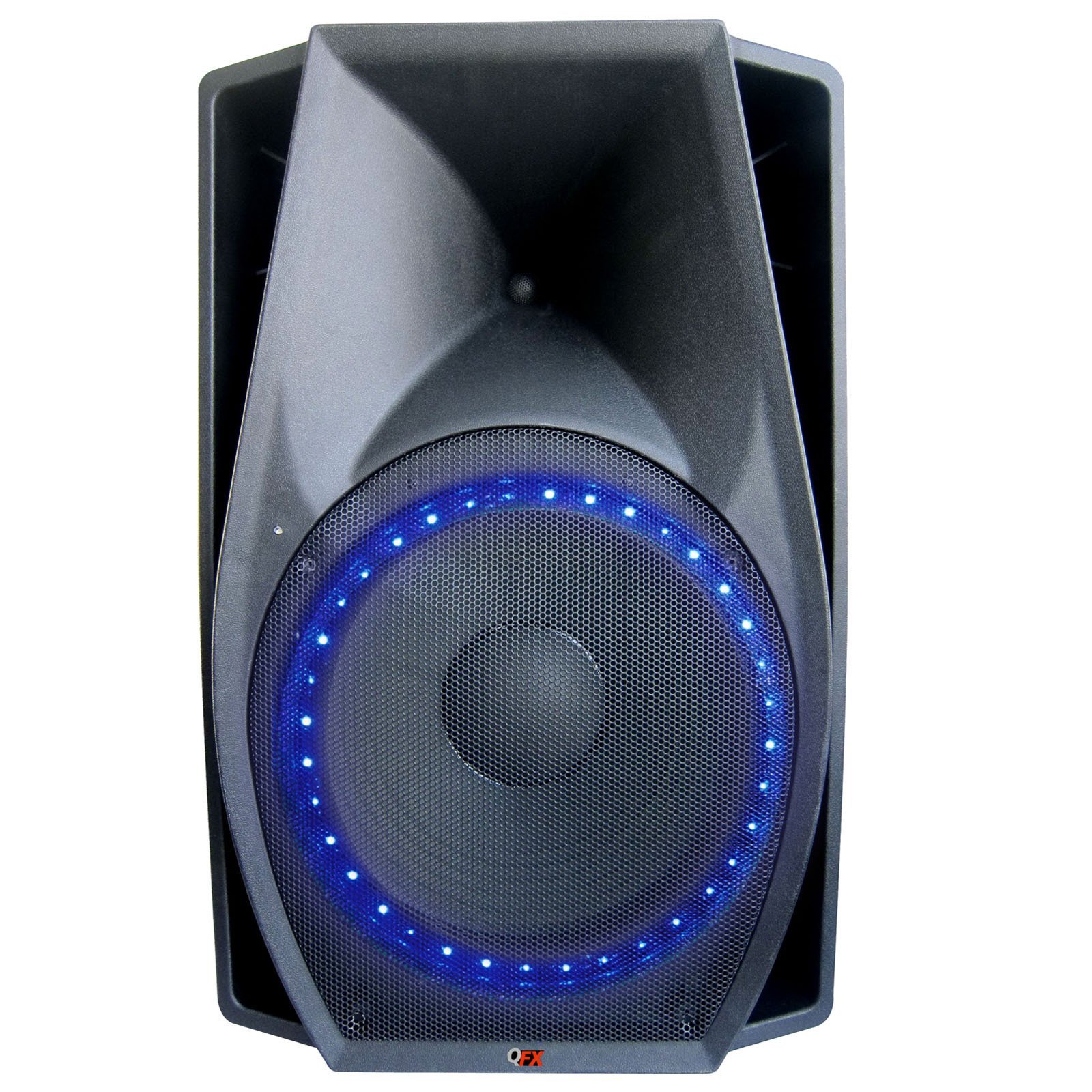
Image 1: QFX SBX-1518BTL Cabinet Speaker and included remote control. The speaker features a large 15-inch woofer and control panel on the front.
4. Opsætning
4.1 Fysisk placering
Place the speaker on a stable, flat surface. Ensure there is enough space around the unit for proper ventilation. Avoid placing it in direct sunlight or near heat sources.
4.2 Strømtilslutning
- Connect the provided power cord to the AC IN port on the back of the speaker.
- Plug the other end of the power cord into a standard wall outlet (AC 120V/60Hz or as specified on the unit).
4.3 Indledende tænding
Locate the POWER switch on the speaker (usually on the rear or control panel). Flip the switch to the "ON" position. The display (if available) will illuminate, indicating the unit is powered on.
5. Betjeningsvejledning
5.1 Kontrolpanel overview
The control panel, typically located on the front or top of the speaker, includes various buttons and knobs for controlling functions. Common controls include:
- MODE knap: Skifter mellem inputkilder (Bluetooth, USB, SD, FM, AUX).
- PLAY/PAUSE knap: Styrer afspilning af medier.
- FORRIGE/NÆSTE knapper: Navigerer mellem numre eller FM-stationer.
- MASTER VOLUME-knap: Justerer det samlede lydniveau.
- MIC VOLUME-knap: Justerer mikrofonens inputlydstyrke.
- ECHO knap: Justerer ekkoeffekten for mikrofoninput.
- 5-bånds grafisk equalizer: Sliders to adjust specific frequency ranges.
5.2 Bluetooth -parring
- Tænd for højttaleren.
- Tryk på MODE button until "BLUETOOTH" or "BT" appears on the display. The speaker will enter pairing mode, indicated by a flashing Bluetooth icon or audible prompt.
- Aktiver Bluetooth på din mobilenhed (smartphone, tablet osv.) og søg efter tilgængelige enheder.
- Select "QFX SBX-1518BTL" or a similar name from the list of devices.
- Once paired, the speaker will emit a confirmation sound, and the Bluetooth indicator will stop flashing. You can now play audio from your device through the speaker.
5.3 USB/SD-afspilning og -optagelse
- Indsæt et USB-flashdrev eller SD-kort i den tilsvarende plads på kontrolpanelet.
- Tryk på MODE button to select "USB" or "SD" mode. The speaker will automatically begin playing audio files fra enheden.
- Brug AFSPIL/PAUSE og FORRIGE NÆSTE knapper til at styre afspilning.
- Indspilning: While in USB/SD mode, if a microphone is connected, you may have a dedicated "REC" button to start recording audio directly to the USB/SD device. Consult the specific button layout on your unit.
5.4 FM-radiofunktion
- Tryk på MODE button to select "FM" mode.
- Tryk og hold på AFSPIL/PAUSE button to initiate an automatic scan for FM stations. The speaker will scan and save available stations.
- Brug FORRIGE NÆSTE knapperne til at navigere gennem de gemte FM-stationer.
5.5 AUX-indgang
- Tilslut en ekstern lydenhed (f.eks. MP3-afspiller, bærbar computer) til AUX IN-porten med et 3.5 mm lydkabel.
- Tryk på MODE knappen for at vælge "AUX"-tilstand.
- Styr afspilning og lydstyrke fra din eksterne enhed.
5.6 mikrofonindgang
- Tilslut en mikrofon til MIC IN-porten.
- Juster MIC LYDSTYRKE knap til at styre mikrofonens udgangsniveau.
- Brug EKKO knob to add an echo effect to the microphone's sound.
5.7 5-Band Graphic Equalizer
The 5-band graphic equalizer allows you to fine-tune the audio output. Each slider corresponds to a specific frequency range. Move the sliders up to boost that frequency or down to cut it, customizing the sound to your preference.
5.8 Fjernbetjening
The included remote control provides convenient access to most functions from a distance. Point the remote directly at the speaker's IR receiver. Functions typically include power, mode selection, volume control, track navigation, and equalizer presets.
6. Vedligeholdelse
6.1 Rengøring
Before cleaning, ensure the speaker is powered off and unplugged from the wall outlet. Use a soft, dry cloth to wipe the exterior surfaces. Do not use abrasive cleaners, waxes, or solvents as they may damage the finish.
6.2 Opbevaring
If storing the speaker for an extended period, unplug it from the power source and store it in a cool, dry place, away from direct sunlight and extreme temperatures. It is recommended to keep the original packaging for protection during storage.
7. Fejlfinding
| Problem | Mulig årsag | Løsning |
|---|---|---|
| Ingen strøm | Power cord not connected; Power switch off; Outlet not working. | Ensure power cord is securely connected. Turn power switch ON. Test outlet with another device. |
| Ingen lyd | Volume too low; Incorrect input mode; Audio cable loose/faulty; Bluetooth not connected. | Increase master volume. Select correct input mode. Check audio cable connections. Re-pair Bluetooth device. |
| Bluetooth-parring mislykkes | Højttaler ikke i parringstilstand; Enhed for langt væk; Interferens; Enhed er allerede parret med en anden højttaler. | Ensure speaker is in Bluetooth pairing mode. Move device closer. Turn off other Bluetooth devices. Disconnect from other speakers. |
| USB/SD afspiller ikke | Forkert tilstand; Ikke understøttet file format; Korrupt files; USB/SD-kort er ikke isat korrekt. | Select USB/SD mode. Ensure files are supported (e.g., MP3). Check card insertion. Try another USB/SD card. |
| Fjernbetjening virker ikke | Batteries dead/incorrectly inserted; Obstruction; Remote too far/not aimed correctly. | Replace batteries. Check battery polarity. Remove obstructions. Aim remote directly at IR receiver. |
8. Specifikationer
| Modelnavn: | SBX-1518BTL |
| Højttalertype: | 2-Way Cabinet Speaker, Woofer |
| Forbindelse teknologi: | Bluetooth, Auxiliary, USB, Wired, Wireless |
| Trådløs kommunikation: | Bluetooth |
| Højttalerstørrelse: | 15 tommer (bashøjttaler) |
| Højttalers maksimale udgangseffekt: | 300 watt (RMS) |
| Lydudgangstilstand: | Stereoanlæg |
| Kontrolmetode: | Fjern |
| Inkluderede komponenter: | Fjernbetjening |
| Strømkilde: | Elektrisk med ledning |
| Produktdimensioner: | 78.74 x 53.34 x 50.8 cm |
| Farve: | Sort |
| Fabrikant: | QFX |
9. Garanti og support
QFX products are designed and manufactured to the highest quality standards. For information regarding warranty coverage, please refer to the warranty card included with your product or visit the official QFX website. For technical support or service inquiries, please contact QFX customer service through their official channels.
Please note: Warranty terms and support availability may vary by region.


